DonationCoder.com forum
 
Read-only archive. This is a static copy of the DonationCoder.com forum. Reading and searching work as before; logging in, posting and private messages do not.
Archive of 2026-10-21 · About this archive · Main site

Last post Author Topic: What's living in your taskbar notification area right now?  (Read 74,462 times)

kyrathaba

  • N.A.N.Y. Organizer
  • Honorary Member
  • Joined in 2006
  • **
  • Posts: 3,200
    • Participated in NANY Challenge Eight Times
    • Programming School - Deluxe Bonus Medal
    • Programming School - Stage 1 Medal
    • Coding Snacks
    • Military Service Badge - US Army
    • Writer
tasky2.png

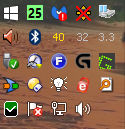
Avast Free
Faststone Capture 5.3
Bluetooth (connects iPhone to PC)
PortableApps.com Platform
Tonido
PBOL
AIMP

Win 10 Pro running on a 3.2 GHz CPU and 12 Gb RAM
__________________________________________

Proofreading Service: http://williammillerservices.com/proofreading

« Last Edit: July 22, 2015, 09:40 PM by kyrathaba »

wraith808

  • Supporting Member
  • Joined in 2006
  • **
  • Posts: 11,205
    • Participated in NANY Challenge Fourteen Times
    • Coding Snacks
    • Writer
    • Hardware Hacker
Re: What's living in your taskbar right now?
« Reply #1 on: July 22, 2015, 08:45 PM »
so you mean taskbar notification area?

kyrathaba

  • N.A.N.Y. Organizer
  • Honorary Member
  • Joined in 2006
  • **
  • Posts: 3,200
    • Participated in NANY Challenge Eight Times
    • Programming School - Deluxe Bonus Medal
    • Programming School - Stage 1 Medal
    • Coding Snacks
    • Military Service Badge - US Army
    • Writer
Re: What's living in your taskbar notification area right now?
« Reply #2 on: July 22, 2015, 08:47 PM »
Yep. Fixed my title.
Win 10 Pro running on a 3.2 GHz CPU and 12 Gb RAM
__________________________________________

Proofreading Service: http://williammillerservices.com/proofreading

MilesAhead

  • Supporting Member
  • Joined in 2009
  • **
  • Posts: 7,736
    • Coding Snacks
Re: What's living in your taskbar notification area right now?
« Reply #3 on: July 22, 2015, 09:07 PM »
I use a triple height taskbar with small icons to give them room to pile on.  :)

Skitch screen cap(only running when taking a snap)
TinySpell
Big Muscle dialog closer for Aero Glass on W8
------ my own utilities---------
ReRun
FolderCache
SoundMixer
CommonKeys
Transpose
PastePath
MoveIt
--------------------------------
KatMouse wheel enhancement
WinPatrol
T-Clock

the bottom row are built in system utilities

[attach]

Curt

  • Supporting Member
  • Joined in 2006
  • **
  • Posts: 7,565
Re: What's living in your taskbar notification area right now?
« Reply #4 on: July 22, 2015, 09:27 PM »
I was given a laptop:

[attachimg=#]


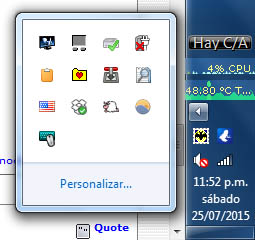
AnVir TaskManager Pro
Paste Text Like
----------
Dell Touchpad
Safely Remove...
FastStone Capture 8
Network 6
--
Speakers
1 hr 24 min (37%) remaining
Computer status: Protected
Action Center (no current issues detected)
--
Mouse Hunter Agent (www.amlpages.com) ON
Remaining 1:24 hour (37%) AC power: Offline
Clipboard Master

-------------
-------------

Regarding Dell Touchpad: inherited, it came with the machine. I have no idea what it does, but I don't dare to kill it.
I have no understanding of why there are two programs to tell me, how long the accumulator's power supply will last.

kyrathaba

  • N.A.N.Y. Organizer
  • Honorary Member
  • Joined in 2006
  • **
  • Posts: 3,200
    • Participated in NANY Challenge Eight Times
    • Programming School - Deluxe Bonus Medal
    • Programming School - Stage 1 Medal
    • Coding Snacks
    • Military Service Badge - US Army
    • Writer
Re: What's living in your taskbar notification area right now?
« Reply #5 on: July 22, 2015, 11:05 PM »
Curious about FolderCache and PastePath...
Win 10 Pro running on a 3.2 GHz CPU and 12 Gb RAM
__________________________________________

Proofreading Service: http://williammillerservices.com/proofreading

MilesAhead

  • Supporting Member
  • Joined in 2009
  • **
  • Posts: 7,736
    • Coding Snacks
Re: What's living in your taskbar notification area right now?
« Reply #6 on: July 22, 2015, 11:39 PM »
Curious about FolderCache and PastePath...

Thank you for asking.  FolderCache got a write-up awhile back here

PastePath was inspired by a post on DC.  I forget the location of the post.  But it mentioned another software that made it easy to paste in an Explorer folder path.  That is all PastePath does.  It remembers the last folder that was active and pastes it when you hit the hotkey.  I detects a command prompt and pastes it in so that the prompt will accept it(I believe it right clicks the mouse.)  Very simple but it is convenient for avoiding drilling down in SaveAs and Open dialogs. It will paste into anything that accepts clipboard text via Control v.

It is not perfect.  It won't get the path of special folders like Computer(neither will FolderCache.)  One of these days I should add that in but I fear making the calls to get the special folder CLSIDs or names may be slow.  If you use a file manager other than File Explorer then these two utilities may not be all that useful.  But if you mainly  do file copy/move with Explorer they may make a few things a bit easier.

Edit: I updated my thread on DC for the program:

http://www.donationcoder.com/forum/index.php?topic=18018.msg385388#msg385388

« Last Edit: July 23, 2015, 12:35 PM by MilesAhead »

x16wda

  • what am I doing in this handbasket?
  • Supporting Member
  • Joined in 2007
  • **
  • Posts: 888
    • Participated in NANY Challenge Once
Re: What's living in your taskbar notification area right now?
« Reply #7 on: July 23, 2015, 12:50 AM »
Screenshot - 7_22_2015 , 8_38_58 PM.png

Way too much.

Remove Hardware, Bluetooth, Beats audio, Windows yammer-at-me center, Dolphin text editor
Xmarks, Citrx receiver, Listary, Intel AppUp (I thought I had uninstalled that!), Gateway IP monitor
Virtual Clone Drive, WinTV, Popfile, Net Extender, VistaSwitcher
D4, Glasswire, Teamviewer, Skydrive, PDF24
File uploader, chrome, RescueTime, Adguard, chrome notifications

In the tray: Win 10, Winpatrol, Avast, ProcessLasso, drive activity, System Explorer, Screenshot Captor, Ditto, network, speakers, and T-Clock

Oh yeah, you can see I have CrossHair running too. :-)
vi vi vi - editor of the beast

kyrathaba

  • N.A.N.Y. Organizer
  • Honorary Member
  • Joined in 2006
  • **
  • Posts: 3,200
    • Participated in NANY Challenge Eight Times
    • Programming School - Deluxe Bonus Medal
    • Programming School - Stage 1 Medal
    • Coding Snacks
    • Military Service Badge - US Army
    • Writer
Re: What's living in your taskbar notification area right now?
« Reply #8 on: July 23, 2015, 02:05 AM »
LOL, x16wda  ;D

How many gigs of RAM you running?
Win 10 Pro running on a 3.2 GHz CPU and 12 Gb RAM
__________________________________________

Proofreading Service: http://williammillerservices.com/proofreading

Deozaan

  • Charter Member
  • Joined in 2006
  • ***
  • Posts: 9,827
    • Participated in NANY Challenge Eight Times
    • Cody Award
Re: What's living in your taskbar notification area right now?
« Reply #9 on: July 23, 2015, 02:15 AM »
[attachimg=#]

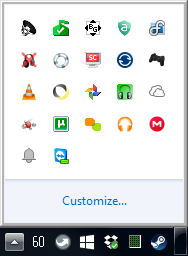
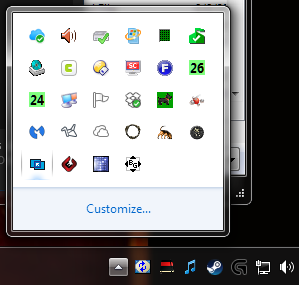
In the expanded view:
  • Realtek HD Audio Manager (audio driver)
  • Microsoft Security Essentials
  • Borderless Gaming (puts games into "fullscreen" borderless windowed mode)
  • AdGuard
  • Display Fusion
  • Mumble
  • Gizmo
  • Screenshot Captor
  • BitTorrent Sync
  • Better DS3
  • VLC
  • Dyn Updater
  • Google Photos
  • Subsonic
  • Microsoft OneDrive
  • AMD Catalyst Control Center (video driver)
  • uTorrent
  • Join.me (can't figure out how to disable launch on startup)
  • Google Music Manager
  • MEGAsync
  • Google Chrome (Notifications)
  • Teamviewer

In the tray:
  • Speedfan (showing my GPU temperature in Celsius)
  • PortableApps.com Launcher
  • Windows 10 Upgrade
  • Dropbox
  • Task Manager
  • Steam

I usually close a few of these (such as join.me and MEGA) but I forgot to do that since my last reboot.

eleman

  • Spam Killer
  • Supporting Member
  • Joined in 2009
  • **
  • Posts: 413
Re: What's living in your taskbar notification area right now?
« Reply #10 on: July 23, 2015, 10:31 AM »
[attach]

wraith808

  • Supporting Member
  • Joined in 2006
  • **
  • Posts: 11,205
    • Participated in NANY Challenge Fourteen Times
    • Coding Snacks
    • Writer
    • Hardware Hacker
Re: What's living in your taskbar notification area right now?
« Reply #11 on: July 23, 2015, 03:12 PM »
  • Join.me (can't figure out how to disable launch on startup)

HKEY_CURRENT_USER\Software\Microsoft\Windows\CurrentVersion\Run -> join.me.launcher

Of course, whenever you use it, it adds it back :(

wraith808

  • Supporting Member
  • Joined in 2006
  • **
  • Posts: 11,205
    • Participated in NANY Challenge Fourteen Times
    • Coding Snacks
    • Writer
    • Hardware Hacker
Re: What's living in your taskbar notification area right now?
« Reply #12 on: July 25, 2015, 12:51 AM »
[attach=#]

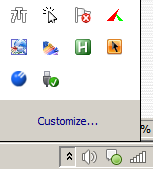
In the Taskbar Notification Area

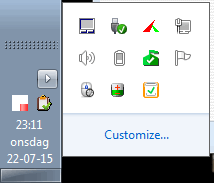
- Wallpaper Cycler
- Notation
- Audion Switcher
- Steam
- Logitech Gaming Software

Hidden

- Synology Cloud Station
- Realtek Audio Thingy
- Intel Rapid Storage
- Windows Update Thingy
- Task Manager Thingy
- MSE
- LG Firmware Check
- Cubby
- Directory Opus
- Screenshot Captor
- Find and Run Robot
- HDD Sentinel
- HDD Sentinel
- UltraMon
- Windows Update Thingy
- Dropbox
- WinPatrol
- AMD Video
- Malwarebytes
- Copy
- OneDrive
- ESO Launcher (I actually haven't moused over it since I played ESO... its not actually running)
- WinPrivacy
- ESODB Updater Client
- Multiplicity
- AMD/Raptr
- TrueCrypt
- Borderless Gaming

Two that are missing right now are ResophNotes and ClipMate.

4wd

  • Pedantic Old Bastard
  • Supporting Member
  • Joined in 2006
  • **
  • Posts: 5,652
    • Coding Snacks
Re: What's living in your taskbar notification area right now?
« Reply #13 on: July 25, 2015, 03:03 AM »
2015-07-25 12_31_50.jpg

Win10 Upgrade notification
HDD Sentinel (Highest temp.)
MBAM (Web Protection disabled)
SyncBack Pro (No profiles running, hence the cross)
HDD Sentinel (HDD throughput)
Realtek HD Audio Manager
Bluetooth
CPUTemp (Temp, Load, Freq)
Safe Removal
DeskAngel
FARR
Logitech Gaming Software
GreenShot
CFoSSpeed
DOpus
Lights-Out Client
iDrive client
Everything
Windows Firewall Control
Windows moaning about Update Settings and SmartScreen
Yay! I've got internet access
... and speakers apparently.

Nothing hidden.
"I will not follow where the path may lead, but I will go where there is no path, and I will leave a trail." - Muriel Strode, 1903

kyrathaba

  • N.A.N.Y. Organizer
  • Honorary Member
  • Joined in 2006
  • **
  • Posts: 3,200
    • Participated in NANY Challenge Eight Times
    • Programming School - Deluxe Bonus Medal
    • Programming School - Stage 1 Medal
    • Coding Snacks
    • Military Service Badge - US Army
    • Writer
Re: What's living in your taskbar notification area right now?
« Reply #14 on: July 25, 2015, 07:30 PM »
Thanks for those hyperlinks, 4wd. I'm a long-time user of Faststone Capture, but I'm gonna give Greenshot a go...
Win 10 Pro running on a 3.2 GHz CPU and 12 Gb RAM
__________________________________________

Proofreading Service: http://williammillerservices.com/proofreading

antekgla

  • Participant
  • Joined in 2011
  • *
  • Posts: 75
    • Participated in NANY Challenge Once
Re: What's living in your taskbar notification area right now?
« Reply #15 on: July 26, 2015, 03:16 AM »
Tray.Apps.jpg

In my Vertical TaskBar
In the Taskbar Notification Area

- The Bat!
- Vuze (Bittorrent Local)

Hidden

- Graphics Intel HR
- Synaptics Touchpad
- Intel Rapid Storage
- Battery Charge
- Clipboard Help + Spell
- Filebox Extender
- Transmission Remote GUI (Bittorrent in NAS)
- Locate 32
- Keyla
- Dropbox
- Workrave
- f.lux
- Genius Software for Wireless Trackball

Above the Notification Area

- Perfgraph CPU Use
- Perfgraph CPU Temp
- BatteryBar Free
SRTFilter Automatic Subtitle Editor & Renamer
Dualcopy If you use Teracopy or Fastcopy this can be interesting   - My N.A.N.Y 2018 Entry
« Last Edit: July 26, 2015, 03:30 AM by antekgla »

4wd

  • Pedantic Old Bastard
  • Supporting Member
  • Joined in 2006
  • **
  • Posts: 5,652
    • Coding Snacks
Re: What's living in your taskbar notification area right now?
« Reply #16 on: July 26, 2015, 04:36 AM »
... but I'm gonna give Greenshot a go...

You can also run it without installing by extracting the installer using UniExtract and copying the contents of the {app} folder wherever you like.
"I will not follow where the path may lead, but I will go where there is no path, and I will leave a trail." - Muriel Strode, 1903

eleman

  • Spam Killer
  • Supporting Member
  • Joined in 2009
  • **
  • Posts: 413
Re: What's living in your taskbar notification area right now?
« Reply #17 on: July 26, 2015, 04:50 AM »
but I'm gonna give Greenshot a go...

I did give it a go... But it apparently uses 15 times the memory used by FScapture, with one fifteenth of the feature set. Mouser's Screenshot Captor beats it handily.

app103

  • That scary taskbar girl
  • Global Moderator
  • Joined in 2006
  • *****
  • Posts: 5,888
    • Participated in NANY Challenge Six Times
    • Coding Snacks
    • Gathering Badge
    • Cody Award
    • Volunteers/Staff
Re: What's living in your taskbar notification area right now?
« Reply #18 on: July 26, 2015, 04:56 AM »
Screenshot - 7_25_2015 , 11_32_52 PM.png

Screenshot - 7_25_2015 , 11_59_34 PM.png

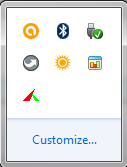
Showing (unchecked):


Hidden (checked):

  • Logitech Gaming Software (my mouse)
  • DClock2 (displaying local time)
  • FileBox eXtender
  • Yahoo Widgets (I have some that I still use)
  • Dell Touchpad (automatically deactivated because I currently have a mouse plugged in)
  • Microsoft Security Essentials
  • Intel Graphics Media Accelerator Driver for Mobile
  • Vector Clock (Carmino style, displaying current time in Melbourne)
« Last Edit: July 27, 2015, 10:19 AM by app103 »

4wd

  • Pedantic Old Bastard
  • Supporting Member
  • Joined in 2006
  • **
  • Posts: 5,652
    • Coding Snacks
Re: What's living in your taskbar notification area right now?
« Reply #19 on: July 26, 2015, 06:24 AM »
but I'm gonna give Greenshot a go...

I did give it a go... But it apparently uses 15 times the memory used by FScapture, ...

With Greenshot using 13.7MB out of my 12GB and at a cost of $19.95 less than FSCapture, I think I can live with it.
"I will not follow where the path may lead, but I will go where there is no path, and I will leave a trail." - Muriel Strode, 1903
« Last Edit: July 26, 2015, 06:35 AM by 4wd »

4wd

  • Pedantic Old Bastard
  • Supporting Member
  • Joined in 2006
  • **
  • Posts: 5,652
    • Coding Snacks
Re: What's living in your taskbar notification area right now?
« Reply #20 on: July 27, 2015, 02:30 AM »
While we've kind of digressed into application memory usage, can I ask what those using the Dropbox client show it's memory usage as?

I installed it today just to sync a few MP3s onto my Lumia 530, (cheap media player), and Task Manager shows it using 140+MB at idle which, quite frankly, is ridiculous considering the iDrive client uses ~26MB and is continuously indexing/uploading atm.
"I will not follow where the path may lead, but I will go where there is no path, and I will leave a trail." - Muriel Strode, 1903

wraith808

  • Supporting Member
  • Joined in 2006
  • **
  • Posts: 11,205
    • Participated in NANY Challenge Fourteen Times
    • Coding Snacks
    • Writer
    • Hardware Hacker
Re: What's living in your taskbar notification area right now?
« Reply #21 on: July 27, 2015, 02:57 AM »
101MB on my laptop (w8), 21m on my 32-bit desktop (w7), and 29k on my 64-bit desktop (w7)

tomos

  • Charter Member
  • Joined in 2006
  • ***
  • Posts: 11,970
    • Gathering Badge
    • Participated in NANY Challenge Once
Re: What's living in your taskbar notification area right now?
« Reply #22 on: July 27, 2015, 04:27 AM »
can I ask what those using the Dropbox client show it's memory usage as?

...Task Manager shows it using 140+MB at idle

120MB on my desktop (idle)
Tom

4wd

  • Pedantic Old Bastard
  • Supporting Member
  • Joined in 2006
  • **
  • Posts: 5,652
    • Coding Snacks
Re: What's living in your taskbar notification area right now?
« Reply #23 on: July 27, 2015, 04:38 AM »
Thanks for confirming it's not just me.

101MB on my laptop (w8), 21m on my 32-bit desktop (w7), and 29k on my 64-bit desktop (w7)

Interesting, I wonder if it's just a Win8 thing?
Using the 32bit version on Win8.1 x64 here.
"I will not follow where the path may lead, but I will go where there is no path, and I will leave a trail." - Muriel Strode, 1903

app103

  • That scary taskbar girl
  • Global Moderator
  • Joined in 2006
  • *****
  • Posts: 5,888
    • Participated in NANY Challenge Six Times
    • Coding Snacks
    • Gathering Badge
    • Cody Award
    • Volunteers/Staff
Re: What's living in your taskbar notification area right now?
« Reply #24 on: July 27, 2015, 07:40 AM »
I installed it today just to sync a few MP3s onto my Lumia 530, (cheap media player), and Task Manager shows it using 140+MB at idle which, quite frankly, is ridiculous considering the iDrive client uses ~26MB and is continuously indexing/uploading atm.

191.2MB idle (using 32-bit version on Win7 x64)

Original address: https://www.donationcoder.com/forum/index.php?topic=41309.0