DonationCoder.com forum
 
Read-only archive. This is a static copy of the DonationCoder.com forum. Reading and searching work as before; logging in, posting and private messages do not.
Archive of 2026-10-21 · About this archive · Main site

Last post Author Topic: What's living in your taskbar notification area right now?  (Read 74,462 times)

lanux128

  • Global Moderator
  • Joined in 2005
  • *****
  • Posts: 6,277
    • Coding Snacks
    • Volunteers/Staff
    • Gathering Badge
    • Participated in NANY Challenge Once
    • Linux User
Re: What's living in your taskbar notification area right now?
« Reply #25 on: July 27, 2015, 08:08 AM »
120MB on my desktop (idle)

same here, on Win7 64-bit.

lanux128

  • Global Moderator
  • Joined in 2005
  • *****
  • Posts: 6,277
    • Coding Snacks
    • Volunteers/Staff
    • Gathering Badge
    • Participated in NANY Challenge Once
    • Linux User
Re: What's living in your taskbar notification area right now?
« Reply #26 on: July 27, 2015, 08:10 AM »
perhaps this is the reason.

Quote
Dropbox may seem like it doesn't need a lot of RAM to operate. The truth is: there's a lot of complexity under the hood!

For instance, Dropbox has to keep track of a lot of information about your files in order to make sure it can sync files quickly and efficiently. The more files you have in your Dropbox folder, the more memory Dropbox will need to keep track of them. That said, we are constantly working on making Dropbox more memory efficient and we continue to have significant improvements with each major release.

For our advanced users

Want more details? Dropbox stores metadata on your files in RAM to prevent constant and expensive database lookups while syncing. The metadata includes paths to files in your Dropbox, checksums, modification times, etc. We are working hard on making this information more compact and are working on several fronts to improve memory usage. Our techniques are not limited to rewriting pieces of our source code and writing custom memory allocators.

Source: Why is Dropbox using so much RAM? - https://www.dropbox.com/en/help/144

eleman

  • Spam Killer
  • Supporting Member
  • Joined in 2009
  • **
  • Posts: 413
Re: What's living in your taskbar notification area right now?
« Reply #27 on: July 27, 2015, 08:28 AM »
perhaps this is the reason.

Quote
Dropbox may seem like it doesn't need a lot of RAM to operate. The truth is: there's a lot of complexity under the hood!

For instance, Dropbox has to keep track of a lot of information about your files in order to make sure it can sync files quickly and efficiently. The more files you have in your Dropbox folder, the more memory Dropbox will need to keep track of them. That said, we are constantly working on making Dropbox more memory efficient and we continue to have significant improvements with each major release.

For our advanced users

Want more details? Dropbox stores metadata on your files in RAM to prevent constant and expensive database lookups while syncing. The metadata includes paths to files in your Dropbox, checksums, modification times, etc. We are working hard on making this information more compact and are working on several fronts to improve memory usage. Our techniques are not limited to rewriting pieces of our source code and writing custom memory allocators.

Source: Why is Dropbox using so much RAM? - https://www.dropbox.com/en/help/144

Translation from corporatespeak to plain English: We can't be bothered to write optimized code for each and every OS. Instead we chose to waste your ram on generic libraries which are built to work on multiple operating systems, rather than for efficiency.
« Last Edit: July 27, 2015, 08:38 AM by eleman »

Shades

  • Member
  • Joined in 2006
  • **
  • Posts: 2,954
Re: What's living in your taskbar notification area right now?
« Reply #28 on: July 27, 2015, 01:56 PM »
Although I agree with eleman here, whenever an application requires to a (full-fledged) database to operate, it is a serious consideration to store the results of queries etc. into RAM. Using more RAM for the application means it will be much more responsive, because retrieving and storing in a database is "expensive". Not only time-wise (responsiveness), but you also introduce an extra factor for reliability, especially when you need to access databases off-site.

Nowadays computers have quite a lot of RAM onboard and usually decent connections to (off-site) databases. However, you cannot trust to have a decent connection 100% of the time, while the RAM is a much more stable resource. For a good (newbie) user-experience, the trend is to use the most stable resources at hand. 
The easy path is usually downhill...

Deozaan

  • Charter Member
  • Joined in 2006
  • ***
  • Posts: 9,827
    • Participated in NANY Challenge Eight Times
    • Cody Award
Re: What's living in your taskbar notification area right now?
« Reply #29 on: July 28, 2015, 08:38 AM »
While we've kind of digressed into application memory usage, can I ask what those using the Dropbox client show it's memory usage as?

15,300K while idling on my PC (Win7 x64).

cshnik

  • Participant
  • Joined in 2014
  • *
  • Posts: 17
Re: What's living in your taskbar notification area right now?
« Reply #30 on: July 29, 2015, 10:11 AM »
I'm not a software geek :D so my system tray icon's set looks like:

Intel Rapid Storage Technology
NVidia Settings
Nokia PC Suite
f.lux
TaskLayout
Miranda

PS TaskLayout is my own project.

Curt

  • Supporting Member
  • Joined in 2006
  • **
  • Posts: 7,565
Re: What's living in your taskbar notification area right now?
« Reply #31 on: August 02, 2015, 10:06 PM »
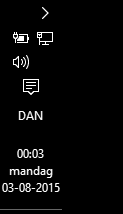
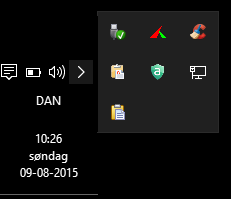
I think Win 10 all over is ugly, and the least ugly part is the ugly taskbar notification area!  :-[


[attachimg=#]

« Last Edit: August 02, 2015, 10:24 PM by Curt »

app103

  • That scary taskbar girl
  • Global Moderator
  • Joined in 2006
  • *****
  • Posts: 5,888
    • Participated in NANY Challenge Six Times
    • Coding Snacks
    • Gathering Badge
    • Cody Award
    • Volunteers/Staff
Re: What's living in your taskbar notification area right now?
« Reply #32 on: August 02, 2015, 11:03 PM »
I think Win 10 all over is ugly, and the least ugly part is the ugly taskbar notification area!  :-[

(see attachment in previous post)

If I didn't know any better I'd think you installed Win 1.0 instead of Win 10. What a step backwards in icon design!

MilesAhead

  • Supporting Member
  • Joined in 2009
  • **
  • Posts: 7,736
    • Coding Snacks
Re: What's living in your taskbar notification area right now?
« Reply #33 on: August 02, 2015, 11:54 PM »
I think Win 10 all over is ugly, and the least ugly part is the ugly taskbar notification area!  :-[

(see attachment in previous post)

If I didn't know any better I'd think you installed Win 1.0 instead of Win 10. What a step backwards in icon design!

What is up with that?  Are there actually smart phones with b/w screens?

4wd

  • Pedantic Old Bastard
  • Supporting Member
  • Joined in 2006
  • **
  • Posts: 5,652
    • Coding Snacks
Re: What's living in your taskbar notification area right now?
« Reply #34 on: August 03, 2015, 12:13 AM »
Actually prefer the clean, monochrome, easily identifiable icons over multi-coloured, wtf is that blobs.
"I will not follow where the path may lead, but I will go where there is no path, and I will leave a trail." - Muriel Strode, 1903

wraith808

  • Supporting Member
  • Joined in 2006
  • **
  • Posts: 11,205
    • Participated in NANY Challenge Fourteen Times
    • Coding Snacks
    • Writer
    • Hardware Hacker
Re: What's living in your taskbar notification area right now?
« Reply #35 on: August 03, 2015, 01:08 AM »
Actually prefer the clean, monochrome, easily identifiable icons over multi-coloured, wtf is that blobs.

agreed.

TaoPhoenix

  • 0 - 60 ... then back to 0 again!
  • Supporting Member
  • Joined in 2011
  • **
  • Posts: 4,642
    • Participated in NANY Challenge Three Times
Re: What's living in your taskbar notification area right now?
« Reply #36 on: August 03, 2015, 03:19 AM »
Actually prefer the clean, monochrome, easily identifiable icons over multi-coloured, wtf is that blobs.

I guess I have few enough blobs that I know what most of them are easily. (List sometime if I get to it!)
Use attachthumb=# to show an attached image as an expandable thumbnail, or attach=# to show full size. (With Brackets)

Deozaan

  • Charter Member
  • Joined in 2006
  • ***
  • Posts: 9,827
    • Participated in NANY Challenge Eight Times
    • Cody Award
Re: What's living in your taskbar notification area right now?
« Reply #37 on: August 03, 2015, 06:11 AM »
I think Win 10 all over is ugly, and the least ugly part is the ugly taskbar notification area!  :-[

(see attachment in previous post)

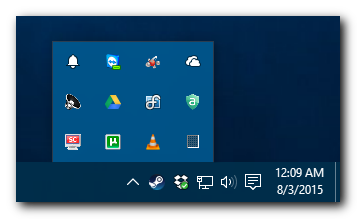
I have no idea why yours looks so bad. Mine looks nice and neat, just like it always has:

[attachimg=#]

Ath

  • Supporting Member
  • Joined in 2006
  • **
  • Posts: 3,649
    • Participated in NANY Challenge Eleven Times
    • Coding Snacks
    • Linux User
    • Hardware Hacker
Re: What's living in your taskbar notification area right now?
« Reply #38 on: August 03, 2015, 09:52 AM »
@Curt, is your taskbar on the right (yeah :P) side of your screen, instead of at the bottom? That could explain something. Your other taskbaricons then are hidden behind the > icon. ;)
/Ton
Ath's software collection, Quote: "A problem well stated is a problem half-solved." (Charles Kettering)

Deozaan

  • Charter Member
  • Joined in 2006
  • ***
  • Posts: 9,827
    • Participated in NANY Challenge Eight Times
    • Cody Award
Re: What's living in your taskbar notification area right now?
« Reply #39 on: August 04, 2015, 11:15 PM »
@Curt, is your taskbar on the right (yeah :P) side of your screen, instead of at the bottom? That could explain something. Your other taskbaricons then are hidden behind the > icon. ;)

I think it's on the left side of the screen. Hence the extra space on the right, and the > which would expand into the open space on the right.

Deozaan

  • Charter Member
  • Joined in 2006
  • ***
  • Posts: 9,827
    • Participated in NANY Challenge Eight Times
    • Cody Award
Re: What's living in your taskbar notification area right now?
« Reply #40 on: August 09, 2015, 03:00 AM »
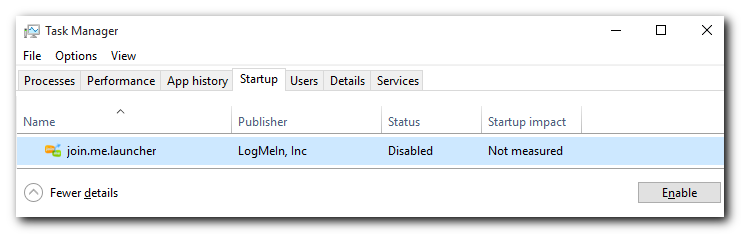
  • Join.me (can't figure out how to disable launch on startup)

HKEY_CURRENT_USER\Software\Microsoft\Windows\CurrentVersion\Run -> join.me.launcher

Of course, whenever you use it, it adds it back :(

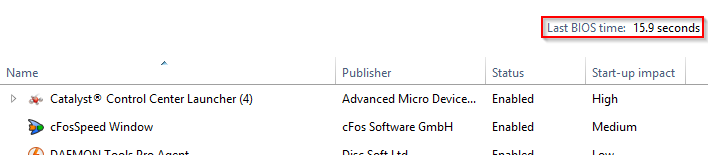
Windows 10 Task Manager has a new Startup tab where you can see and enable/disable your startup items. Nice!
[attachimg=#]

4wd

  • Pedantic Old Bastard
  • Supporting Member
  • Joined in 2006
  • **
  • Posts: 5,652
    • Coding Snacks
Re: What's living in your taskbar notification area right now?
« Reply #41 on: August 09, 2015, 05:55 AM »
Windows 10 Task Manager has a new Startup tab where you can see and enable/disable your startup items. Nice!

That appeared in Windows 8.

There's also the Last BIOS time indicator, (in Win8 anyway), which displays how long it took from pushing the power button to displaying the Windows loading screen, (for those interested in that kind of thing):

2015-08-09 16_26_17.png

SuperUser Q&A about it.
"I will not follow where the path may lead, but I will go where there is no path, and I will leave a trail." - Muriel Strode, 1903
« Last Edit: August 09, 2015, 06:39 AM by 4wd »

Curt

  • Supporting Member
  • Joined in 2006
  • **
  • Posts: 7,565
Re: What's living in your taskbar notification area right now?
« Reply #42 on: August 09, 2015, 08:30 AM »
Sorry it has taken me so long to reply. I didn't quite know how to answer your various comments and questions to my ugly taskbar / notification area, because right after posting "Reply #31", I installed Stardock Start10, but in my setup it really looks the same as Win 10 (but without the errors), so only a few would ever notice the difference... But it's still not pretty (here on top of a black wallpaper):

With Start10:


[attachimg=#]


At the moment my clipboard is Clipdiary from Softvoile.

Deozaan

  • Charter Member
  • Joined in 2006
  • ***
  • Posts: 9,827
    • Participated in NANY Challenge Eight Times
    • Cody Award
Re: What's living in your taskbar notification area right now?
« Reply #43 on: August 10, 2015, 03:52 AM »
Windows 10 Task Manager has a new Startup tab where you can see and enable/disable your startup items. Nice!

That appeared in Windows 8.

Cool. I've never used Windows 8, so I didn't know that. :Thmbsup:

FYI, I don't see anything about a Last BIOS time in Windows 10, so that may not have survived.

4wd

  • Pedantic Old Bastard
  • Supporting Member
  • Joined in 2006
  • **
  • Posts: 5,652
    • Coding Snacks
Re: What's living in your taskbar notification area right now?
« Reply #44 on: August 10, 2015, 04:31 AM »
FYI, I don't see anything about a Last BIOS time in Windows 10, so that may not have survived.

There's specific system requirements that need to be available before it shows up from what I gather, one of them seems to be a UEFI BIOS.

The only system running W10 atm is my netbook which, like yours, is too old for UEFI, as such it doesn't show the Last BIOS time info.
My main system is still W8.1 but has a UEFI BIOS so that's where the screenshot came from, so as yet I can't precisely tell you if it occurs in W10 or not.

There may be other requirements, eg. someone mentioned GPT formatted HDD, mine are all MBR so that appears to be wrong.
"I will not follow where the path may lead, but I will go where there is no path, and I will leave a trail." - Muriel Strode, 1903

Josh

  • Charter Honorary Member
  • Joined in 2005
  • ***
  • Posts: 3,411
    • Gathering Badge
    • Official Forum Clown
    • Coding Snacks
    • Plugin Coding Medal
    • Volunteers/Staff
    • Military Service Badge - US Army
    • Furry Fandom Badge - Furry Fandom
    • Linux User
Re: What's living in your taskbar notification area right now?
« Reply #45 on: August 10, 2015, 04:50 AM »
2015-08-10_004941.jpg
Strength in Knowledge

mouser

  • First Author
  • Administrator
  • Joined in 2005
  • *****
  • Posts: 40,931
    • Gathering Badge
    • Plugin Coding Medal
    • Participated in NANY Challenge Seventeen Times
    • Cody Award
    • Coding Snacks
    • Volunteers/Staff
Re: What's living in your taskbar notification area right now?
« Reply #46 on: August 10, 2015, 06:42 AM »
Screenshot - 8_10_2015 , 1_34_30 AM_ver001.png

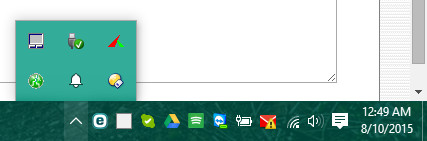
Note: some of the apps i'm using i'm just using because i'm too lazy to move to something better, so don't take my choices as my recommendations for best tools.

lanux128

  • Global Moderator
  • Joined in 2005
  • *****
  • Posts: 6,277
    • Coding Snacks
    • Volunteers/Staff
    • Gathering Badge
    • Participated in NANY Challenge Once
    • Linux User
Re: What's living in your taskbar notification area right now?
« Reply #47 on: August 10, 2015, 07:46 AM »
(see attachment in previous post)
Note: some of the apps i'm using i'm just using because i'm too lazy to move to something better, so don't take my choices as my recommendations for best tools.

mouser, how do you do that in SC? I tried expanding the canvas but the text got cut-off.


mouser

  • First Author
  • Administrator
  • Joined in 2005
  • *****
  • Posts: 40,931
    • Gathering Badge
    • Plugin Coding Medal
    • Participated in NANY Challenge Seventeen Times
    • Cody Award
    • Coding Snacks
    • Volunteers/Staff
Re: What's living in your taskbar notification area right now?
« Reply #48 on: August 10, 2015, 07:53 AM »
exactly as you said, i used the expand canvas feature.

usually what i do is like this: i expand the canvas a LOT, more than i will need,
then after i add all the text i want, i crop the image to get rid of the extra space.

x16wda

  • what am I doing in this handbasket?
  • Supporting Member
  • Joined in 2007
  • **
  • Posts: 888
    • Participated in NANY Challenge Once
Re: What's living in your taskbar notification area right now?
« Reply #49 on: August 10, 2015, 10:33 AM »
Sorry it has taken me so long to reply. I didn't quite know how to answer your various comments and questions to my ugly taskbar / notification area, because right after posting "Reply #31", I installed Stardock Start10, but in my setup it really looks the same as Win 10 (but without the errors), so only a few would ever notice the difference... But it's still not pretty (here on top of a black wallpaper):

With Start10:

(see attachment in previous post)

At the moment my clipboard is Clipdiary from Softvoile.

Curt, this is off topic, but out of curiosity did you use Start8? I have not seen an email about an upgrade from Stardock. Also wondered how you are finding Clipdiary, how long you have been trying it out.
vi vi vi - editor of the beast

Original address: https://www.donationcoder.com/forum/index.php?topic=41309.0