DonationCoder.com forum
 
Read-only archive. This is a static copy of the DonationCoder.com forum. Reading and searching work as before; logging in, posting and private messages do not.
Archive of 2026-10-21 · About this archive · Main site

Last post Author Topic: Windows 10 Announced  (Read 1,207,036 times)

4wd

  • Pedantic Old Bastard
  • Supporting Member
  • Joined in 2006
  • **
  • Posts: 5,652
    • Coding Snacks
Re: Windows 10 Announced
« Reply #725 on: January 07, 2016, 12:27 PM »
Any tips for upgrading to Windows 10 now?
=> upgrading from 8.1, I'm going try keeping programmes unless advised otherwise.
Yes: Check with the manufacturer of the computer if an upgrade to Windows 10 is supported.
In hindsight I found out why my upgrade adventures failed for my Lenovo Y580 laptop: Lenovo states that it is not possible to upgrade that specific model (and a few others) to Windows 10.

thanks Ath,
that knocks the idea on the head -- it's a Lenovo (n581) that is included in that list as not recommended. It doesnt clearly state why (that I could see), so I probably wont bother following up on it.

I think I'd be tempted to go ahead anyway, just image the drive and let it update, then do an image after it has 10 on it.

If it doesn't work restore the image, you'll have lost a couple of hours but on the flip side the laptop is now registered with a Windows 10 license so that if relevant drivers ever do appear for esoteric hardware, you can upgrade for nothing.

Otherwise, you might find that you can live without whatever functions no longer work under 10.
"I will not follow where the path may lead, but I will go where there is no path, and I will leave a trail." - Muriel Strode, 1903

tomos

  • Charter Member
  • Joined in 2006
  • ***
  • Posts: 11,970
    • Gathering Badge
    • Participated in NANY Challenge Once
Re: Windows 10 Announced
« Reply #726 on: January 08, 2016, 12:18 PM »
^ Okay, decided to go for it. The Windows upgrade window/dialogue said the machine is okay.

I clicked on Start download now, upgrade later
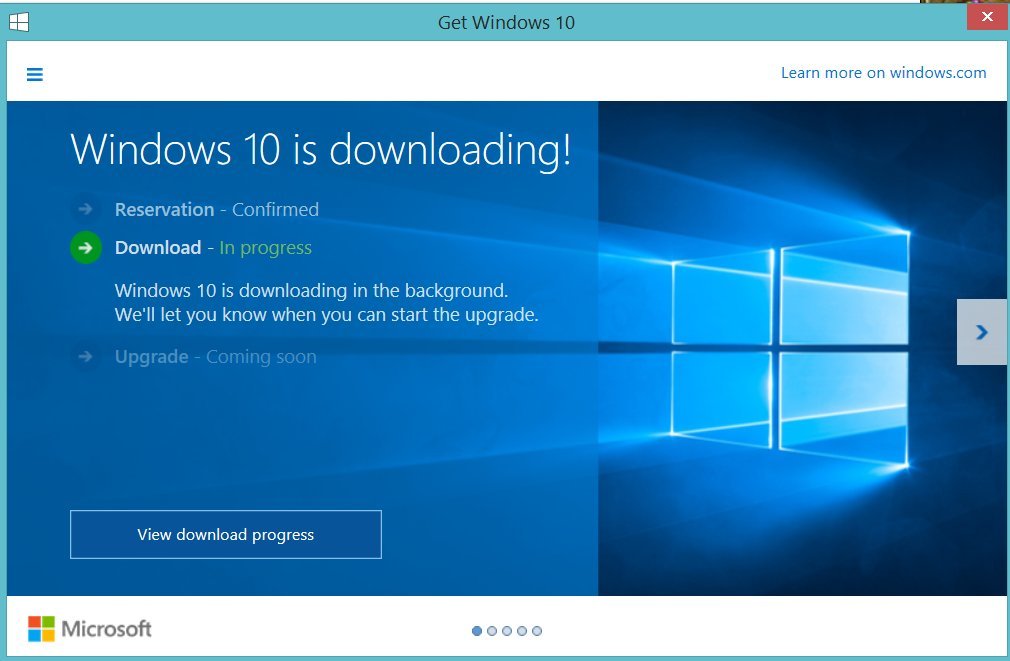
I got a flash of this window (or something very similar) - but it immediately disappeared:

ScwK3.jpg

I not sure what happened.
  • Task Manager shows GWX running, using no CPU, and less than one MB ram
  • I'm pretty sure there's nothing being downloaded
  • Internet connection is working fine

So, I tried it again (I get the initial dialogue again), and got exactly the same result.

Any tips?
(I didnt get very far with online search)
Tom

Stoic Joker

  • Honorary Member
  • Joined in 2008
  • **
  • Posts: 6,652
    • Cody Award
    • Participated in NANY Challenge Five Times
Re: Windows 10 Announced
« Reply #727 on: January 08, 2016, 12:33 PM »
It may be trickling in using BITS, so look for a hidden folder named $Windows.~BT on the root of the C: drive. In there you should have a - (getting) rather large -  install.esd file in the (IIRC) sources folder.

tomos

  • Charter Member
  • Joined in 2006
  • ***
  • Posts: 11,970
    • Gathering Badge
    • Participated in NANY Challenge Once
Re: Windows 10 Announced
« Reply #728 on: January 08, 2016, 01:02 PM »
It may be trickling in using BITS, so look for a hidden folder named $Windows.~BT on the root of the C: drive. In there you should have a - (getting) rather large -  install.esd file in the (IIRC) sources folder.

I unhid system files -- there's no folder by that name.
Tom

Ath

  • Supporting Member
  • Joined in 2006
  • **
  • Posts: 3,649
    • Participated in NANY Challenge Eleven Times
    • Coding Snacks
    • Linux User
    • Hardware Hacker
Re: Windows 10 Announced
« Reply #729 on: January 08, 2016, 03:11 PM »
The waiting frustrated me too much ;D, I'd advice to use the MCT, get it from here
/Ton
Ath's software collection, Quote: "A problem well stated is a problem half-solved." (Charles Kettering)

Stoic Joker

  • Honorary Member
  • Joined in 2008
  • **
  • Posts: 6,652
    • Cody Award
    • Participated in NANY Challenge Five Times
Re: Windows 10 Announced
« Reply #730 on: January 08, 2016, 05:04 PM »
The waiting frustrated me too much ;D, I'd advice to use the MCT, get it from here
Me too TBH.. ;)

wraith808

  • Supporting Member
  • Joined in 2006
  • **
  • Posts: 11,205
    • Participated in NANY Challenge Fourteen Times
    • Coding Snacks
    • Writer
    • Hardware Hacker
Re: Windows 10 Announced
« Reply #731 on: January 08, 2016, 06:32 PM »
The waiting frustrated me too much ;D, I'd advice to use the MCT, get it from here

Me too TBH.. ;)

Can you use that on multiple machines?  I've downloaded it for one machine- but have others I'm looking at upgrading.

Stoic Joker

  • Honorary Member
  • Joined in 2008
  • **
  • Posts: 6,652
    • Cody Award
    • Participated in NANY Challenge Five Times
Re: Windows 10 Announced
« Reply #732 on: January 08, 2016, 08:33 PM »
The waiting frustrated me too much ;D, I'd advice to use the MCT, get it from here

Me too TBH.. ;)

Can you use that on multiple machines?  I've downloaded it for one machine- but have others I'm looking at upgrading.

As long as each machine has a "qualifying product" OS and its accompanying product key, yes ... Many as you like.

Deozaan

  • Charter Member
  • Joined in 2006
  • ***
  • Posts: 9,827
    • Participated in NANY Challenge Eight Times
    • Cody Award
Re: Windows 10 Announced
« Reply #733 on: January 09, 2016, 06:37 PM »
I clicked on Start download now, upgrade later
I got a flash of this window (or something very similar) - but it immediately disappeared:

I had a similar problem on one device and ended up needing to use the Download tool (linked by others already) to install Windows 10 to get it to do it.

tomos

  • Charter Member
  • Joined in 2006
  • ***
  • Posts: 11,970
    • Gathering Badge
    • Participated in NANY Challenge Once
Re: Windows 10 Announced
« Reply #734 on: January 10, 2016, 12:15 PM »
The waiting frustrated me too much ;D, I'd advice to use the MCT, get it from here

I went for this today:
I got the same update-dialogue again -- then got a UAC prompt, then it all disappeared again.

Clicking on the 10 icon in the tray, I see the update-dialogue with no indication that anything is being downloaded. GWX using almost no resources.

I tried killing GWX and repeating the process, no change (cant see anything relevant in the task manager -- GWX remains gone).

Will try a reboot and see if anything 'evolves' ...
Tom

Deozaan

  • Charter Member
  • Joined in 2006
  • ***
  • Posts: 9,827
    • Participated in NANY Challenge Eight Times
    • Cody Award
Re: Windows 10 Announced
« Reply #735 on: January 11, 2016, 10:41 PM »
On second thought, I think I needed to install some .NET updates from Windows update before the GWX updater would work for me without just closing immediately. But this was on a fresh Windows 7 install. I'd expect Windows 8.1 to have most of the more recent .NET packages/updates.

Still, it's worth a try.

4wd

  • Pedantic Old Bastard
  • Supporting Member
  • Joined in 2006
  • **
  • Posts: 5,652
    • Coding Snacks
Re: Windows 10 Announced
« Reply #736 on: January 12, 2016, 12:37 AM »
On second thought, I think I needed to install some .NET updates from Windows update before the GWX updater would work for me without just closing immediately. But this was on a fresh Windows 7 install. I'd expect Windows 8.1 to have most of the more recent .NET packages/updates.

Does it for me on one of my Windows 8.1 Pro machines.  This machine I previously upgraded to 10 Pro but then found that a USB TV Tuner didn't work, so restored an image of the drive.

Now that I have a solution for the hardware I told it a few times to Start Download, Upgrade Later but all it ever does is go to Windows Update and grab the latest Defender definitions - no sign of it downloading the upgrade at all.

I'll probably have to upgrade it via ISO.
"I will not follow where the path may lead, but I will go where there is no path, and I will leave a trail." - Muriel Strode, 1903

tomos

  • Charter Member
  • Joined in 2006
  • ***
  • Posts: 11,970
    • Gathering Badge
    • Participated in NANY Challenge Once
Re: Windows 10 Announced
« Reply #737 on: January 12, 2016, 11:18 AM »
On second thought, I think I needed to install some .NET updates from Windows update before the GWX updater would work for me without just closing immediately. But this was on a fresh Windows 7 install. I'd expect Windows 8.1 to have most of the more recent .NET packages/updates.

Does it for me on one of my Windows 8.1 Pro machines.  This machine I previously upgraded to 10 Pro but then found that a USB TV Tuner didn't work, so restored an image of the drive.

Now that I have a solution for the hardware I told it a few times to Start Download, Upgrade Later but all it ever does is go to Windows Update and grab the latest Defender definitions - no sign of it downloading the upgrade at all.

I'll probably have to upgrade it via ISO.

I didnt check what NET is installled, but threw everything windows update had to offer at it (except the malicious tool :p).
Tried again (update now) and it went to Windows Update and offered 10 -- is now updating :up:
Tom

Arizona Hot

  • Supporting Member
  • Joined in 2007
  • **
  • Posts: 3,197
Re: Windows 10 Announced
« Reply #738 on: January 13, 2016, 01:32 AM »
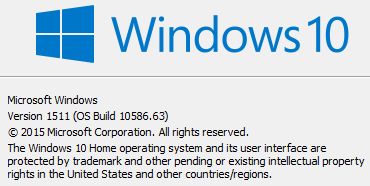
^Tomos, Did you get this update?

Win 10 v.1511 b. 1586.63.jpg

"If you can't be a good example, then you'll just have to be a horrible warning"  - Catherine Aird

tomos

  • Charter Member
  • Joined in 2006
  • ***
  • Posts: 11,970
    • Gathering Badge
    • Participated in NANY Challenge Once
Re: Windows 10 Announced
« Reply #739 on: January 13, 2016, 11:37 AM »
Tried again (update now) and it went to Windows Update and offered 10 -- is now updating :up:

well, that didnt work in the end. I tried again today with download and update later and now have Windows 10 running (yah!)
It's only just installed, so cant say a lot, but:

# I didnt see any option given during install to delete files -- it kept (almost) all software but seems to have removed some user data:
PaleMoon bookmarks are gone, but History is still there

# OS build is 10586.63

# I cant AltTab to the desktop :(

# I think it looks great :up:

[edit] I'm pretty sure Windows said I would need to download a new language pack (it was originally a German lang. Win.8 that I had changed to English). But it remained in Englsih :up: [/edit]
Tom
« Last Edit: January 13, 2016, 11:48 AM by tomos »

Arizona Hot

  • Supporting Member
  • Joined in 2007
  • **
  • Posts: 3,197
Re: Windows 10 Announced
« Reply #740 on: January 28, 2016, 06:47 AM »
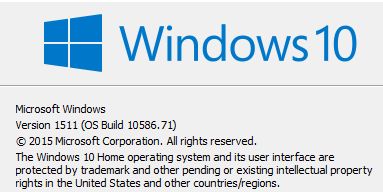
Win 10 Build 10536.71.jpg

Tomos: Time to meet the future. If you aren't part of the problem, your'e part of Microsoft.

"If you can't be a good example, then you'll just have to be a horrible warning"  - Catherine Aird

tomos

  • Charter Member
  • Joined in 2006
  • ***
  • Posts: 11,970
    • Gathering Badge
    • Participated in NANY Challenge Once
Re: Windows 10 Announced
« Reply #741 on: January 28, 2016, 12:12 PM »
[attachment 1 not found]

Tomos: Time to meet the future.

have hardly used the machine since,
must give it a go and see if I meet the future :-)
Tom

Deozaan

  • Charter Member
  • Joined in 2006
  • ***
  • Posts: 9,827
    • Participated in NANY Challenge Eight Times
    • Cody Award
Re: Windows 10 Announced
« Reply #742 on: January 28, 2016, 10:24 PM »
It won't be long before the build number jumps up quite a bit:

Quote from: insiderhub://announcements/44329459-f020-4d08-a48a-f1b3f14b0b16
Today, we are releasing Build 14251 [to] Windows Insiders in the Fast ring.

Sharp-eyed Insiders likely noted the big jump in build numbers from our last preview build (11102). Historically, the codebase for mobile had a different OS version than the codebase for PC because they were developed by different teams on different schedules. With Windows 10, we became one Windows team and brought these two codebases together. We started by changing the version string displayed in the UI to be consistent, which is why you saw similarly labeled builds over the past year for both Mobile and PC, but the underlying binary version numbers were still different. As part of our work getting the common codebase ready for the next release, we decided to complete that work and sync the build numbers between mobile and PC. Because the mobile codebase used higher build numbers than PC, we needed to jump ahead a bunch of build numbers to ensure updates to future builds will continue to work. So that’s why build numbers went from 11105, 11106, and 11107 to 14251.

You can view this announcement for yourself if you're on a Windows 10 device and have joined the Windows Insider program and/or installed the Windows Insider app.

4wd

  • Pedantic Old Bastard
  • Supporting Member
  • Joined in 2006
  • **
  • Posts: 5,652
    • Coding Snacks
Re: Windows 10 Announced
« Reply #743 on: January 28, 2016, 11:38 PM »
Meh, two machines with Win10Pro (x86/x64) still say 10568.36 with no pending updates - their build/version numbers are about as useful as the paper they're written on.
"I will not follow where the path may lead, but I will go where there is no path, and I will leave a trail." - Muriel Strode, 1903

Ath

  • Supporting Member
  • Joined in 2006
  • **
  • Posts: 3,649
    • Participated in NANY Challenge Eleven Times
    • Coding Snacks
    • Linux User
    • Hardware Hacker
Re: Windows 10 Announced
« Reply #744 on: January 29, 2016, 07:49 AM »
[attachment 1 not found]

I may be a bit slow today, but can anybody explain me where I can find this info screen in Windows 10? I've been unable to find it since I started using Windows 10 :-[
/Ton
Ath's software collection, Quote: "A problem well stated is a problem half-solved." (Charles Kettering)

4wd

  • Pedantic Old Bastard
  • Supporting Member
  • Joined in 2006
  • **
  • Posts: 5,652
    • Coding Snacks
Re: Windows 10 Announced
« Reply #745 on: January 29, 2016, 11:47 AM »
I may be a bit slow today, but can anybody explain me where I can find this info screen in Windows 10? I've been unable to find it since I started using Windows 10 :-[

Open a CLI and type winver.exe, or do it from Start->Run
"I will not follow where the path may lead, but I will go where there is no path, and I will leave a trail." - Muriel Strode, 1903

Ath

  • Supporting Member
  • Joined in 2006
  • **
  • Posts: 3,649
    • Participated in NANY Challenge Eleven Times
    • Coding Snacks
    • Linux User
    • Hardware Hacker
Re: Windows 10 Announced
« Reply #746 on: January 29, 2016, 03:45 PM »
Open a CLI and type winver.exe, or do it from Start->Run
Thnx! :up: (now I feel really silly, never used winver much, but it finally proves to be useful for something) :-[
/Ton
Ath's software collection, Quote: "A problem well stated is a problem half-solved." (Charles Kettering)

Arizona Hot

  • Supporting Member
  • Joined in 2007
  • **
  • Posts: 3,197
Re: Windows 10 Announced
« Reply #747 on: February 09, 2016, 09:45 PM »
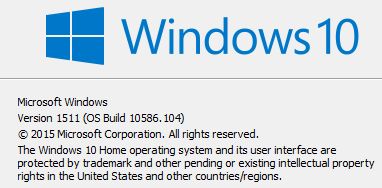
Win10 1511.1586.104.jpg

The latest Win 10 update.

"If you can't be a good example, then you'll just have to be a horrible warning"  - Catherine Aird

Stoic Joker

  • Honorary Member
  • Joined in 2008
  • **
  • Posts: 6,652
    • Cody Award
    • Participated in NANY Challenge Five Times
Re: Windows 10 Announced
« Reply #748 on: February 10, 2016, 05:22 AM »
Oh crap ... Another one?!? Damn it!

4wd

  • Pedantic Old Bastard
  • Supporting Member
  • Joined in 2006
  • **
  • Posts: 5,652
    • Coding Snacks
Re: Windows 10 Announced
« Reply #749 on: February 10, 2016, 07:03 AM »
Oh yay ... I've reached .63 ... whooppee ... still, I guess all you guys get to find all the data destroying bugs at least a month before I do ... there is a plus side ...
"I will not follow where the path may lead, but I will go where there is no path, and I will leave a trail." - Muriel Strode, 1903

Original address: https://www.donationcoder.com/forum/index.php?topic=39119.0