DonationCoder.com forum
 
Read-only archive. This is a static copy of the DonationCoder.com forum. Reading and searching work as before; logging in, posting and private messages do not.
Archive of 2026-10-21 · About this archive · Main site

Last post Author Topic: Screenshot Captor 3.28 aka 4.0RC Beta Test - Mar 17, 2013 - Feedback Wanted  (Read 215,354 times)

cmpm

  • Charter Member
  • Joined in 2006
  • ***
  • Posts: 2,026
Re: Screenshot Captor 3.20 Beta Test - Mar 3, 2013 - Feedback Wanted
« Reply #100 on: March 05, 2013, 04:08 AM »
Have the latest version.
Double checked to make sure that section of the .ini was deleted.
Here's the shot-

mouser

  • First Author
  • Administrator
  • Joined in 2005
  • *****
  • Posts: 40,931
    • Gathering Badge
    • Plugin Coding Medal
    • Participated in NANY Challenge Seventeen Times
    • Cody Award
    • Coding Snacks
    • Volunteers/Staff
Re: Screenshot Captor 3.20 Beta Test - Mar 3, 2013 - Feedback Wanted
« Reply #101 on: March 05, 2013, 04:14 AM »
ok i can confirm the problem when using enlarged font setting  :mad:  god i wish i could kill whoever at microsoft came up with that setting.. causes no end to problems..  ok at least i can reproduce and investigate.  i will report.

cmpm

  • Charter Member
  • Joined in 2006
  • ***
  • Posts: 2,026
Re: Screenshot Captor 3.20 Beta Test - Mar 3, 2013 - Feedback Wanted
« Reply #102 on: March 05, 2013, 04:15 AM »
to be sure I downloaded and installed again
checked reset all settings to default

edit-but didn't delete that part of the .ini, but i see you can reproduce it...

mouser

  • First Author
  • Administrator
  • Joined in 2005
  • *****
  • Posts: 40,931
    • Gathering Badge
    • Plugin Coding Medal
    • Participated in NANY Challenge Seventeen Times
    • Cody Award
    • Coding Snacks
    • Volunteers/Staff
Re: Screenshot Captor 3.20 Beta Test - Mar 3, 2013 - Feedback Wanted
« Reply #103 on: March 05, 2013, 04:46 AM »
Ok, thanks for your patience.
I've uploaded a new version -- can you give that a try and give me another screenshot?
And also let me know what Operating System you are using.
« Last Edit: March 05, 2013, 05:01 AM by mouser »

cmpm

  • Charter Member
  • Joined in 2006
  • ***
  • Posts: 2,026
Re: Screenshot Captor 3.20 Beta Test - Mar 3, 2013 - Feedback Wanted
« Reply #104 on: March 05, 2013, 05:20 AM »
I'm just glad I can help, thanks for SC!
Ok, this looks better, Thanks.

edit-o yeah, windows 7 32bit

mouser

  • First Author
  • Administrator
  • Joined in 2005
  • *****
  • Posts: 40,931
    • Gathering Badge
    • Plugin Coding Medal
    • Participated in NANY Challenge Seventeen Times
    • Cody Award
    • Coding Snacks
    • Volunteers/Staff
Re: Screenshot Captor 3.20 Beta Test - Mar 3, 2013 - Feedback Wanted
« Reply #105 on: March 05, 2013, 05:29 AM »
Ok the width is fixed, thats good and the important thing.
I haven't the slightest idea why your form is so tall -- on my windows 7 test i reproduced your width problem when i set the text size larger, but i can't for the life of me get the height problem to reproduce -- the form is normal height on my windows 7 test machine with large text settings..

mouser

  • First Author
  • Administrator
  • Joined in 2005
  • *****
  • Posts: 40,931
    • Gathering Badge
    • Plugin Coding Medal
    • Participated in NANY Challenge Seventeen Times
    • Cody Award
    • Coding Snacks
    • Volunteers/Staff
Re: Screenshot Captor 3.20 Beta Test - Mar 3, 2013 - Feedback Wanted
« Reply #106 on: March 05, 2013, 05:33 AM »
Actually, can you re-download yet again and see if the height is fixed now?

cmpm

  • Charter Member
  • Joined in 2006
  • ***
  • Posts: 2,026
Re: Screenshot Captor 3.20 Beta Test - Mar 3, 2013 - Feedback Wanted
« Reply #107 on: March 05, 2013, 05:34 AM »
You mean the difference between the mini buttons and the others, like settings and capture?
Post a shot of yours if you want to. I've been using greenshot for some of these, like the QCB.

"Actually, can you re-download yet again and see if the height is fixed now?" Yes
« Last Edit: March 05, 2013, 05:53 PM by cmpm »

cmpm

  • Charter Member
  • Joined in 2006
  • ***
  • Posts: 2,026
Re: Screenshot Captor 3.20 Beta Test - Mar 3, 2013 - Feedback Wanted
« Reply #108 on: March 05, 2013, 05:38 AM »
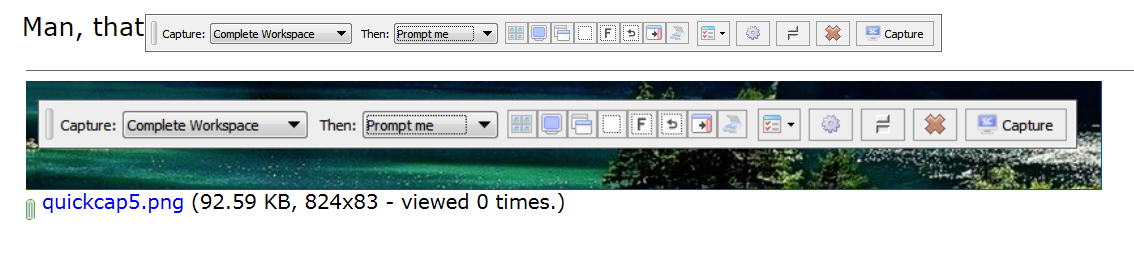
Man, that one is perfect! I like it.

mouser

  • First Author
  • Administrator
  • Joined in 2005
  • *****
  • Posts: 40,931
    • Gathering Badge
    • Plugin Coding Medal
    • Participated in NANY Challenge Seventeen Times
    • Cody Award
    • Coding Snacks
    • Volunteers/Staff
Re: Screenshot Captor 3.20 Beta Test - Mar 3, 2013 - Feedback Wanted
« Reply #109 on: March 05, 2013, 05:40 AM »
That's more like it :)

Thanks for the patience and the testing, I appreciate it.  Now we can get to tracking down the *real* bugs  :P

cmpm

  • Charter Member
  • Joined in 2006
  • ***
  • Posts: 2,026
Re: Screenshot Captor 3.20 Beta Test - Mar 3, 2013 - Feedback Wanted
« Reply #110 on: March 05, 2013, 05:40 AM »
It actually looks smaller on my screen then that shot....
and that is good!

bubbajunk

  • Participant
  • Joined in 2012
  • *
  • Posts: 53
Re: Screenshot Captor 3.20 Beta Test - Mar 3, 2013 - Feedback Wanted
« Reply #111 on: March 05, 2013, 05:34 PM »
Downloaded portable (*.zip) version of v3.21.01. I have been using v3.08.01 for quite some time. Noticed a couple of issues:

1) Settings for Highlighting Rectangle and Text Object not saved between reboots. This was an issue for me in v3.08.01, so I don't think it's related to any recent changes. Settings are saved within a given session, and also saved if I exit and restart SCC, just not saved between reboots of Windows.

2) Filename Template %quickfield% Screenshot - %customdate% %num%, where %customdate% is set to: %Y_%m%d. The first capture does not contain the %num% value in the filename, shows blank (e.g. Screenshot - 2013_0305 .png). Subsequent captures numbered 002, 003, 004, etc. (e.g. Screenshot - 2013_0305 002.png). I expected the first capture to have filename Screenshot - 2013_0305 001.png.

3) Navigating hierarchy in Preferences dialog using arrow keys - Pressing down arrow moves down the list and jumps across sections, as expected. Using the up arrow key moves up, but will not jump across sections. I expected to be able to arrow up between sections. Also, left arrow jumps to the top of list within the section, but does not collapse a section. Expected that using left arrow would highlight the section header and second left arrow would collapse the section. Then arrow up would move cursor to bottom of the prior section. I expected the navigation to work like Windows Explorer.

Other than these, I don't notice any other issues or regressions.
« Last Edit: March 05, 2013, 09:25 PM by bubbajunk »

mouser

  • First Author
  • Administrator
  • Joined in 2005
  • *****
  • Posts: 40,931
    • Gathering Badge
    • Plugin Coding Medal
    • Participated in NANY Challenge Seventeen Times
    • Cody Award
    • Coding Snacks
    • Volunteers/Staff
Re: Screenshot Captor 3.20 Beta Test - Mar 3, 2013 - Feedback Wanted
« Reply #112 on: March 06, 2013, 01:18 AM »
I noticed that some recent changes i made to the options form in the way it displayed when main form was not visible were causing some problems with some options editing, so i've uploaded a new version with an attempt to fix that.

bubba:
1. i hope this is just a fluke - SC should be remembering all settings now even across reboots.  Might be on reboot it ran your old install of screenshot captor?

2. %num% tries to replace to a blank string unless it NEEDS to use a number; you can force use of starting value of 001 by using %num0%

3. i'll have a look.

mouser

  • First Author
  • Administrator
  • Joined in 2005
  • *****
  • Posts: 40,931
    • Gathering Badge
    • Plugin Coding Medal
    • Participated in NANY Challenge Seventeen Times
    • Cody Award
    • Coding Snacks
    • Volunteers/Staff
Re: Screenshot Captor 3.20 Beta Test - Mar 3, 2013 - Feedback Wanted
« Reply #113 on: March 06, 2013, 09:58 AM »
bubba, regarding #1 not saving between reboots -- i stand corrected!  i just found and corrected a long-standing bug preventing settings saving on reboot.  thank you for your comment about this.

mouser

  • First Author
  • Administrator
  • Joined in 2005
  • *****
  • Posts: 40,931
    • Gathering Badge
    • Plugin Coding Medal
    • Participated in NANY Challenge Seventeen Times
    • Cody Award
    • Coding Snacks
    • Volunteers/Staff
Re: Screenshot Captor 3.20 Beta Test - Mar 3, 2013 - Feedback Wanted
« Reply #114 on: March 06, 2013, 10:39 AM »
So close to being ready to release.. Just need a few more testers to put it through it's paces and discover any new bugs i've missed!

Ath

  • Supporting Member
  • Joined in 2006
  • **
  • Posts: 3,649
    • Participated in NANY Challenge Eleven Times
    • Coding Snacks
    • Linux User
    • Hardware Hacker
Re: Screenshot Captor 3.20 Beta Test - Mar 3, 2013 - Feedback Wanted
« Reply #115 on: March 06, 2013, 11:19 AM »
The Window-title doesn't show the actual directory selected in the browser on the left, as would be expected (by me at least :))
/Ton
Ath's software collection, Quote: "A problem well stated is a problem half-solved." (Charles Kettering)

hamradio

  • Amateur Radio Guy
  • Charter Honorary Member
  • Joined in 2006
  • ***
  • Posts: 893
    • Plugin Coding Medal
    • Participated in NANY Challenge Fifteen Times
    • Cody Award
    • Coding Snacks
    • Volunteers/Staff
    • Hardware Hacker
Re: Screenshot Captor 3.20 Beta Test - Mar 3, 2013 - Feedback Wanted
« Reply #116 on: March 06, 2013, 03:41 PM »
The Window-title doesn't show the actual directory selected in the browser on the left, as would be expected (by me at least :))

1. Cant change folder in the file browser and load a file from it as well.
« Last Edit: March 06, 2013, 06:28 PM by hamradio »

cmpm

  • Charter Member
  • Joined in 2006
  • ***
  • Posts: 2,026
Re: Screenshot Captor 3.20 Beta Test - Mar 3, 2013 - Feedback Wanted
« Reply #117 on: March 06, 2013, 04:35 PM »

The previous bug of adding a caption and then performing a vertical splice still leaves the caption full sized.
Undoing the changes leaves the image a bit messed up

Same thing is happening with cropping the shot after adding a caption, either in the post capture dialog or using SC's editor.
It seems to open in other editors correctly, sometimes, with the different saves-save, save as new version, and save as. It will work consistently by flattening the shot.
It is still easy to work with as is though.

But I think mouser is going to try to fix it. (sorry mouser)
As you may know by reading this thread.

mouser

  • First Author
  • Administrator
  • Joined in 2005
  • *****
  • Posts: 40,931
    • Gathering Badge
    • Plugin Coding Medal
    • Participated in NANY Challenge Seventeen Times
    • Cody Award
    • Coding Snacks
    • Volunteers/Staff
Re: Screenshot Captor 3.20 Beta Test - Mar 3, 2013 - Feedback Wanted
« Reply #118 on: March 06, 2013, 04:42 PM »
The solution to the caption object being too wide after performing a vertical splice is to not perform a vertical splice after adding a caption. That's a first world problem in the Screenshot Captor universe.  :P


cmpm

  • Charter Member
  • Joined in 2006
  • ***
  • Posts: 2,026
Re: Screenshot Captor 3.20 Beta Test - Mar 3, 2013 - Feedback Wanted
« Reply #119 on: March 06, 2013, 04:43 PM »
It seems to be working now without clicking any save buttons, I don't know why.
Inside of SC it still shows the full caption bar, opening the shot in any other editor shows the correct cropped shot.

cmpm

  • Charter Member
  • Joined in 2006
  • ***
  • Posts: 2,026
Re: Screenshot Captor 3.20 Beta Test - Mar 3, 2013 - Feedback Wanted
« Reply #120 on: March 06, 2013, 04:43 PM »
The solution to the caption object being too wide after performing a vertical splice is to not perform a vertical splice after adding a caption. That's a first world problem in the Screenshot Captor universe.  :P


I agree, it will work like that.

mouser

  • First Author
  • Administrator
  • Joined in 2005
  • *****
  • Posts: 40,931
    • Gathering Badge
    • Plugin Coding Medal
    • Participated in NANY Challenge Seventeen Times
    • Cody Award
    • Coding Snacks
    • Volunteers/Staff
Re: Screenshot Captor 3.20 Beta Test - Mar 3, 2013 - Feedback Wanted
« Reply #121 on: March 06, 2013, 05:12 PM »
Quote
The Window-title doesn't show the actual directory selected in the browser on the left

I'm confused as to what you are saying -- the SC window title shows the directory you are currently in or the full path to the current file.  Doesn't it? Shouldn't it?

hamradio

  • Amateur Radio Guy
  • Charter Honorary Member
  • Joined in 2006
  • ***
  • Posts: 893
    • Plugin Coding Medal
    • Participated in NANY Challenge Fifteen Times
    • Cody Award
    • Coding Snacks
    • Volunteers/Staff
    • Hardware Hacker
Re: Screenshot Captor 3.20 Beta Test - Mar 3, 2013 - Feedback Wanted
« Reply #122 on: March 06, 2013, 05:55 PM »
Quote
The Window-title doesn't show the actual directory selected in the browser on the left

I'm confused as to what you are saying -- the SC window title shows the directory you are currently in or the full path to the current file.  Doesn't it? Shouldn't it?

It does not for me. I switch to say OLDER and it still says the screenshot path and I click on a file and it doesn't load either.  I switch back to the main one and it loads as well.

mouser

  • First Author
  • Administrator
  • Joined in 2005
  • *****
  • Posts: 40,931
    • Gathering Badge
    • Plugin Coding Medal
    • Participated in NANY Challenge Seventeen Times
    • Cody Award
    • Coding Snacks
    • Volunteers/Staff
Re: Screenshot Captor 3.20 Beta Test - Mar 3, 2013 - Feedback Wanted
« Reply #123 on: March 06, 2013, 06:18 PM »
ok i see what you mean, changing directories by double clicking folders in the thumbnail panel is no longer actually changing the directory that SC thinks it is in.

cmpm

  • Charter Member
  • Joined in 2006
  • ***
  • Posts: 2,026
Re: Screenshot Captor 3.20 Beta Test - Mar 3, 2013 - Feedback Wanted
« Reply #124 on: March 06, 2013, 06:39 PM »
It changes the directory Window Title using the 'GoTo' menu.
if that helps

Original address: https://www.donationcoder.com/forum/index.php?topic=34092.0