DonationCoder.com forum
 
Read-only archive. This is a static copy of the DonationCoder.com forum. Reading and searching work as before; logging in, posting and private messages do not.
Archive of 2026-10-21 · About this archive · Main site

Last post Author Topic: Screenshot Captor 3.28 aka 4.0RC Beta Test - Mar 17, 2013 - Feedback Wanted  (Read 215,354 times)

mouser

  • First Author
  • Administrator
  • Joined in 2005
  • *****
  • Posts: 40,931
    • Gathering Badge
    • Plugin Coding Medal
    • Participated in NANY Challenge Seventeen Times
    • Cody Award
    • Coding Snacks
    • Volunteers/Staff
Re: Screenshot Captor 3.19 Beta Test - Feb 27, 2013 - Feedback Wanted
« Reply #75 on: February 27, 2013, 08:15 PM »
crap -- i'm not sure when this happened but the paint layer does not seem to be loading from saved files any more.. in fact ALL semi-transparentness is being eliminated on save.  working on it..
« Last Edit: February 27, 2013, 08:59 PM by mouser »

mouser

  • First Author
  • Administrator
  • Joined in 2005
  • *****
  • Posts: 40,931
    • Gathering Badge
    • Plugin Coding Medal
    • Participated in NANY Challenge Seventeen Times
    • Cody Award
    • Coding Snacks
    • Volunteers/Staff
Re: Screenshot Captor 3.19 Beta Test - Feb 27, 2013 - Feedback Wanted
« Reply #76 on: February 27, 2013, 10:04 PM »
Ok new version uploaded..

A features to try:  Drop files from explorer onto the Screenshot Captor window -- you have some new choices now.


Abterix, can you try the things that weren't working for you before and let me know if any of those problems have not been fixed?  Thanks!

cschw

  • Supporting Member
  • Joined in 2012
  • **
  • Posts: 50
Re: Screenshot Captor 3.19 Beta Test - Feb 27, 2013 - Feedback Wanted
« Reply #77 on: February 28, 2013, 06:24 AM »
Here's a list of minor details found in the SC Options (or Preferences):

Spelling errors
¯¯¯¯¯¯¯¯¯¯¯¯¯¯¯
1. Incorrect spelling of "miscellaneous" on the following screens:
  [Saving and Loading Files]
  [More Interface Options]
  [Window Capturing 2]

2. [Image File Format] screen: Backgroud Transparency should be spelled 'Background'


Date Fields - help button
¯¯¯¯¯¯¯¯¯¯¯¯¯¯¯¯¯¯¯¯¯¯¯¯¯
On the [Saving and Loading Files] screen the date field help is brought up using a button with a ? icon, while on the [File Naming Template] screen the button is labeled 'Help on Fields'. 
Suggest using the same button on both screens for consistency.

mouser

  • First Author
  • Administrator
  • Joined in 2005
  • *****
  • Posts: 40,931
    • Gathering Badge
    • Plugin Coding Medal
    • Participated in NANY Challenge Seventeen Times
    • Cody Award
    • Coding Snacks
    • Volunteers/Staff
Re: Screenshot Captor 3.19 Beta Test - Feb 27, 2013 - Feedback Wanted
« Reply #78 on: February 28, 2013, 06:35 AM »
Thanks very much cschw, i will fix  :up:

dluby

  • Charter Member
  • Joined in 2006
  • ***
  • Posts: 253
Re: Screenshot Captor 3.19 Beta Test - Feb 27, 2013 - Feedback Wanted
« Reply #79 on: February 28, 2013, 11:15 AM »
Using the latest beta (3.19.01) I have noticed the following:

Major bug (for me):
(1) The latest version stopped copying the captured image to clipboard. However, I discovered a change in Post-Capture options but switching on 'Copy to Clipboard: File itself', makes no difference. When I manually copy the image from SSC it truncates the image horizontally and vertically!

UPDATE - I had the wrong setting for 'Copy to Clipboard:' I should have set it to 'Image bitmap' to copy the image to the clipboard

Other minor bugs:
(1) While I like the added controls on the Add Caption screen, some of the controls are over lapping.
(2) Using the undo function doesn't correctly undo the newly added captions
(3) After adding a caption, try splice out a vertical selection on the entire image and the newly added caption remains the same size (i.e. doesn't get spliced)

I see though the issue with the Quick bar reappearing after logging back onto Windows (after previously closing the Quickbar) has been resolved :)
« Last Edit: February 28, 2013, 03:36 PM by dluby »

ralfs

  • Charter Member
  • Joined in 2005
  • ***
  • Posts: 81
Re: Screenshot Captor 3.19 Beta Test - Feb 27, 2013 - Feedback Wanted
« Reply #80 on: March 03, 2013, 04:29 PM »
Screenshot Captor v3.19 Beta

1.
Sometimes i recognized an unresposible Screenshot Captor when editing a screenshot with a external graphic editor (GIMP).
After saving the screenshot in GIMP, Screenshot Captor doesn't display the changes and also doesn't change the viewed picture while clicking on an other screenshot-file.
Only closing an restarting Screenshot Captor makes it responsible again.

Unfortunately it does't happen every time, only when I don't try to reproduce it.

2.
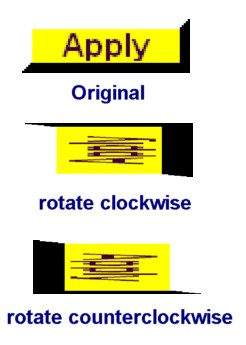
The "rotate clockwise" and "rotate counterclockwise" buttons in the clipart object toolbar are making a not expected rotation (Only visible with not square cliparts) :
The content ot the clipart is rotated but the aspect ratio doesn't follow the rotation:
New.jpg
Ralf

mouser

  • First Author
  • Administrator
  • Joined in 2005
  • *****
  • Posts: 40,931
    • Gathering Badge
    • Plugin Coding Medal
    • Participated in NANY Challenge Seventeen Times
    • Cody Award
    • Coding Snacks
    • Volunteers/Staff
Re: Screenshot Captor 3.19 Beta Test - Feb 27, 2013 - Feedback Wanted
« Reply #81 on: March 03, 2013, 06:05 PM »
Quote
After saving the screenshot in GIMP, Screenshot Captor doesn't display the changes and also doesn't change the viewed picture while clicking on an other screenshot-file.  Only closing an restarting Screenshot Captor makes it responsible again.

I'm about to release a new beta, i'd appreciate if you could see if the problem remains in the new beta -- i have tried to improve the code responsible for this kind of thing.

(If the problem should ever happen again, clicking on the thumbnail of the current image should force it to reload the current and now changed-by-external-tool image. and hitting f5 in the thumbnail panel should force the thumbnail panel to refresh thumbnails).

mouser

  • First Author
  • Administrator
  • Joined in 2005
  • *****
  • Posts: 40,931
    • Gathering Badge
    • Plugin Coding Medal
    • Participated in NANY Challenge Seventeen Times
    • Cody Award
    • Coding Snacks
    • Volunteers/Staff
Re: Screenshot Captor 3.19 Beta Test - Feb 27, 2013 - Feedback Wanted
« Reply #82 on: March 03, 2013, 06:05 PM »
Quote
The "rotate clockwise" and "rotate counterclockwise" buttons in the clipart object toolbar are making a not expected rotation

thanks, i will fix.

mouser

  • First Author
  • Administrator
  • Joined in 2005
  • *****
  • Posts: 40,931
    • Gathering Badge
    • Plugin Coding Medal
    • Participated in NANY Challenge Seventeen Times
    • Cody Award
    • Coding Snacks
    • Volunteers/Staff
Re: Screenshot Captor 3.19 Beta Test - Feb 27, 2013 - Feedback Wanted
« Reply #83 on: March 03, 2013, 06:06 PM »
Thanks dluby, i'm fixing the things you mention.

mouser

  • First Author
  • Administrator
  • Joined in 2005
  • *****
  • Posts: 40,931
    • Gathering Badge
    • Plugin Coding Medal
    • Participated in NANY Challenge Seventeen Times
    • Cody Award
    • Coding Snacks
    • Volunteers/Staff
Re: Screenshot Captor 3.20 Beta Test - Mar 3, 2013 - Feedback Wanted
« Reply #84 on: March 04, 2013, 01:52 AM »
I have uploaded a new beta 3.20.


Now with this beta I have good news and bad news and a renewed call for help testing.

The good+bad news are the same -- I've spent the last few days refactoring some very kludgey startup and options code that had been growing more convoluted each year.  I am much happier with the code at this point.

However, there is a very high likelyhood, that with all of the changes and code surgery i've done in the last week that i've broken stuff..

Problems are most likely to be in startup behavior, thumbnail panel refreshing, and options remembering..


I really desperately need your help in testing the new 3.20 version and helping me locate problems -- especially problems you can reproduce.

At this point i'd like to focus on fixing bugs and cap the feature requests until after this release since the change list is already huge with this version.

Thank you!
« Last Edit: March 04, 2013, 02:05 AM by mouser »

Ath

  • Supporting Member
  • Joined in 2006
  • **
  • Posts: 3,649
    • Participated in NANY Challenge Eleven Times
    • Coding Snacks
    • Linux User
    • Hardware Hacker
Re: Screenshot Captor 3.20 Beta Test - Mar 3, 2013 - Feedback Wanted
« Reply #85 on: March 04, 2013, 07:40 AM »
The download links in the original message give me 404 errors, are the files actually there?
/Ton
Ath's software collection, Quote: "A problem well stated is a problem half-solved." (Charles Kettering)

mouser

  • First Author
  • Administrator
  • Joined in 2005
  • *****
  • Posts: 40,931
    • Gathering Badge
    • Plugin Coding Medal
    • Participated in NANY Challenge Seventeen Times
    • Cody Award
    • Coding Snacks
    • Volunteers/Staff
Re: Screenshot Captor 3.20 Beta Test - Mar 3, 2013 - Feedback Wanted
« Reply #86 on: March 04, 2013, 07:46 AM »
Try again please.

Ath

  • Supporting Member
  • Joined in 2006
  • **
  • Posts: 3,649
    • Participated in NANY Challenge Eleven Times
    • Coding Snacks
    • Linux User
    • Hardware Hacker
Re: Screenshot Captor 3.20 Beta Test - Mar 3, 2013 - Feedback Wanted
« Reply #87 on: March 04, 2013, 07:56 AM »
Ah, much better :Thmbsup:
/Ton
Ath's software collection, Quote: "A problem well stated is a problem half-solved." (Charles Kettering)

dluby

  • Charter Member
  • Joined in 2006
  • ***
  • Posts: 253
Re: Screenshot Captor 3.20 Beta Test - Mar 3, 2013 - Feedback Wanted
« Reply #88 on: March 04, 2013, 05:13 PM »
In the Add Caption to Picture screen:
The text on all of the controls relating to colour/color are truncated.
Everything in the Border Options control are truncated.
'Caption Font Size' is truncated

The previous bug of adding a caption and then performing a vertical splice still leaves the caption full sized.
Undoing the changes leaves the image a bit messed up

The 'Autofit' caption at the top right of the screen is 'squashed' (all the words run into each other).
The 'Clear All Painting' button (at least I think that's what it says) has truncated text

I see a pattern here on the text truncation, maybe it is my PC?


mouser

  • First Author
  • Administrator
  • Joined in 2005
  • *****
  • Posts: 40,931
    • Gathering Badge
    • Plugin Coding Medal
    • Participated in NANY Challenge Seventeen Times
    • Cody Award
    • Coding Snacks
    • Volunteers/Staff
Re: Screenshot Captor 3.20 Beta Test - Mar 3, 2013 - Feedback Wanted
« Reply #89 on: March 04, 2013, 07:02 PM »
Thanks for the report dluby; i think i can fix that Add Caption form, and let's forget about the splicing of caption for now.

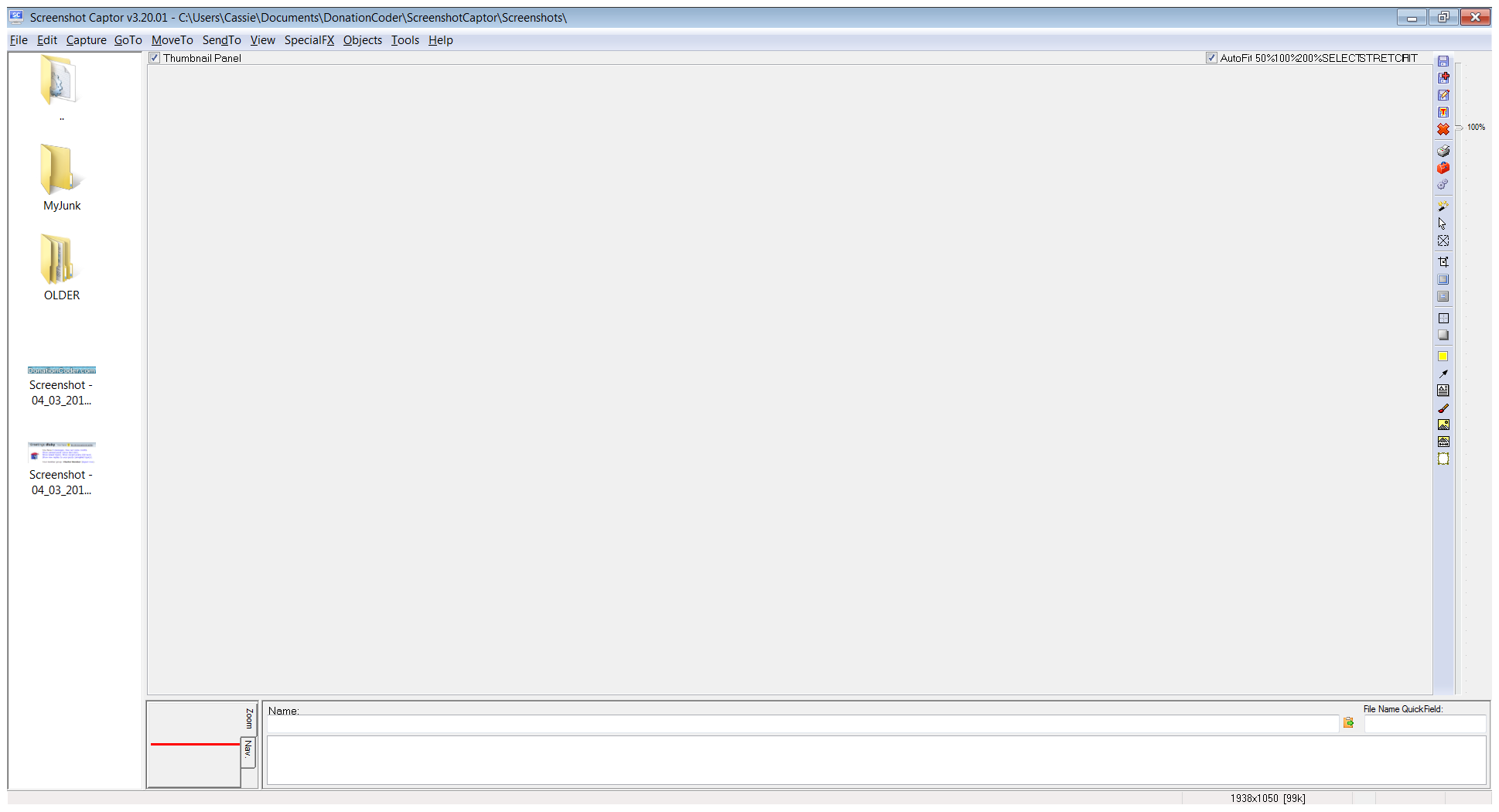
But the AutoFit squashed caption bothers me.  Can you use the "Capture image of Screenshot Captor window itself" from the main menu Capture menu to show me what it looks like?

dluby

  • Charter Member
  • Joined in 2006
  • ***
  • Posts: 253
Re: Screenshot Captor 3.20 Beta Test - Mar 3, 2013 - Feedback Wanted
« Reply #90 on: March 04, 2013, 09:20 PM »
Hey Mouser, here is a screenshot of SSC as requested. My PC is output onto my TV at 1920 x 1080 in Landscape mode (running on Windows7 64bit home edition).

mouser

  • First Author
  • Administrator
  • Joined in 2005
  • *****
  • Posts: 40,931
    • Gathering Badge
    • Plugin Coding Medal
    • Participated in NANY Challenge Seventeen Times
    • Cody Award
    • Coding Snacks
    • Volunteers/Staff
Re: Screenshot Captor 3.20 Beta Test - Mar 3, 2013 - Feedback Wanted
« Reply #91 on: March 05, 2013, 02:35 AM »
new update uploaded to try to fix the squished labels.
also has a fairly significant new feature -- better autosizing of captions -- see Automatic Captions tab for options to control caption sizing options.

cmpm

  • Charter Member
  • Joined in 2006
  • ***
  • Posts: 2,026
Re: Screenshot Captor 3.20 Beta Test - Mar 3, 2013 - Feedback Wanted
« Reply #92 on: March 05, 2013, 03:42 AM »
I'm not sure if this is by design or a work in progress concerning the Quick Capture Bar.
There is a significant amount of space on the right of the Bar with no buttons or commands.
Or it may be my computer. I have 2 monitors and it's the same on both.
I've checked and unchecked all the options for the bar and still the same amount of space.

cranioscopical

  • Friend of the Site
  • Supporting Member
  • Joined in 2006
  • **
  • Posts: 4,776
    • Cody Award
    • Official Forum Clown
    • rotten turkey sandwich - Rotten Turkey Sandwich
Re: Screenshot Captor 3.20 Beta Test - Mar 3, 2013 - Feedback Wanted
« Reply #93 on: March 05, 2013, 03:44 AM »
better autosizing of captions
Please elucidate. What should be set to help with an oversize caption?
Opps, sorry — got it "\n"  :Thmbsup:
Chris
« Last Edit: March 05, 2013, 04:04 AM by cranioscopical »

mouser

  • First Author
  • Administrator
  • Joined in 2005
  • *****
  • Posts: 40,931
    • Gathering Badge
    • Plugin Coding Medal
    • Participated in NANY Challenge Seventeen Times
    • Cody Award
    • Coding Snacks
    • Volunteers/Staff
Re: Screenshot Captor 3.20 Beta Test - Mar 3, 2013 - Feedback Wanted
« Reply #94 on: March 05, 2013, 03:48 AM »
cmpm, that's definitely a bug, and one i had really hoped would not be seen in the new version :(
if you restart the program is it still the same?
in fact i don't quite understand why your buttons are so large.


Quote
Please elucidate. Waht should be set to help with an oversize caption?
in the Automatic Captions tab you can control how long-lines are handled.. it should be automatic after that.

mouser

  • First Author
  • Administrator
  • Joined in 2005
  • *****
  • Posts: 40,931
    • Gathering Badge
    • Plugin Coding Medal
    • Participated in NANY Challenge Seventeen Times
    • Cody Award
    • Coding Snacks
    • Volunteers/Staff
Re: Screenshot Captor 3.20 Beta Test - Mar 3, 2013 - Feedback Wanted
« Reply #95 on: March 05, 2013, 03:55 AM »
cmpm, i wonder if you might try exiting Screenshot captor and deleting the section of your ScreenshotCaptor.ini file labeled
[QuickCaptureForm.rsPropSaver]

Maybe there is something in your old settings that could be causing this..

cmpm

  • Charter Member
  • Joined in 2006
  • ***
  • Posts: 2,026
Re: Screenshot Captor 3.20 Beta Test - Mar 3, 2013 - Feedback Wanted
« Reply #96 on: March 05, 2013, 03:57 AM »
Exited Sc and started it again.
This shot is on my larger monitor with 1920x1080.
The previous shot was 1600x900.
Keep in mind that I have my displays set to 125%, not 100%.

cmpm

  • Charter Member
  • Joined in 2006
  • ***
  • Posts: 2,026
Re: Screenshot Captor 3.20 Beta Test - Mar 3, 2013 - Feedback Wanted
« Reply #97 on: March 05, 2013, 04:00 AM »
Delete all of this?

[QuickCaptureForm.rsPropSaver]
AppBarMonitorId=0
ComboBox_Quick_WhatCapture.ItemIndex=3
DockHeight=50
DockPlacement=1
DockSizeMode=
DockWasShowing=
DockWidth=1140
Dock_NonfullHorzLeft=268
Dock_NonfullHorzWidth=1065
Dock_NonfullVertHeight=-1
Dock_NonfullVertTop=-1
FloatHeight=50
FloatLeft=2099
FloatTop=10
FloatWidth=1065
FormPlacement="0,1,-1,-1,-1,-1,2348,10,3093,16"
LastPlace=1
Place=4

mouser

  • First Author
  • Administrator
  • Joined in 2005
  • *****
  • Posts: 40,931
    • Gathering Badge
    • Plugin Coding Medal
    • Participated in NANY Challenge Seventeen Times
    • Cody Award
    • Coding Snacks
    • Volunteers/Staff
Re: Screenshot Captor 3.20 Beta Test - Mar 3, 2013 - Feedback Wanted
« Reply #98 on: March 05, 2013, 04:02 AM »
Yes, and can you make sure you have the latest version from today?

mouser

  • First Author
  • Administrator
  • Joined in 2005
  • *****
  • Posts: 40,931
    • Gathering Badge
    • Plugin Coding Medal
    • Participated in NANY Challenge Seventeen Times
    • Cody Award
    • Coding Snacks
    • Volunteers/Staff
Re: Screenshot Captor 3.20 Beta Test - Mar 3, 2013 - Feedback Wanted
« Reply #99 on: March 05, 2013, 04:04 AM »
Quote
Keep in mind that I have my displays set to 125%, not 100%.
well yes it does seem very likely that that is the proximal cause, but it really shouldn't have this effect.

Original address: https://www.donationcoder.com/forum/index.php?topic=34092.0