
* Stephen66515 may have to review this, seeing as he did the review for the first version 


 Topic: Bvckup 2 (Read 77,826 times)


 . Might install a bit more software on it, just to have a few more files - the more the merrier. Did end up with a Raptor disk in it, though... pondering whether I should use a somewhat slower disk, but I guess I'll run some tests first. Hopefully during the coming week
 I've tried running few cold-cache test and got numbers that are wildly different - from 131 seconds to 70 to 24. This is on a box that was shutdown, then powered on (with network connection disabled, with Windows Search and Windows Update services disabled, virtually no active tasks in the Task Manager and no resident antivirus/malware apps... so theoretically there's nothing that would actively populate disk index cache on boot). I will see what I've missed in a bit and re-run the tests.Sounds weird that you got such discrepancies - did you manage to make it somewhat reliable? Obviously there's going to be some fluctuation, but even 74 vs 24 seconds sound... interesting.
With regards to getting 3x speed up on a warm cache - what's not to like?Oh, it's not that it's not something to like, I was just thinking that as a user, the absolute time difference isn't that big - and it will be dwarfed by syncing even a few files. (I'm pretty sensitive to timing myself, so it's something I might notice - but I'm thinking regular users here).
. And I can't see much reason not to do the threading, at least when keeping the number of threads sane. I pondered a bit about the whole thing; there's some increase in CPU usage and thus speedstep, power consumption and heat (and potential noise from CPU fan), but I don't think any of those are realistic concerns, given the short running time. - carpe noctem
Sounds weird that you got such discrepancies - did you manage to make it somewhat reliable? Obviously there's going to be some fluctuation, but even 74 vs 24 seconds sound... interesting.
How are you doing the threading? Threadpool of workers that fetch a path from a queue, and while processing a path add found directories to the queue and "do whatever" with files? (Guess it could be somewhat difficult controlling breadth vs depth scanning reliably that way?) Or a different level of granularity?
With regards to getting 3x speed up on a warm cache - what's not to like? :) Arguably, this is the use case for real-time backups, with an operational profile consisting largely of frequent scans of small number of selected locations.Oh, it's not that it's not something to like, I was just thinking that as a user, the absolute time difference isn't that big - and it will be dwarfed by syncing even a few files. (I'm pretty sensitive to timing myself, so it's something I might notice - but I'm thinking regular users here).
As a programmer, I think it's a cool achivement, though... and it wasn't something I had expected - guess I should revisit that old benchmark code :). And I can't see much reason not to do the threading, at least when keeping the number of threads sane. I pondered a bit about the whole thing; there's some increase in CPU usage and thus speedstep, power consumption and heat (and potential noise from CPU fan), but I don't think any of those are realistic concerns, given the short running time.
Then there's additional memory consumption because of threads - but when sticking with a sane number of threads, that shouldn't be a problem either, neither for user- nor kernelmode memory.
So I don't see a reason to not do the threading, with the data given so far. And the 1.5x cold speedup is nice, hope I can duplicate that on my testbox! :)
. So far I've only run warm-cache tests - for cold-cache, I really really really want to be able to automate the process. I want to collect a lot of data sets, but I'm way too lazy to manually do all the reboots necessary :-). The testbox was freshly installed with Win7-x64 enterprise, LibreOffice 3.6.4, PiriForm Defraggler (didn't defrag it, though), Chrome, and all Windows Updates as of, well, last weekend. I furthermore copied some ~33gig of FLAC music from my server to get some meat on the filesystem - there's ~2.3gig free. The Windows partition is only ~52gig, as I didn't want to nuke the Linux test install I had on the disk - so the Windows partition starts ~18gig into the disk. Furthermore, I've disabled the following services: Defrag, Superfetch, Windows Search (hopefully turns off indexing?). Other than that, it's a pretty vanilla install, I even left the 2gig pagefile in place.@echo off
FOR /L %%I IN (1,1,16) DO CALL :ONEROUND %%I
GOTO :EOF
:ONEROUND
SET OUTFILE=results-run-%1.txt
ECHO ********** ROUND %1, Verbose Stats for 4 threads
ECHO ********** ROUND %1, Verbose Stats for 4 threads > %OUTFILE%
bvckup2-demo2-x64.exe -t 4 -v e:\ >> %OUTFILE%
FOR /L %%I IN (1,1,16) DO CALL :ONEBENCH %1 %%I
GOTO :EOF
:ONEBENCH
ECHO ========== ROUND %1, Breadth, %2 Threads
ECHO ========== ROUND %1, Breadth, %2 Threads >> %OUTFILE%
bvckup2-demo2-x64.exe -q -t %2 --breadth-first e:\ >> %OUTFILE%
ECHO ========== ROUND %1, Depth, %2 Threads
ECHO ========== ROUND %1, Depth, %2 Threads >> %OUTFILE%
bvckup2-demo2-x64.exe -q -t %2 e:\ >> %OUTFILE%
GOTO :EOF bvckup2-bench1.zip
(29.4 KB - downloaded 588 times.) - carpe noctem
bvckup2-bench1.zip
(29.4 KB - downloaded 588 times.) - carpe noctemIt would seem that the difference between depth- and breadth-first are pretty small for the warm-cache tests.
I guess the 16 consecutive runs should be processed into {min,max,avg,mean} values - should be easy enough to do the processing, but how to handle the rendering?
Also, if I find a way to automate the cold-cache testing (suggestions would be very welcome!)


Apologies for not replying sooner. I was pushing out the major website redesign.No problem - I've been slow/distracted myself. Nice and simple web design - I personally find it slightly annoying that the 'features' text fades in after waiting for the features-text-are has expanded, but that's a minor quibble
. Also, the outline and bgcolor-change (I think?) effect on your buttons is very subtle - having the browser on my secondary TFT, at first I wasn't sure if my eyes were playing tricks on me Well, I'd want something entirely automated - boot, auto-login and perform test, reboot, advance to next test et cetera. I'm not going to do 512 boots unless it's something 100% automated the machine can perform while I'm at workQuoteAlso, if I find a way to automate the cold-cache testing (suggestions would be very welcome!)I think the key to unlocking this problem is called shutdown.exe
(sure, could probably be handed by being pretty creative with batch files, but... ugh.)Another thing was that NOT using FindExLargeFetch in warm-cache scenario results in 20-30% speed up (from 1000 ms to 800 ms). I added a command-line argument to control this in more recent versions of bvckup2-demo2.exeIirc I did the test with the version supporting this switch, but since it wasn't documented I didn't think to include it - what's it do?
- carpe noctemvery niceThanks.
Btw, "Cache-aware reading" - are there actually any APIs or IOCTLs you can use to determine whether a file is cached? Or are you simply using FILE_FLAG_NO_BUFFERING all the time? smiley

Iirc I did the test with the version supporting this switch, but since it wasn't documented I didn't think to include it - what's it do?
Syntax: bvckup2-demo2.exe [-t <threads>] [-v | -q] location-to-scan

  -t   number of threads to use
  -v   verbose, dump API timing profile
  -q   quiet, print only final timing

  --breadth-first    scan siblings then children
  --no-large-fetch   do NOT use FindExLargeFetch
  --no-info-basic    do NOT use FindExInfoBasic, use FindExInfoStandard instead

  Thread count defaults to the number of CPU cores if not specified.

Also, if I find a way to automate the cold-cache testing (suggestions would be very welcome!), I'll throw in stats from my old dualcore-with-SSD laptop.
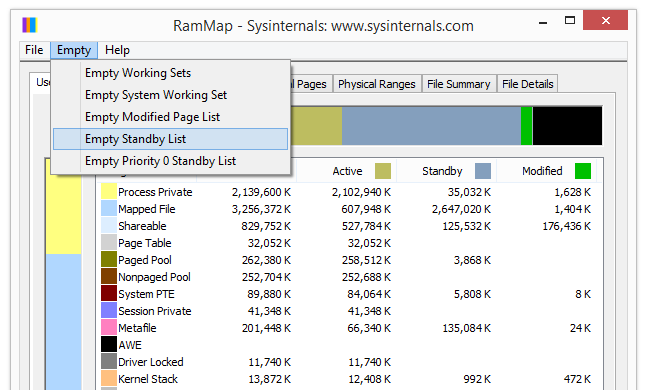


Great, thanks!Also, if I find a way to automate the cold-cache testing (suggestions would be very welcome!), I'll throw in stats from my old dualcore-with-SSD laptop.I found a way (a while ago, I just keep forgetting to update this thread).
This is done by flushing "Standby list" of Windows Memory Manager. For example, with Sysinternals' RAMMap -
It can also be done with NtSetSystemInformation from within the app if needed.
- carpe noctemOriginal address: https://www.donationcoder.com/forum/index.php?topic=27117.0
