DonationCoder.com forum
 
Read-only archive. This is a static copy of the DonationCoder.com forum. Reading and searching work as before; logging in, posting and private messages do not.
Archive of 2026-10-21 · About this archive · Main site

Author Topic: PixCalc - a handy pixel-to-inches/centimeters calculator  (Read 43,944 times)

BGM

  • Honorary Member
  • Joined in 2008
  • **
  • Posts: 566
    • Participated in NANY Challenge Seven Times
Hello, all!

Here's a little program that would have been better for the NANY.
I made it for myself, but I like to share (for free), so here it is!

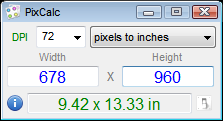
It is a handy dandy calculator for converting pixels to inches or centimeters and vice-versa. You set the dpi, height, width of your image and it will give you immediate results and automatically copy them to your clipboard. You can also drag-n-drop images onto PixCalc and it will read the dimensions and dpi for you.

It comes with a chm help file.

[attach=#]

Download link
« Last Edit: January 16, 2019, 04:16 AM by BGM »

lanux128

  • Global Moderator
  • Joined in 2005
  • *****
  • Posts: 6,277
    • Coding Snacks
    • Volunteers/Staff
    • Gathering Badge
    • Participated in NANY Challenge Once
    • Linux User
Re: PixCalc - a handy pixel-to-inches/centimeters calculator
« Reply #1 on: June 20, 2015, 02:40 PM »
nice looking app, BGM. thanks for sharing! :Thmbsup:

Curt

  • Supporting Member
  • Joined in 2006
  • **
  • Posts: 7,565
Re: PixCalc - a handy pixel-to-inches/centimeters calculator
« Reply #2 on: June 23, 2015, 06:03 PM »
Thank you for sharing!
I like how easy you've made it to use the program. Bravo!
---
However,
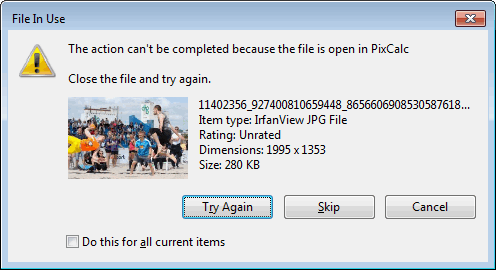
Is it true that the program only can be closed, exit, by right-clicking the icon in the tray?

surely, it must "let go" of the picture.


[attachimg=#]

BGM

  • Honorary Member
  • Joined in 2008
  • **
  • Posts: 566
    • Participated in NANY Challenge Seven Times
Re: PixCalc - a handy pixel-to-inches/centimeters calculator
« Reply #3 on: June 23, 2015, 06:07 PM »
Hmm..  I didn't know it would lock the file!
You can exit by using the menu for the icon in the system tray, or by pushing ctrl+Q (see the help file for keyboard commands).
I'll look at the file-locks and make an update.

BGM

  • Honorary Member
  • Joined in 2008
  • **
  • Posts: 566
    • Participated in NANY Challenge Seven Times
Re: PixCalc - a handy pixel-to-inches/centimeters calculator
« Reply #4 on: June 23, 2015, 08:06 PM »
Ah - I figured it out.  It was a typo in the releasing code....  :-[
But I've updated it.
Please try it again for me!

Download link

Curt

  • Supporting Member
  • Joined in 2006
  • **
  • Posts: 7,565
Re: PixCalc - a handy pixel-to-inches/centimeters calculator
« Reply #5 on: June 23, 2015, 10:31 PM »
thanks, it is working fine now  :up:

-------------

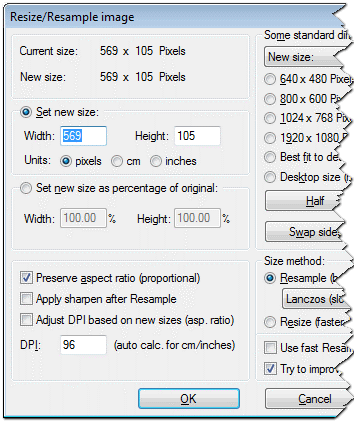
By the way: Being a user of IrfanView, I already have this feature easy at hand (Ctrl+R).
In IrfanView it is even supplied with the option to also change the photo's DPI setting.


[attachimg=#]

BGM

  • Honorary Member
  • Joined in 2008
  • **
  • Posts: 566
    • Participated in NANY Challenge Seven Times
Re: PixCalc - a handy pixel-to-inches/centimeters calculator
« Reply #6 on: June 24, 2015, 02:27 AM »
Oh yeah?  Well I use XnView, and it can too!
Actually, I originally made PixCalc to be just a calculator, so I could take the pixel sizes and figure out the print sizes (hence pixels to inches) - that's why it's called Pix - Calc.
Then I realized how easy it would be to drag-n-drop an image and load the values automatically.
PixCalc is just a calculator for lazy people like m who don't want to do math to figure inches...

lanux128

  • Global Moderator
  • Joined in 2005
  • *****
  • Posts: 6,277
    • Coding Snacks
    • Volunteers/Staff
    • Gathering Badge
    • Participated in NANY Challenge Once
    • Linux User
Re: PixCalc - a handy pixel-to-inches/centimeters calculator
« Reply #7 on: June 24, 2015, 02:51 AM »
@BGM: is there a way to pass an mage via command-line? btw, thanks for the update

BGM

  • Honorary Member
  • Joined in 2008
  • **
  • Posts: 566
    • Participated in NANY Challenge Seven Times
Re: PixCalc - a handy pixel-to-inches/centimeters calculator
« Reply #8 on: June 24, 2015, 03:20 AM »
Aha!  No, not yet.  However, I have that on my todo list.

I am also conteplating a popup that can show some more image information (if you have dragged an image) - including the bit depth.
Also, I'm going to add an option (via commandline too) to disable the tray support - that way if you use it via commandline then it will stay hidden and not show.

That will be in the next version as soon as I can get a chance.

BGM

  • Honorary Member
  • Joined in 2008
  • **
  • Posts: 566
    • Participated in NANY Challenge Seven Times
Re: PixCalc - a handy pixel-to-inches/centimeters calculator
« Reply #9 on: June 25, 2015, 03:02 AM »
Okay, I've updated it to version 1.1.
Now it has several commandline parameters and an option to toggle the tray support.
Please see the accompanying chm file for details.

lanux128

  • Global Moderator
  • Joined in 2005
  • *****
  • Posts: 6,277
    • Coding Snacks
    • Volunteers/Staff
    • Gathering Badge
    • Participated in NANY Challenge Once
    • Linux User
Re: PixCalc - a handy pixel-to-inches/centimeters calculator
« Reply #10 on: June 25, 2015, 03:21 AM »
> Now it has several commandline parameters and an option to toggle the tray support.

thanks for the quick update! i've added PixCalc to the totalcmd's app menu.

robertgs

  • Supporting Member
  • Joined in 2012
  • **
  • Posts: 1
Re: PixCalc - a handy pixel-to-inches/centimeters calculator
« Reply #11 on: September 16, 2015, 12:32 PM »
BGM, thank you for this hand little program.
Best regards, robertgs

Original address: https://www.donationcoder.com/forum/index.php?topic=41139.0