
The AutoIt stuff seemed to be based on this C/C++ code into the Native WiFi API
Hm... I'll have to explore that this evening as it just may be a better angle of attack than the one I'm currently using.


 Topic: How to create a shortcut for the "wireless network connection" in Windows XP? (Read 80,935 times)


The AutoIt stuff seemed to be based on this C/C++ code into the Native WiFi API


Below is the current build with working save to .ini, or registry options. The default action is to save nothing anywhere in the interest of portability.
(see attachment in previous post)

I tried it at home on a Windows 7 pc with no wifi adapters, and it gave some kind of GUID error dialog.
I'll make sure to do that once I get home.I tried it at home on a Windows 7 pc with no wifi adapters, and it gave some kind of GUID error dialog.
Really? Weird, I just ran it here (Win7 desktop/no WiFi) and it just quietly exited. Might that have been an earlier build? I gotta remember to put build numbers in these things (bad habbit...).
If you let me know which GUID error (there's several...) it threw, I'll see if I can figure out how it got there. I still gotta work out a dead adapter check too.

I tried it at home on a Windows 7 pc with no wifi adapters, and it gave some kind of GUID error dialog.
Really? Weird, I just ran it here (Win7 desktop/no WiFi) and it just quietly exited. Might that have been an earlier build? I gotta remember to put build numbers in these things (bad habbit...).
I tried it at home on a Windows 7 pc with no wifi adapters, and it gave some kind of GUID error dialog.
Really? Weird, I just ran it here (Win7 desktop/no WiFi) and it just quietly exited. Might that have been an earlier build? I gotta remember to put build numbers in these things (bad habbit...).
Quietly exited here on my x64 W7 PC when I selected an unplugged WiFi adapter. Selecting the LAN connection does the same as clicking on the tray icon.
Selecting the WiFi adpater when it's plugged in resulted in the same as clicking on the tray icon, (the popup window that shows what you're currently connected to - same result as LAN connection).
I was wrong. There's no error. Maybe i was using the older version.I'll make sure to do that once I get home.I tried it at home on a Windows 7 pc with no wifi adapters, and it gave some kind of GUID error dialog.
Really? Weird, I just ran it here (Win7 desktop/no WiFi) and it just quietly exited. Might that have been an earlier build? I gotta remember to put build numbers in these things (bad habbit...).
If you let me know which GUID error (there's several...) it threw, I'll see if I can figure out how it got there. I still gotta work out a dead adapter check too.
Am I miss-reading that? ...Or are you saying you got a connections window for a LAN adapter?
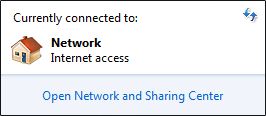
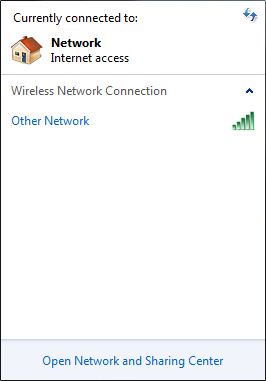


The C# Native WiFi API thing didn't pan out as it's Vista/7 only (I'm not ready to give-up on XP just yet), so I'm polking around looking for options.

I was wrong. There's no error. Maybe i was using the older version.
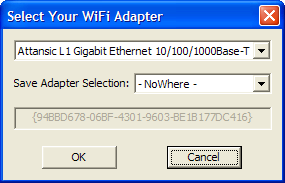
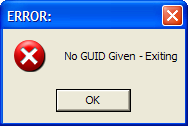
That error message is (should only be) displayed when you hit the cancel button.
Okay, my intention was to give the user feedback regarding the programs intentions. So they weren't waiting for it to do something else, and/or were not sure it had completely closed. If it is actually causing more confusion I can pull it out of the next build.That error message is (should only be) displayed when you hit the cancel button.
yes, that's what i did. was just testing on a PC with non-wifi component to see what happens.
Okay, my intention was to give the user feedback regarding the programs intentions. So they weren't waiting for it to do something else, and/or were not sure it had completely closed. If it is actually causing more confusion I can pull it out of the next build.
 // GetIfEntry.cpp : Defines the entry point for the console application.
//=============== Created by Stoic Joker: Tuesday, 02/01/2011 @ 6:23:11pm
#include "stdafx.h" //--------------------------------------------+++-->

 //================================================================================================
//-------------+++--> Strip \DEVICE\TCPIP_ Off of wszName to Get the Adapter's GUID For Comparison:
void StripOutGUID(WCHAR *szGUID, WCHAR *wszName) { //---------------------------------------+++-->
	WCHAR *p; // Walk the string to find the GUID opening '{' character. Sure There
	int i=0; // Are Easier Ways to do This ... But This Way I Avoid Language Issues.

  p = wszName;
  while(*p != '{') {
	  *p++; i++;
  }

  wsprintf(szGUID, L"%s", p);
}
 //================================================================================================
//------------------------+++--> Get Lst of Network Interfaces Available on Machine for Comparison:
BOOL GetAdapters(WCHAR *szTarg) { //-----------( Much of This is From the MSDN )------------+++-->
	PMIB_IFTABLE ifTable; // Declare and initialize variables.
	PMIB_IFROW pMibIfRow;
	DWORD dwSize = 0;
	DWORD dwRetVal = 0;

  // Allocate memory for our pointers.
  ifTable = (MIB_IFTABLE*) malloc(sizeof(MIB_IFTABLE));
  pMibIfRow = (MIB_IFROW*) malloc(sizeof(MIB_IFROW));

   // Before calling GetIfEntry, we call GetIfTable to make sure there are entries to get.
  // So... First, make an initial call to GetIfTable to get the necessary size into dwSize
  if(GetIfTable(ifTable, &dwSize, 0) == ERROR_INSUFFICIENT_BUFFER) {
	  GlobalFree(ifTable);
	  ifTable = (MIB_IFTABLE *) malloc (dwSize);
  }
  // Then make a second call to GetIfTable to get the actual data we want.
  if((dwRetVal = GetIfTable(ifTable, &dwSize, 0)) == NO_ERROR) {
	  if(ifTable->dwNumEntries > 0) {
		  for(UINT i=1; i<= ifTable->dwNumEntries; i++) {
				pMibIfRow->dwIndex = i;
			  if((dwRetVal = GetIfEntry(pMibIfRow)) == NO_ERROR) {
				  if(pMibIfRow->dwType == MIB_IF_TYPE_ETHERNET &&
					  pMibIfRow->dwAdminStatus == MIB_IF_ADMIN_STATUS_UP) {
						  WCHAR szGUID[GEN_BUFF] = {0};
					  printf("\tDescription: %s\n", pMibIfRow->bDescr);
					  printf("\twszName: %S\n", pMibIfRow->wszName);
					  StripOutGUID(szGUID, pMibIfRow->wszName);
					  if(wcscmp(szGUID, szTarg) == MATCH) {
						  printf("\tGUID: %S <--+++--> MATCHES REQUESTED ACTIVE TARGET ADAPTER!!!\n", szGUID);
					  }else{
						  printf("\tGUID: %S <-+-> Is Active, But Not the One We're After.\n", szGUID);
					  }
					  printf("\tReceived %d, Sent %d\n", pMibIfRow->dwInOctets, pMibIfRow->dwOutOctets);
					  printf("\t\tNext...\n\n");
				  }
			  }
		  }
	  }
	  GlobalFree(ifTable);
	  return TRUE;
  }
 return FALSE;
}
 //================================================================================================
//--------------------------------------//---------------------------+++--> Console Program Main():
int _tmain(int argc, _TCHAR* argv[]) { //---------------------------------------------------+++-->
  if(argc < 2) {
	  printf("\n\n\tERROR: No GUID Specified, Exiting!\n\n");
	  return 0;
  }else{
	  printf("\n\n\tSearching for GUID: %S\n\n", argv[1]);
  }
  if(!GetAdapters(argv[1])) printf("\tGetIfTable failed.\n");
 return 0;
}

 // ============================================= STDAFX.H <-> Header File Below This Line!
// stdafx.h : include file for standard system include files,
// or project specific include files that are used frequently, but
// are changed infrequently
//

#pragma once

#ifndef _WIN32_WINNT		// Allow use of features specific to Windows XP or later.
#define _WIN32_WINNT 0x0501	// Change this to the appropriate value to target other versions of Windows.
#endif

#define GEN_BUFF   128
#define MATCH		 0

#include <stdio.h>
#include <tchar.h>

// TODO: reference additional headers your program requires here
#include <Windows.h>   //--+++--> Also Required by GetIfEntry():
#include <Iphlpapi.h> //---+++--> Required by GetIfEntry():
#pragma comment(lib, "Iphlpapi.lib") //-++-> ^See Above^:


From a (Windows) programming standpoint, these kind of shenanigans are normal...


Note: Granted using the WiFi API 4wd mentioned above would have been a more elegant solution (simpler code & faster to pound out), however it also doesn't run on (isn't available in) Windows XP ... Which is (after all) or target platform.

Original address: https://www.donationcoder.com/forum/index.php?topic=25395.0
