DonationCoder.com forum
 
Read-only archive. This is a static copy of the DonationCoder.com forum. Reading and searching work as before; logging in, posting and private messages do not.
Archive of 2026-10-21 · About this archive · Main site

Last post Author Topic: Word Processor OS  (Read 42,937 times)

aidan_cage

  • Supporting Member
  • Joined in 2007
  • **
  • Posts: 27
Word Processor OS
« on: January 10, 2011, 05:21 AM »
Does anyone know of something pre existing, or would it be possible to create a simple operating system that can be booted from the BIOS, and that simply launches a fullscreen notepad that can save files to the root harddrive? It's pretty key that it offer nothing more; any distraction would ruin it. If the user wants to load a browser to check a definition, then facebook, then play a quick flash game, etc., onward to procrastinationland, then they would first have to shutdown and boot back into the main OS.

This is a dream of mine: to push my computer to do only what I need to do, despite what I might want to do, or just decide to do, etc. Typewriter soundsets, like in WriteMonkey, would be an added bonus ;)

Any thoughts on feasibility, or similar concepts in the wild?

Renegade

  • Tell me something you don't know...
  • Charter Member
  • Joined in 2005
  • ***
  • Posts: 13,291
    • Participated in NANY Challenge Three Times
    • Furry Fandom Badge - Furry Fandom
    • Linux User
Re: Word Processor OS
« Reply #1 on: January 10, 2011, 05:30 AM »
The first electronic typewriters were like that.

I've not seen anything like it since though.
Slow Down Music - Where I commit thought crimes...

Freedom is the right to be wrong, not the right to do wrong. - John Diefenbaker

aidan_cage

  • Supporting Member
  • Joined in 2007
  • **
  • Posts: 27
Re: Word Processor OS
« Reply #2 on: January 10, 2011, 05:38 AM »
I've thought to chase one down, but it seems silly when something so simple should be emulatable on a netbook

Target

  • Honorary Member
  • Joined in 2006
  • **
  • Posts: 1,840
    • Coding Snacks
Re: Word Processor OS
« Reply #3 on: January 10, 2011, 05:40 AM »
what about booting to the command line?

you can EDIT, and no doubt there are other CLI editors...

no distractions (unless they waste time drawing ASCII art...)
Alcohol is photoshop, bottled
Askhole - someone who ask for advice, then ignores it
"Look wise, say nothing, and grunt. Speech was given to conceal thought" - Sir William Osler

aidan_cage

  • Supporting Member
  • Joined in 2007
  • **
  • Posts: 27
Re: Word Processor OS
« Reply #4 on: January 10, 2011, 05:44 AM »
That's worth looking into, but I don't know computers like that. I grew up on an LC II and entered PCs post windows xp..

It's probably not too difficult to figure out, though...

nudone

  • Cody's Creator
  • Columnist
  • Joined in 2005
  • ***
  • Posts: 4,119
    • Cody Award
Re: Word Processor OS
« Reply #5 on: January 10, 2011, 09:01 AM »
if not commandline, maybe one of the linux variations aimed at netbooks to provide quick boot ups. or one that can quickly come out of hibernate.

unfortunately, can't recommend anything as i don't know much about linux. i just know i've seen netbooks with linux based o/s.

Curt

  • Supporting Member
  • Joined in 2006
  • **
  • Posts: 7,565
Re: Word Processor OS
« Reply #6 on: January 10, 2011, 09:28 AM »
maybe a Dabian distribution plus a software package

http://www.debian.org/distrib/packages
http://packages.debian.org/stable/editors/abiword-common

40hz

  • Supporting Member
  • Joined in 2007
  • **
  • Posts: 11,861
Re: Word Processor OS
« Reply #7 on: January 10, 2011, 11:50 AM »
ok...I was just putting the finishing touches on a fairly long response when this popped up:

[attach]
« Last Edit: January 10, 2011, 12:37 PM by 40hz »

Eóin

  • O'Callaghan
  • Charter Member
  • Joined in 2006
  • ***
  • Posts: 1,401
Re: Word Processor OS
« Reply #8 on: January 10, 2011, 02:57 PM »
You could probably fake it without leaving windows world. I'm sure you could setup a Windows install which would boot and autologin to a extremely limited user account, one which only has permission to run say, WriteMonkey, and save to a specific folder.
Interviewer: Is there anything you don't like?
Bjarne Stroustrup: Marketing hype as a substitute for technical argument. Thoughtless adherence to dogma. Pride in ignorance.

aidan_cage

  • Supporting Member
  • Joined in 2007
  • **
  • Posts: 27
Re: Word Processor OS
« Reply #9 on: January 10, 2011, 04:05 PM »
That's a great idea. I'm reformatting my netbook now, so I'll look around about doing that to get started. It's what I know, anyway.

timns

  • Veni, vidi, debuggi
  • Supporting Member
  • Joined in 2007
  • **
  • Posts: 1,211
    • Participated in NANY Challenge Four Times
Re: Word Processor OS
« Reply #10 on: January 10, 2011, 05:27 PM »
That's a great idea. I'm reformatting my netbook now, so I'll look around about doing that to get started. It's what I know, anyway.

How about Presto:

http://www.prestomypc.com/

aidan_cage

  • Supporting Member
  • Joined in 2007
  • **
  • Posts: 27
Re: Word Processor OS
« Reply #11 on: January 10, 2011, 05:48 PM »
Close. Something similar, but simpler. Just word processing. Just like the old electric typewriters that were mentioned above. Maybe the niche is too small. It looks like Presto is trying to offer the entirety of a "computer" (as that refers to the actions one can take with the modern computer), as rapidly accessible. I just want an electric typewriter without having to boot, wait, watch all the icons and calendar load on the desktop, wait for my network and security apps to load, then launch notepad and type in a window, etc. I like some of the simpler ideas up here, but they are ideas I'll have to research and set up myself. Good minds in the hive here, though, so I thought I'd poke in.

nudone

  • Cody's Creator
  • Columnist
  • Joined in 2005
  • ***
  • Posts: 4,119
    • Cody Award
Re: Word Processor OS
« Reply #12 on: January 10, 2011, 07:13 PM »
That's a great idea. I'm reformatting my netbook now, so I'll look around about doing that to get started. It's what I know, anyway.

How about Presto:

http://www.prestomypc.com/

ooh, that looks like just want i'd want for my netbook. going to give it a try at the weekend.

40hz

  • Supporting Member
  • Joined in 2007
  • **
  • Posts: 11,861
Re: Word Processor OS
« Reply #13 on: January 10, 2011, 07:30 PM »
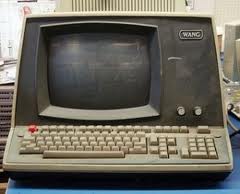
Wow. Looks like you're trying to bring back the old days of dedicated WP appliances like the Wang :rip:.

[attach]
« Last Edit: January 10, 2011, 07:42 PM by 40hz »

aidan_cage

  • Supporting Member
  • Joined in 2007
  • **
  • Posts: 27
Re: Word Processor OS
« Reply #14 on: January 10, 2011, 07:46 PM »
Thanks. I especially appreciate that it's the second attempt. Thanks again!

40hz

  • Supporting Member
  • Joined in 2007
  • **
  • Posts: 11,861
Re: Word Processor OS
« Reply #15 on: January 10, 2011, 07:54 PM »
@aidan_cage: de nada...I'm waiting for a credential change to percolate through the domain so I can log back into this client's server I'm working on.

Besides, your project is a lot more interesting than what I'm being paid to do right now. ;D

Shades

  • Member
  • Joined in 2006
  • **
  • Posts: 2,954
Re: Word Processor OS
« Reply #16 on: January 10, 2011, 10:41 PM »
How about a Windows Server 2008 R2 Standard (Core edition)?  :P

As far as I know it has only a console and doesn't let you install too much extras in a severely limited graphical shell.
The easy path is usually downhill...

Ath

  • Supporting Member
  • Joined in 2006
  • **
  • Posts: 3,649
    • Participated in NANY Challenge Eleven Times
    • Coding Snacks
    • Linux User
    • Hardware Hacker
Re: Word Processor OS
« Reply #17 on: January 10, 2011, 10:56 PM »
Are you sure you need a computer-like device for that? A simple paper notebook (yup, the kind that you can tear pages off of) and a pencil would do, I guess?

If it has to be something electronic, the Chrome OS on it's special laptop, by Google could fit in nicely, but you'd have to make Docs your startup-page then 8)
/Ton
Ath's software collection, Quote: "A problem well stated is a problem half-solved." (Charles Kettering)

40hz

  • Supporting Member
  • Joined in 2007
  • **
  • Posts: 11,861
Re: Word Processor OS
« Reply #18 on: January 11, 2011, 12:46 AM »
How about a Windows Server 2008 R2 Standard (Core edition)?  :P

As far as I know it has only a console and doesn't let you install too much extras in a severely limited graphical shell.


:Thmbsup:

sword

  • Charter Member
  • Joined in 2005
  • ***
  • Posts: 200
Re: Word Processor OS
« Reply #19 on: January 11, 2011, 06:08 AM »
MenuetOS and KolibriOS with Tinypad are small and basic.

40hz

  • Supporting Member
  • Joined in 2007
  • **
  • Posts: 11,861
Re: Word Processor OS
« Reply #20 on: January 11, 2011, 08:58 PM »
Just occurred to me you could also try starting with BartPE using PEBuilder to roll a customized Windows live CD containing something like WriteMonkey and little else. Be easier for most people than going the Linux route I outlined earlier. Tons of "how-to" and forum help available for BartPE and PE Builder just a Google search away too. Possibly somebody's already done it?

8)
« Last Edit: January 11, 2011, 09:03 PM by 40hz »

aidan_cage

  • Supporting Member
  • Joined in 2007
  • **
  • Posts: 27
Re: Word Processor OS
« Reply #21 on: January 11, 2011, 10:27 PM »
I'm thinking I might be able to create an account in Windows 7 that doesn't have network access, and that boots right in to Windows with WriteMonkey as the only startup program. Is that possible to do? I've never played around with creating user accounts...

the downside, of course, is that all of windows has to boot just to get there. The other ideas seem better, but require a bit of curved learning on my part.

NOT THAT THERE'S ANYTHING WRONG WITH THAT :)

Edvard

  • Coding Snacks Author
  • Charter Honorary Member
  • Joined in 2005
  • ***
  • Posts: 3,027
    • Participated in NANY Challenge Once
    • Coding Snacks
    • Linux User
Re: Word Processor OS
« Reply #22 on: January 14, 2011, 08:06 PM »
You might be looking for something called "Kiosk mode".
It can be easily enabled for most browsers, and I believe Windows has a security template or some thingummy actually called "kiosk mode" to do exactly what you're wanting.

Two of the most promising links I found searching around http://support.microsoft.com:

TeamTutorials: Configuring your own Kiosk Machine
http://teamtutorials.com/windows-tutorials/configuring-your-own-kiosk-machine
Microsoft SteadyState
http://www.microsoft.com/windows/products/winfamily/sharedaccess/seeit/internetcafe.mspx

There were more, but most of them involved Internet Explorer in Kiosk Mode and some security-related topics, which I assume you would not need because you're not trying to set up a public internet kiosk.
I've not used it, but I've heard SteadyState is fairly configurable.
Unfortunately support drops after June 30; but it still may be just the thing.
All children left unattended will be given a mocha and a puppy.

Stoic Joker

  • Honorary Member
  • Joined in 2008
  • **
  • Posts: 6,652
    • Cody Award
    • Participated in NANY Challenge Five Times
Re: Word Processor OS
« Reply #23 on: January 14, 2011, 08:29 PM »
Quick-N-Dirty shortcut - Kiosk Mode can be toggled (on/off) by pressing F11

aidan_cage

  • Supporting Member
  • Joined in 2007
  • **
  • Posts: 27
Re: Word Processor OS
« Reply #24 on: January 14, 2011, 08:31 PM »
Thanks for the link references. I looked briefly at the steadystate page, but will look into each link further as I go. The IDEAL of my vision, which I am still holding crystalline, is to have a relatively instant-on OS (if you can call such a thing an OS) that loads a fullscreen, ultra minimal text input program, such as a notepad-type app, and allows me to type instantly all of my thoughts, and automatically autosave to a folder of my choosing in the root directory of my harddrive (or usb key if it's that kind of a setup). Such a thing would allow me to use my netbook as an electric typewriter (as programs like writemonkey, and darkroom do), but would mean I could focus without the distractions of a fully loaded OS (updates, syncs, internets, etc.). I just push the power button, and away I go.

It seems odd, I guess, because it's sort of a Luddite, anti-tech dream, but still almost steampunk in its potential to be a work of art. I still have this dream of graphic, old typewriter arms klick-klacking up to the cursor line on the screen, punching an old typewriter font, creating an engaging and immersive typing experience...  :Thmbsup:

Original address: https://www.donationcoder.com/forum/index.php?topic=25174.0