Forgot to mention: I'm open to suggestions with these 


 Topic: FARR plugin: FarrWebMetaSearch 1.6.0 (Read 129,988 times)


 Is there a way to not have it do that? (Sorry if I missed the discussion of how to do this if it has already been mentioned -- I did scan this topic and the help file, FWIW
  )
)description=AutoHotkey Script Listing
searchUrl=http://www.autohotkey.com/wiki/index.php?title=Script_Listing
resultPattern=<p><a href="([^"]+)" class="external text" title="[^"]+" rel="nofollow">([^>]+)</a> by <a href="[^"]+" class="external text" title="[^"]+" rel="nofollow">([^>]+)</a>
farrCaption=$2
farrGroup=$3
farrPath=$1

description=AutoHotkey Script Listing
searchUrl=http://www.autohotkey.com/wiki/index.php?title=Script_Listing
resultPattern=<p><a href="([^"]+)" class="external text" title="[^"]+" rel="nofollow">([^>]+)</a> by <a href="[^"]+" class="external text" title="[^"]+" rel="nofollow">([^>]+)</a>
farrCaption=$2
farrGroup=$3
farrPath=$1
isFeed=true


Requested New Functionality to WMS
- subSearch sorting: I've added a parameter to the subSearches though it can be named anything. OneLook suffers from not having the ability to sort the subSearches.
- subSearch hiding: Some of the subSearches in TimeAndDate should only be used from the context menu as typing the search criteria in doesn't make sense (and crashes FARR at the moment)
- Context Menu:
- I seem to have hit the limit with the context menu. Is that a WMS restriction or FARR?
- The context menus don't seem to be being cleared for each subSearch. You can see this in the OneLook search: the submenus for the default search are carried over to all of the subSearches. I think it would be preferable to start each subSearch fresh.
- Can we have subMenus? I'd like to put all the dictionary type searches into a subMenu (Art, Computer, etc)
- Two-stage RegEx: Those dictionary type searches could really do with a two-stage RegEx Match where the second RegEx operates on the result of the first. I also wondered if a RegEx Replace was possible (would help cleaning up some pages).
- Search Navigation: It would be helpful to have an ability to backwards and forwards in the search results. Sometimes you can not get back to where you came from with the search results, and a back button would be helpful. Something like this:
- wms timeanddate +w: cities displayed
- type "syd": filter to "Sydney"
- select forecast context menu: 14 day forecast displayed
- at this point I would like to go back one step to the cities filtered on "syd" to access the current conditions context menu.
 . Concerning multi-stage regex: how should we specify input/output from one stage to the next? Until now, subsearches would inherit any parameters from the main search if they were not specified. This leads to the problem you describe. I've thought about a way to keep this behaviour but get rid of the problem, but did not find anything that pleased me. I saw that you were not using that 'feature' anyway (except maybe for the isFeed parameter) so I just got rid of it thus solving that problem.
description=AutoHotkey Script Listing
searchUrl=http://www.autohotkey.com/wiki/index.php?title=Script_Listing
resultPattern=<p><a href="([^"]+)" class="external text" title="[^"]+" rel="nofollow">([^>]+)</a> by <a href="([^"]+)" class="external text" title="[^"]+" rel="nofollow">([^>]+)</a>
farrCaption=$2 :: $4
farrGroup=<i>Written by $4</i>
farrPath=$1
isFeed=true
contextCaption1=Open $4's Profile
contextIcon1=autohotkeyscripts.ico
contextHint1=Open $4's Profile
contextPath1=$3I've just done a very quick search config for DevCheatSheets is on this thread.Cheers! And I have done one that uses the site's search engine:
description=Cheat sheets for developers
searchUrl=http://devcheatsheet.com/search/?q=
resultPattern=<h2><a href="([^"]*)" title="[^"]*">(.*)</h2>\s*Source: <a href="([^"]*)" title="[^"]*">(.*)</a><br>\s*(.*)<br>\s*Tag(?:s)?: <a href="([^"]*)" title="[^"]*">(.*)</a><br>
farrCaption=$2
farrGroup=Source: $4, $5
farrPath=$1
I'll merge this as a subsearch into yours if you don't mind.
 I was going to say why don't you add mine as a subSearch on yours: +tag, +tag2, +tag3, etc
If you do something like the following (that is adding author to the caption) you can also search by author
You can also add simple html to the output if you like, and add context menus...

Multi-stage regex and history will have to wait a bit longer I'm afraid
I'd like to be able to specify local files for searchUrl (e.g. for a local copy of the autohotkey script listing page).You mean instead of searching in a file downloaded from the web, you want to search in a local file?
Is it possible to do this already and if so, is there a way to do it without specifying absolute paths?
You mean instead of searching in a file downloaded from the web, you want to search in a local file?
Is it possible to do this already and if so, is there a way to do it without specifying absolute paths?It's not currently possible. If not absolute, relative to what would you like to specify it?
I'd like to be able to specify local files for searchUrl (e.g. for a local copy of the autohotkey script listing page).You mean instead of searching in a file downloaded from the web, you want to search in a local file?
Is it possible to do this already and if so, is there a way to do it without specifying absolute paths?
It's not currently possible. If not absolute, relative to what would you like to specify it?
What about the output of a executable? That would be interesting...
description=Google
searchUrl=http://www.google.com/search?q=
resultPattern=(?:<td>\s*<img src="?/images/calc_img\.gif"? width="?40"? height="?30"? alt="">.*?<h2 class="?r"? style="font-size:138%">\s*<b>(.*?)</b>\s*</h2>|<h3 class="?r"?>\s*<a href="(.+?)" class="?l"?.*?>(.*?)</a>\s*</h3>.*?<div class=(?:s|"s hc".*?|"s")>(.*?)<br>)
farrCaption=$1$3
farrGroup=$1$4
farrPath=$1$2
P.S. aaah yes, and is it possible to have text in itallics or bold, or different color in the results window? Strangely enough, FARR seems to "cope" with the markup coming from Google - it ignores it.
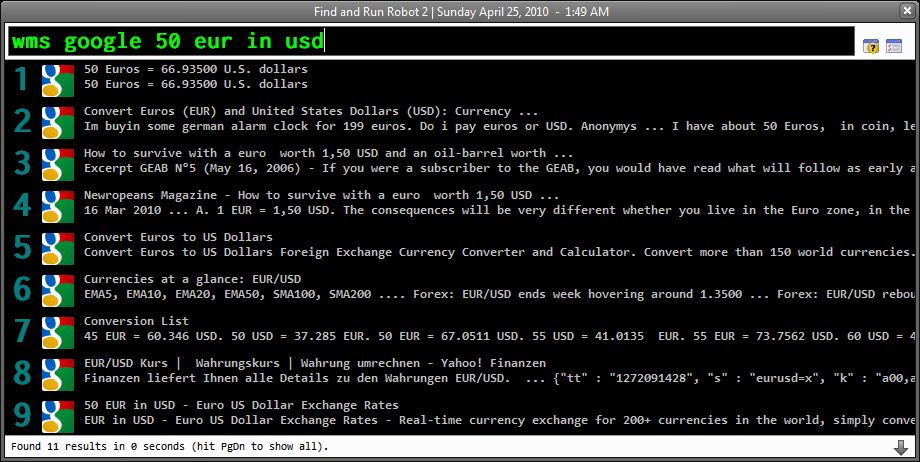
<i>$2</i>... I needed Google search (strange that nobody has asked for that yet?), especially with calculator and converter support - that is, I wanted to be able to input "50 eur in usd" and get the answer from Google. "50 km in miles" works too. ...The reason for this is that there's s.newave's GooglePlus plugin that covers google search (and in a very sophisticated way). Not sure if it can do conversions and stuff though.
Yes: you just set it in your definition -- simple html format works fine. something likeCode: (html4strict)works OK: I've used that in my onelook search.<i>$2</i>
The reason for this is that there's s.newave's GooglePlus plugin that covers google search (and in a very sophisticated way). Not sure if it can do conversions and stuff though.
Otherwise, the google search is not that useful, because you can't see the WHOLE description and the keywords found aren't highlighted (that is why I was asking about the em tags).
Any chance you might be motivated to work on this?I'd like to be able to specify local files for searchUrl (e.g. for a local copy of the autohotkey script listing page).You mean instead of searching in a file downloaded from the web, you want to search in a local file?
Is it possible to do this already and if so, is there a way to do it without specifying absolute paths?
Original address: https://www.donationcoder.com/forum/index.php?topic=21340.0