DonationCoder.com forum
 
Read-only archive. This is a static copy of the DonationCoder.com forum. Reading and searching work as before; logging in, posting and private messages do not.
Archive of 2026-10-21 · About this archive · Main site

Author Topic: Using an Alias on a plugin  (Read 6,923 times)

naveed

  • Supporting Member
  • Joined in 2007
  • **
  • Posts: 19
Using an Alias on a plugin
« on: August 28, 2020, 06:32 PM »
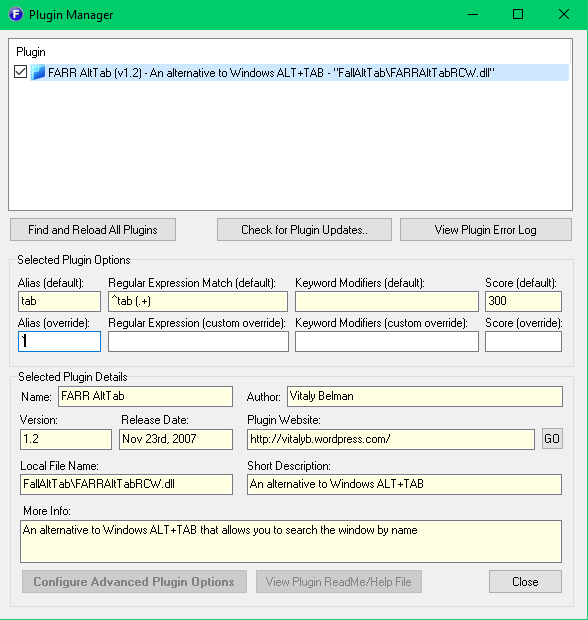
shot_200828_132845.png

I'm trying to set a custom alias (tilde) on this plugin, but it doesn't save when I close this dialog or work. I tried with other characters and it still doesn't work.

I'm using the latest version of FARR v2.239.03. Am I doing something wrong or is it a bug?

Nod5

  • Supporting Member
  • Joined in 2006
  • **
  • Posts: 1,175
    • Coding Snacks
    • Participated in NANY Challenge Three Times
    • Plugin Coding Medal
Re: Using an Alias on a plugin
« Reply #1 on: September 01, 2020, 08:23 PM »
I don't know how to fix the plugin itself. But you could try an external AutoHotkey script as a workaround. This might do the trick, if I understand the plugin screenshot correctly.

Code: ( autohotkey)
#NoEnv
#SingleInstance force
; use ' as hotkey to send string "tab " if pressed when FARR is active and searchbox is empty
#IfWinActive, ahk_exe FindAndRunRobot.exe
':: 
  ControlGetText, FarrText, TEdit1, ahk_exe FindAndRunRobot.exe
  if !FarrText
    Send tab%A_Space%
Return
#IfWinActive

naveed

  • Supporting Member
  • Joined in 2007
  • **
  • Posts: 19
Re: Using an Alias on a plugin
« Reply #2 on: September 01, 2020, 08:29 PM »
Thank you! This is a good stop-gap.

I suspect it's a bug with FARR not the plugin, as I imagine FARR's the one that handles the alias.

Original address: https://www.donationcoder.com/forum/index.php?topic=50354.0