
DonationCoder.com forum
 
Read-only archive. This is a static copy of the DonationCoder.com forum. Reading and searching work as before; logging in, posting and private messages do not.
Archive of 2026-10-21 · About this archive · Main site

Last post Author Topic: new forum feature coded - ability to inline link attachments!  (Read 238,733 times)

AsmDev

  • Member
  • Joined in 2006
  • **
  • Posts: 21
Re: new forum feature coded - ability to inline link attachments!
« Reply #75 on: March 01, 2009, 11:42 AM »
test
Sunset.jpg

CleverCat

  • Cat's Are Fun!
  • Supporting Member
  • Joined in 2006
  • **
  • Posts: 1,164
Re: new forum feature coded - ability to inline link attachments!
« Reply #76 on: June 15, 2009, 08:37 AM »
Hmmm testing[attach=#]
If you need help - JUST ASK!

CleverCat

  • Cat's Are Fun!
  • Supporting Member
  • Joined in 2006
  • **
  • Posts: 1,164
Re: new forum feature coded - ability to inline link attachments!
« Reply #77 on: June 15, 2009, 08:39 AM »
Got it..........

[attach=#]
If you need help - JUST ASK!

alivingspirit

  • Supporting Member
  • Joined in 2006
  • **
  • Posts: 167
    • Programming School - Stage 1 Medal
    • Programming School - Deluxe Bonus Medal
Re: new forum feature coded - ability to inline link attachments!
« Reply #78 on: August 08, 2010, 05:44 PM »
Test
meow.jpg

wideeyedguy

  • Supporting Member
  • Joined in 2007
  • **
  • Posts: 28
Re: new forum feature coded - ability to inline link attachments!
« Reply #79 on: September 22, 2010, 01:44 PM »
Doing a test of inserting a "before thumbnail" capture:

scrnsht1.png


Above, should be a screenshot prior to thumbnail-ing.

Below, should be the thumbnailed version with border around and
showing the lower resolution effect.

thumb1.png

This is end of test message.

weg

elvisbrown

  • Programmer - what else
  • Charter Member
  • Joined in 2005
  • ***
  • Posts: 27
Re: new forum feature coded - ability to inline link attachments!
« Reply #80 on: April 04, 2012, 04:09 AM »
this is a badly implemented feature, I have just spent 15 frustrating minutes trying to work out how to get an inline image in a review. Shame on you, it should be easy and encourage people to use not obfuscated and difficult. Try Bogger or any other web user interface to see how it should be done. Bah >:(
I started out with nothing and still have most of it left

mouser

  • First Author
  • Administrator
  • Joined in 2005
  • *****
  • Posts: 40,931
    • Gathering Badge
    • Plugin Coding Medal
    • Participated in NANY Challenge Seventeen Times
    • Cody Award
    • Coding Snacks
    • Volunteers/Staff
Re: new forum feature coded - ability to inline link attachments!
« Reply #81 on: April 04, 2012, 04:14 AM »
We are far from perfect.  But what we lack in ease of use we hopefully make up in helpfullness.  If you let us know (or send me a personal message) where you are getting stuck, we can try to help.

Giampy

  • Participant
  • Joined in 2009
  • *
  • Posts: 446
Re: new forum feature coded - ability to inline link attachments!
« Reply #82 on: December 16, 2012, 05:01 PM »
I have tried in any way but I don't still succeed in publishing an image stored in my PC.
"A refrigerator without beer is like a body without soul"

tomos

  • Charter Member
  • Joined in 2006
  • ***
  • Posts: 11,970
    • Gathering Badge
    • Participated in NANY Challenge Once
Re: new forum feature coded - ability to inline link attachments!
« Reply #83 on: December 16, 2012, 05:55 PM »
I have tried in any way but I don't still succeed in publishing an image stored in my PC.

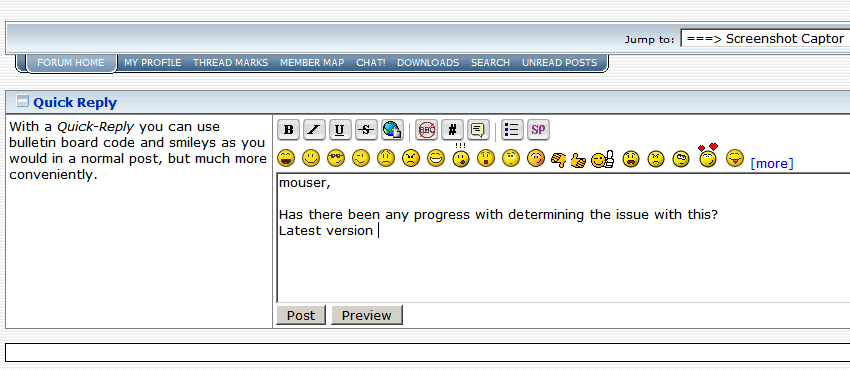
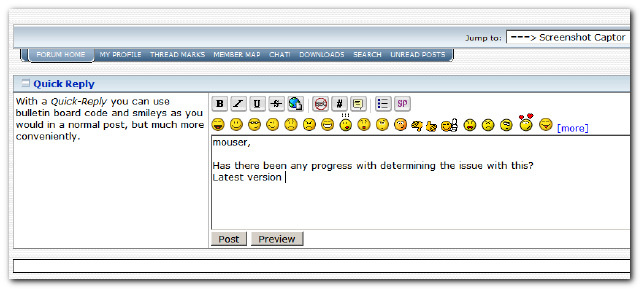
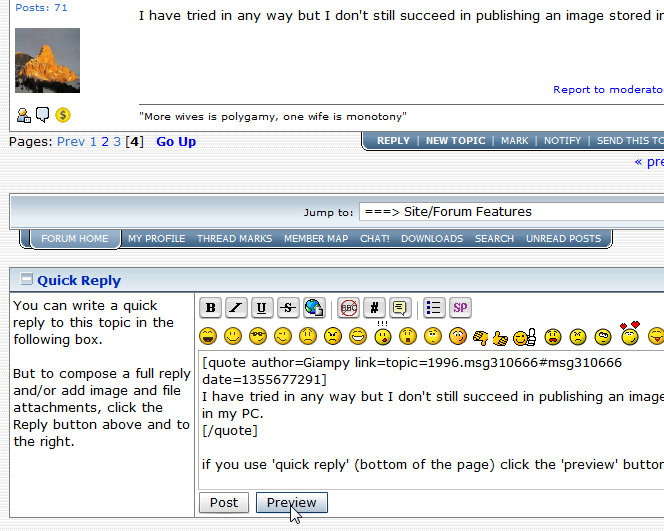
if you use 'quick reply' (bottom of the page) click the 'preview' button.

[attachthumb=#]

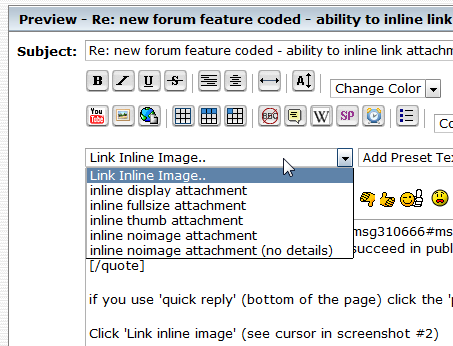
Click 'Link inline image' (see cursor in next screenshot)

[attachthumb=#]

Select e.g. "inline thumb attachment" which shows this text: [attachthumb=#] - to show the image as thubmnail that enlarges when you click on it (recommended especially for bigger images)

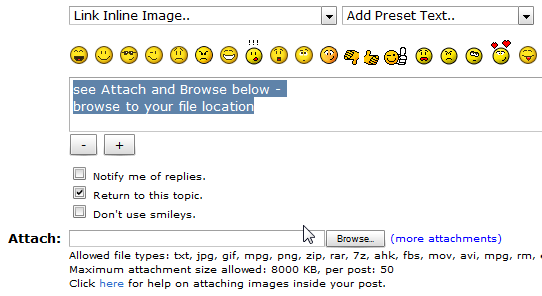
Then, go to Attach:[______________] [Browse] below the textbox

[attachthumb=#]

Browse to the image on your HD. Select your image and post. The image will show where the [attachthumb=#] text is.
NOTE: the image will *not* show when you preview the post!


If it doesnt work, try to figure out and explain where it fails (thanks!)
Tom
« Last Edit: March 29, 2013, 10:58 AM by tomos »

TaoPhoenix

  • 0 - 60 ... then back to 0 again!
  • Supporting Member
  • Joined in 2011
  • **
  • Posts: 4,642
    • Participated in NANY Challenge Three Times
Re: new forum feature coded - ability to inline link attachments!
« Reply #84 on: December 16, 2012, 06:58 PM »
Quick question - why aren't the extended options available from the initial reply screen? I do it by speed posting half the post then quickly modifying it to get the image attached.
Use attachthumb=# to show an attached image as an expandable thumbnail, or attach=# to show full size. (With Brackets)

tomos

  • Charter Member
  • Joined in 2006
  • ***
  • Posts: 11,970
    • Gathering Badge
    • Participated in NANY Challenge Once
Re: new forum feature coded - ability to inline link attachments!
« Reply #85 on: December 16, 2012, 07:17 PM »
^ my 'method' gives you more time ;-)


Quick question - why aren't the extended options available from the initial reply screen?
hmmm
"quick reply" could well include images without taking up too much space :-\
Tom

Giampy

  • Participant
  • Joined in 2009
  • *
  • Posts: 446
Re: new forum feature coded - ability to inline link attachments!
« Reply #86 on: December 17, 2012, 01:07 AM »
I try...
[attach]
"A refrigerator without beer is like a body without soul"

KynloStephen66515

  • Animated Giffer in Chief
  • Honorary Member
  • Joined in 2010
  • **
  • Posts: 3,772
    • Participated in NANY Challenge Three Times
    • Cody Award
    • Coding Snacks
    • Official Forum Clown
    • Volunteers/Staff
    • Writer
    • Hardware Hacker
    • DJ Badge - DJ
    • Linux User
Re: new forum feature coded - ability to inline link attachments!
« Reply #87 on: December 17, 2012, 01:28 AM »
I think I understand what you mean...so here is a video...if I am wrong...tell me, and I shall re-do it :)

Giampy

  • Participant
  • Joined in 2009
  • *
  • Posts: 446
Re: new forum feature coded - ability to inline link attachments!
« Reply #88 on: December 17, 2012, 01:34 AM »
Select your image and post. The image will show where the [attachthumb=#] text is.

Now I understand why it seemed to not work: every time I looked at the preview of my messages, I always saw the code only ([attachthumb=#] or similar), I never saw the image in the preview, therefore I believed it didn't work. I'd have never imagined that to see the image it took to post the message.

Thank you Tomos.
"A refrigerator without beer is like a body without soul"

tomos

  • Charter Member
  • Joined in 2006
  • ***
  • Posts: 11,970
    • Gathering Badge
    • Participated in NANY Challenge Once
Re: new forum feature coded - ability to inline link attachments!
« Reply #89 on: December 17, 2012, 02:46 PM »
Select your image and post. The image will show where the [attachthumb=#] text is.

Now I understand why it seemed to not work: every time I looked at the preview of my messages, I always saw the code only ([attachthumb=#] or similar), I never saw the image in the preview, therefore I believed it didn't work. I'd have never imagined that to see the image it took to post the message.

Thank you Tomos.

Good point Giampy (and you're welcome).
I'll edit my post to note that.

@mouser -
it might be good if that was made clearer to the poster when previewing their post?
Tom

tomos

  • Charter Member
  • Joined in 2006
  • ***
  • Posts: 11,970
    • Gathering Badge
    • Participated in NANY Challenge Once
Re: new forum feature coded - ability to inline link attachments!
« Reply #90 on: December 17, 2012, 02:51 PM »
I think I understand what you mean...so here is a video...if I am wrong...tell me, and I shall re-do it :)

:up: very slick video Stephen (what do you use?)
The tip with the numbering is superfluous (it wont screw anything up though!) - the only reason it would be necessary to add numbers would be if you had, say four attachments, and you realised you had attached them in the wrong sequence -
then you could use e.g.
[attachimg=1]
[attachimg=4]
[attachimg=2]
[attachimg=3]
- in this example, the fourth file attached would be shown as the second image in the post.
Tom

KynloStephen66515

  • Animated Giffer in Chief
  • Honorary Member
  • Joined in 2010
  • **
  • Posts: 3,772
    • Participated in NANY Challenge Three Times
    • Cody Award
    • Coding Snacks
    • Official Forum Clown
    • Volunteers/Staff
    • Writer
    • Hardware Hacker
    • DJ Badge - DJ
    • Linux User
Re: new forum feature coded - ability to inline link attachments!
« Reply #91 on: December 17, 2012, 11:18 PM »
I think I understand what you mean...so here is a video...if I am wrong...tell me, and I shall re-do it :)

:up: very slick video Stephen (what do you use?)
The tip with the numbering is superfluous (it wont screw anything up though!) - the only reason it would be necessary to add numbers would be if you had, say four attachments, and you realised you had attached them in the wrong sequence -
then you could use e.g.
[attachimg=1]
[attachimg=4]
[attachimg=2]
[attachimg=3]
- in this example, the fourth file attached would be shown as the second image in the post.


Camtasia :)

bit

  • Supporting Member
  • Joined in 2013
  • **
  • Posts: 686
Re: new forum feature coded - ability to inline link attachments!
« Reply #92 on: December 11, 2013, 04:00 AM »
Sorry. I tried to get through this, bogged down, and still can't figure out how to link to on-line pix so they'll appear in my posts.
Furthermore, the pix I upload all appear in the same small size, no matter how much I enlarge them first.
And if I try downloading one of the larger pix in this thread, 'meow' (white tiger), as a test shot, then reposting it in one of my own posts, it still comes out way smaller than original size, like this:
« Last Edit: December 11, 2013, 04:10 AM by bit »

bit

  • Supporting Member
  • Joined in 2013
  • **
  • Posts: 686
Re: new forum feature coded - ability to inline link attachments!
« Reply #93 on: December 11, 2013, 04:12 AM »
Then again, thought I just had it. Let's try again:
[attach]
« Last Edit: December 11, 2013, 04:41 AM by bit »

bit

  • Supporting Member
  • Joined in 2013
  • **
  • Posts: 686
Re: new forum feature coded - ability to inline link attachments!
« Reply #94 on: December 11, 2013, 04:21 AM »
[attach]

dcwul62

  • Supporting Member
  • Joined in 2013
  • **
  • Posts: 336
Re: new forum feature coded - ability to inline link attachments!
« Reply #95 on: February 08, 2014, 08:06 AM »

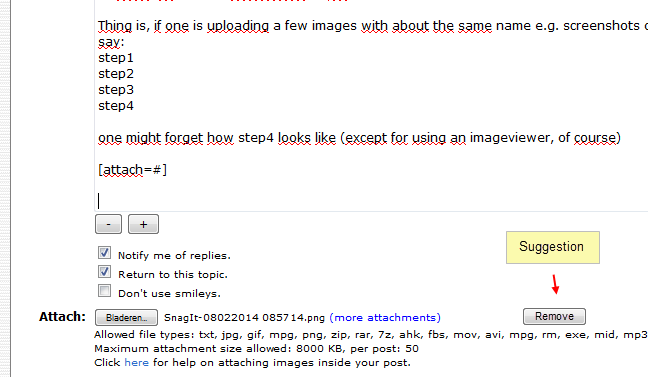
Q: when will images be displayed in the preview?

Thing is, if one is uploading a few images with about the same name e.g. screenshots of steps taken
say:
step1
step2
step3
step4

one might forget how step4 looks like (except for using an imageviewer, of course)

SnagIt-08022014 085714.png


maybe also add a kind of remove button?

SnagIt-08022014 090424.png

Keep up the good work!
=

Original address: https://www.donationcoder.com/forum/index.php?topic=1996.0