DonationCoder.com forum
 
Read-only archive. This is a static copy of the DonationCoder.com forum. Reading and searching work as before; logging in, posting and private messages do not.
Archive of 2026-10-21 · About this archive · Main site

Last post Author Topic: DONE: Sort images into folders based on resolution  (Read 148,324 times)

skwire

  • I eat Coding Snacks for breakfast...
  • Global Moderator
  • Joined in 2005
  • *****
  • Posts: 5,297
    • Participated in NANY Challenge Seventeen Times
    • Coding Snacks
    • Superboy Coder
    • Cody Award
    • Volunteers/Staff
    • Gathering Badge
Re: DONE: Sort images into folders based on resolution
« Reply #50 on: October 16, 2016, 12:36 AM »
Hi, pepanee, and welcome to the DonationCoder site.  Here's an update with a fix.

Website | Download
v1.0.8 - 2016-10-15
    + Added icons to the interface buttons.
    ! The "Matches/Does not match" option was not saved.  (Thanks, pepanee)

pepanee

  • Participant
  • Joined in 2016
  • *
  • Posts: 2
Re: DONE: Sort images into folders based on resolution
« Reply #51 on: October 16, 2016, 03:46 AM »
Hello skwire,
You're welcome, and

Thank you so much for this program! I have it set up to detect any new wallpaper that I have in a folder to make copies of any wallpaper that is not 16x9, so I can be aware and fix that wallpaper image for my Desktop Slideshow & Lock Screen Slideshow on Windows 10.

Thank you so much for that little bug fix. Now the program works perfectly! All I have to do now from time to time is to open Dimensions 2 Folders and press the Go button!

Awesome program!

skwire

  • I eat Coding Snacks for breakfast...
  • Global Moderator
  • Joined in 2005
  • *****
  • Posts: 5,297
    • Participated in NANY Challenge Seventeen Times
    • Coding Snacks
    • Superboy Coder
    • Cody Award
    • Volunteers/Staff
    • Gathering Badge
Re: DONE: Sort images into folders based on resolution
« Reply #52 on: October 16, 2016, 03:55 AM »
Thank you so much for that little bug fix.

You're quite welcome.  :Thmbsup:  I'm glad you find the program useful.  :)


wolcluck

  • Participant
  • Joined in 2017
  • *
  • Posts: 1
Three further suggestions
« Reply #53 on: January 07, 2017, 05:04 PM »
Hi.  Thanks for writing Dimensions 2 Folders.  I sent a small donation and encourage others to do the same.  A few suggestions:
1: Dimension order:
It appears that the 9 x 16 option also captures 16 x 9?  It would be nice if there were a checkbox to tie the first dimension to width, 2nd to height? 
Why: to winnow out images that will fit on a hard landscape oriented device vs portrait

2: Only 1 identical image of same name
The current default of adding "(2),(3)..." to images of the same name is righteous.  However, a checkbox might engage feature to capture an "identical" file.  I think identical byte sizes would be good enough test for me, but of course to do it right, you'd want to do byte-wise comparison.
Why: So I don't have to find and delete identical files on my own

3: Folder replication
You have an option to recursively descend into source subfolders.  Maybe another option would recreate the same tree on the destination side?  When a new file is copied, if its relative folder doesn't already exist, create new folder(s) and then place copied file in same relative place.
Why: Because my wife spent a lot of time dividing things neatly into folders.

4: Size limitation
This one is tricky.  Basically copy no more than <specified> K bytes.  For extra credit either create additional folders and copy into them as needed or else allow for a second run to start where the first one stopped?  (It might have to work exclusively from suggestion #3 above.)
Why: to divvy source images for limited size media (4G thumb drives, for instance)

cci8j

  • Supporting Member
  • Joined in 2008
  • **
  • Posts: 11
Re: DONE: Sort images into folders based on resolution
« Reply #54 on: April 11, 2017, 12:13 PM »
Indeed, this is a powerful tool and a great way to sort. I had an additional request, and was curious if it would be easy and appropriate to add-- I think much of the fore-knowledge to implement it is already inherent to the tool.

I find myself in the position of staging other, unrelated imaging automation (like batch re-sizing), and for it to succeed, I need to separate the "portrait" orientations from the "landscape" orientations. Could a mode be offered that would simply create those two directories in the target, and (as today) copy or move the images appropriately?

Thanks Skwire, for a useful tool, and for entertaining the feature request; of course, if I'm missing how it can do this, forgive the ignorance.

-C

zephyrprime

  • Participant
  • Joined in 2017
  • *
  • Posts: 1
Re: DONE: Sort images into folders based on resolution
« Reply #55 on: September 30, 2017, 02:03 AM »
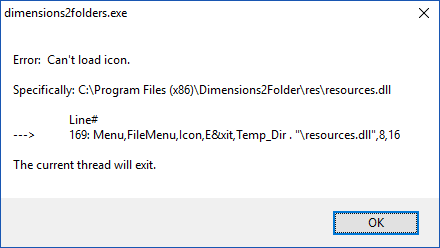
I used to run this successfully but with the 2016 version I get the following error when I launch the app
error: can't load icon"

Also, is the source code available for this app?  I would like the ability to create symbolic links rather than copying or moving so that the images can stay in their original folder location but also be sorted by dimensions.
« Last Edit: October 02, 2017, 07:12 PM by zephyrprime »

Rockets

  • Supporting Member
  • Joined in 2011
  • **
  • Posts: 61
Re: DONE: Sort images into folders based on resolution
« Reply #56 on: October 08, 2020, 07:03 PM »
I tried to find similar peace of software, but google didn't show me this site. After long searching, this site came to mind and  I added donationcoder to my query. I'm sorting 2000 pics for my picture frame right now. Thanks a lot!  :-* :P :Thmbsup:
« Last Edit: October 08, 2020, 07:19 PM by Rockets »

skwire

  • I eat Coding Snacks for breakfast...
  • Global Moderator
  • Joined in 2005
  • *****
  • Posts: 5,297
    • Participated in NANY Challenge Seventeen Times
    • Coding Snacks
    • Superboy Coder
    • Cody Award
    • Volunteers/Staff
    • Gathering Badge
Re: DONE: Sort images into folders based on resolution
« Reply #57 on: October 10, 2020, 07:30 PM »
I tried to find similar peace of software, but google didn't show me this site. After long searching, this site came to mind and  I added donationcoder to my query. I'm sorting 2000 pics for my picture frame right now. Thanks a lot!  :-* :P :Thmbsup:

Great to hear.  I hope the program worked well for you.  :Thmbsup:

aires69uk

  • Participant
  • Joined in 2024
  • *
  • Posts: 2
Re: DONE: Sort images into folders based on resolution
« Reply #58 on: February 27, 2024, 01:59 PM »
I tried to find similar peace of software, but google didn't show me this site. After long searching, this site came to mind and  I added donationcoder to my query. I'm sorting 2000 pics for my picture frame right now. Thanks a lot!  :-* :P :Thmbsup:

Great to hear.  I hope the program worked well for you.  :Thmbsup:

I came across this software in 2013 and I've kept hold of it for years.

I know it's been a few years since you posted to this thread, but I wondered if it might be possible to tweak the utility so that when you split the files to a new folder, it not only creates folders based on dimension, but retains the original folder structure?

So for example..

My original folder might be Melissa which contains sub-folders Amalfi Coast Summer 2012, Australia Mobile Uploads, Christmas.

If I move the photographs to a new folder, could they be listed as follows?..

D:\Melissa [Parent Folder]

D:\Melissa\Amalfi Coast Summer 2012\1000 x 1000
D:\Melissa\Amalfi Coast Summer 2012\900 x 900
D:\Melissa\Amalfi Coast Summer 2012\800 x 800

Or is this too complicated?

aires69uk

  • Participant
  • Joined in 2024
  • *
  • Posts: 2
Re: IDEA: Sort images into folders based on resolution
« Reply #59 on: February 27, 2024, 02:03 PM »
2wreckedcarzz
If you take a look on linked thread you'll be done :)
http://ghisler.ch/board/viewtopic.php?p=163528

Patched version:
http://fenixproductions.dcmembers.com/tmp/MRTpatch.zip

Just drag'n'drop your pictures into it and use similar settings to these on screenshot:

[attachthumb=#,msg161407]

After Start you're done :)

I came to this forum because I had a query regarding Dimensions2Folders and I noticed your post.

I have tried to locate the software at the link without success and I cannot find it on Google or Wayback Machine.

I have located a page at Github under the name of 'majkinetor' but there are no files on that page.

Therefore I wondered whatever happened to this as it feels like something I would use and keep forever.

Ath

  • Supporting Member
  • Joined in 2006
  • **
  • Posts: 3,649
    • Participated in NANY Challenge Eleven Times
    • Coding Snacks
    • Linux User
    • Hardware Hacker
Re: DONE: Sort images into folders based on resolution
« Reply #60 on: February 27, 2024, 09:40 PM »
Therefore I wondered whatever happened to this as it feels like something I would use and keep forever.

Not sure what exact software you are pointing at here (multiple links, and a different thread subject... :huh:)

The user fenixproductions wasn't migrated to the new DCMembers,.com/[username] site it seems (it was a manual move with a temporary redirect, that they didn't participate in, AFAICS)

The ghisler link is still working.

The download for the Dimensions2Folders software by skwire, in this thread, is also still working.
/Ton
Ath's software collection, Quote: "A problem well stated is a problem half-solved." (Charles Kettering)

Original address: https://www.donationcoder.com/forum/index.php?topic=18029.0