DonationCoder.com forum
 
Read-only archive. This is a static copy of the DonationCoder.com forum. Reading and searching work as before; logging in, posting and private messages do not.
Archive of 2026-10-21 · About this archive · Main site

Last post Author Topic: DONE: Tag2Folder-New Feature added 1.0.3 'Close Tag2Folders after Conversion'  (Read 144,286 times)

paarkhi

  • Supporting Member
  • Joined in 2009
  • **
  • Posts: 90
Dear all,
First Post and desperately in need of help for the small program which can automatically create sub-folders on the basis of album name for music files and move those music files into the specific folder... example

Name of the song                               Album
abcdef.mp3                                       sample
weferw.mp3                                       sample
qwerty.mp3                                       Test
do not worry.mp3                                Test

Now it should create 2 sub folders with the name Sample and Test and move first 2 files in Sample and 2nd 2 files in Test...

Album Names are already present.... :)
« Last Edit: November 15, 2009, 07:46 AM by paarkhi »

skwire

  • I eat Coding Snacks for breakfast...
  • Global Moderator
  • Joined in 2005
  • *****
  • Posts: 5,297
    • Participated in NANY Challenge Seventeen Times
    • Coding Snacks
    • Superboy Coder
    • Cody Award
    • Volunteers/Staff
    • Gathering Badge
I can do this one.

paarkhi

  • Supporting Member
  • Joined in 2009
  • **
  • Posts: 90
Please do it...

I thank u in advance...

skwire

  • I eat Coding Snacks for breakfast...
  • Global Moderator
  • Joined in 2005
  • *****
  • Posts: 5,297
    • Participated in NANY Challenge Seventeen Times
    • Coding Snacks
    • Superboy Coder
    • Cody Award
    • Volunteers/Staff
    • Gathering Badge
Working on it now...

skwire

  • I eat Coding Snacks for breakfast...
  • Global Moderator
  • Joined in 2005
  • *****
  • Posts: 5,297
    • Participated in NANY Challenge Seventeen Times
    • Coding Snacks
    • Superboy Coder
    • Cody Award
    • Volunteers/Staff
    • Gathering Badge
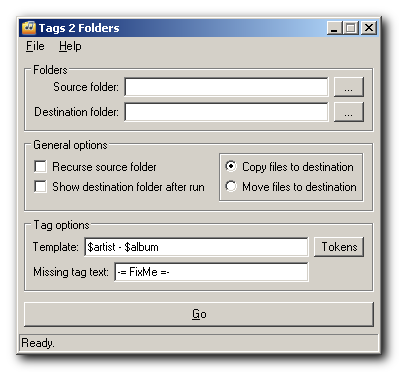
Tags 2 Folders is a small utility to sort audio files into folders based on their tags.  The following audio file types are suppported:

AAC, APE, FLAC, MP1, MP2, MP3, MP4, MPC, M4A, M4B, OGG, OFR, OFS, TTA, WMA, WV 

Simply choose a source folder, a destination folder, set your options and click the "Go" button.

Options

1) Recurse source folder:  Scan through the source folder's sub-directories.
2) Show destination folder after run:  Launch an Explorer window of the destination folder when done.
3) Template:  Use the tokens to come up with your own folder naming scheme.
4) Copy files to destination:  Make copies of the original files in the destination folder.
5) Move files to destination:  Move the original files into the destination folder.

Other notes

1) You can drag & drop folders onto the source and destination fields.
2) Filename collisions will be automatically renamed like this:

audio_file.mp3
audio_file[1].mp3
audio_file[2].mp3
audio_file[3].mp3
...

[attachthumb=#]

Webpage | Download
« Last Edit: August 16, 2009, 05:57 PM by skwire »

skwire

  • I eat Coding Snacks for breakfast...
  • Global Moderator
  • Joined in 2005
  • *****
  • Posts: 5,297
    • Participated in NANY Challenge Seventeen Times
    • Coding Snacks
    • Superboy Coder
    • Cody Award
    • Volunteers/Staff
    • Gathering Badge
BTW, you can use a template like this to create subfolders:  $artist\[$year] $album

paarkhi

  • Supporting Member
  • Joined in 2009
  • **
  • Posts: 90
Thank you SKWIRE, it perfectly works or say works like a charm (Small, Efficient)
and more over thanks for the credits given in About...

Owe you a Big one

skwire

  • I eat Coding Snacks for breakfast...
  • Global Moderator
  • Joined in 2005
  • *****
  • Posts: 5,297
    • Participated in NANY Challenge Seventeen Times
    • Coding Snacks
    • Superboy Coder
    • Cody Award
    • Volunteers/Staff
    • Gathering Badge
Thanks for the compliments and feedback.  I'm glad it's working how you'd like.

wetsmellydog

  • Participant
  • Joined in 2007
  • *
  • Posts: 120
If you are looking for more features, there is a great program called Media Monkey.
There is a freeware version and a paid version.

Tags2Folders is great simple program too!  :Thmbsup:

paarkhi

  • Supporting Member
  • Joined in 2009
  • **
  • Posts: 90
Thank u wetsmellydog

Edit: Didn't like MediaMonkey, Well Personal Choice, can't say anything more than this
« Last Edit: October 25, 2009, 09:34 AM by paarkhi »

Innuendo

  • Charter Member
  • Joined in 2005
  • ***
  • Posts: 2,266
If you are looking for more features, there is a great program called Media Monkey.
There is a freeware version and a paid version.

Media Monkey is a great program & the free version offers almost all of the functionality of the paid version. Well worth checking out, IMHO.

paarkhi

  • Supporting Member
  • Joined in 2009
  • **
  • Posts: 90
I Thank you once again for the program and would like to reuqest some more features
May I request you the 'Shell Extension' please and can we sort it out on more than one token or only single token is allowed, if yes then please show us how, and if not can you add it please?

Thanking you
Paarkhi
« Last Edit: October 25, 2009, 09:35 AM by paarkhi »

skwire

  • I eat Coding Snacks for breakfast...
  • Global Moderator
  • Joined in 2005
  • *****
  • Posts: 5,297
    • Participated in NANY Challenge Seventeen Times
    • Coding Snacks
    • Superboy Coder
    • Cody Award
    • Volunteers/Staff
    • Gathering Badge
Re: DONE: Tag2Folder-New Feature Request (Skwire Please Check)
« Reply #12 on: October 25, 2009, 01:27 PM »
May I request you the 'Shell Extension' please

Sure, I can add this.

and can we sort it out on more than one token or only single token is allowed, if yes then please show us how, and if not can you add it please?

If I understand you correctly, yes, you can.  Let's assume a destination directory of "C:\Music".  For instance, if you use a template like this: $artist\[$year] $album    
That backslash will let you create a folder structure like:

C:
+---Music
|   +---U2
|   |   \---[1987] The Joshua Tree


Or, you can use a template like this:  $artist - $album
This will create a folder like:

C:\Music\U2 - The Joshua Tree

Does that answer your question?

Edit: Fleshed out the examples a bit.
« Last Edit: February 13, 2015, 07:23 PM by skwire »

skwire

  • I eat Coding Snacks for breakfast...
  • Global Moderator
  • Joined in 2005
  • *****
  • Posts: 5,297
    • Participated in NANY Challenge Seventeen Times
    • Coding Snacks
    • Superboy Coder
    • Cody Award
    • Volunteers/Staff
    • Gathering Badge
Re: DONE: Tag2Folder-New Feature Request (Skwire Please Check)
« Reply #13 on: October 25, 2009, 04:21 PM »
Website | Download

v1.0.1 - 2009-10-25
    + Added a "Tags 2 Folders" shell extension option to the Extra menu.
      Once enabled, you can right-click a folder, select the Tags 2 Folders
      option and it will then be loaded as the source directory.  (Thanks, paarkhi)

paarkhi

  • Supporting Member
  • Joined in 2009
  • **
  • Posts: 90
Re: DONE: Tag2Folder-New Feature Request (Skwire Please Check)
« Reply #14 on: October 27, 2009, 12:01 AM »
'Thank you Sir, Works with Artist\Album. Can you fill out the destination directory as source directory because I want to make sub folders in the same folders. Doesn't work when you right click a folder and call Tag2Folder, and can the default action for the files be "Move the Files to the Destination" Instead of "Copy Files to the Destination"

Sorry I forgot to say all these in my previous post...
« Last Edit: October 27, 2009, 12:24 AM by paarkhi »

skwire

  • I eat Coding Snacks for breakfast...
  • Global Moderator
  • Joined in 2005
  • *****
  • Posts: 5,297
    • Participated in NANY Challenge Seventeen Times
    • Coding Snacks
    • Superboy Coder
    • Cody Award
    • Volunteers/Staff
    • Gathering Badge
Re: DONE: Tag2Folder-New Feature Request (Skwire Please Check)
« Reply #15 on: October 27, 2009, 09:50 PM »
Website | Download

v1.0.2 - 2009-10-27
    * Loading a folder from the shell now populates both the source and
      destination fields.  (Thanks, paarkhi)
    * Made "Move files to destination" the default.  (Thanks, paarkhi)
    ! Source folder added via shell extension didn't work properly.
    ! Dragging a folder to the destination folder field cleared out
      the source folder field.  (Thanks, paarkhi)

CleverCat

  • Cat's Are Fun!
  • Supporting Member
  • Joined in 2006
  • **
  • Posts: 1,164
Re: DONE: Tag2Folder-New Feature Request (Skwire Please Check)
« Reply #16 on: October 28, 2009, 07:37 AM »
I used Tag2Folder to organize my messy Audio Books Folder - worked a treat!

Thanks skwire... :Thmbsup:
If you need help - JUST ASK!

skwire

  • I eat Coding Snacks for breakfast...
  • Global Moderator
  • Joined in 2005
  • *****
  • Posts: 5,297
    • Participated in NANY Challenge Seventeen Times
    • Coding Snacks
    • Superboy Coder
    • Cody Award
    • Volunteers/Staff
    • Gathering Badge
Re: DONE: Tag2Folder-New Feature Request (Skwire Please Check)
« Reply #17 on: October 28, 2009, 07:42 AM »
Great success!  ;)  Thanks for the feedback.  What sort of template did you use?

CleverCat

  • Cat's Are Fun!
  • Supporting Member
  • Joined in 2006
  • **
  • Posts: 1,164
Re: DONE: Tag2Folder-New Feature Request (Skwire Please Check)
« Reply #18 on: October 29, 2009, 07:11 AM »
Me? I used just the Album template as it was all I needed!  :)
If you need help - JUST ASK!

skwire

  • I eat Coding Snacks for breakfast...
  • Global Moderator
  • Joined in 2005
  • *****
  • Posts: 5,297
    • Participated in NANY Challenge Seventeen Times
    • Coding Snacks
    • Superboy Coder
    • Cody Award
    • Volunteers/Staff
    • Gathering Badge
Re: DONE: Tag2Folder-New Feature Request (Skwire Please Check)
« Reply #19 on: October 29, 2009, 07:15 AM »
:)  Great.  I'm glad it worked as designed.  =]

CleverCat

  • Cat's Are Fun!
  • Supporting Member
  • Joined in 2006
  • **
  • Posts: 1,164
Re: DONE: Tag2Folder-New Feature Request (Skwire Please Check)
« Reply #20 on: October 29, 2009, 07:18 AM »
Will test more (I made a copy of folder first just in case I got it wrong!)  ;)
If you need help - JUST ASK!

skwire

  • I eat Coding Snacks for breakfast...
  • Global Moderator
  • Joined in 2005
  • *****
  • Posts: 5,297
    • Participated in NANY Challenge Seventeen Times
    • Coding Snacks
    • Superboy Coder
    • Cody Award
    • Volunteers/Staff
    • Gathering Badge
Re: DONE: Tag2Folder-New Feature Request (Skwire Please Check)
« Reply #21 on: October 29, 2009, 07:20 AM »
Will test more (I made a copy of folder first just in case I got it wrong!)  ;)

Yep, that's smart thinking.  No code is perfect.

CleverCat

  • Cat's Are Fun!
  • Supporting Member
  • Joined in 2006
  • **
  • Posts: 1,164
Re: DONE: Tag2Folder-New Feature Request (Skwire Please Check)
« Reply #22 on: October 29, 2009, 07:24 AM »
Cats are always cautious! ;D
If you need help - JUST ASK!

paarkhi

  • Supporting Member
  • Joined in 2009
  • **
  • Posts: 90
Re: DONE: Tag2Folder-New Feature Request (Skwire Please Check)
« Reply #23 on: October 29, 2009, 11:10 AM »
Its the greatness of SKWIRE for thanking me everywhere but in reality Im thankful and grateful to him for making my life a little easier by coding this snack and helping me to organise my music

Thank you and am Grateful

skwire

  • I eat Coding Snacks for breakfast...
  • Global Moderator
  • Joined in 2005
  • *****
  • Posts: 5,297
    • Participated in NANY Challenge Seventeen Times
    • Coding Snacks
    • Superboy Coder
    • Cody Award
    • Volunteers/Staff
    • Gathering Badge
Re: DONE: Tag2Folder-New Feature Request (Skwire Please Check)
« Reply #24 on: October 29, 2009, 11:14 AM »
You are more than welcome.  I enjoy writing Coding Snacks so I'm thankful to everybody for providing all the ideas.

Original address: https://www.donationcoder.com/forum/index.php?topic=19543.0