DonationCoder.com forum
 
Read-only archive. This is a static copy of the DonationCoder.com forum. Reading and searching work as before; logging in, posting and private messages do not.
Archive of 2026-10-21 · About this archive · Main site

Last post Author Topic: BBCeditor 1.1.35  (Read 405,986 times)

Target

  • Honorary Member
  • Joined in 2006
  • **
  • Posts: 1,840
    • Coding Snacks
Re: BBCeditor 1.0.30
« Reply #200 on: August 02, 2012, 10:09 PM »
I will check what I can do.

The problem here is: I am always overthinking things, so now I have not only an idea for starting external application with some parameters BUT to also have WM_MESSAGES support. Darn me ;)

hehe, it's not like you had anything else to do though, is it...
Alcohol is photoshop, bottled
Askhole - someone who ask for advice, then ignores it
"Look wise, say nothing, and grunt. Speech was given to conceal thought" - Sir William Osler

fenixproductions

  • Honorary Member
  • Joined in 2006
  • **
  • Posts: 1,186
    • Participated in NANY Challenge Four Times
Re: BBCeditor 1.0.30
« Reply #201 on: August 02, 2012, 11:14 PM »
hehe, it's not like you had anything else to do though, is it...
Yes and no ;)
No - BBCeditor has most of the features you would normally use and I am pretty lazy.

Yes:
- code cleanup (again) - there is a lot of redundant or unwanted code - either from old engine (manual parsing in past, regexp now) or some functions used multiple times (Ctrl+C/V is easier for beginner but re-factoring is important for bigger programs),
- tabs - always useful but multithreading is still problematic for me (preview is generated in separate thread),
- templates - although BBCeditor has snippets it would be nice to implement templates like DC has,
- tags rule sets -there are multiple variations of BB syntax and my tool tries to handle most of them but maybe some should be possible to be switched off (i.e. parse only tags which are valid for DC),
- live editor - I saw on CodeProject HTML edit control which allowed to edit HTML code directly within it; BBCeditor would have the possibility to work in WYSIWYG way;
- direct post -it should be technically possible to send POST message via HTTP to any web address and put your message directly into wanted board,
- BB syntax highlight,
- text operation - sorting, case change, etc.
- Jump lists - since I have Win7 on my work laptop I can always play with that.
Надо было учиться, а не камни в школу бросать...
--
f0dder is my personal hero :)
« Last Edit: August 02, 2012, 11:21 PM by fenixproductions »

paulhypno

  • Participant
  • Joined in 2012
  • *
  • Posts: 8
Re: BBCeditor 1.0.30
« Reply #202 on: August 03, 2012, 08:24 AM »
Feature request...?

I continue to find this software just excellent so am reluctant to suggest this but...I would love to have a prominent 'Copy' button which selects all and copies to clipboard so I can paste into the forum. I know I can 'select all' and copy from the Edit menu so I am really looking at the icing on the cake here  :D

fenixproductions

  • Honorary Member
  • Joined in 2006
  • **
  • Posts: 1,186
    • Participated in NANY Challenge Four Times
Re: BBCeditor 1.0.30
« Reply #203 on: August 05, 2012, 11:39 PM »
I did not prepare RegExp examples yet but…

@Target
Test version with external applications added:
http://fenixproductions.dcmembers.com/bbc/BBCeditor1134.zip

@paulhypno
I think Ctrl+A and Ctrl+C are enough for this task.
Надо было учиться, а не камни в школу бросать...
--
f0dder is my personal hero :)

Target

  • Honorary Member
  • Joined in 2006
  • **
  • Posts: 1,840
    • Coding Snacks
Re: BBCeditor 1.0.30
« Reply #204 on: August 07, 2012, 10:53 PM »
@Target
Test version with external applications added:
http://fenixproductions.dcmembers.com/bbc/BBCeditor1134.zip
I think Ctrl+A and Ctrl+C are enough for this task.

looks good  :Thmbsup: :Thmbsup:

I note that there are 3(?) buttons on the toolbar that don't have icons - is this an oversight, or part of your dev tools?
Alcohol is photoshop, bottled
Askhole - someone who ask for advice, then ignores it
"Look wise, say nothing, and grunt. Speech was given to conceal thought" - Sir William Osler

cranioscopical

  • Friend of the Site
  • Supporting Member
  • Joined in 2006
  • **
  • Posts: 4,776
    • Cody Award
    • Official Forum Clown
    • rotten turkey sandwich - Rotten Turkey Sandwich
Re: BBCeditor 1.0.30
« Reply #205 on: August 07, 2012, 11:46 PM »
[/b]
Test version with external applications added:
With this version I'm back to it not starting up  :(
I'll dig around some and see what comes up.
Chris

fenixproductions

  • Honorary Member
  • Joined in 2006
  • **
  • Posts: 1,186
    • Participated in NANY Challenge Four Times
Re: BBCeditor 1.0.30
« Reply #206 on: August 08, 2012, 07:33 AM »
@cranioscopical
I've commented out error checking code in this one. I will add it back later today and we'll see if that helps.

@Target
Oversight for not cleaning all test strings.
Надо было учиться, а не камни в школу бросать...
--
f0dder is my personal hero :)

MilesAhead

  • Supporting Member
  • Joined in 2009
  • **
  • Posts: 7,736
    • Coding Snacks
Re: BBCeditor 1.0.30
« Reply #207 on: August 09, 2012, 05:49 AM »
I like to use BBCeditor in tandem with Text Editor Anywhere. I have one request. Would it be possible to remove items in the Recent Files List that no longer exist? I use CCleaner frequently to clean out temp folders. It's not really important. But it is a bit disconcerting when clicking a file in the list, to get a Ding error dialog.

Thanks for the program. :)

ioncube

  • Participant
  • Joined in 2012
  • *
  • Posts: 6
Re: BBCeditor 1.0.30
« Reply #208 on: August 10, 2012, 05:20 PM »
@ioncube
Expression: \[yell](.*?)\[/yell]
Replacement: <div style="background:yellow">$1</div>
Thank you sir, much appreciated.
What i have noticed to some may be irksome:
For instance you write some text in the editor, then you highlight it & then press say bold command the resulting BBCode automatically will appear like
Code: (generic)
[b{sometext}[/b]
BUT for custom commands using RegEx works otherwise. You write some text in the editor, then you highlight it & then press  custom command button the resulting BBCode automatically will appear like
Code: (generic)
[yell](.*?)[/yell]{sometext}
:tellme:
So you have to manually substitute (.*?) with {sometext}

fenixproductions

  • Honorary Member
  • Joined in 2006
  • **
  • Posts: 1,186
    • Participated in NANY Challenge Four Times
Re: BBCeditor 1.1.35
« Reply #209 on: August 12, 2012, 11:18 PM »
1.1.35:
http://fenixproductions.dcmembers.com/bbc/BBCeditor1135.zip

- error logging re-enabled - cranioscopical
- option for clearing non-existing Recent files on startup - MilesAhead
- if some text is selected, clicking on Regexp button uses it inside tags (if there are (.*?) or (\d*?) in expressions) - ioncube
- few Regex buttons samples added - taken from here as ioncube suggested
Надо было учиться, а не камни в школу бросать...
--
f0dder is my personal hero :)
« Last Edit: August 13, 2012, 12:37 AM by fenixproductions »

MilesAhead

  • Supporting Member
  • Joined in 2009
  • **
  • Posts: 7,736
    • Coding Snacks
Re: BBCeditor 1.1.35
« Reply #210 on: August 13, 2012, 12:38 AM »
[/b]
- option for clearing non-existng Recent files on startup - MilesAhead

Thank you. :)

cranioscopical

  • Friend of the Site
  • Supporting Member
  • Joined in 2006
  • **
  • Posts: 4,776
    • Cody Award
    • Official Forum Clown
    • rotten turkey sandwich - Rotten Turkey Sandwich
Re: BBCeditor 1.1.35
« Reply #211 on: August 13, 2012, 03:23 AM »
error logging re-enabled - cranioscopical
Great, thanks, I'll give it a try  :Thmbsup:
Chris

cranioscopical

  • Friend of the Site
  • Supporting Member
  • Joined in 2006
  • **
  • Posts: 4,776
    • Cody Award
    • Official Forum Clown
    • rotten turkey sandwich - Rotten Turkey Sandwich
Re: BBCeditor 1.0.30
« Reply #212 on: August 13, 2012, 03:34 AM »
@fenix
Here's the log entry for 1135…
Thanks for taking the time and trouble to investigate!
log data
Exception: Object reference not set to an instance of an object.

Stack:    at BBCeditor.Form1.Form1_Resize(Object sender, EventArgs e) in D:\code\Projects2010\BBCeditor\BBCeditor\Form1.cs:line 56
  at System.Windows.Forms.Control.OnResize(EventArgs e)
  at System.Windows.Forms.Form.OnResize(EventArgs e)
  at System.Windows.Forms.Control.OnSizeChanged(EventArgs e)
  at System.Windows.Forms.Control.UpdateBounds(Int32 x, Int32 y, Int32 width, Int32 height, Int32 clientWidth, Int32 clientHeight)
  at System.Windows.Forms.Control.UpdateBounds(Int32 x, Int32 y, Int32 width, Int32 height)
  at System.Windows.Forms.Control.SetBoundsCore(Int32 x, Int32 y, Int32 width, Int32 height, BoundsSpecified specified)
  at System.Windows.Forms.Form.SetBoundsCore(Int32 x, Int32 y, Int32 width, Int32 height, BoundsSpecified specified)
  at System.Windows.Forms.Control.ScaleControl(SizeF factor, BoundsSpecified specified)
  at System.Windows.Forms.ScrollableControl.ScaleControl(SizeF factor, BoundsSpecified specified)
  at System.Windows.Forms.Form.ScaleControl(SizeF factor, BoundsSpecified specified)
  at System.Windows.Forms.Control.ScaleControl(SizeF includedFactor, SizeF excludedFactor, Control requestingControl)
  at System.Windows.Forms.ContainerControl.Scale(SizeF includedFactor, SizeF excludedFactor, Control requestingControl)
  at System.Windows.Forms.ContainerControl.PerformAutoScale(Boolean includedBounds, Boolean excludedBounds)
  at System.Windows.Forms.ContainerControl.OnLayoutResuming(Boolean performLayout)
  at System.Windows.Forms.Control.ResumeLayout(Boolean performLayout)
  at BBCeditor.Form1.InitializeComponent() in D:\code\Projects2010\BBCeditor\BBCeditor\Form1.Designer.cs:line 1604
  at BBCeditor.Form1..ctor() in D:\code\Projects2010\BBCeditor\BBCeditor\Form1.cs:line 43
  at BBCeditor.Program.Main() in D:\code\Projects2010\BBCeditor\BBCeditor\Program.cs:line 22
Chris

fenixproductions

  • Honorary Member
  • Joined in 2006
  • **
  • Posts: 1,186
    • Participated in NANY Challenge Four Times
Re: BBCeditor 1.0.30
« Reply #213 on: August 13, 2012, 05:20 PM »
@cranioscopical
Try this one:
http://fenixproductions.dcmembers.com/bbc/BBCeditor1135b.zip

If it works I will need to note somewhere down that each work with Designer requires manual code re-arrangement.
Надо было учиться, а не камни в школу бросать...
--
f0dder is my personal hero :)

cranioscopical

  • Friend of the Site
  • Supporting Member
  • Joined in 2006
  • **
  • Posts: 4,776
    • Cody Award
    • Official Forum Clown
    • rotten turkey sandwich - Rotten Turkey Sandwich
Re: BBCeditor 1.0.30
« Reply #214 on: August 13, 2012, 07:17 PM »
@cranioscopical
Try this one:
http://fenixproductions.dcmembers.com/bbc/BBCeditor1135b.zip

If it works I will need to note somewhere down that each work with Designer requires manual code re-arrangement.
You nailed it!  :Thmbsup: :Thmbsup:
Thanks for taking the time.
Chris

fenixproductions

  • Honorary Member
  • Joined in 2006
  • **
  • Posts: 1,186
    • Participated in NANY Challenge Four Times
Re: BBCeditor 1.0.30
« Reply #215 on: August 13, 2012, 08:42 PM »
@cranioscopical
It is still the same issue: Designer generated code has one method called before proper object is set. You can be sure that's it if you see:
Quote
at System.Windows.Forms.Control.ResumeLayout(Boolean performLayout)
at BBCeditor.Form1.InitializeComponent() in D:\code\Projects2010\BBCeditor\BBCeditor\Form1.Designer.cs:line 1604
I had thought one time fix is enough but I was wrong: any work with Designer switches this error back. This is something to teach you being scrupulous ;)
Надо было учиться, а не камни в школу бросать...
--
f0dder is my personal hero :)

cranioscopical

  • Friend of the Site
  • Supporting Member
  • Joined in 2006
  • **
  • Posts: 4,776
    • Cody Award
    • Official Forum Clown
    • rotten turkey sandwich - Rotten Turkey Sandwich
Re: BBCeditor 1.0.30
« Reply #216 on: August 14, 2012, 12:41 AM »
This is something to teach you being scrupulous
I can't afford to be completely scrupulous, so I suppose I'm scru'd.
Thanks for the extra effort  :)
Chris

ioncube

  • Participant
  • Joined in 2012
  • *
  • Posts: 6
Re: BBCeditor 1.0.30
« Reply #217 on: August 16, 2012, 02:17 AM »
[/b]
- option for clearing non-existng Recent files on startup - MilesAhead

Thank you. :)
Extremely thank you. No I am a happy engineer :-*

By the way being a chemical engineer am not much in scripts stuff. Can you tell me or just give me reference URLs what is the difference b/w (.*?) or (\d*?)

fenixproductions

  • Honorary Member
  • Joined in 2006
  • **
  • Posts: 1,186
    • Participated in NANY Challenge Four Times
Re: BBCeditor 1.0.30
« Reply #218 on: August 16, 2012, 08:45 AM »
@ioncube
Long info:
http://www.regular-expressions.info/tutorial.html

Short:
. - any character
\d - any numeric character
* - zero or more occurrences
? - after them is switch for "non greedy mode"
parenthesis - mark expression group which can be referenced in replacement as $1
Надо было учиться, а не камни в школу бросать...
--
f0dder is my personal hero :)

Curt

  • Supporting Member
  • Joined in 2006
  • **
  • Posts: 7,565
Re: BBCeditor 1.0.30
« Reply #219 on: January 25, 2013, 11:36 PM »
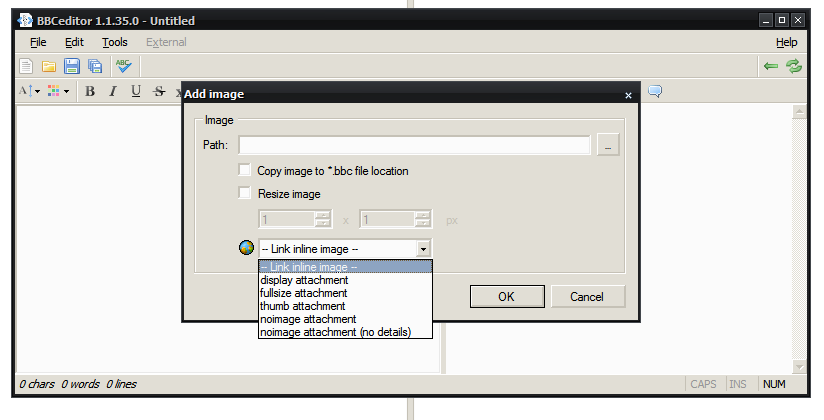
I really like BBCeditor, but it has been two years without updates, even though in my little square world, an update is needed. How does anyone use (insert) Image? I cannot see where it should be relevant to the post I am typing, that the photo I want to upload along with the post, now is located in [ img ]C:\FotoTemp\12big copy.jpg[ /img ]. Or maybe you all only use BBCeditor anywhere else than here at DC? Or is it a trick to help me remembering which photo goes where, and then I "merely" must remember to clean and re-write the image tags before posting?
:tellme:
« Last Edit: January 25, 2013, 11:43 PM by Curt »

fenixproductions

  • Honorary Member
  • Joined in 2006
  • **
  • Posts: 1,186
    • Participated in NANY Challenge Four Times
Re: BBCeditor 1.0.30
« Reply #220 on: January 26, 2013, 12:12 PM »
@Curt
Although I forgot to edit first post, last version is from august 2012 - it is hardly 2 years.

To be honest: I know working with images can be a hassle but I have no idea how to make it better. Any suggestions?

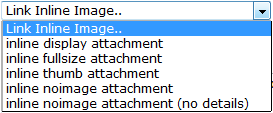
As far as I can see I could improve "DC images" part by adding tags mapping (i.e. attachthumb=X would point to some specific image within post) and maybe an option for exporting whole posts (desired location: copy post images to it, change images names according to some rules).
Надо было учиться, а не камни в школу бросать...
--
f0dder is my personal hero :)

Curt

  • Supporting Member
  • Joined in 2006
  • **
  • Posts: 7,565
Re: BBCeditor 1.1.35
« Reply #221 on: January 26, 2013, 01:25 PM »
sorry for the sloppy date mistake, and for the sour tone added because I was frustrated with not having been able to fall asleep.  :-[

My suggestion would be for you to keep what is already there, and maybe add yet another "img" button, which would insert one of [ attach=# ] [ attachimg=# ] [ attachthumb=# ] [ attachurl=# ] [ attachmini=# ] - the way we have it here at DC. My reason of course being that DonationCoder is where I am using BBCeditor the most.

[attachimg=#]

:tellme:

fenixproductions

  • Honorary Member
  • Joined in 2006
  • **
  • Posts: 1,186
    • Participated in NANY Challenge Four Times
Re: BBCeditor 1.1.35
« Reply #222 on: January 26, 2013, 02:07 PM »
@Curt
It is working that way in recent version!
It does not map linked image in preview but neither to say:
Screenshot - 2013-01-26 , 15_11_14.png
Надо было учиться, а не камни в школу бросать...
--
f0dder is my personal hero :)

Curt

  • Supporting Member
  • Joined in 2006
  • **
  • Posts: 7,565
Re: BBCeditor 1.1.35
« Reply #223 on: January 26, 2013, 10:32 PM »
embarrassing; I never really saw that DC icon! Once I had navigated to the picture file, I would click OK and not think about more. I feel the order is twisted, would it be okay to make them swift position, so "Path" comes last?

« Last Edit: January 26, 2013, 10:39 PM by Curt »

cranioscopical

  • Friend of the Site
  • Supporting Member
  • Joined in 2006
  • **
  • Posts: 4,776
    • Cody Award
    • Official Forum Clown
    • rotten turkey sandwich - Rotten Turkey Sandwich
Re: BBCeditor 1.1.35
« Reply #224 on: January 27, 2013, 02:25 PM »

@fenixproductions

Hi  :)

A wish-list item for your consideration.
When modifying text style (italic/bold/underline etc.) check for any immediately preceding style and make tags cumulative.

example:
highlight this then hit italic, then immediately hit bold

currently yields [i]this[b][/b][/i]

would prefer    [i][b]this[/b][/i]

Chris

Original address: https://www.donationcoder.com/forum/index.php?topic=17623.0