DonationCoder.com forum
 
Read-only archive. This is a static copy of the DonationCoder.com forum. Reading and searching work as before; logging in, posting and private messages do not.
Archive of 2026-10-21 · About this archive · Main site

Last post Author Topic: FARR alias: Quick Outlook Task  (Read 140,760 times)

stannen123

  • Participant
  • Joined in 2008
  • *
  • Posts: 3
Re: FARR alias: Quick Outlook Task
« Reply #100 on: August 25, 2011, 03:34 PM »
Looks like there hasn't been much activity on this thread, but I just discovered this add-in and it looks awesome!  One question - is it possible to create a task without start and due dates?

Thanks.

jpijper

  • Supporting Member
  • Joined in 2008
  • **
  • Posts: 90
Re: FARR alias: Quick Outlook Task
« Reply #101 on: August 25, 2011, 03:51 PM »
Glad you like the utility! On the previous page, in an answer to someone else, I attached a version of do.exe that supports a /nodate switch.

Jan Roelof

stannen123

  • Participant
  • Joined in 2008
  • *
  • Posts: 3
Re: FARR alias: Quick Outlook Task
« Reply #102 on: August 25, 2011, 04:00 PM »
Hi Jan,

Wow - quick response - thank you!

I didn't see a post with the download, but I got version 1.5 from your donationcoder.com page - is that the latest?  I tried the /nodate switch and it didn't work.  My test from the command line was:

do This is a test /cat testcat /high /nodate

Thanks again.


skip

jpijper

  • Supporting Member
  • Joined in 2008
  • **
  • Posts: 90
Re: FARR alias: Quick Outlook Task
« Reply #103 on: August 25, 2011, 04:04 PM »
No, that's not the one - I forgot how to get access to my donationcoder.com page.
Try the one attached here. It also supports a /location switch.

Jan Roelof

stannen123

  • Participant
  • Joined in 2008
  • *
  • Posts: 3
Re: FARR alias: Quick Outlook Task
« Reply #104 on: August 25, 2011, 04:19 PM »
That one works perfectly - this is EXACTLY what I was looking for!

Thanks for your help and the really quick responses!


skip

jpijper

  • Supporting Member
  • Joined in 2008
  • **
  • Posts: 90
Re: FARR alias: Quick Outlook Task
« Reply #105 on: August 25, 2011, 04:23 PM »
Thank you!

matarile

  • Participant
  • Joined in 2011
  • *
  • Posts: 2
Re: FARR alias: Quick Outlook Task
« Reply #106 on: July 11, 2012, 03:57 AM »
Hi Jan,
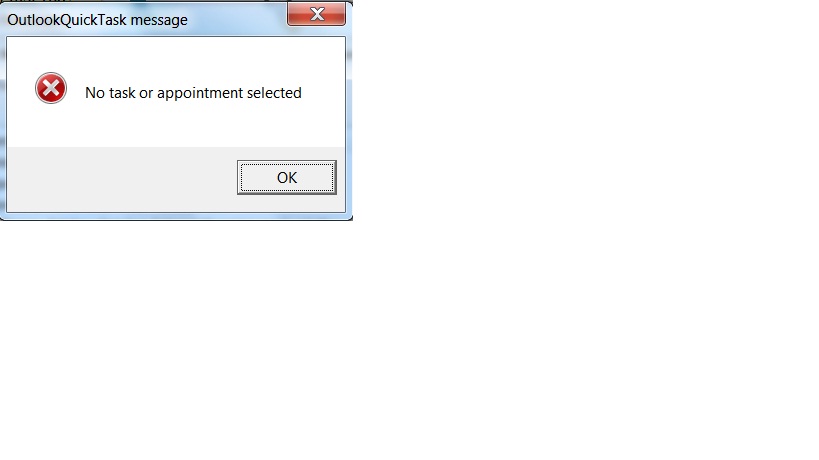
Some I can not make the /total work switch work, for intance: when type "do Mow lawn /due sat /cat house /totalwork 2" in the FARR box, I get a message saying "No task or appointment seleted". In fact everytime I tried to use the total work switch when creating a new task, I got the same message.  

Please Help!

Matarile

jpijper

  • Supporting Member
  • Joined in 2008
  • **
  • Posts: 90
Re: FARR alias: Quick Outlook Task
« Reply #107 on: July 11, 2012, 05:55 AM »
Hi Matarile,

I'm sorry you are having trouble, but I cannot reproduce the error you get. If I give the exact same command "do Mow lawn /due sat /cat house /totalwork 2" the task is created as expected.

I suggest that you try downloading the version that I included as an attachment to a reply to someone a few posts back and see if perhaps that one works better.

Please keep me informed - I want this to work for you!

Jan Roelof

matarile

  • Participant
  • Joined in 2011
  • *
  • Posts: 2
Re: FARR alias: Quick Outlook Task
« Reply #108 on: July 12, 2012, 12:34 AM »
Thanks for your quick response Jan,
I did as you said...downloaded the attachment herein and replaced the "do.exe" file of my FARR portable folder with this one, then tryed to create the following task (taken from one of your examples):
"do Mow lawn /due sat /cat house /totalwork 2"
After this, the following message appeared: "No task or appointment seleted" (please check the file attached).  I don't know if actually matters, but I am on WIN 7 and Outlook 2010 running a  portable version of FARR  from my flash drive.

Thanks in advance for your help, I really appreciate it!

Matarile

Original address: https://www.donationcoder.com/forum/index.php?topic=14208.0