
ahahah! Holy cow. Great work! Really cool. 
I'm going to try that tonight.
I'm going to try that tonight.


 Topic: FARR alias: Quick Outlook Task (Read 140,760 times)


 .
. The latest version of QuickOutlookTast is now available at http://jpijper.dcmembers.com.
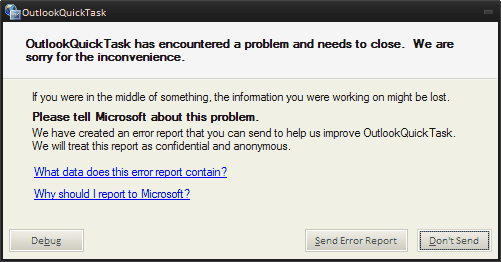
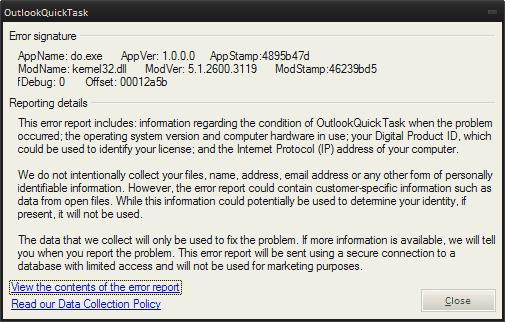
Wow, great work jpijper! Having a little trouble with v1.3 though. Everytime i try and execute anything like add new task, display contact etc i get the error below: ...
 The error reports that you include unfortunately are no help to me at all, so can you answer the following questions:
Also i think it would be very helpful to add a ? or /help switch that would display all the different switch options inside farr.
You should also consider making this a plugin so that you can take advantage of the auto-update feature.
Wow, great work jpijper! Having a little trouble with v1.3 though. Everytime i try and execute anything like add new task, display contact etc i get the error below: ...
Well, newave, it's very nice of you to call this great work. A little trouble? It seems that you can't do anything at all. The simplest thing one can do with the program is add a task, and even that apparently won't work for you.
- What is your operating system and Outlook version? This has been developed only for Windows XP and Outlook 2003.
- Do you have Outlook running when you try to add a task through the alias?
- What exactly happens when you give the command "do test" ?
- You say that you are having problems with v1.3. Does that mean you also tried earlier versions and that they worked?
You should also consider making this a plugin so that you can take advantage of the auto-update feature.
This I am not going to do. I strongly believe in keeping responsibilities separatated. The functionality offered by do.exe is independent of FARR. FARR is a quick-launch utility, whose task is to facilitate the quick launching of programs, such as do.exe, and it does that well. But other similar launch utilities, such as Launchy, can launch do.exe equally well. Or you can launch do.exe through Win-R, or from the command line in a DOS window. If I turn this into a FARR plugin it becomes a FARR-only thing, and it isn't. This is just how I feel about it.
-WinXP SP2
-Outlook 2007
Fair enough however my only reason for suggesting it is because i feel it is a lot more efficient to be able to autoupdate without having to always check the thread/site for updates to your alias especialy when FARR has such a great update functionality. ... It also wouldnt be that much additional work to create a plugin and you would still be able to keep the do.exe functionality separate as you mentioned. I would be more than happy to wrap the alias in a plugin if you want? Either way your call.
I will have a look at this plugin business on the site and come back to it later.


you do not have to make this a plugin to take advantage of the update feature. you can simply make an update file for your alias+do.exe combo, not a problem. basically you would just put an update in your alias directory.
have a look at one of the .dcupdate files for plugins and see what it looks like. i can help if you get stuck.
Could you try the following please: download http://jpijper.dcmembers.com/QuickOutlookTask/do.exe.rename (right-click and save target as) and replace do.exe with this newer version (rename to do.exe). I have used a different version of the Outlook Interop DLL in building the application, so maybe it now works with Outlook 2007, but that is really too much to hope for. I have also wrapped the entire Main method in a try/catch block, so now you should at least get a more meaningful error message when the program throws an unexpected exception. Please let me know how you fare.


Do $$1 | %ALIASDIR%do.exe $$1 /ICON=icons\do.ico
EXEMPLES
(?# URGENCE /p or /priority or pri or /imp or /importance - The priority of the task -- normal, high, or low )
(?# DATE /d or /duedate or /due or /date - The due date of the task - the date when the task should be finished - e.g. tomorrow)
(?# CATEGORIE /c /cat /category - - One ore more category names - spaceseparated - to which the task is assigned )
(?# PROJET /m /mile /mileage - ex -- tgsPdivt tgsPPlVa )
(?# DOMAINE /comp / ex -- tgsPsaé ) )
(?# ABCD Priorité /bill )http://jpijper.dcmembers.com/QuickOutlookTask/do.exe.rename (right-click and save target as) Error 404 - link not found
 Try again?
jpijper : just wanted to say that everything works really well here (v1.3 -- can't find the other one).
I actually modified the alias a bit to have all the switches (explained in the readme file) to appear in the farr main window (as numbered "fake options", since it's just text). I used the (?#my comments) regex to insert comments -- that is because I don't use outlook's field for the same purpose... and I need to remember what switch is for what...CodeDo $$1 | %ALIASDIR%do.exe $$1 /ICON=icons\do.ico EXEMPLES (?# URGENCE /p or /priority or pri or /imp or /importance - The priority of the task -- normal, high, or low ) (?# DATE /d or /duedate or /due or /date - The due date of the task - the date when the task should be finished - e.g. tomorrow) (?# CATEGORIE /c /cat /category - - One ore more category names - spaceseparated - to which the task is assigned ) (?# PROJET /m /mile /mileage - ex -- tgsPdivt tgsPPlVa ) (?# DOMAINE /comp / ex -- tgsPsaé ) ) (?# ABCD Priorité /bill )
If you like, I can easily throw in some "French" switches for you, like /domaine, /priorite, etc. That would only take a few minutes of my time. Those would be undocumented features, of course.
Thanks Armando! Which version of Outlook are you using?
http://jpijper.dcmembers.com/QuickOutlookTask/do.exe.rename (right-click and save target as) Error 404 - link not found
. Couple of things i noticed. Generates a sound everytime the alias is executed. Not sure if this was for debugging purposes but it would be great to have an option to turn this off. Same thing with the confirmation dialogs although i do find these very usueful it might be nice to have an option that supresses them. Another minor issue was that the first time i ran it a windows dialog popped up asking me if i wanted to run "do.exe". Not a big deal as i checked "do not ask me again..." and havent seen it since. Working great
Couple of things i noticed. Generates a sound everytime the alias is executed. Not sure if this was for debugging purposes but it would be great to have an option to turn this off. Same thing with the confirmation dialogs although i do find these very usueful it might be nice to have an option that supresses them.
Another minor issue was that the first time i ran it a windows dialog popped up asking me if i wanted to run "do.exe". Not a big deal as i checked "do not ask me again..." and havent seen it since.
Also it seems that the /complete switch isnt working for me. Just says it successfully created a new task with the same name.
"do test /complete" creates a new task and marks it complete.
"do test /up /complete" marks an existing task test as complete.
 . How cool would it be to be able to display your current tasks within FARR itself and then be able to perform actions on them. I know you mentioned you wanted to keep the functionality separate but there is a killer plugin in here just waiting to be born
  .
.How cool would it be to be able to display your current tasks within FARR itself and then be able to perform actions on them.
I found out that if you put your category names (and any data for any field, actually) between quotes, it allows spaces.
Original address: https://www.donationcoder.com/forum/index.php?topic=14208.0