DonationCoder.com forum
 
Read-only archive. This is a static copy of the DonationCoder.com forum. Reading and searching work as before; logging in, posting and private messages do not.
Archive of 2026-10-21 · About this archive · Main site

Author Topic: Eject/CloseCD  (Read 20,785 times)

CleverCat

  • Cat's Are Fun!
  • Supporting Member
  • Joined in 2006
  • **
  • Posts: 1,164
Eject/CloseCD
« on: February 05, 2008, 09:10 AM »
Works great :Thmbsup: but...

Have changed script to reflect only one drive, but it still does 2 simultaneously?

:)
If you need help - JUST ASK!

lanux128

  • Global Moderator
  • Joined in 2005
  • *****
  • Posts: 6,277
    • Coding Snacks
    • Volunteers/Staff
    • Gathering Badge
    • Participated in NANY Challenge Once
    • Linux User
Re: Eject/CloseCD
« Reply #1 on: February 06, 2008, 02:58 AM »
post modified script here so that someone can have a look and suggest what's wrong. ;)

CleverCat

  • Cat's Are Fun!
  • Supporting Member
  • Joined in 2006
  • **
  • Posts: 1,164
Re: Eject/CloseCD
« Reply #2 on: February 06, 2008, 11:19 AM »
I think I'm confusing Title line in the shortcut?

Anyway here's script on EjectCD

;EjectCD.ahk
; Ejects all CD drives, or add the drives to eject to the command line.
;  Example: EjectCD.exe E
;Skrommel @2006

list=%1%
If 0=0
  DriveGet,list,List,CDROM

Loop,Parse,list
  Drive,Eject,%A_LoopField%:


Thanks
If you need help - JUST ASK!

jgpaiva

  • Artificial Idiocy
  • Global Moderator
  • Joined in 2006
  • *****
  • Posts: 4,727
    • Cody Award
    • Participated in NANY Challenge Once
    • Coding Snacks
    • Portugal Inhabitant
    • Linux User
Re: Eject/CloseCD
« Reply #3 on: February 06, 2008, 11:38 AM »
I know what the problem is. A recent ahk update broke the following line:
Code
if 0=0

Which was supposed to check if there were no command line arguments.
Replace it with:
Code
if (list = "")
And it should be fixed ;)

CleverCat

  • Cat's Are Fun!
  • Supporting Member
  • Joined in 2006
  • **
  • Posts: 1,164
Re: Eject/CloseCD
« Reply #4 on: February 06, 2008, 11:47 AM »
Don't work  :(

Code:

;EjectCD.ahk
; Ejects all CD drives, or add the drives to eject to the command line.
;  Example: EjectCD.exe E
;Skrommel @2006

list=%1%
if (list = "")
  DriveGet,list,List,CDROM

Loop,Parse,list
  Drive,Eject,%A_LoopField%:

If you need help - JUST ASK!
« Last Edit: February 06, 2008, 11:49 AM by CleverCat »

CleverCat

  • Cat's Are Fun!
  • Supporting Member
  • Joined in 2006
  • **
  • Posts: 1,164
Re: Eject/CloseCD
« Reply #5 on: February 06, 2008, 11:55 AM »
Am I supposed to add something in the 'start in' or 'arguments' line on my shortcut?
If you need help - JUST ASK!

jgpaiva

  • Artificial Idiocy
  • Global Moderator
  • Joined in 2006
  • *****
  • Posts: 4,727
    • Cody Award
    • Participated in NANY Challenge Once
    • Coding Snacks
    • Portugal Inhabitant
    • Linux User
Re: Eject/CloseCD
« Reply #6 on: February 06, 2008, 12:36 PM »
Oh, i thought you already were doing that!

Yes, in the "arguments" line, add the letter of the drive you want to eject!
(better add it with the ':' for example, e: )

CleverCat

  • Cat's Are Fun!
  • Supporting Member
  • Joined in 2006
  • **
  • Posts: 1,164
Re: Eject/CloseCD
« Reply #7 on: February 06, 2008, 01:36 PM »
Done that on open and close...

Still opening both?? :(
If you need help - JUST ASK!

jgpaiva

  • Artificial Idiocy
  • Global Moderator
  • Joined in 2006
  • *****
  • Posts: 4,727
    • Cody Award
    • Participated in NANY Challenge Once
    • Coding Snacks
    • Portugal Inhabitant
    • Linux User
Re: Eject/CloseCD
« Reply #8 on: February 06, 2008, 01:56 PM »
I made a small mistake, you're supposed to only use the drive letter (without the ':').

Does it close only one but open both of them?

lanux128

  • Global Moderator
  • Joined in 2005
  • *****
  • Posts: 6,277
    • Coding Snacks
    • Volunteers/Staff
    • Gathering Badge
    • Participated in NANY Challenge Once
    • Linux User
Re: Eject/CloseCD
« Reply #9 on: February 06, 2008, 06:42 PM »
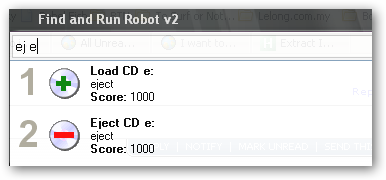
CleverCat, how do you launch your EjectCD app, i mean by clicking on icon or via command-line and how many optical drives do you have? because the above if run by itself is designed eject all drives but you can insert drive parameters to selectively eject.

also, you can use a command-line tool called Eject to open/close a CD-ROM drive. this can be called via Farr alias as i did here thanks to jgpaiva.

[attach=#]

CleverCat

  • Cat's Are Fun!
  • Supporting Member
  • Joined in 2006
  • **
  • Posts: 1,164
Re: Eject/CloseCD
« Reply #10 on: February 07, 2008, 12:32 PM »
Opens both/closes both... :D

Via Icon on Dock.

Trying to make it work thru farr - but I'm not really sure what I'm doing!  ;D
If you need help - JUST ASK!

CleverCat

  • Cat's Are Fun!
  • Supporting Member
  • Joined in 2006
  • **
  • Posts: 1,164
Re: Eject/CloseCD
« Reply #11 on: February 07, 2008, 12:44 PM »
I've downloaded eject - is it non install - do I place it where I want it? :tellme:

If you need help - JUST ASK!
« Last Edit: February 07, 2008, 12:54 PM by CleverCat »

CleverCat

  • Cat's Are Fun!
  • Supporting Member
  • Joined in 2006
  • **
  • Posts: 1,164
Re: Eject/CloseCD
« Reply #12 on: February 09, 2008, 11:01 AM »
I've gone back to using Wizmo...

http://www.grc.com/wizmo/wizmo.htm

Working great.... :Thmbsup:
If you need help - JUST ASK!

johnnyzero

  • Participant
  • Joined in 2006
  • *
  • Posts: 25
Re: Eject/CloseCD
« Reply #13 on: July 13, 2008, 01:16 AM »
I'd like to modify your EjectCD script so that it will either eject or close a certain drive, depending on its current state. To toggle the drive's "tray state", if you will.

I've tried modifying your script by just adding "1" as the last argument (Drive,Eject,%A_LoopField%:,1). According to the AutoHotKey command docs, that argument should make the Eject command work the way I want.

Unfortunately, it doesn't work. My recompiled script will close the tray if it's open, but it won't eject it if it's closed. Any suggestions? As you can tell, I'm not an AutoHotkey scripting expert... :)

best,
JohnB

btw, I've also made the if (list = "") change to your script, as mentioned in a previous post.

jgpaiva

  • Artificial Idiocy
  • Global Moderator
  • Joined in 2006
  • *****
  • Posts: 4,727
    • Cody Award
    • Participated in NANY Challenge Once
    • Coding Snacks
    • Portugal Inhabitant
    • Linux User
Re: Eject/CloseCD
« Reply #14 on: July 13, 2008, 09:00 AM »
Hi johnnyzero!
From what I understand from reading the help file, the '0' is for eject and the '1' is for close.
You can try the following, though:

Code
{
Drive,Eject,%A_LoopField%:,0
if (Errorlevel = 0)
  Drive,Eject,%A_LoopField%:,1
}
Instead of the Drive,Eject line.
That'll check if the state of the drive changed, and if not, do the other command.

johnnyzero

  • Participant
  • Joined in 2006
  • *
  • Posts: 25
Re: Eject/CloseCD
« Reply #15 on: July 13, 2008, 03:53 PM »
Thanks for the reply, jgpaiva. Good idea - your code seems like it should work, but it didn't for me. Oh well...

I ended up using this rather clever example code from the AHK docs to create a hotkey-based script, converted it to an EXE, and I have the EXE autorun at system startup:

F11::
Drive, Eject
; If the command completed quickly, the tray was probably already ejected.
; In that case, retract it:

if A_TimeSinceThisHotkey < 1000 ; Adjust this time if needed.
    Drive, Eject,, 1
return

Works great - pressing F11 toggles my drive tray open/closed. That's actually more convenient than having to click on something.

best,
JohnB

Original address: https://www.donationcoder.com/forum/index.php?topic=12167.0