DonationCoder.com forum
 
Read-only archive. This is a static copy of the DonationCoder.com forum. Reading and searching work as before; logging in, posting and private messages do not.
Archive of 2026-10-21 · About this archive · Main site

Last post Author Topic: What's your preferred File Manager  (Read 662,361 times)

kartal

  • Supporting Member
  • Joined in 2008
  • **
  • Posts: 1,529
Re: What's your preferred File Manager
« Reply #275 on: August 08, 2008, 02:44 AM »
Actually this application is quite sophisticated. It has quite a list of hand features like temp folders, easy filtering, encryption etc. It definetely deserves a second look.

Well this is not my preferred file manager, but it is almost:

AC Browser Plus

http://www.konradp.com/products/acbplus/

This browser is basically free and has many of the coolest and helpful features aiding in file management.  Just for example, the three last used files in any folder are automatically highlighted; it has FTP integration, great multithreading of move and copy operations, fast image browsing, very nice breadcrumb navigation, editorial renaming is ingenious ( edit the file names in a folder like a text in texteditor), it is scriptable, ......  the cool tools,  there are soo many.
Furthermore, the program is stable  (the looks could be polished a bit, though).

So, why is this not my favorite?
AC Browser Plus has a unique windowing philosophy; it does not use the standard dual-pane approach; but instead you can open as many independent browser windows inside the main window as you want. Whoever likes this approach, should absolutely use this program; it is fantastic otherwise (I always thought one uses a filemanager to get rid of the multiple explorer windows ;) ).  For me, multiple windows quickly become a mess that is simply too annoying to navigate.  I sincerely hope a "standard" tabbed dual pane interface can be added to this program. It has great potential.

nms1944

  • Participant
  • Joined in 2006
  • *
  • Posts: 12
Re: What's your preferred File Manager
« Reply #276 on: September 19, 2008, 01:27 PM »
I have been using EF Commander (http://www.efsoftware.com/) since Norton Commander went off the market many years ago.  It also has two windows and stuff like directory comparison, ftp abilities, kill running processes, read/create zip files, read other zip like files (ie: rar), and change it's hotkeys.

J-Mac

  • Supporting Member
  • Joined in 2007
  • **
  • Posts: 2,918
Re: What's your preferred File Manager
« Reply #277 on: September 20, 2008, 04:53 AM »
Well, though I have lifetime licenses for Total Commander and XYPlorer, Directory Opus  - even with its high initial cost and upgrade costs - is my keeper for as long as I am using a Windows box. The longer I use it the more indispensable it becomes.

Jim
"I am getting so tired of slitting the throats of people who say that I am a violent psychopath."

CleverCat

  • Cat's Are Fun!
  • Supporting Member
  • Joined in 2006
  • **
  • Posts: 1,164
Re: What's your preferred File Manager
« Reply #278 on: September 20, 2008, 07:16 AM »
For all those who prefer windows explorer, I have just received this from Gizmo Richards.
"The lack of tabs in Windows Explorer is a real liability. Indeed, it's one of the main reasons why many users install an Explorer replacement such as XYPlorer and UltraExplorer.

However, not all users are comfortable straying from the standard Microsoft setup. For these folks there is some good news: It's quite possible to add tabs to Windows Explorer itself by using a free utility called QT TabBar. As a bonus, you'll not only get tabs but a few additional features, such as instant file viewing, thrown in as well.

I've been using QT TabBar on one of my PCs for a week now and have seen enough to be able to say that many PC users are going to view this as a great productivity tool. However, if you are already using an Explorer replacement like XYPlorer, then it's unlikely QT TabBar is for you."

There is more to the article, here is the link to  the Utility

http://quizo.at.infoseek.co.jp/freeware/indexEn.html#qttab


Just discovered this thread - installed QT TabBar and it works for me! I particularly love the the Desktop tool to quickly jump to folders...  :Thmbsup:

Gizmo does it again!!  :D
If you need help - JUST ASK!

cranioscopical

  • Friend of the Site
  • Supporting Member
  • Joined in 2006
  • **
  • Posts: 4,776
    • Cody Award
    • Official Forum Clown
    • rotten turkey sandwich - Rotten Turkey Sandwich
Re: What's your preferred File Manager
« Reply #279 on: September 20, 2008, 03:43 PM »
Just discovered this thread - installed QT TabBar
Did you try 'QTAddressBar' as well? If not, see if you like it .
Chris

CleverCat

  • Cat's Are Fun!
  • Supporting Member
  • Joined in 2006
  • **
  • Posts: 1,164
Re: What's your preferred File Manager
« Reply #280 on: September 21, 2008, 07:17 AM »
What exactly is it's use?  :)
If you need help - JUST ASK!

Curt

  • Supporting Member
  • Joined in 2006
  • **
  • Posts: 7,565
Re: What's your preferred File Manager
« Reply #281 on: September 21, 2008, 10:30 AM »
Quote from: Quizo
QT AddressBar

Features:
Vista address bar clone for XP.

In a directory, Vista is easier to navigate, than XP.
QT AddressBar imitates Vista, on XP.

that's all.

[attachimg=#]

« Last Edit: September 21, 2008, 10:34 AM by Curt »

fenixproductions

  • Honorary Member
  • Joined in 2006
  • **
  • Posts: 1,186
    • Participated in NANY Challenge Four Times
Re: What's your preferred File Manager
« Reply #282 on: September 21, 2008, 11:53 AM »
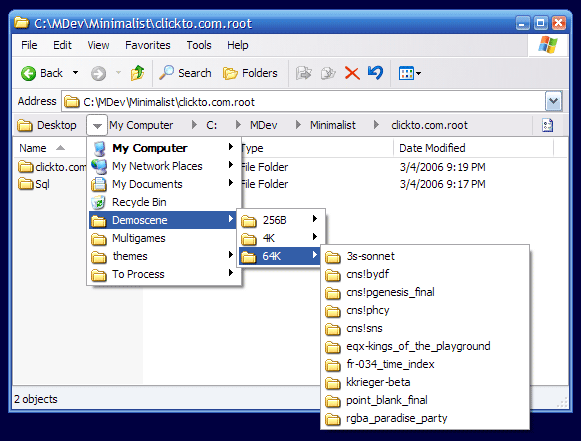
I recommend Minimalist breadcrumbs:
http://minimalist.com/software/ExplorerBreadcrumbs/

I was using QT AdressBar for quite time 'till it started to crash my Explorer. Even IE went crazy and I had to remove that.
No problems with Minimalist tool althougt.
Надо было учиться, а не камни в школу бросать...
--
f0dder is my personal hero :)

Curt

  • Supporting Member
  • Joined in 2006
  • **
  • Posts: 7,565
Re: What's your preferred File Manager
« Reply #283 on: September 21, 2008, 12:39 PM »
- a fine way to mark post number 100, fenixproductions  :)

The drop-down navigation makes the Minimalist so much more useful.
Really good find!  :up:

clickable thumb:

[attachthumb=#]


Edited:
You are encouraged to donate pay $8 for this app.
« Last Edit: September 21, 2008, 12:44 PM by Curt »

CleverCat

  • Cat's Are Fun!
  • Supporting Member
  • Joined in 2006
  • **
  • Posts: 1,164
Re: What's your preferred File Manager
« Reply #284 on: September 22, 2008, 06:39 AM »
The main reason I like QT TabBar is the function to click on taskbar and jump to a folder!  :D
If you need help - JUST ASK!

fenixproductions

  • Honorary Member
  • Joined in 2006
  • **
  • Posts: 1,186
    • Participated in NANY Challenge Four Times
Re: What's your preferred File Manager
« Reply #285 on: September 22, 2008, 08:26 AM »
2Curt
Hm. I don't recall it required payment when I had it installed first time. Maybe it's time to review all long ago installed software here;)
Надо было учиться, а не камни в школу бросать...
--
f0dder is my personal hero :)

Curt

  • Supporting Member
  • Joined in 2006
  • **
  • Posts: 7,565
Re: What's your preferred File Manager
« Reply #286 on: September 22, 2008, 10:28 AM »
You are encouraged to donate pay $8 for this app.
I don't recall it required payment when I had it installed first time.

- not inside the program, but on their site:

Quote
Registration/License

You're free to install this on any number of machines for any amount of time. We ask that if you find this software useful, that you register it for the low low price of $7.95. That's cheaper than seeing a movie, and we'd really appreciate it. Click the button below if you'd like to register, and thank you very much if you do.

[attachimg=#]

fenixproductions

  • Honorary Member
  • Joined in 2006
  • **
  • Posts: 1,186
    • Participated in NANY Challenge Four Times
Re: What's your preferred File Manager
« Reply #287 on: September 22, 2008, 02:17 PM »
2Curt
I've downloaded it from mentioned site back in 2006. Now I have a dilema: it's hard to define how useful it is for me because I am using Explorer maybe once per month... Well, I think I will pay as soon as I get alive:)
Надо было учиться, а не камни в школу бросать...
--
f0dder is my personal hero :)

CleverCat

  • Cat's Are Fun!
  • Supporting Member
  • Joined in 2006
  • **
  • Posts: 1,164
Re: What's your preferred File Manager
« Reply #288 on: September 22, 2008, 02:20 PM »
Once a month??  :huh:
If you need help - JUST ASK!

Darwin

  • Charter Member
  • Joined in 2005
  • ***
  • Posts: 6,985
    • Gathering Badge
Re: What's your preferred File Manager
« Reply #289 on: September 22, 2008, 02:55 PM »
Once a month??  :huh:

Two thoughts, first the second one: I LIVE in my file manager (DOpus 9). The first thought was, perhaps fenixproductions is like me and uses windows explorer RARELY because he uses a third party file manager most of the time?
"Some people have a way with words, other people,... oh... have not way" - Steve Martin

fenixproductions

  • Honorary Member
  • Joined in 2006
  • **
  • Posts: 1,186
    • Participated in NANY Challenge Four Times
Re: What's your preferred File Manager
« Reply #290 on: September 22, 2008, 03:06 PM »
2Darwin
You're right but I live with Total Commander. It replaced so many things in my system that anyone would be surprised. The only thing left is normal Explorer behaviour.
AFAIK: DO replaces even that (i.e. for double click on My Computer).

PS. You can find a proof of being TC-addicted on my homepage ;)
Надо было учиться, а не камни в школу бросать...
--
f0dder is my personal hero :)

CleverCat

  • Cat's Are Fun!
  • Supporting Member
  • Joined in 2006
  • **
  • Posts: 1,164
Re: What's your preferred File Manager
« Reply #291 on: September 22, 2008, 03:08 PM »
Ah - understood!  :D
If you need help - JUST ASK!

Darwin

  • Charter Member
  • Joined in 2005
  • ***
  • Posts: 6,985
    • Gathering Badge
Re: What's your preferred File Manager
« Reply #292 on: September 22, 2008, 04:28 PM »
Heh, heh - as documented throughout this thread and throughout DC, I am a software addict and a file manager addict in particular. I have TC installed as well and love it. IIRC, there is a hack to have TC replace Explorer, but it's buried somewhere on the user forum. Because I have DO setup to do this, I haven't bothered with it.

BTW - nice webpage on TC, Karol  :Thmbsup:
"Some people have a way with words, other people,... oh... have not way" - Steve Martin

TucknDar

  • Advanced coder of Nowt
  • Charter Member
  • Joined in 2005
  • ***
  • Posts: 1,133
Re: What's your preferred File Manager
« Reply #293 on: September 22, 2008, 06:57 PM »
That's a pretty good TC site, indeed, fenixproductions! The latest plugin version stuff will be very useful. Added it to Website-Watcher :)

Curt

  • Supporting Member
  • Joined in 2006
  • **
  • Posts: 7,565
Re: What's your preferred File Manager
« Reply #294 on: September 22, 2008, 07:06 PM »
You can find a proof of being TC-addicted on [link removed]my homepage

- indeed!!  :up:
« Last Edit: September 03, 2015, 05:08 PM by Curt »

SleepingWolf

  • Supporting Member
  • Joined in 2007
  • **
  • Posts: 118
Re: What's your preferred File Manager
« Reply #295 on: September 22, 2008, 08:26 PM »
What I'm looking for in a FM is the ability to copy web pages WITH the associated folders...

e.g. copy XYZ.htm With the folder XYZ_files.

Explorer does this, do any others?

This functionality is so basic, yet seems to be hard to find.
-------------------------------------------

Question everything, use a fact-checker.
Respect yourself and respect others.
Peace out!

fenixproductions

  • Honorary Member
  • Joined in 2006
  • **
  • Posts: 1,186
    • Participated in NANY Challenge Four Times
Re: What's your preferred File Manager
« Reply #296 on: September 22, 2008, 09:56 PM »
2SleepingWolf
TC should do the same if you enable using Explorer's copy/delete methods. Personally I found it annoying (and generating the mess).

Maybe consider saving webpages as MHT? It's more comfortable solution.
IE7 and Opera have built-in support for such files. For Firefox you will need separate extension (https://addons.mozilla.org/pl/firefox/search?q=MHT&cat=all).

Such files are easier to manage and if you want their content, you can unpack them using free tools or TC's plugin.

PS. 1. "_files" suffix depends on your systems localisation (more info: http://msdn2.microsoft.com/en-US/library/aa969390.aspx#connected).
Надо было учиться, а не камни в школу бросать...
--
f0dder is my personal hero :)
« Last Edit: September 22, 2008, 10:04 PM by fenixproductions »

SleepingWolf

  • Supporting Member
  • Joined in 2007
  • **
  • Posts: 118
Re: What's your preferred File Manager
« Reply #297 on: September 22, 2008, 10:30 PM »
Thanks fenixproduction.

The second link doesn't work for me. Is it current? Probably it's FireFox playing up again (can you believe I can't donate without getting the same  "Unable to connect" error page.

Nice to see another Brit here!!!
-------------------------------------------

Question everything, use a fact-checker.
Respect yourself and respect others.
Peace out!

fenixproductions

  • Honorary Member
  • Joined in 2006
  • **
  • Posts: 1,186
    • Participated in NANY Challenge Four Times
Re: What's your preferred File Manager
« Reply #298 on: September 22, 2008, 10:59 PM »
2SleepingWolf
The second link is just for "MHT" phrase search on mozilla addons site.

BTW I am Polishman in New London;)
Надо было учиться, а не камни в школу бросать...
--
f0dder is my personal hero :)

Darwin

  • Charter Member
  • Joined in 2005
  • ***
  • Posts: 6,985
    • Gathering Badge
Re: What's your preferred File Manager
« Reply #299 on: September 22, 2008, 11:38 PM »
BTW I am Polishman in New London

"New"? Since 1666 or...?
"Some people have a way with words, other people,... oh... have not way" - Steve Martin

Original address: https://www.donationcoder.com/forum/index.php?topic=9958.0