DonationCoder.com forum
 
Read-only archive. This is a static copy of the DonationCoder.com forum. Reading and searching work as before; logging in, posting and private messages do not.
Archive of 2026-10-21 · About this archive · Main site

Author Topic: IDEA: Keyboard locale auto-switcher?  (Read 26,941 times)

f0dder

  • [Well, THAT escalated quickly!]
  • Charter Honorary Member
  • Joined in 2005
  • ***
  • Posts: 9,153
    • Participated in NANY Challenge Once
IDEA: Keyboard locale auto-switcher?
« on: September 01, 2007, 04:08 PM »
[REQ] Keyboard locale auto-switcher?

I don't know if Windows has built-in functionality for this, or if there's perhaps some freeware utility available that does it; if not, I expect it to be a relatively quick hackjob in autohotkey/whatever, if somebody has the time - I'm unfortunately pretty tied up myself :/

Now, for the problem description: I run an English XP with Danish local - no problems there, I can use my quirky æøåÆØÅ letters without having the OS language butchered translated. However, when coding, I prefer an English keyboard layout, because the various chars used in C++ have a better mapping that way.

I have both Danish and English locale installed, and it's as easy as ALT+SHIFT to toggle... but it's annoying that I _have_ to do this every time I start notepad++ or cmd.exe, and ALT+SHIFT can be a bit hard to hit properly sometimes.

So, my idea: automatically setting keyboard locale on application startup. Doable?
- carpe noctem
« Last Edit: November 14, 2007, 12:10 PM by brotherS »

lanux128

  • Global Moderator
  • Joined in 2005
  • *****
  • Posts: 6,277
    • Coding Snacks
    • Volunteers/Staff
    • Gathering Badge
    • Participated in NANY Challenge Once
    • Linux User
Re: [REQ] Keyboard locale auto-switcher?
« Reply #1 on: September 02, 2007, 03:35 AM »
another suggestion: why not use a program like AllChars or Skrommels Accents? :)

f0dder

  • [Well, THAT escalated quickly!]
  • Charter Honorary Member
  • Joined in 2005
  • ***
  • Posts: 9,153
    • Participated in NANY Challenge Once
Re: [REQ] Keyboard locale auto-switcher?
« Reply #2 on: September 02, 2007, 10:48 AM »
lanux, those apps seem to be intended for inserting special accents... what I really need is the entire key layout to change... a small example: with DK layout, I need to press AltGr+{7,8,9,0} to get the "{[]}" characters - with a US layout I get [] simply by pressing the two keys right of P, and if I hold shift while pressing them, I get {}.

Compare Danish layout to US layout.
- carpe noctem

lanux128

  • Global Moderator
  • Joined in 2005
  • *****
  • Posts: 6,277
    • Coding Snacks
    • Volunteers/Staff
    • Gathering Badge
    • Participated in NANY Challenge Once
    • Linux User
Re: [REQ] Keyboard locale auto-switcher?
« Reply #3 on: September 02, 2007, 01:29 PM »
i see the difference now.. looks simple enough, monitor apps & send some keystrokes.. i will post in a day or two.. :)

lanux128

  • Global Moderator
  • Joined in 2005
  • *****
  • Posts: 6,277
    • Coding Snacks
    • Volunteers/Staff
    • Gathering Badge
    • Participated in NANY Challenge Once
    • Linux User
Re: [REQ] Keyboard locale auto-switcher?
« Reply #4 on: September 03, 2007, 04:03 AM »
f0dder, do you want to switch keyboard layout whenever a certain program is active or only upon start? i can basically convert this script to what you want, what do you think?

f0dder

  • [Well, THAT escalated quickly!]
  • Charter Honorary Member
  • Joined in 2005
  • ***
  • Posts: 9,153
    • Participated in NANY Challenge Once
Re: [REQ] Keyboard locale auto-switcher?
« Reply #5 on: September 03, 2007, 11:50 AM »
Upon startup is fine, since local settings are stored per process - I can have notepad++ running with english layout and the rest of the system with danish, and when I alt+tab windows itself handles setting the locale.

And there should definitely be API calls to change locale. I just wondered if there was some smart built-in way to do it all automagically :)
- carpe noctem

lanux128

  • Global Moderator
  • Joined in 2005
  • *****
  • Posts: 6,277
    • Coding Snacks
    • Volunteers/Staff
    • Gathering Badge
    • Participated in NANY Challenge Once
    • Linux User
Re: [REQ] Keyboard locale auto-switcher?
« Reply #6 on: September 04, 2007, 03:56 AM »
found a web-site with a list of keyboard language IDs. now to find an API Call that could plugged into AHK to take care of things programmatically.. :)

• http://www.cryer.co.uk/brian/windows/info_windows_locale_table.htm

lanux128

  • Global Moderator
  • Joined in 2005
  • *****
  • Posts: 6,277
    • Coding Snacks
    • Volunteers/Staff
    • Gathering Badge
    • Participated in NANY Challenge Once
    • Linux User
Re: [REQ] Keyboard locale auto-switcher?
« Reply #7 on: September 09, 2007, 01:23 PM »
f0dder, try this ahk script: Auto-switch Locale.. :) the script will switch to English keyboard layout whenever certain programs are active.. Start the program once then you can edit the ini file to add more programs - partial windows title will do and also class names in this format: ahk_class <class name>.

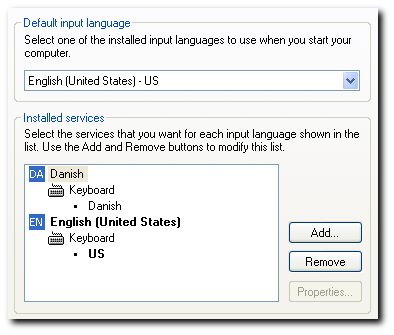
btw, i'm not sure how your system is set-up.. so i've configured mine like this (see pic below) and with the assumption that Danish is the default language..

[attach=#]

to use with different languages, edit the INI file and add the layout codes in this format: 00000xxx where xxx is the locale code. here are some examples:
00000409
00000401
00000403
00000406
00000407
00000408
0000040B
0000040C
00000410
00000416
00000814
0000040A
English - United States
Arabic - Saudi Arabia
Catalan - Spain
Danish - Denmark
German - Germany
Greek
Finnish - Finland
French - France
Italian - Italy
Portuguese - Brazil
Norwegian – Norway (Nynorsk)
Spanish - Spain (International Sort)
Source: http://www.cryer.co.uk/brian/windows/info_windows_locale_table.htm

Edit: added the AHK source and Windows locale table.
Edit2: added the recompiled exe (without upx) to avoid false alarms [related thread].
« Last Edit: June 04, 2010, 05:51 AM by lanux128 »

TucknDar

  • Advanced coder of Nowt
  • Charter Member
  • Joined in 2005
  • ***
  • Posts: 1,133
Re: [REQ] Keyboard locale auto-switcher?
« Reply #8 on: September 09, 2007, 01:33 PM »
mind sharing the source, lanux128?

lanux128

  • Global Moderator
  • Joined in 2005
  • *****
  • Posts: 6,277
    • Coding Snacks
    • Volunteers/Staff
    • Gathering Badge
    • Participated in NANY Challenge Once
    • Linux User
Re: [REQ] Keyboard locale auto-switcher?
« Reply #9 on: September 09, 2007, 01:43 PM »
sure, no problems.. i'm planning to post the source after i've finalised things with f0dder as now it's just a quick hack.. but Tuck, if you're in a hurry, you can always PM me.. ;)

TucknDar

  • Advanced coder of Nowt
  • Charter Member
  • Joined in 2005
  • ***
  • Posts: 1,133
Re: [REQ] Keyboard locale auto-switcher?
« Reply #10 on: September 09, 2007, 02:06 PM »
heh, no hurry, just for "educational" reasons, and scancode reminded me that AHK executables can be decompiled ;)

f0dder

  • [Well, THAT escalated quickly!]
  • Charter Honorary Member
  • Joined in 2005
  • ***
  • Posts: 9,153
    • Participated in NANY Challenge Once
Re: [REQ] Keyboard locale auto-switcher?
« Reply #11 on: September 09, 2007, 04:28 PM »
Does seem to work, thank you!

Wonder how 'clean' the solution is... it would be nice if people would generally post AHK scripts in script rather than compiled format, makes it easier to tinker with :)
- carpe noctem

lanux128

  • Global Moderator
  • Joined in 2005
  • *****
  • Posts: 6,277
    • Coding Snacks
    • Volunteers/Staff
    • Gathering Badge
    • Participated in NANY Challenge Once
    • Linux User
Re: [REQ] Keyboard locale auto-switcher?
« Reply #12 on: September 10, 2007, 12:54 AM »
Does seem to work, thank you!
great! that's all i want to hear.. now, i can attach the source as well here.. :)

btw, i've added hotkeys Win+Alt+p & Win+Alt+q to pause and exit the script respectively..

lanux128

  • Global Moderator
  • Joined in 2005
  • *****
  • Posts: 6,277
    • Coding Snacks
    • Volunteers/Staff
    • Gathering Badge
    • Participated in NANY Challenge Once
    • Linux User
Re: [REQ] Keyboard locale auto-switcher?
« Reply #13 on: October 10, 2007, 01:46 AM »
found a similar program with the added advantage of changing the typed words to the language intended.. currently supports only 3 languages but you can drop an email to the author to add other languages.

Screenshots


Text Converter
Text Converter will correct typing errors usually happened due to forgetting switch the keyboard language before typing.
Also Text Converter allows you to change letters case from uppercase to lowercase and vice versa or just capitalize the first letter of a word.

• http://www.utceditors.totalcmd.net/textconv/text_converter.htm

Armando

  • Charter Member
  • Joined in 2005
  • ***
  • Posts: 2,727
    • Coding Snacks
Re: [REQ] Keyboard locale auto-switcher?
« Reply #14 on: November 11, 2007, 02:02 AM »
I've always had problems with my keyboard changing from French to English -- a real drag when you're using an app like farr and you're trying to get things done quickly.
Anyway : thanks Lanux.  :up:
That little app does exactly what it's supposed to do, and does it well.
"I suppose it can be said that I'm an absent-minded driver. It's true that I've driven through a number of red lights on occasion, but on the other hand, I've stopped at a lot of green ones but never gotten credit for it."
Glenn Gould

lanux128

  • Global Moderator
  • Joined in 2005
  • *****
  • Posts: 6,277
    • Coding Snacks
    • Volunteers/Staff
    • Gathering Badge
    • Participated in NANY Challenge Once
    • Linux User
Re: [REQ] Keyboard locale auto-switcher?
« Reply #15 on: November 12, 2007, 01:20 AM »
thanks Armando, i'm glad that you find it useful plus it is very nice to start the day with such a compliment.. :)

PPLandry

  • Supporting Member
  • Joined in 2007
  • **
  • Posts: 702
Re: [REQ] Keyboard locale auto-switcher?
« Reply #16 on: November 13, 2007, 03:09 AM »
I've always had problems with my keyboard changing from French to English

Many years ago, I got used to the US International keyboard layout. More double-keystoke characters, but it is so complete and matches perfectly with the keycaps. I use it for whatever language I write in (of course, I don't write in Chinease, only in French, English and German)
Real generosity toward the future lies in giving all to the present -- Albert Camus -- www.InfoQube.biz
« Last Edit: November 13, 2007, 06:21 AM by PPLandry »

uuderzo

  • Supporting Member
  • Joined in 2009
  • **
  • Posts: 38
Re: IDEA: Keyboard locale auto-switcher?
« Reply #17 on: June 04, 2010, 01:38 PM »
Lanux, thank you for your hint...

I copied from the source of your app and changed this way:

#InstallKeybdHook
ifWinActive, ahk_class Photoshop
{

è::
SetLayout( 00000409 )
Send, [
SetLayout( 00000410 )
Return

+::
SetLayout( 00000409 )
Send, ]
SetLayout( 00000410 )
Return

}

SetLayout(Locale) {
  DllCall("LoadKeyboardLayout", Str, %Locale%, UInt, 257)
}

Now Photoshop looks like it understands the command, but it does not revert to italian layout after Send command (i love being able to write text with correct keys, you know)... what should I check?

Thank you!

lanux128

  • Global Moderator
  • Joined in 2005
  • *****
  • Posts: 6,277
    • Coding Snacks
    • Volunteers/Staff
    • Gathering Badge
    • Participated in NANY Challenge Once
    • Linux User
Re: IDEA: Keyboard locale auto-switcher?
« Reply #18 on: June 04, 2010, 03:39 PM »
Lanux, thank you for your hint...
...
Now Photoshop looks like it understands the command, but it does not revert to italian layout after Send command (i love being able to write text with correct keys, you know)... what should I check?

try adding a '$' before the hotkey like the code below. i also changed the IfWinActive directive to be controlled by the keystroke instead of the other way around. let me know if this works.. :)

Code
#InstallKeybdHook

$è::
IfWinActive, ahk_class Photoshop
  {
  SetLayout( 00000409 )
  Send, [
  }
Else
  {
  SetLayout( 00000410 )
  Send, è
  }
Return

$+::
IfWinActive, ahk_class Photoshop
  {
  SetLayout( 00000409 )
  Send, ]
  }
Else
  {
  SetLayout( 00000410 )
  Send, +
  }
Return

SetLayout(Locale) {
  DllCall("LoadKeyboardLayout", Str, %Locale%, UInt, 257)
}

Original address: https://www.donationcoder.com/forum/index.php?topic=9805.0