i posted here about a program that creates new folders from the context-menu. maybe the author will be interested in extending the program by adding the 'click on file' feature.. 
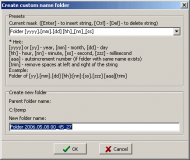
• Custom Folder v1.2
• Custom Folder v1.2


 Topic: IDEA: Create a containing folder by right clicking on a file (Read 146,159 times)


Here it is : FileNannyCode;; FileNanny ;; "Go to your room !" ;; by ak Loop, %0% { param := %A_Index% SplitPath param, fileName, dirName StringSplit rawName, fileName, "." dirToCreate = %dirName%\%rawName1% FileCreateDir %dirToCreate% FileMove %param%, %dirToCreate% }
Actually, a nice solution is to put a shortcut to fileNanny.exe in the sendTo folder. It works with multiple files.
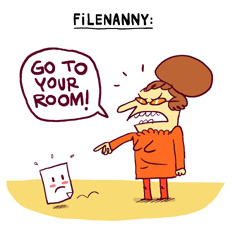
I quickly created an icon because i don't like software (even crappy little stuff like that) without icon, but i'm not sure the picture is very obvious (i hate using the mouse).


Should I wait to see if Andy's context info can be implemented into FileNanny?Andy's information is very interesting. Knowing this, it should be easy to add a config GUI to add/remove the context menu entry. I don't know when i'll have the time to work on it because right now i'm in holiday AND i have work to do (tell me about working at home and freedom
 ) I think i'll have some time on friday so maybe we should consider that FileNanny is now 1.0 and will be 1.1 on friday
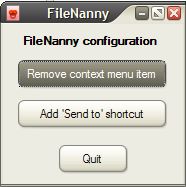


;; FileNanny
;; "Go to your room !"
;; by ak

#SingleInstance ignore
if 0 = 0 ; if fileNanny is launched without arguments
{
if strlen(winX) = 0
  winX := (A_Screenwidth - 180) / 2 ; if winX variable doesn't exist, window is centered
if strlen(winY) = 0
winY := (A_Screenheight - 130) / 2
gosub CreateGUI
}

else ; if there are arguments
{
Loop, %0% ; for each file
{
param := %A_Index%
SplitPath param, fileName, dirName ; we retrieve the folder and file name (with extension)
StringSplit rawName, fileName, "." ; rawname is the filename without extension
dirToCreate = %dirName%\%rawName1%  ; the folder to create is named after the file
FileCreateDir %dirToCreate% ; folder is created
FileMove %param%, %dirToCreate% ; the file is moved to the new folder
}
ExitApp
}
return

CreateGUI:
  gui destroy ; we destroy previous gui
  RegRead, regTest, HKEY_CLASSES_ROOT, *\shell\FileNanny ; check if the filenanny key exist
  if strlen(regTest) = 0 ; if it doesn't exist
  {
    button1Text = Add context menu item ; we set the label of the first button...
    button1Action = addCMI ; ... and its action
  }
  else
  {
    button1Text = Remove context menu item
    button1Action = remCMI
  }

  sendToFolder = %UserProfile%\SendTo ; path to "Send to" folder
  ifnotExist %sendToFolder%\filenanny.lnk ; if there's no filenanny shortcut in there
  {
    button2text = Add 'Send to' shortcut ; we set the label of the first button...
    button2action = addST ; ... and ? Its action, right.
  }
  else
  {
    button2text = Remove 'Send to' shortcut
    button2action = remST
  }

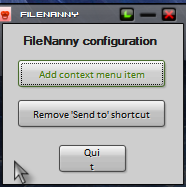
  Gui, Font, s9 w600
  Gui, Add, Text, x20 y10 w150 h20 , FileNanny configuration
  Gui font, norm
  Gui, Add, Button, x14 y35 w150 h30 g%button1Action%, %button1Text% ; the first button, with appropriate label etc
  Gui, Add, Button, x14 y75 w150 h30 g%button2Action%, %button2Text% ; the second button...
  Gui, Add, Button, x55 y120 w70 h30 gQuit, Quit
  Gui, Show, x%winX% y%winY% h160 w180, FileNanny
return

AddCMI: ; operations to add context menu item
RegWrite, REG_SZ, HKEY_CLASSES_ROOT, *\shell\FileNanny, , FileNann&y this ; create the first key
RegWrite, REG_SZ, HKEY_CLASSES_ROOT, *\shell\FileNanny\command, , "%A_ScriptFullPath%" "`%L" ; and the subkey
gosub refreshGUI ; we redraw gui because buttons must be changed
return

RemCMI: ; operations to remove context menu item
RegDelete HKEY_CLASSES_ROOT, *\shell\FileNanny ; remove FileNanny registry key
gosub refreshGUI ; we redraw gui because buttons must be changed
return

addST: ; operations to add 'Send to' shortcut
FileCreateShortcut, %A_ScriptFullPath%, %sendToFolder%\filenanny.lnk ; create a shortcut to filenanny.exe
gosub refreshGUI
return

remST: ; operations to remove 'Send to' shortcut
FileDelete, %sendToFolder%\filenanny.lnk ; shortcut is deleted
gosub refreshGUI
return

refreshGUI:
winId := WinExist("FileNanny") ; we retrieve FileNanny's unique id
WinGetPos winX, winY, , , ahk_id %winId% ; we store window coordinates in winX and winY
gosub CreateGUI
return

Quit:
GuiClose:
GuiEscape:
  ExitApp
return . Anyway its no problem, the script does exactly what it says it will, and its only when you set it up that its seen anyway.


 Nice to see my little nanny is useful. Wolf.b, if i get some time, i'll add the edit field you asked for.

AK, your little nanny is VERY useful. I use it daily - so a big 'thank you' from me, too.
I'd like to be given the opportunity to edit the new folder name before it's processed so that I could, e.g. change "Filenanny.zip" to "File Nanny" for the folder name.
Keep up the fine work
 filenanny.exe
(293.1 KB - downloaded 845 times.)
filenanny.exe
(293.1 KB - downloaded 845 times.)  (And -- I love the icon -- and your drawing.)

;; FileNanny
;; "Go to your room !"
;; by ak

GetKeyState kstate, Shift
if kstate = D
  editFolder = 1

#SingleInstance ignore
if 0 = 0
{
if strlen(winX) = 0
  winX := (A_Screenwidth - 180) / 2
if strlen(winY) = 0
winY := (A_Screenheight - 130) / 2
gosub CreateGUI
}

else
{
Loop, %0%
{
param := %A_Index%
SplitPath param, fileName, dirName
StringSplit rawName, fileName, "."
if editFolder = 1
{
  InputBox InputRawName, FileNanny, Name of the folder to create, , 320, 120, , , , , %rawName1%
  rawName1 = %InputRawName%
  if ErrorLevel
    ExitApp
}
dirToCreate = %dirName%\%rawName1%
FileCreateDir %dirToCreate%
FileMove %param%, %dirToCreate%
}
ExitApp
}
return

CreateGUI:
  gui destroy
  RegRead, regTest, HKEY_CLASSES_ROOT, *\shell\FileNanny
  if strlen(regTest) = 0
  {
    button1Text = Add context menu item
    button1Action = addCMI
  }
  else
  {
    button1Text = Remove context menu item
    button1Action = remCMI
  }

  sendToFolder = %UserProfile%\SendTo
  ifnotExist %sendToFolder%\filenanny.lnk
  {
    button2text = Add 'Send to' shortcut
    button2action = addST
  }
  else
  {
    button2text = Remove 'Send to' shortcut
    button2action = remST
  }

  Gui, Font, s9 w600
  Gui, Add, Text, x20 y10 w150 h20 , FileNanny configuration
  Gui font, norm
  Gui, Add, Button, x14 y35 w150 h30 g%button1Action%, %button1Text%
  Gui, Add, Button, x14 y75 w150 h30 g%button2Action%, %button2Text%
  Gui, Add, Button, x55 y120 w70 h30 gQuit, Quit
  Gui, Show, x%winX% y%winY% h160 w180, FileNanny
return

AddCMI:
RegWrite, REG_SZ, HKEY_CLASSES_ROOT, *\shell\FileNanny, , FileNann&y this
RegWrite, REG_SZ, HKEY_CLASSES_ROOT, *\shell\FileNanny\command, , "%A_ScriptFullPath%" "`%L"
gosub refreshGUI
return

RemCMI:
RegDelete HKEY_CLASSES_ROOT, *\shell\FileNanny
gosub refreshGUI
return

addST:
FileCreateShortcut, %A_ScriptFullPath%, %sendToFolder%\filenanny.lnk
gosub refreshGUI
return

remST:
FileDelete, %sendToFolder%\filenanny.lnk
gosub refreshGUI
return

refreshGUI:
winId := WinExist("FileNanny")
WinGetPos winX, winY, , , ahk_id %winId%
gosub CreateGUI
return

Quit:
GuiClose:
GuiEscape:
  ExitApp
return


Original address: https://www.donationcoder.com/forum/index.php?topic=9357.0