
Re: new launcher just released
« Reply #25 on: July 19, 2007, 04:18 PM »


 Topic: new launcher just released (Read 52,826 times)


FARR's what first introduced me to DC and one of the most used apps on my PC. Went to use my wife's computer the other day and spent several minutes sure her computer was broken--alt+space did nothing, the catalyst which every application on a computer system relies upon was not present, nothing worked! She did have something on there called a "start menu", but I am not one for fumbling with ancient technology that may or may not be booby trapped.


making google searches, opening firefox/explorer bookmarks, finding start menu items, being able to navigate and find the most important system folders (my documents, etc) out of the box should be a priority.yep, all of those work out of the box, although the bookmarks part is done through a plugin, which might not be included in the default package (not sure, as this is mouser's decision).
 ):
):<mouser> it IS a very huge leap from v1Maybe you should take a look at farr V2 beta, or wait for its grand launch next week. I think you'll be positivelly surprised
<mouser> in fact when i think on v1 now i get sick

 Screenshot - 7_24_2007 , 6_50_02 PM.png
(24.9 KB, 548x281 - viewed 1260 times.)
Screenshot - 7_24_2007 , 6_50_02 PM.png
(24.9 KB, 548x281 - viewed 1260 times.) Screenshot - 7_24_2007 , 6_35_07 PM.png
(57.1 KB, 595x551 - viewed 1298 times.)
Screenshot - 7_24_2007 , 6_35_07 PM.png
(57.1 KB, 595x551 - viewed 1298 times.) Screenshot - 7_24_2007 , 6_41_31 PM.png
(26.5 KB, 535x296 - viewed 1264 times.)
Screenshot - 7_24_2007 , 6_41_31 PM.png
(26.5 KB, 535x296 - viewed 1264 times.) Screenshot - 7_24_2007 , 6_42_35 PM.png
(43.8 KB, 535x296 - viewed 1070 times.)
Screenshot - 7_24_2007 , 6_42_35 PM.png
(43.8 KB, 535x296 - viewed 1070 times.) Screenshot - 7_24_2007 , 6_43_37 PM.png
(28.1 KB, 535x289 - viewed 1250 times.)
Screenshot - 7_24_2007 , 6_43_37 PM.png
(28.1 KB, 535x289 - viewed 1250 times.) Screenshot - 7_24_2007 , 6_44_07 PM.png
(25.1 KB, 531x272 - viewed 1234 times.)
Screenshot - 7_24_2007 , 6_44_07 PM.png
(25.1 KB, 531x272 - viewed 1234 times.) Screenshot - 7_24_2007 , 6_44_37 PM.png
(28.4 KB, 535x295 - viewed 1216 times.)
Screenshot - 7_24_2007 , 6_44_37 PM.png
(28.4 KB, 535x295 - viewed 1216 times.) Screenshot - 7_24_2007 , 6_48_03 PM.png
(24.7 KB, 515x182 - viewed 1214 times.)
Screenshot - 7_24_2007 , 6_48_03 PM.png
(24.7 KB, 515x182 - viewed 1214 times.)
BUT, the time it'd take to change the looks would probably be better spent in improving other parts of farr, at the expense of losing some "costumers" because of the looks.jgpaiva was spot-on with this point. before the days of plugins in Farr, i was tempted to use Launchy not because of the looks but because there was a plugin for searching Firefox bookmarks. this plugin feature has been implemented in Farr since then and has expanded to several other useful plugins.. and also that Farr allows me tweak more than other launchers is another appeal, this is my personal opinion, of course..
Have you considered ridding yourself of the titlebar for farr?

What FARR will not do on its own is let you type a string of letters without spaces and match those at different places.
as an optional feature.

Music album search $$1 | dosearch -alias +folder_music +open_winamp +\ +USEINDEX $$1


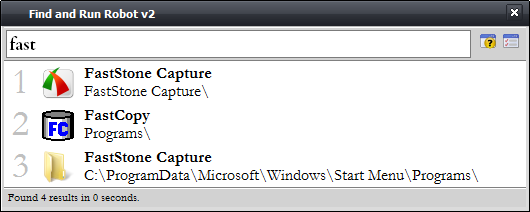
EditEditBoxHeight=28
EditResultLineHeight=20
EditSlideLineHeight=11
EditBoxFont.Name=Garamond Premr Pro Smbd
EditBoxFont.Size=14
EditBoxFont.Pitch=0
EditBoxFont.Style=1
EditBoxFont.Color=-2147483640
SmallResultFont.Name=Garamond
SmallResultFont.Size=12
SmallResultFont.Pitch=0
SmallResultFont.Style=0
SmallResultFont.Color=-2147483640
LargeResultFont.Name=Garamond
LargeResultFont.Size=28
LargeResultFont.Pitch=0
LargeResultFont.Style=0
LargeResultFont.Color=12632256
RicheditFont.Name=Consolas
RicheditFont.Size=10
RicheditFont.Pitch=0
RicheditFont.Style=0
RicheditFont.Color=-2147483640 FindAndRunRobot.ini
(7.8 KB - downloaded 404 times.)
FindAndRunRobot.ini
(7.8 KB - downloaded 404 times.)
BTW, is it possible to disable the numbers in the "big icons" mode?yes.
Another question that I have is: how does the new version of FARR handle "alternative" modes? I really like how in Launchy if you select "Google" (by typing gg for instance) and type TAB you go into "google search mode". In Dash this is even more evident, as the "Google search" text appears on top of your editbox which makes it clear that any words that you type will be used for a google search.
Another related question is how does FARR handle "alternative actions". By default, hitting ENTER opens or executes the program or file selected. Can you select things such as "open folder" or "copy", etc? In Dash and Quicksilver you can by hitting TAB until you select the action that you want to perform.
 Screenshot - 7_25_2007 , 8_48_17 AM.png
(34.5 KB, 416x398 - viewed 1171 times.)
Screenshot - 7_25_2007 , 8_48_17 AM.png
(34.5 KB, 416x398 - viewed 1171 times.) Screenshot - 7_25_2007 , 8_54_48 AM.png
(6.1 KB, 478x104 - viewed 1095 times.)
Screenshot - 7_25_2007 , 8_54_48 AM.png
(6.1 KB, 478x104 - viewed 1095 times.)Original address: https://www.donationcoder.com/forum/index.php?topic=9268.0

 VanDragt.com