DonationCoder.com forum
 
Read-only archive. This is a static copy of the DonationCoder.com forum. Reading and searching work as before; logging in, posting and private messages do not.
Archive of 2026-10-21 · About this archive · Main site

Author Topic: Custom Font Settings for FARR  (Read 23,058 times)

mouser

  • First Author
  • Administrator
  • Joined in 2005
  • *****
  • Posts: 40,931
    • Gathering Badge
    • Plugin Coding Medal
    • Participated in NANY Challenge Seventeen Times
    • Cody Award
    • Coding Snacks
    • Volunteers/Staff
Custom Font Settings for FARR
« on: June 27, 2007, 06:19 PM »
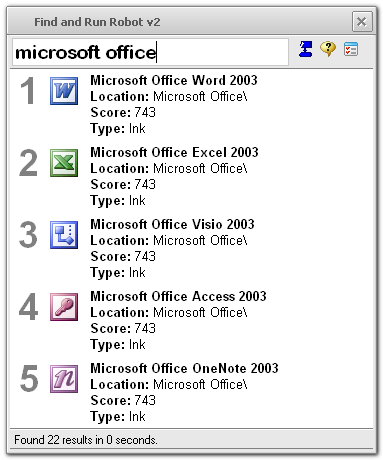
I'm just finishing up the ability to have complete control over the fonts/fontsizes used by FARR, if you want to tweak them:
[attach]

jgpaiva

  • Artificial Idiocy
  • Global Moderator
  • Joined in 2006
  • *****
  • Posts: 4,727
    • Cody Award
    • Participated in NANY Challenge Once
    • Coding Snacks
    • Portugal Inhabitant
    • Linux User
Re: Custom Font Settings for FARR
« Reply #1 on: June 27, 2007, 06:25 PM »
BEAUTIFUL!!  :-* :-* :-*

We need to find you a better icon for that "help" button, i think it isn't as good as the rest of the interface.

*jgpaiva searches the interweb*

[edit] that was fast.

what do you think about the following icon:
http://tango.freedesktop.org/static/cvs/tango-icon-theme/scalable/apps/help-browser.svg

It's from the Tango Icon Gallery, and from what i found, can be used in apps as long as there's a link to the tango gallery somewhere. [/edit]
« Last Edit: June 27, 2007, 06:37 PM by jgpaiva »

Lashiec

  • Member
  • Joined in 2006
  • **
  • Posts: 2,374
Re: Custom Font Settings for FARR
« Reply #2 on: June 27, 2007, 06:36 PM »
Nifty! As jgpaiva says, a new icon for "Help" and the other ones too :P

Nod5

  • Supporting Member
  • Joined in 2006
  • **
  • Posts: 1,175
    • Coding Snacks
    • Participated in NANY Challenge Three Times
    • Plugin Coding Medal
Re: Custom Font Settings for FARR
« Reply #3 on: July 20, 2007, 12:53 PM »
Mouser, the large font for the input box is very useful!  :Thmbsup:

I'd prefer separating the option for large/small icons and the option to have multiple columns on one row vs. multiple rows for each result. For example, I'd prefer small icons and two rows with text fields for each result (filename+path).

The filename is the only text field for results that is displayed in bold. To further increase the contrast between filename and the other text fields it would be good to have an option to change color for the other text fields (path, score and so on), for example to some shade of grey. Also, maybe two display modes could be set for the other text fields: in the default mode the other texts fields are invisible or light grey, in the second mode (activated when holding CTRL or CTRL+SHIFT or something like that) they become visible in black or dark grey.
« Last Edit: July 20, 2007, 12:57 PM by Nod5 »

tablaji

  • Participant
  • Joined in 2007
  • *
  • Posts: 10
Re: Custom Font Settings for FARR
« Reply #4 on: July 26, 2007, 11:46 AM »
Hello all,

I have two problems:
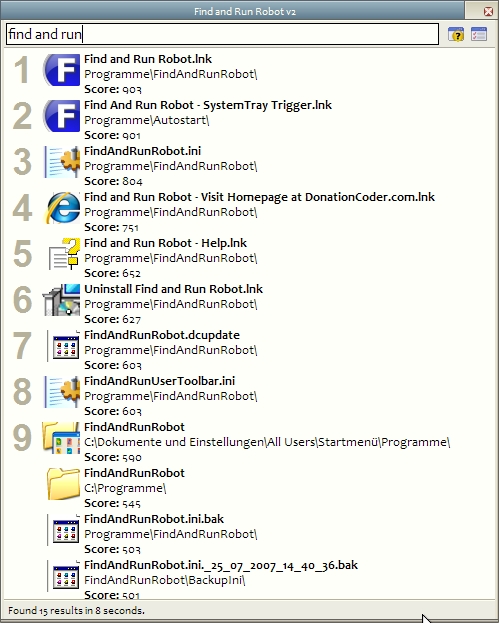
- my icons are displayed larger than the supposed field and therefore get trimmed:
[attach]

justice

  • Solve issues simply.
  • Supporting Member
  • Joined in 2006
  • **
  • Posts: 1,898
    • Participated in NANY Challenge Four Times
    • Cody Award
    • Coding Snacks
    • DJ Badge - DJ
Re: Custom Font Settings for FARR
« Reply #5 on: July 26, 2007, 01:17 PM »
it's the result text height option (or something similar) that you need to increase.

tablaji

  • Participant
  • Joined in 2007
  • *
  • Posts: 10
Re: Custom Font Settings for FARR
« Reply #6 on: July 26, 2007, 01:26 PM »
@justice:
I don't think so. - That does not make an effect.
Supposedly it has anything to do with a set icon size from my WinXP, but I could not find any setting that solves the (very very minor) problem.

jgpaiva

  • Artificial Idiocy
  • Global Moderator
  • Joined in 2006
  • *****
  • Posts: 4,727
    • Cody Award
    • Participated in NANY Challenge Once
    • Coding Snacks
    • Portugal Inhabitant
    • Linux User
Re: Custom Font Settings for FARR
« Reply #7 on: July 26, 2007, 01:35 PM »
tablaji:
I'd hardly say that's a "very very minor" problem. Let's try to figure this out:
Was it like that when you installed farr? Or did it appear after you changed the size of the text?
Do you have any program to increase the size of the icons somewhere? (like a desktop enhancer or something like that)
Does the small icon view in farr also have icons too big? (to see that view, just add "+sall" to your search)

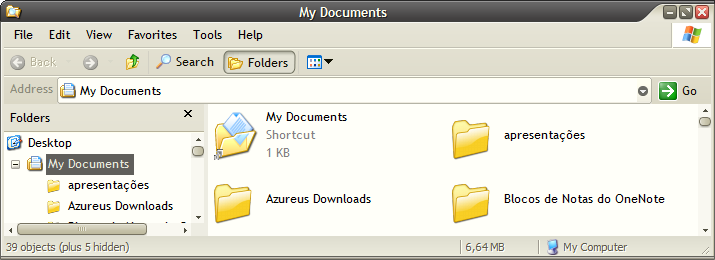
I've attached an image of my windows explorer with icon view. Could you please check if your icons have the same size? How about the icons on your Desktop?

Thanks a lot!

tablaji

  • Participant
  • Joined in 2007
  • *
  • Posts: 10
Re: Custom Font Settings for FARR
« Reply #8 on: July 26, 2007, 01:46 PM »
@jgpaiva:

> Was it like that when you installed farr?

Yes, from the very beginning. Currently I am not using any program for changing icons.

> Does the small icon view in farr also have icons too big? (to see that view, just add "+sall" to your search)

No, the small view is ok.

> I've attached an image of my windows explorer with icon view.

I was confused because you have the same skin as I have ;-)
My icons are same size as yours.

> How about the icons on your Desktop?

I have disabled them, but they shoud be  same size.

Thank you for your efforts.

jgpaiva

  • Artificial Idiocy
  • Global Moderator
  • Joined in 2006
  • *****
  • Posts: 4,727
    • Cody Award
    • Participated in NANY Challenge Once
    • Coding Snacks
    • Portugal Inhabitant
    • Linux User
Re: Custom Font Settings for FARR
« Reply #9 on: July 26, 2007, 02:04 PM »
I was confused because you have the same skin as I have ;-)
That can only mean one thing: you have good taste ;)

Thank you for your efforts.
Well, that's as far as i can go, but hopefuly, mouser will get here, read this, and come up with an immediate explanation :)

mouser

  • First Author
  • Administrator
  • Joined in 2005
  • *****
  • Posts: 40,931
    • Gathering Badge
    • Plugin Coding Medal
    • Participated in NANY Challenge Seventeen Times
    • Cody Award
    • Coding Snacks
    • Volunteers/Staff
Re: Custom Font Settings for FARR
« Reply #10 on: July 27, 2007, 12:13 PM »
Wow that sure is strange.. i think it's probably that you have your windows configured to show icons at some size larger than 32x32.. perhaps 48x48?  I've never actually seen this..  and jgpaiva had the right instinct to check out the size of your icons in windows explorer..

maybe you or i or someone can do a little searching about this and see if we cant find any articles about dealing with large icons.

justice

  • Solve issues simply.
  • Supporting Member
  • Joined in 2006
  • **
  • Posts: 1,898
    • Participated in NANY Challenge Four Times
    • Cody Award
    • Coding Snacks
    • DJ Badge - DJ
Re: Custom Font Settings for FARR
« Reply #11 on: July 27, 2007, 02:11 PM »
Looking at the icons I wonder if you have a high DPI instlaled and/or Large fonts setup? See http://www.microsoft.com/resources/documentation/windows/xp/all/proddocs/en-us/display_use_large_or_small_fonts.mspx?mfr=true

tablaji

  • Participant
  • Joined in 2007
  • *
  • Posts: 10
Re: Custom Font Settings for FARR
« Reply #12 on: July 27, 2007, 04:50 PM »
Me again.
You may remember I said that I have Desktop Icons turned off. - Now I enabled them again to find any hints, and indeed - they were set to a larger size (48px). After resetting the size to 32px and restart of FARR, they are displayed as should be.
Strange effect, anyway...

And, please also remember the other effect I noticed when changing the font size (see my first posting in this thread).

mouser

  • First Author
  • Administrator
  • Joined in 2005
  • *****
  • Posts: 40,931
    • Gathering Badge
    • Plugin Coding Medal
    • Participated in NANY Challenge Seventeen Times
    • Cody Award
    • Coding Snacks
    • Volunteers/Staff
Re: Custom Font Settings for FARR
« Reply #13 on: July 27, 2007, 05:02 PM »
can you explain the font size changing issue again, i'm not sure i understood it.

tablaji

  • Participant
  • Joined in 2007
  • *
  • Posts: 10
Re: Custom Font Settings for FARR
« Reply #14 on: July 30, 2007, 02:39 PM »
Mouser:
I open the options Dialog/"Plugins,Update,Fonts" an click on any of the arrow buttons for changing size. So far O.K.
When I click now anywhere in the options window, or even in the FARR main window, the recently used size button is being activated again - resulting in a change of the size I just adjusted. This repeats several times (sometimes more, sometimes less often).

I hope you understand it better now. Though very obvious, it is hard to describe for someone who has never encountered this effect before.
I have never seen a similar thing before. Nobody else has the same problem?

mackal

  • Member
  • Joined in 2007
  • **
  • Posts: 25
Re: Custom Font Settings for FARR
« Reply #15 on: August 23, 2007, 08:07 AM »
Hi all,

I am having the same problem that tablaji was having with the clipped icons.  My DPI is set to "Normal 96" in Control Panel > Display > Settings > Advanced, and I am using Display Settings > Appearance > Effects > "Use large icons" option in Windows, since otherwise things are just way too tiny on my laptop (1680x1050 resolution).  But my explorer icon sizes look the same as in jgpaiva's screenshot, so I do not think I have "unusual" settings.  Can FARR be made to work with my setup?

EDIT: actually a few more observations:
  • if I turn off "Use large icons" and restart FARR, FARR's "large icons" work/look great!  (but need a microscope to use the icons on my desktop then...  :( )
  • if I then turn "Use large icons" back on, but do not restart FARR, I get the best of both worlds
  • Launchy has no problems with icon sizes, regardless what my desktop setting is

Surely this is an issue in how FARR obtains the icons, no?  If Launchy can do it...  :P  (it uses the large version of icons that are present when "Use large icons" is off, even when that setting is turned on... somehow it ignores the desktop setting and polls the correct-sized icon directly).

jgpaiva: my explorer window icon sizes match the ones in your attached pic.  Do you not have the same clipping problem when using large icons in FARR?  It sounds like you don't... I wonder what's different about my setup...

BTW, I'm using the latest beta, downloaded today.


« Last Edit: August 23, 2007, 04:07 PM by mackal »

mouser

  • First Author
  • Administrator
  • Joined in 2005
  • *****
  • Posts: 40,931
    • Gathering Badge
    • Plugin Coding Medal
    • Participated in NANY Challenge Seventeen Times
    • Cody Award
    • Coding Snacks
    • Volunteers/Staff
Re: Custom Font Settings for FARR
« Reply #16 on: August 23, 2007, 05:16 PM »
I'll see what i can do about this.  i think it should be a simple fix..

apurvarc

  • Participant
  • Joined in 2009
  • *
  • Posts: 6
Re: Custom Font Settings for FARR
« Reply #17 on: May 01, 2009, 04:32 PM »
Mouser,

Recently jumped into FARR and love what you are doing here.

Just wanted to bump this thread up as I am having the same problem, and I am pretty sure its because I have large icons setup on my desktop. I am using WinXP. Any suggestions on how to fix this?

mouser

  • First Author
  • Administrator
  • Joined in 2005
  • *****
  • Posts: 40,931
    • Gathering Badge
    • Plugin Coding Medal
    • Participated in NANY Challenge Seventeen Times
    • Cody Award
    • Coding Snacks
    • Volunteers/Staff
Re: Custom Font Settings for FARR
« Reply #18 on: May 01, 2009, 05:29 PM »
let me have another look at it in the next few days.

mouser

  • First Author
  • Administrator
  • Joined in 2005
  • *****
  • Posts: 40,931
    • Gathering Badge
    • Plugin Coding Medal
    • Participated in NANY Challenge Seventeen Times
    • Cody Award
    • Coding Snacks
    • Volunteers/Staff
Re: Custom Font Settings for FARR
« Reply #19 on: May 01, 2009, 05:32 PM »
apurvarc and others:

let's move all discussion of this big icon problem to this thread:
http://www.donationcoder.com/forum/index.php?topic=17873.0

Original address: https://www.donationcoder.com/forum/index.php?topic=9008.0