DonationCoder.com forum
 
Read-only archive. This is a static copy of the DonationCoder.com forum. Reading and searching work as before; logging in, posting and private messages do not.
Archive of 2026-10-21 · About this archive · Main site

Author Topic: Disable tray icon entirely (aka stealth mode)  (Read 10,885 times)

robin850

  • "i'm driving three wheels these days..."
  • Supporting Member
  • Joined in 2007
  • **
  • Posts: 1
Disable tray icon entirely (aka stealth mode)
« on: April 12, 2007, 12:20 PM »
Newbie here.

Is it possible to disable the tray icon entirely?  I don't want any visible signs of ProcessTamer running, I just want it to work.  If I need to look at something I can live with clicking an icon.

Possible or "feature request"?

Cheers,

robin850

mouser

  • First Author
  • Administrator
  • Joined in 2005
  • *****
  • Posts: 40,931
    • Gathering Badge
    • Plugin Coding Medal
    • Participated in NANY Challenge Seventeen Times
    • Cody Award
    • Coding Snacks
    • Volunteers/Staff
Re: Disable tray icon entirely (aka stealth mode)
« Reply #1 on: April 13, 2007, 08:25 PM »
i think the best solution here is to use one of the existing utilities that will let you hide any/all icons that you want in the system tray -- this will let you still access the pt icon menu when you need to by using the special tool.

You can find a few listed here: http://www.donationcoder.com/forum/index.php?topic=2315

kooda

  • Participant
  • Joined in 2007
  • *
  • Posts: 2
Re: Disable tray icon entirely (aka stealth mode)
« Reply #2 on: September 07, 2007, 04:37 PM »
I found a utility on Bitsum web site called MakeService. These are the steps I took for my test setup:
  • Install MakeService from Bitsum
  • Install ProcessTamer and configure it to not start with Windows
  • Use MakeService to create a Windows service to run ProcessTamerTray.exe
After this, the ProcessTamer utility ran without any tray icon at all. I didn't test it for extended period of time and didn't see what would happen after machine reboot but it might be something to try.

PhilB66

  • Supporting Member
  • Joined in 2007
  • **
  • Posts: 1,522
Re: Disable tray icon entirely (aka stealth mode)
« Reply #3 on: September 07, 2007, 05:16 PM »
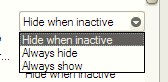
How about right clicking on the start button -->> Properties -->> Taskbar tab -->> Notification are -->> Customize -->> Select item and to change behavior.

Original address: https://www.donationcoder.com/forum/index.php?topic=8065.0