DonationCoder.com forum
 
Read-only archive. This is a static copy of the DonationCoder.com forum. Reading and searching work as before; logging in, posting and private messages do not.
Archive of 2026-10-21 · About this archive · Main site

Author Topic: Volume Control recommendation  (Read 12,571 times)

222fbj

  • Supporting Member
  • Joined in 2006
  • **
  • Posts: 53
Volume Control recommendation
« on: March 20, 2007, 03:32 AM »
Hi all,
I just found a freebie that solves a minor annoyance (for me anyway) by providing a convenient way to adjust/mute volume via the mouse.    http://www.zvolume.com/

hope it helps someone.

FBJ
Nighted

  • Meat Popsicle
  • Charter Honorary Member
  • Joined in 2005
  • ***
  • Posts: 572
Re: Volume Control recommendation
« Reply #1 on: March 20, 2007, 04:02 AM »
Cool, ZVolume used to be shareware.

Here's a couple other good ones.

VolumeTouch

3RVX
I`m a firm believer in the philosophy of a ruling class, especially since I rule.
« Last Edit: March 20, 2007, 04:10 AM by Nighted »

Curt

  • Supporting Member
  • Joined in 2006
  • **
  • Posts: 7,565
Re: Volume Control recommendation
« Reply #2 on: March 20, 2007, 09:36 AM »
a convenient way to adjust/mute volume via the mouse. 

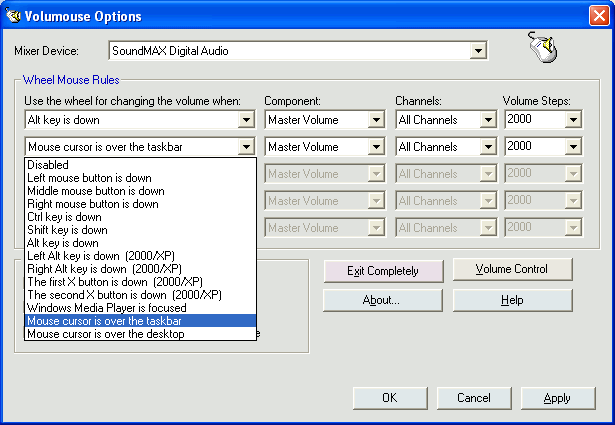
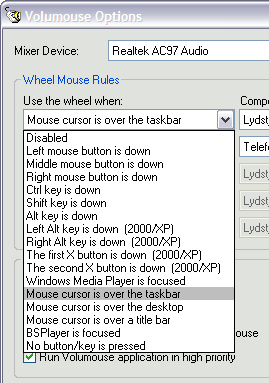
An even more convenient way might be Volumouse,  :-*
FREE at Snapfiles


[attachthumb=#]

skywalka

  • Member
  • Joined in 2005
  • **
  • Posts: 254
Re: Volume Control recommendation
« Reply #3 on: March 24, 2007, 04:49 PM »
I've used Volumouse for years.

Here's the original page: http://www.nirsoft.net/utils/volumouse.html

I haven't had the need to try anything else.

mouser

  • First Author
  • Administrator
  • Joined in 2005
  • *****
  • Posts: 40,931
    • Gathering Badge
    • Plugin Coding Medal
    • Participated in NANY Challenge Seventeen Times
    • Cody Award
    • Coding Snacks
    • Volunteers/Staff
Re: Volume Control recommendation
« Reply #4 on: March 24, 2007, 04:53 PM »
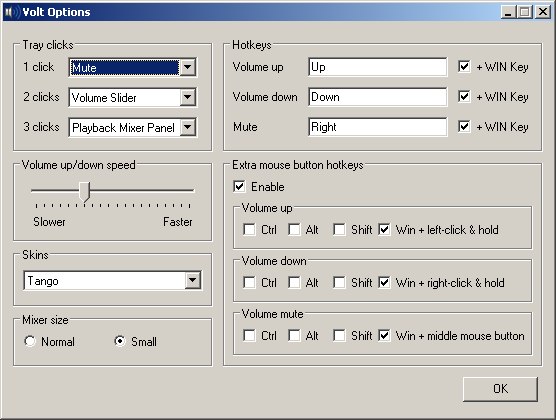
Don't miss VOLT from the NANY project.

Quote
WHAT IT DOES:
I humbly submit "Volt", a tray-based, hotkey-driven system volume controller.  The app is a redux of VolumeTray (http://glorysoft.omsk.ru/volumetray.html) that can use the same skin format but that will allow me to add/change a few things that VolumeTray does not have/allow.

http://www.donationcoder.com/forum/index.php?topic=6585

volt-options-dialog.jpg

DesertEagle

  • Charter Honorary Member
  • Joined in 2005
  • ***
  • Posts: 16
Re: Volume Control recommendation
« Reply #5 on: March 27, 2007, 08:23 PM »
You can check Audio Sliders as well. http://www.audiosliders.com

azza

  • Supporting Member
  • Joined in 2005
  • **
  • Posts: 12
Re: Volume Control recommendation
« Reply #6 on: March 29, 2007, 05:30 AM »
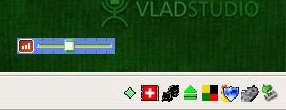
Personally I use VolumeTray, an excellent little program that sits in your Taskbar.
It provides two options for changing volume:
1.  Custombisable hotkeys
2.  Left click on the taskbar icon = volume up
    Right click on the taksbar icon = volume down

By default it puts two icons on the taskbar, which is a bit of overkill, but it can be very easily customised in user preferences to use just one.

Grab it from http://glorysoft.omsk.ru/

Curt

  • Supporting Member
  • Joined in 2006
  • **
  • Posts: 7,565
Re: Volume Control recommendation
« Reply #7 on: March 29, 2007, 01:42 PM »
I've used Volumouse for years.

Here's the original page: http://www.nirsoft.net/utils/volumouse.html

I haven't had the need to try anything else.

I so agree with you on this, skywalka. I too have been using Volumouse for several years, and have never had any need to try something else: Volumouse is THE easiest way of controlling the volume - you can have it anyway you want:

[attachimg=#]

On my PC I just point at the taskbar, and scroll. Thats it!  :Thmbsup:

And when you are happy with the settings, you can hide the tray icon.

http://www.nirsoft.net/utils/volumouse.html

Original address: https://www.donationcoder.com/forum/index.php?topic=7823.0