
mouser
I try "this word". Wonderful !!!!
I try "this word". Wonderful !!!!


 Topic: SelectoSurf v1.1.0 - Jan 25,2008 - AutoHotkey script to open plaintext URLs (Read 82,247 times)


theurl = http://www.google.com/search?hl=en&q=`%22%theurl%`%22;theurl = http://www.google.com/search?hl=en&q=`%22%theurl%`%22
theurl = http://duckduckgo.com/?q=`%22%theurl%`%22; otherwise a google (or other) search will be confucted with the phrase.
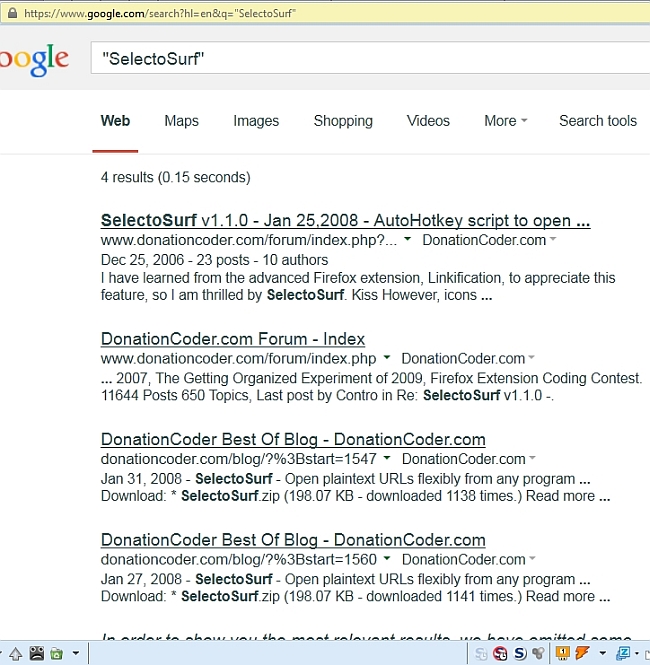 SelectoSurf AHK - 01 Google search.jpg
(224.5 KB, 650x665 - viewed 1814 times.)
SelectoSurf AHK - 01 Google search.jpg
(224.5 KB, 650x665 - viewed 1814 times.)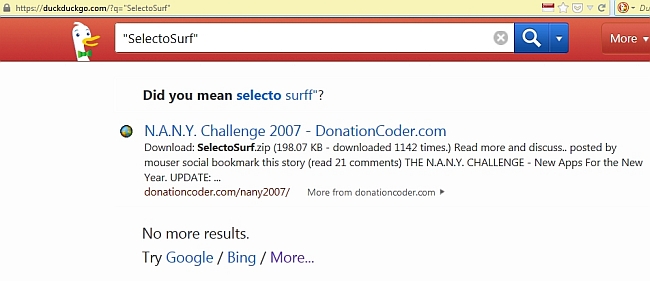 SelectoSurf AHK - 02 DuckGo search.jpg
(76.9 KB, 650x281 - viewed 1802 times.)
SelectoSurf AHK - 02 DuckGo search.jpg
(76.9 KB, 650x281 - viewed 1802 times.)

@mouser provided a rather nifty bit of code for AutoHotKey use (called Selectosurf) to do what you seem to want. You just select the text or URL that you want to search for, press the hotkeys Ctrl+Space (this can be changed), and the search engine of your choice (see lines 88, 89 in the code window below), and your browser opens a search result panel/window.
If you search on the DC Forum for Selectosurf, you will come up with these discussion threads:
- SelectoSurf v1.1.0 - Jan 25,2008 - AutoHotkey script to open plaintext URLs
- Launch a web from plain text expressing the url from that site
- fast map
I use it as per below, to invoke a duckduckgo search. It's rather fast. It puts the search string as a specific literal inside double quotes though, which you might want to change or vary.Code: (autohotkey)SelectoSurf: ;Sends selected plaintext url or other string and opens it in a browser or search. ; Based on SelectoSurf by mouser@donationcoder.com ; see http://www.donationcoder.com/Forums/bb/index.php?topic=6714.0 ; v 1.1.0, Jan 25, 2008 - improved browser option, added split-line reconstruction, added about box ; v 1.0.2, Nov 10, 2006 - initial release ; ; Select plaintext in any program and hit the hotkey (ctrl+space) ; If the text looks like a url or website name (like donationcoder.com), it will be opened ; otherwise a google (or other) search will be confucted with the phrase. ;------------------------------------------------------------------ ; ATTN, OPTIONAL: configure a specific browser overide, to bypass using default ;browserexe = iexplore.exe ;browserexe = C:\Program Files\Mozilla Firefox\firefox.exe ;------------------------------------------------------------------ temp = %clipboard% ; grab old clipboard Send, ^c ; send ctrl+C to copy new text to clipboard Sleep 100 ; sleep a tiny bit to give a chance for clipboard to propage theurl = %clipboard% ; *potential* url ; ; merge split lines StringReplace, theurl, theurl, `r`n,, All StringReplace, theurl, theurl, `r,, All StringReplace, theurl, theurl, `n,, All ; ; clean spaces StringReplace, theurl, theurl, %A_Space%,`%20, All ; ; Lets do some other common replacements StringReplace, theurl, theurl, hxxp:,http:, All StringReplace, theurl, theurl, hxxps:,http:, All StringReplace, theurl, theurl, h??p:,http:, All StringReplace, theurl, theurl, h??ps:,http:, All ; ; remove any leading or trailing () [] . " ' theurl := RegExReplace(theurl, "^[\.\(\)\'\[\]""]+") theurl := RegExReplace(theurl, "[\.\(\)\'\[\]""]+$") ;-------------------------- ; is it a full url isaurl = 0 IfInString, theurl, http: { isaurl = 1 } else IfInString, theurl, https: { isaurl = 1 } else IfInString, theurl, mailto { isaurl = 1 } else IfInString, theurl, ftp: { isaurl = 1 } else IfInString, theurl, www. { isaurl = 1 } else IfInString, theurl, .com { isaurl = 1 theurl = www.%theurl% } else IfInString, theurl, .net { isaurl = 1 theurl = www.%theurl% } else IfInString, theurl, .org { isaurl = 1 theurl = www.%theurl% } else { ; @sign with no spaces is an email ; ATTN: toddo if (0==1) { ; add a mailto theurl = mailto:%theurl% isaurl = 1 } else { ; search for the string - note this makes isaurl true always, which is what we want. ;theurl = http://www.google.com/search?hl=en&q=`%22%theurl%`%22 theurl = http://duckduckgo.com/?q=`%22%theurl%`%22 isaurl = 1 } } ;-------------------------- ; launch it? if (isaurl = 1) { ; beep? ; SoundBeep ; launch explorer with url if (browserexe != "") { Run, %browserexe% %theurl% } else { Run %theurl% } } ;-------------------------- ; restore clipboard clipboard = %temp% ;-------------------------- ; all done return ;--------------------------
Thanks a ton IaianB!
Riding on your script from Mouser, I made an ahk script to find Firefox, create a new tab, and open the search results:
...
_______________________________
I'm very pleased to see that it was of use/help.
I see that your nice and short script uses the AHK InputBox, and is browser-specific.
I am always interested in trying out scripts and proggies to test them to see whether they do what they were intended/designed for, and what makes them fail, and what they do when they fail or are presented with input that was not necessarily intended in their design - for example, what they might do when things cause them to fail in some manner.
Testing a script under different conditions is useful, because the good/effective or bad things about a script might not always be immediately apparent. In the case of Selectosurf some interesting points/features/possibilities are:
- 1. Housekeeping: The script makes a copy of the Clipboard current state before sending a copy command to capture the text highlighted by the user. At the end of the script, the saved clipboard state is replaced, overwriting any changes that the script may have made to the clipboard whilst the script was running. So you won't see the copied text in (for example) the CHS (Clipboard Help and Spell) list of recently copied text (it's called the "QuickPaste" list in CHS). It is good practice for a script to do some tidy up housekeeping after itself like this. But you might not want that. You might want to (say) keep any text you searched for, retained in QuickText. You can modify the script to do that by commenting out the housekeeping bits.
- 2. Browser: You can get it to use either the system default browser, or a specific browser which might not be the system default browser. This allows flexibility under the user's control.
- 3. Search engine: You have to specify the search engine in the parameters sent to the browser. This allows flexibility/choice under the user's control. However, you could modify this to just passing the assembled search text to the browser address bar ("awesome bar"), which could have been already set to apply that browser's default search engine to whatever was put in the address bar. More user choice.
- 4. Failure state: (Potentially very useful.) If the user does not select any text and presses the hotkeys to activate Selectosurf anyway, then the script does not fail (it makes a null copy capture) but picks up the last thing you happened to copy into the clipboard - could be an image or text, for example.
If you happen to be setting about collecting lots of material and references to search, then knowing this enables you to turn the combination of Selectosurf and CHS' QuickPaste (or whatever other Clipboard manager you might be using) into an incredibly useful. time-saving combination tool. You could go around copying the chunks of text - which may be either specific strings of text that you want to research or which may include some such specific strings in disconnected form. You can then select (click on) each item in turn from the CHS QuickPaste list and invoke Selectosurf in the usual way, for that item (ensure your mouse is not selecting any text at the time).
This works because selecting the item from the QuickPaste list pushes it into the Clipboard as "the last copied item", which is what Selectosurf falls back on when it makes a null copy capture (as above).
Before you do that though, if the item is a larger lump of text containing some text that would be irrelevant for a required search, then you can quickly edit it in CHS to reduce it to just that specific text string that you want to search for, and that goes into the QuickPaste list.
General note: You probably need to be mindful of whether you want the script to constrain the string to be an explicit literal field (inside double quotes):
e.g. something like:
theurl = http://duckduckgo.com/?q=`%22%theurl%`%22
theurl = http://duckduckgo.com/?q=%theurl%
- - when it is sent/put into the search box, as this will necessarily govern the outcome - i.e., the search result.(After some experiment, I think I find the latter more useful.)
- [/li]
- 5. Autocopy: If you have Firefox, you can use the AutoCopy extension:
QuoteSelect text on any web page and it will be automatically copied to the clipboard. It works in much the same way as does Trillian or mIrc.For capturing text strings containing more than one word, you have to select them all using the mouse, whereupon they are copied to the Clipboard.
Paste on middle click into textboxes, the url bar, and the search bar.
_______________________________________________
For capturing text strings containing just one word, double-clicking on the single word selects and copies that single word to the Clipboard.
As above in point 4, if using (say) CHS:QuoteYou can then select (click on) each item in turn from the CHS QuickPaste list and invoke Selectosurf in the usual way, for that item. This works because selecting the item from the QuickPaste list pushes it into the Clipboard as "the last copied item". Before you do that though, if the item is a larger lump of text containing some text that would be irrelevant for a required search, then you can quickly edit it in CHS to reduce it to just that specific text string that you want to search for, and that goes into the QuickPaste list.With a clipboard manager such as (say) CHS, this can be very handy/speedy when gathering reference strings, as it puts them into the "latest captures" list - the QuickPaste list. If you select a string, using the mouse, and then invoke Selectosurf, the selected item goes into the Clipboard (and thus the CHS QuickPaste list) before Selectosurf saves the Clipboard state and makes its own copy of the selected item (which copy is later expunged when the script exits).
_____________________
The degree of control possible over CHS puts the user in full control of using things like the QuickPaste list and even the content and order/sequence of items on it, making it an ideal tool for this sort of repetitive collection-and-research process.
I mention these points/features/possibilities because you describe your nice and short script as being derived from ("Riding on") the Selectosurf script, and your script uses the AHK InputBox, and is browser-specific.
The InputBox could be an area for potential process improvement, by eliminating it altogether when/if it is redundant.
It thus occurred to me that you might be unaware of the above Selectosurf points/features/possibilities. I imagined you manually typing each search string (text item) into the InputBox, and wondered how many times that might be repeated with different/new strings and how many hours that might consume over a researcher's lifetime, when one could perhaps easily automate the data capture aspect to a major extent, thus avoiding most/all of the manual input, and leaving you at liberty to use the freed up cognitive surplus for something more interesting/enjoyable.
So, just some thoughts. Hope they are not too jumbled.
I abhor using manual processes where automation can be more usefully applied, and I am often appalled when I come across some unnecessary and repetitive tedium that we have unwittingly imposed upon ourselves or others.
All kudos to @mouser and his Selectosurf and CHS.
Original address: https://www.donationcoder.com/forum/index.php?topic=6714.0
.png)