DonationCoder.com forum
 
Read-only archive. This is a static copy of the DonationCoder.com forum. Reading and searching work as before; logging in, posting and private messages do not.
Archive of 2026-10-21 · About this archive · Main site

Last post Author Topic: Latest FARR v2.00.140 ALPHA PREVIEW Release - Aug 15, 2007  (Read 840,318 times)

Lashiec

  • Member
  • Joined in 2006
  • **
  • Posts: 2,374
Re: Latest FARR v2.00.135 ALPHA PREVIEW Release - July 17, 2007
« Reply #775 on: July 24, 2007, 10:58 PM »
mouser, I've been experiment with FARR this night, and I have a technical question. Does it really make a difference in reaction time to have the heaviest or the lightest memory profile in "Inactive memory use"? I'm not noticing anything, and I remember correctly, I didn't have speed problems in the old workhorse.

mouser

  • First Author
  • Administrator
  • Joined in 2005
  • *****
  • Posts: 40,931
    • Gathering Badge
    • Plugin Coding Medal
    • Participated in NANY Challenge Seventeen Times
    • Cody Award
    • Coding Snacks
    • Volunteers/Staff
Re: Latest FARR v2.00.135 ALPHA PREVIEW Release - July 17, 2007
« Reply #776 on: July 24, 2007, 11:22 PM »
the only difference these settings make is in waking up from the system tray after a long time of non-use.

jOc

  • Supporting Member
  • Joined in 2006
  • **
  • Posts: 8
Re: Latest FARR v2.00.135 ALPHA PREVIEW Release - July 17, 2007
« Reply #777 on: July 25, 2007, 07:57 PM »
Quote
Josh actually asked for this and i kind of implemented it in an odd way -- i need to add an alias to make it easier to use. Basically i added a way to tell farr what to do if there are no results found.  See the "The noresults alias" help topic in Advanced Use:
Code
You can now create a special alias called noresults.
If user hits enter when no results are shown, this alias will be triggered.
It can be useful if you want to do something like launch what they type directly (as if it was on path), or invoke another search program, etc.  Just use $$1 in the results.
I will make a default alias for this to make it easier to use.

Aha. I thought there might already be a solution. Thanks!

But I have played with it and I don't get it. Should there be any search pattern? For example, how to throw regedit keyword to system, like it would be throug standard windows run box?

Quote
Quote
The improvement I do like very much is browsing through folders. I have a folder for which I have set high score. In that folder I put links to folders I use often. What I like is, if I start to type the name of the link (that is in that folder, having favorits links) and pres tab the alias for the link is resolved into path and you can directly browse in that *favorits* folder.

just to make sure: you are saying this is something you already can do, not requesting something new?
Of course this works. And I use it all the times. For example if you would like to browse through a folder that is deep in the hierarchy of the hard disk, what you can do is to put a link to that folder into the folder that FARR seeks. You then just type the name that you gave to link and press type and voila, FARR throws you to that folder and you can search inside that target folder.
« Last Edit: July 25, 2007, 08:21 PM by jOc »

Trilinea

  • Supporting Member
  • Joined in 2007
  • **
  • Posts: 14
Re: Latest FARR v2.00.135 ALPHA PREVIEW Release - July 17, 2007
« Reply #778 on: July 25, 2007, 11:48 PM »
MOUSER = AWESOME! FARR ALPHA = AWESOME!  :Thmbsup:

Thank you!

:)

xbz

  • Participant
  • Joined in 2007
  • *
  • Posts: 4
Re: Latest FARR v2.00.135 ALPHA PREVIEW Release - July 17, 2007
« Reply #779 on: July 27, 2007, 06:28 AM »
Trying FARR v2 and i love it!

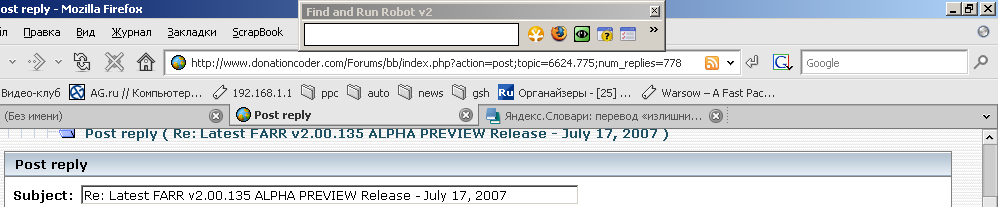
But.. i want to use FARR as a launchbar, so i need it to be always on top, always on screen, it is possible but it looks like this [attach]

Armando

  • Charter Member
  • Joined in 2005
  • ***
  • Posts: 2,727
    • Coding Snacks
Re: Latest FARR v2.00.135 ALPHA PREVIEW Release - July 17, 2007
« Reply #780 on: July 27, 2007, 07:13 AM »
Trying FARR v2 and i love it!

But.. i want to use FARR as a launchbar, so i need it to be always on top, always on screen, it is possible but it looks like this [attach]
"I suppose it can be said that I'm an absent-minded driver. It's true that I've driven through a number of red lights on occasion, but on the other hand, I've stopped at a lot of green ones but never gotten credit for it."
Glenn Gould
« Last Edit: July 27, 2007, 07:17 AM by Armando »

xbz

  • Participant
  • Joined in 2007
  • *
  • Posts: 4
Re: Latest FARR v2.00.135 ALPHA PREVIEW Release - July 17, 2007
« Reply #781 on: July 27, 2007, 08:04 AM »
Don't you use farr to launch stuff using your... keyboard?  :)

farr appears and disappears when you hit the "break" key (Can also be configured to work with (Alt+Space), (Ctrl+Space) etc.). Why would you need it to be permanently there?
Why FARR have toolbar with buttons? Isn't toolbar is for mouse? I prefer permanent toolbar, not hitting "break" before using toolbar with my mouse :)

Thanks for the skin tip, FARR looks better without captition, but it is still thick, is there any skin to make it more more thin :) It would be perfect if FARR fit my browser captition, not covering the browser menu buttons

mouser

  • First Author
  • Administrator
  • Joined in 2005
  • *****
  • Posts: 40,931
    • Gathering Badge
    • Plugin Coding Medal
    • Participated in NANY Challenge Seventeen Times
    • Cody Award
    • Coding Snacks
    • Volunteers/Staff
Re: Latest FARR v2.00.135 ALPHA PREVIEW Release - July 17, 2007
« Reply #782 on: July 27, 2007, 08:42 AM »
you can drag the divider where the toolbar is far to the right to completely hide it.

Armando

  • Charter Member
  • Joined in 2005
  • ***
  • Posts: 2,727
    • Coding Snacks
Re: Latest FARR v2.00.135 ALPHA PREVIEW Release - July 17, 2007
« Reply #783 on: July 27, 2007, 06:08 PM »
Thanks for the skin tip, FARR looks better without captition, but it is still thick, is there any skin to make it more more thin :) It would be perfect if FARR fit my browser captition, not covering the browser menu buttons

Maybe someone will be willing to make such a skin. I wouldn't know how to do it though.

You should also have a look at LaunchBar Commander http://www.donationcoder.com/Software/Mouser/LaunchBarCommander/index.html.
"I suppose it can be said that I'm an absent-minded driver. It's true that I've driven through a number of red lights on occasion, but on the other hand, I've stopped at a lot of green ones but never gotten credit for it."
Glenn Gould

xbz

  • Participant
  • Joined in 2007
  • *
  • Posts: 4
Re: Latest FARR v2.00.135 ALPHA PREVIEW Release - July 17, 2007
« Reply #784 on: July 28, 2007, 05:01 PM »
strange behavior for some cyrillic letters
try "search роутер"

xbz

  • Participant
  • Joined in 2007
  • *
  • Posts: 4
Re: Latest FARR v2.00.135 ALPHA PREVIEW Release - July 17, 2007
« Reply #785 on: July 29, 2007, 05:13 AM »
you can drag the divider where the toolbar is far to the right to completely hide it.

Could you make butons on toolbar just stand on their places? Thats all i want


To make FARR thiner
Options -> Plugins, etc -> EditBox Height

jsturtridge

  • Supporting Member
  • Joined in 2006
  • **
  • Posts: 8
Re: Latest FARR v2.00.135 ALPHA PREVIEW Release - July 17, 2007
« Reply #786 on: July 30, 2007, 02:24 PM »
Mouser,

Minor point UI/usability point.  I've got a lot of aliases in "my_aliases" (more than a screenful) and when I want to move an alias from the top to the bottom - I would expect to be able to drag the alias to the bottom of the visible window and since there are more aliases off the page - it would scroll automatically until the end of the alias list was reached - but it doesn't.

Minor point though - all the rest looking good.

J.
« Last Edit: July 30, 2007, 02:35 PM by jsturtridge »

Code6226

  • Honorary Member
  • Joined in 2007
  • **
  • Posts: 12
    • Plugin Coding Medal
Re: Latest FARR v2.00.135 ALPHA PREVIEW Release - July 17, 2007
« Reply #787 on: August 01, 2007, 07:19 PM »
Bug with Uninstaller plugin (which I love, btw): When you uninstall something, it is not removed from the list.
It would be really nice if the list of installed programs refreshed on its own after you uninstall something... or at least remove that particular program.
I know, the program is not removed from the registry list until after the particular Uninstaller is done doing its thing, and it's hard to say when that is... but it's not that hard.
Worst case you could Launch the uninstaller with another helper program, which would ExecWait the Uninstaller, and once closed, refresh the list.
That would give proper results no matter if the Uninstaller was canceled or succeeded.

Other than that, great work!

PS: Still wish there was Fuzzy Search like Launchy has so I can find "noetpad", but no biggy. ;)

mouser

  • First Author
  • Administrator
  • Joined in 2005
  • *****
  • Posts: 40,931
    • Gathering Badge
    • Plugin Coding Medal
    • Participated in NANY Challenge Seventeen Times
    • Cody Award
    • Coding Snacks
    • Volunteers/Staff
Re: Latest FARR v2.00.135 ALPHA PREVIEW Release - July 17, 2007
« Reply #788 on: August 01, 2007, 07:24 PM »
Quote
Still wish there was Fuzzy Search like Launchy has so I can find "noetpad", but no biggy.

can you be a little clearer about what you mean?

ah i see you want when you type noetpad for it to find notepad, despite the bad spelling, even without adding it as a special alias. i'm afraid thats not coming anytime soon, however i will probably try to add a first word abreviation thing where if you type a few letters like np it will match notepad.
« Last Edit: August 01, 2007, 07:28 PM by mouser »

Nod5

  • Supporting Member
  • Joined in 2006
  • **
  • Posts: 1,175
    • Coding Snacks
    • Participated in NANY Challenge Three Times
    • Plugin Coding Medal
Re: Latest FARR v2.00.135 ALPHA PREVIEW Release - July 17, 2007
« Reply #789 on: August 01, 2007, 09:05 PM »
I've noticed a small GUI-related thing...

If I set FARR v2.00.135 to
- checked: options > auto-shrink window to fit results
- unchecked: options > alpha fade into view
- set to some degree: options > window transparency
(... perhaps some other setting - i've played around with many of them)
I then get a very brief but clearly noticeable black colored FARR results window when launching FARR. It's as if the whole results part of the window first gets painted black in a flash and then quickly re-painted like it should be. I hope that description makes sense - I can't think of a better way to put it.

Changing any of the three settings above removes the brief "black flash"

mouser

  • First Author
  • Administrator
  • Joined in 2005
  • *****
  • Posts: 40,931
    • Gathering Badge
    • Plugin Coding Medal
    • Participated in NANY Challenge Seventeen Times
    • Cody Award
    • Coding Snacks
    • Volunteers/Staff
Re: Latest FARR v2.00.135 ALPHA PREVIEW Release - July 17, 2007
« Reply #790 on: August 01, 2007, 09:09 PM »
thanks nod, i'll look into it. sounds like the transparancy stuff may be causing some troubles.

Armando

  • Charter Member
  • Joined in 2005
  • ***
  • Posts: 2,727
    • Coding Snacks
Re: Latest FARR v2.00.135 ALPHA PREVIEW Release - July 17, 2007
« Reply #791 on: August 02, 2007, 03:30 PM »
There seem to be a little bug with the "Plugins, Updates, Fonts"-->"Advanced Custom Font Configuration". Don't know if anybody mentionned it yet.

When I start changing the "EditBox Height" value, everything I'll click on afterwards in the option window will add one unit to the EditBox Height. it's not even possible to close the option window normally (atl+f4, the right corner X icon, etc.). The only way to get rid of the option window, is to hit the hotkey (Pause/Break, Alt+Space or Ctrl+Space) twice to make farr disappear. When relaunched with the hotkey, farr's fine.
"I suppose it can be said that I'm an absent-minded driver. It's true that I've driven through a number of red lights on occasion, but on the other hand, I've stopped at a lot of green ones but never gotten credit for it."
Glenn Gould

mouser

  • First Author
  • Administrator
  • Joined in 2005
  • *****
  • Posts: 40,931
    • Gathering Badge
    • Plugin Coding Medal
    • Participated in NANY Challenge Seventeen Times
    • Cody Award
    • Coding Snacks
    • Volunteers/Staff
Re: Latest FARR v2.00.135 ALPHA PREVIEW Release - July 17, 2007
« Reply #792 on: August 02, 2007, 03:43 PM »
i can't reproduce this armando, anyone else?

Armando

  • Charter Member
  • Joined in 2005
  • ***
  • Posts: 2,727
    • Coding Snacks
Re: Latest FARR v2.00.135 ALPHA PREVIEW Release - July 17, 2007
« Reply #793 on: August 02, 2007, 03:54 PM »
Ok, let me try this with other skins since it looks like a GUI problem.
"I suppose it can be said that I'm an absent-minded driver. It's true that I've driven through a number of red lights on occasion, but on the other hand, I've stopped at a lot of green ones but never gotten credit for it."
Glenn Gould

Armando

  • Charter Member
  • Joined in 2005
  • ***
  • Posts: 2,727
    • Coding Snacks
Re: Latest FARR v2.00.135 ALPHA PREVIEW Release - July 17, 2007
« Reply #794 on: August 02, 2007, 04:00 PM »
Different skins don't have any effect -- predictably since the option window is not skinned.

Let me add that the bug occurs only when I'm changing the Height value with the little "arrow" buttons. It doesn't happen when I change the value using the keyboard.
"I suppose it can be said that I'm an absent-minded driver. It's true that I've driven through a number of red lights on occasion, but on the other hand, I've stopped at a lot of green ones but never gotten credit for it."
Glenn Gould

Nod5

  • Supporting Member
  • Joined in 2006
  • **
  • Posts: 1,175
    • Coding Snacks
    • Participated in NANY Challenge Three Times
    • Plugin Coding Medal
Re: Latest FARR v2.00.135 ALPHA PREVIEW Release - July 17, 2007
« Reply #795 on: August 02, 2007, 06:48 PM »
mouser, just an addition: I later realized that that brief black background I wrote about also appears every time the window gets auto-shrunk (or de-shrunk) given these settings:
- checked: options > auto-shrink window to fit results
- set to some degree: options > window transparency

tablaji

  • Participant
  • Joined in 2007
  • *
  • Posts: 10
Re: Latest FARR v2.00.135 ALPHA PREVIEW Release - July 17, 2007
« Reply #796 on: August 03, 2007, 08:44 AM »
Armando's problem is the same that I described here:
http://www.donationcoder.com/forum/index.php?topic=9008.msg70048#msg70048

Armando

  • Charter Member
  • Joined in 2005
  • ***
  • Posts: 2,727
    • Coding Snacks
"I suppose it can be said that I'm an absent-minded driver. It's true that I've driven through a number of red lights on occasion, but on the other hand, I've stopped at a lot of green ones but never gotten credit for it."
Glenn Gould

lethalrocks

  • Participant
  • Joined in 2007
  • *
  • Posts: 3
Re: Latest FARR v2.00.135 ALPHA PREVIEW Release - July 17, 2007
« Reply #798 on: August 06, 2007, 08:06 PM »
Bug in #138... (although present in version 1 too)

[attachthumb]
« Last Edit: August 06, 2007, 09:04 PM by lethalrocks »

tablaji

  • Participant
  • Joined in 2007
  • *
  • Posts: 10
Re: Latest FARR v2.00.135 ALPHA PREVIEW Release - July 17, 2007
« Reply #799 on: August 09, 2007, 10:24 AM »
one small wish:
I am used to select all text in an input box with Ctrl+A, but in FARR, the input field does not react to this.
Mouser, could you implement this?

Original address: https://www.donationcoder.com/forum/index.php?topic=6624.0