DonationCoder.com forum
 
Read-only archive. This is a static copy of the DonationCoder.com forum. Reading and searching work as before; logging in, posting and private messages do not.
Archive of 2026-10-21 · About this archive · Main site

Last post Author Topic: Compressing files into multiple .zip archives with each .zip being independent  (Read 202,041 times)

BoyWonder

  • Participant
  • Joined in 2007
  • *
  • Posts: 3
Hey!!! This tool is wicked!! This is exactly what Ive been looking for. I was wondering if it is possible to release an updated version that keeps the file name the same with exception to the extension??!?

ie

pic1.jpg –> pic1.zip

This would be a nice option

skwire

  • I eat Coding Snacks for breakfast...
  • Global Moderator
  • Joined in 2005
  • *****
  • Posts: 5,297
    • Participated in NANY Challenge Seventeen Times
    • Coding Snacks
    • Superboy Coder
    • Cody Award
    • Volunteers/Staff
    • Gathering Badge
Hey!!! This tool is wicked!! This is exactly what Ive been looking for.

Thanks, I'm glad you like it.

I was wondering if it is possible to release an updated version that keeps the file name the same with exception to the extension??!?

ie

pic1.jpg –> pic1.zip

This would be a nice option

Hmmm...I'm not exactly understanding what you want since there going to be numerous files in each zip (as in, how would I know which filename to make the zipname from?).  Can you elaborate a bit further?

BoyWonder

  • Participant
  • Joined in 2007
  • *
  • Posts: 3
What i mean is if I have a folder full of, for instance, images;

pic1.jpg
pic2.jpg
pic3.jpg
etc...

After running Spinzip, I would like to have

pic1.zip
pic2.zip
pic3.zip
etc...

with of course the corresponding compressed file, so in result I would have as many
compressed files as I would uncompressed files.  The only difference would be the file size.

Is this more clear?

Curt

  • Supporting Member
  • Joined in 2006
  • **
  • Posts: 7,565
@ skwire - no problems found, [Edit: wow, you just wrote about this, and I didn't see it!) but it would be so nice if you will add option the keep the original name of the file, please! ie: picSomeName.jpg => picSomeName.jpg.zip, or picSomeName.jpg => picSomeName.zip


Edit2: To clear it up a little: Webshots images's name is vital to another file which contains informations abouth the picture. So the name of the picture cannot / must not be changed.

:tellme:
« Last Edit: October 02, 2007, 02:54 PM by Curt »

skwire

  • I eat Coding Snacks for breakfast...
  • Global Moderator
  • Joined in 2005
  • *****
  • Posts: 5,297
    • Participated in NANY Challenge Seventeen Times
    • Coding Snacks
    • Superboy Coder
    • Cody Award
    • Volunteers/Staff
    • Gathering Badge
with of course the corresponding compressed file, so in result I would have as many
compressed files as I would uncompressed files.  The only difference would be the file size.
Is this more clear?

Ah, so you want one zip per file no matter what the size of the file is, right?  8000 bitmaps would result in 8000 zips, eh?

@ skwire - no problems found, but it would be so nice if you will add option the keep the original name of the file, please! ie: pic1.jpg => pic1.jpg.zip, or pic1.jpg => pic1.zip

Sure, easily done if 'one zip per file' was what BoyWonder initially wanted.

BoyWonder

  • Participant
  • Joined in 2007
  • *
  • Posts: 3
Quote
Ah, so you want one zip per file no matter what the size of the file is, right?  8000 bitmaps would result in 8000 zips, eh?

Yes, Im looking for one zip per file regardless of the file size with the root of the file name retained.

Lashiec

  • Member
  • Joined in 2006
  • **
  • Posts: 2,374
Oh, then WinRAR will do the job. Look here for the details (I don't feel like repeating myself :P)

skwire

  • I eat Coding Snacks for breakfast...
  • Global Moderator
  • Joined in 2005
  • *****
  • Posts: 5,297
    • Participated in NANY Challenge Seventeen Times
    • Coding Snacks
    • Superboy Coder
    • Cody Award
    • Volunteers/Staff
    • Gathering Badge
Yes, Im looking for one zip per file regardless of the file size with the root of the file name retained.

Sure, easily done.  I'll find some time this week(end) to add your request.  I'll also work in Curt's request: picSomeName.jpg.zip or picSomeName.zip

Oh, then WinRAR will do the job. Look here for the details (I don't feel like repeating myself :P)

WinRAR is a great application.  However, it's possible that BoyWonder does not own WinRAR nor does he plan on purchasing it.

lanux128

  • Global Moderator
  • Joined in 2005
  • *****
  • Posts: 6,277
    • Coding Snacks
    • Volunteers/Staff
    • Gathering Badge
    • Participated in NANY Challenge Once
    • Linux User
Oh, then WinRAR will do the job. Look here for the details (I don't feel like repeating myself
;D Lashiec, i mentioned the same thing here but i think it's a good feature to have in SpinZip as well since i can copy it into a USB drive & use it where WinRAR is not available.. :)


• a batch Zip program

testgames

  • Participant
  • Joined in 2007
  • *
  • Posts: 10
Hi,
The recursive feature doesn't work for me. Any tricks?

I did release a later version that isn't on this thread.  You can download it here: http://www.autohotkey.net/~skwire/apps/spinzip/spinzip-setup-v0.0.4.exe

It offers recursive zipping as well as a single wildcard (*.jpg, etc.) option.  If you find problems with it...don't hesitate to let me know.  Thanks.  =]


testgames

  • Participant
  • Joined in 2007
  • *
  • Posts: 10
The recursive directory zip doesn't work for me.
Any solution or trick to make this works?

mouser

  • First Author
  • Administrator
  • Joined in 2005
  • *****
  • Posts: 40,931
    • Gathering Badge
    • Plugin Coding Medal
    • Participated in NANY Challenge Seventeen Times
    • Cody Award
    • Coding Snacks
    • Volunteers/Staff
it might be nice to have the option to name the zip as the FIRST file in the zip if there are more than 1 per zip.

skwire

  • I eat Coding Snacks for breakfast...
  • Global Moderator
  • Joined in 2005
  • *****
  • Posts: 5,297
    • Participated in NANY Challenge Seventeen Times
    • Coding Snacks
    • Superboy Coder
    • Cody Award
    • Volunteers/Staff
    • Gathering Badge
The recursive directory zip doesn't work for me.
Any solution or trick to make this works?

Try the latest version (v0.0.5.0) I just uploaded.  You can find the download link in the next post.

skwire

  • I eat Coding Snacks for breakfast...
  • Global Moderator
  • Joined in 2005
  • *****
  • Posts: 5,297
    • Participated in NANY Challenge Seventeen Times
    • Coding Snacks
    • Superboy Coder
    • Cody Award
    • Volunteers/Staff
    • Gathering Badge
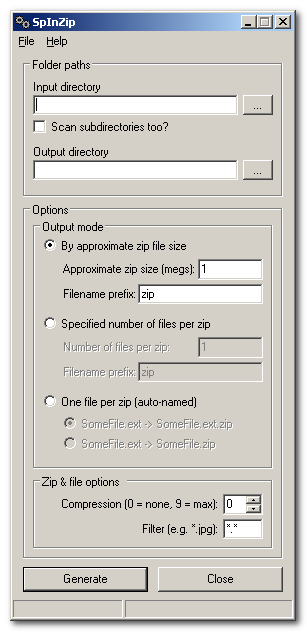
First of all, apologies to BoyWonder and Curt that this version took so long to put together.  Real life, work, blah, blah...you know the drill.  At any rate, here's a screenshot of the newest version (0.0.5.0):

spinzip.png

You can download it from: http://www.autohotkey.net/~skwire/apps/spinzip/spinzip-setup-v0.0.5.0.exe

Questions, comments, and flak are all welcome.

testgames

  • Participant
  • Joined in 2007
  • *
  • Posts: 10
Hi,
Thanks for this version.
My problem is that it doesn't create the zip files (in oppose to the old versions).
Can you fixed that?
Thanks
Testgames
« Last Edit: December 07, 2007, 08:04 AM by testgames »

justice

  • Solve issues simply.
  • Supporting Member
  • Joined in 2006
  • **
  • Posts: 1,898
    • Participated in NANY Challenge Four Times
    • Cody Award
    • Coding Snacks
    • DJ Badge - DJ
I can confirm it doesn't create any zipfiles. Also if you could tick the "include subdirectory" option by default and include standard sizes (650, 700,4.7GB) that would make it quicker to use.

Urig

  • Participant
  • Joined in 2007
  • *
  • Posts: 1
It looks like a great tool. I look forward to receiving the fixed one.

skwire

  • I eat Coding Snacks for breakfast...
  • Global Moderator
  • Joined in 2005
  • *****
  • Posts: 5,297
    • Participated in NANY Challenge Seventeen Times
    • Coding Snacks
    • Superboy Coder
    • Cody Award
    • Volunteers/Staff
    • Gathering Badge
My problem is that it doesn't create the zip files (in oppose to the old versions).
Can you fixed that?

Hmmmm...it works here without any problems.

1) What OS are you using?

2) Are there no zip files no matter which of the three output modes you can choose from?

3) What are the input and output paths you're using (so I can try them on my system)?

skwire

  • I eat Coding Snacks for breakfast...
  • Global Moderator
  • Joined in 2005
  • *****
  • Posts: 5,297
    • Participated in NANY Challenge Seventeen Times
    • Coding Snacks
    • Superboy Coder
    • Cody Award
    • Volunteers/Staff
    • Gathering Badge
Actually, I may have found an (the?) issue.  Replace the spinzip.exe in your install folder with this one:

http://www.autohotkey.net/~skwire/apps/spinzip/spinzip.exe

Let me know if that works.  If not, please answer my questions above.  Thanks.  =]

testgames

  • Participant
  • Joined in 2007
  • *
  • Posts: 10
Hi,
Thanks a lot for the quick response.

I have tested the application and here are the details:
The application works fine with small size directories (up to 2 GB).
When I tried to create stand alone zip files out of a 7 GB directory, only 2 out of 4 zip files were actually created.
Also, when choosing the big directory and marking the "scan subdirectories too?" box, most of the time the application gets stuck and I need to restart it (4 out of 5 times it doesn't work).

I am sure this app wasn't meant to handle such a big size directories, but maybe with some minor changes it will.
I appriciate your help !
BR,
testgames.

skwire

  • I eat Coding Snacks for breakfast...
  • Global Moderator
  • Joined in 2005
  • *****
  • Posts: 5,297
    • Participated in NANY Challenge Seventeen Times
    • Coding Snacks
    • Superboy Coder
    • Cody Award
    • Volunteers/Staff
    • Gathering Badge
I am sure this app wasn't meant to handle such a big size directories, but maybe with some minor changes it will.

Correct, I really didn't have such large directories in mind when creating the app.  You may be better off using a full-fledged archiving app for your purposes.  That being said, can you give me some details about the directories you're using?  You mention a 7GB folder. 

1) What sorts of sizes of files are we talking about here?  Biggest?  Smallest?

2) What sort of (sub)folder structure?  How many levels?  Path length?

3) What output mode are you using?

I usually test this app on my wife's family picture folder which currently has 3600 files comprising 2.75GB of space.  Granted, most of the files are fairly small on the scale of things (from a few hundred kilobytes to a couple of megs each).  I also test on my software archive folder which has many levels and all sorts of files and file sizes.

Ralf Maximus

  • Supporting Member
  • Joined in 2007
  • **
  • Posts: 927
    • Coding Snacks
The .zip format has an upper limit of 2GB per file.  You can create spanning .zip files for larger jobs, but a tool like RAR is better suited for humungoid directories.

Lashiec

  • Member
  • Joined in 2006
  • **
  • Posts: 2,374
Wasn't the limit 4 GB?

Forget about it, I just checked the WinRAR helpfile, and it's 2 GB. You can always use the Zip64 extension, though.
« Last Edit: December 09, 2007, 07:54 PM by Lashiec »

Ralf Maximus

  • Supporting Member
  • Joined in 2007
  • **
  • Posts: 927
    • Coding Snacks
Nope, 2GB.  Pure .zip is an old standard, going back to the days when 2GB was bigger than any disk drive imaginable.  Who'd ever need more?

I imagine there are "enhanced" .zip supersets of the standard (7zip?) but if you're talking oldschool .zip, it's 2GB.

UPDATE: Goddamn it Lash, you're posting too fast!  :-)

skwire

  • I eat Coding Snacks for breakfast...
  • Global Moderator
  • Joined in 2005
  • *****
  • Posts: 5,297
    • Participated in NANY Challenge Seventeen Times
    • Coding Snacks
    • Superboy Coder
    • Cody Award
    • Volunteers/Staff
    • Gathering Badge
I imagine there are "enhanced" .zip supersets of the standard (7zip?) but if you're talking oldschool .zip, it's 2GB.

Oddly enough, I spoke to mouser the other day about giving the user the option to create .7z files (which supports 16000000000GB size files).  Sounds like it's time for me to implement that feature, eh?

Original address: https://www.donationcoder.com/forum/index.php?topic=6321.0