DonationCoder.com forum
 
Read-only archive. This is a static copy of the DonationCoder.com forum. Reading and searching work as before; logging in, posting and private messages do not.
Archive of 2026-10-21 · About this archive · Main site

Last post Author Topic: Compressing files into multiple .zip archives with each .zip being independent  (Read 202,041 times)

sri

  • Honorary Member
  • Joined in 2006
  • **
  • Posts: 689
Anyone know a way to compress about 9000 files into multiple .zip files of 8 MB each?

The individual zip files have to be independent of each other, meaning: each of them should be extractable to get the files inside w/o the necessity of other .zip files.

Thanks for help/ideas.

skwire

  • I eat Coding Snacks for breakfast...
  • Global Moderator
  • Joined in 2005
  • *****
  • Posts: 5,297
    • Participated in NANY Challenge Seventeen Times
    • Coding Snacks
    • Superboy Coder
    • Cody Award
    • Volunteers/Staff
    • Gathering Badge
Since it's the closest post to the top that I can edit, I'm going to hijack it to provide the latest download link for SpinZip.  I had a report of the links pointing at autohotkey.net not working properly so please use this link instead:

SpinZip v0.0.9.0


~ORIGINAL POST BELOW~
Here's a quick-n-dirty script.  Unzip the attached file to its own folder and run sri-zip.exe (or sri-zip.ahk if you have AutoHotkey installed).  A folder dialog will pop up, select the folder that contains the files you want to zip and click OK.  There's no GUI (except for the tray icon) so a message box will pop up when the app has finished running and you'll find your zips in a "zips" sub-folder of the one you chose when running the script.  Currently, it does no recursion through folders (all your files must be in the folder you chose at the start) so if you want something more configurable, just ask.  I can write up a GUI for it in no time.  Let me know how it works for you.
« Last Edit: January 18, 2009, 01:14 PM by skwire »

sri

  • Honorary Member
  • Joined in 2006
  • **
  • Posts: 689
skwire: I tried the script. It seemed to be working because I could see some temporary folder/file changing its size while the operation was going on. After some time I got a pop up that it's done. But the 'zips' folder is empty.

Are the new .zip files placed some where else? What will their names be? (so I can do a search)

skwire

  • I eat Coding Snacks for breakfast...
  • Global Moderator
  • Joined in 2005
  • *****
  • Posts: 5,297
    • Participated in NANY Challenge Seventeen Times
    • Coding Snacks
    • Superboy Coder
    • Cody Award
    • Volunteers/Staff
    • Gathering Badge
Quote
Are the new .zip files placed some where else?

Hmmm...they shouldn't be.

Quote
What will their names be?

zip-1.zip
zip-2.zip
zip-3.zip
...

sri

  • Honorary Member
  • Joined in 2006
  • **
  • Posts: 689
searched for zip-1.zip...nothing  :-\

skwire

  • I eat Coding Snacks for breakfast...
  • Global Moderator
  • Joined in 2005
  • *****
  • Posts: 5,297
    • Participated in NANY Challenge Seventeen Times
    • Coding Snacks
    • Superboy Coder
    • Cody Award
    • Volunteers/Staff
    • Gathering Badge
Mind giving me a small sample of the filenames you're using?

sri

  • Honorary Member
  • Joined in 2006
  • **
  • Posts: 689
ACC35108.jpg
ACC35108L.jpg
...
...
ZNG9264L.jpg
ZNG9269L.jpg

skwire

  • I eat Coding Snacks for breakfast...
  • Global Moderator
  • Joined in 2005
  • *****
  • Posts: 5,297
    • Participated in NANY Challenge Seventeen Times
    • Coding Snacks
    • Superboy Coder
    • Cody Award
    • Volunteers/Staff
    • Gathering Badge
Hmmm...not sure what the issue could be.  It works here in my (albeit limited) testing.  Is the zip.exe file in the same folder as sri-zip.exe?  Each zip is generated sequentially so you should be able to watch them be created in the zips folder as the script runs.

sri

  • Honorary Member
  • Joined in 2006
  • **
  • Posts: 689
Yes. It is in the same folder as sri-zip.exe. Kindly download this screencast and launch skwire.html:

http://www.sendspace.com/file/0f8lzi

skwire

  • I eat Coding Snacks for breakfast...
  • Global Moderator
  • Joined in 2005
  • *****
  • Posts: 5,297
    • Participated in NANY Challenge Seventeen Times
    • Coding Snacks
    • Superboy Coder
    • Cody Award
    • Volunteers/Staff
    • Gathering Badge
Try the attached version.
« Last Edit: December 05, 2006, 11:30 AM by skwire »

sri

  • Honorary Member
  • Joined in 2006
  • **
  • Posts: 689
Excellent! It is working.

Thanks a ton skwire. I'll blog about your tiny program and give the link here.

skwire

  • I eat Coding Snacks for breakfast...
  • Global Moderator
  • Joined in 2005
  • *****
  • Posts: 5,297
    • Participated in NANY Challenge Seventeen Times
    • Coding Snacks
    • Superboy Coder
    • Cody Award
    • Volunteers/Staff
    • Gathering Badge
Great to hear.  If you'd like, I can make up a GUI for it with options for zip size, output directory, etc.

sri

  • Honorary Member
  • Joined in 2006
  • **
  • Posts: 689
Yes. Please do. Being able to specify the max individual .zip file size is useful. Also, if you can code it such a way that there is a provision to enter the name used for the generated zip files.

Like if I enter "skwire", it should output "skwire-1.zip", "skwire-2.zip" etc.

Another way it could be extended is by giving the user an option of output being .zip or .rar.

skwire

  • I eat Coding Snacks for breakfast...
  • Global Moderator
  • Joined in 2005
  • *****
  • Posts: 5,297
    • Participated in NANY Challenge Seventeen Times
    • Coding Snacks
    • Superboy Coder
    • Cody Award
    • Volunteers/Staff
    • Gathering Badge
Quote
Yes. Please do. Being able to specify the max individual .zip file size is useful. Also, if you can code it such a way that there is a provision to enter the name used for the generated zip files.

Like if I enter "skwire", it should output "skwire-1.zip", "skwire-2.zip" etc.

Easily done.

Quote
Another way it could be extended is by giving the user an option of output being .zip or .rar.

I could write the code to do that, however, the end-user would have to provide the rar.exe themselves since it's not a free program.  If I'm mistaken, somebody please correct me.

skwire

  • I eat Coding Snacks for breakfast...
  • Global Moderator
  • Joined in 2005
  • *****
  • Posts: 5,297
    • Participated in NANY Challenge Seventeen Times
    • Coding Snacks
    • Superboy Coder
    • Cody Award
    • Volunteers/Staff
    • Gathering Badge
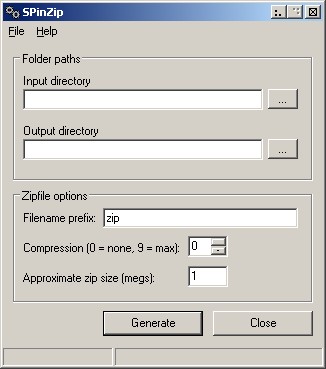
I've attached the setup package for the GUI version.  There is only very basic error checking involved at this point.  Let me know how you like it and if you'd like anything changed.
« Last Edit: December 05, 2006, 11:30 AM by skwire »

sri

  • Honorary Member
  • Joined in 2006
  • **
  • Posts: 689
skwire:

1. I entered 8 in the Size field and all (almost) the resulting zip files are more than 8 MB in size. Pls chk the attached screenshot. Is this a bug? I think this will be fixed by being able to specify the size field in bytes and not in megs.

2. If the Output directory doesn't exist, even tho the prog says that zip files are generated, they aren't. Ideally the output directory has to be created if it doesn't exist.

3. Rename the program from Sri-zip to "SPinZip" (SP = Span, in = independently). That is, this is a program that generates spanned zip files that are independent of each other. 

4. What's the max. allowable value in Compression field?

skwire

  • I eat Coding Snacks for breakfast...
  • Global Moderator
  • Joined in 2005
  • *****
  • Posts: 5,297
    • Participated in NANY Challenge Seventeen Times
    • Coding Snacks
    • Superboy Coder
    • Cody Award
    • Volunteers/Staff
    • Gathering Badge
Quote
1. I entered 8 in the Size field and all (almost) the resulting zip files are more than 8 MB in size. Pls chk the attached screenshot. Is this a bug? I think this will be fixed by being able to specify the size field in bytes and not in megs.

No, it's not a bug; it's a by-product of the way the app works.  It goes through the list of files in the folder one-by-one (in order) and keeps track of the total size.  Once the amount goes over the value you entered, it zips those and the process repeats until there are no more files in the directory.  In other words, there is no magic algorithm going on that scans the whole folder and attempts to make perfect-sized zip files.

Quote
2. If the Output directory doesn't exist, even tho the prog says that zip files are generated, they aren't. Ideally the output directory has to be created if it doesn't exist.

Again, there is little to no error-checking implemented at this point; the GUI was more of a proof-of-concept for you.

Quote
3. Rename the program from Sri-zip to "SPinZip" (SP = Span, in = independently). That is, this is a program that generates spanned zip files that are independent of each other.

Can do.

Quote
4. What's the max. allowable value in Compression field?

Nine.
« Last Edit: December 02, 2006, 01:43 PM by skwire »

skwire

  • I eat Coding Snacks for breakfast...
  • Global Moderator
  • Joined in 2005
  • *****
  • Posts: 5,297
    • Participated in NANY Challenge Seventeen Times
    • Coding Snacks
    • Superboy Coder
    • Cody Award
    • Volunteers/Staff
    • Gathering Badge
Here's the latest version (v0.0.3) with some fairly comprehensive error-checking.  Let me know how it works for you.  Thanks.

spinzip.jpg
« Last Edit: December 06, 2006, 04:41 AM by skwire »

sri

  • Honorary Member
  • Joined in 2006
  • **
  • Posts: 689
Thanks sk. Works fine. Looks like you improved the compression logic. Now the generated zip files are all less than the max size that we enter in the program.

I blogged about this in my site.

http://www.sridhareena.com/2006/12/06/freeware-spinzip-compress-files-into-multiple-independent-zips/.

skwire

  • I eat Coding Snacks for breakfast...
  • Global Moderator
  • Joined in 2005
  • *****
  • Posts: 5,297
    • Participated in NANY Challenge Seventeen Times
    • Coding Snacks
    • Superboy Coder
    • Cody Award
    • Volunteers/Staff
    • Gathering Badge
You're welcome; I'm happy to help.  =]

AHMalik

  • Supporting Member
  • Joined in 2006
  • **
  • Posts: 20
Sorry that I can't find Files page to download.
Regards

AHMalik

  • Supporting Member
  • Joined in 2006
  • **
  • Posts: 20
Can someone give me the link io download

CNeo

  • Participant
  • Joined in 2007
  • *
  • Posts: 1
Thanks for a great little utility.  I had been scouring Google trying to find a program to do exactly this.  Great site, bookmarked!

skwire

  • I eat Coding Snacks for breakfast...
  • Global Moderator
  • Joined in 2005
  • *****
  • Posts: 5,297
    • Participated in NANY Challenge Seventeen Times
    • Coding Snacks
    • Superboy Coder
    • Cody Award
    • Volunteers/Staff
    • Gathering Badge
I did release a later version that isn't on this thread.  You can download it here: http://www.autohotkey.net/~skwire/apps/spinzip/spinzip-setup-v0.0.4.exe

It offers recursive zipping as well as a single wildcard (*.jpg, etc.) option.  If you find problems with it...don't hesitate to let me know.  Thanks.  =]

Original address: https://www.donationcoder.com/forum/index.php?topic=6321.0