DonationCoder.com forum
 
Read-only archive. This is a static copy of the DonationCoder.com forum. Reading and searching work as before; logging in, posting and private messages do not.
Archive of 2026-10-21 · About this archive · Main site

Author Topic: Quicklaunch bar question  (Read 7,944 times)

wreckedcarzz

  • Still lurking. Still an anthro.
  • Charter Member
  • Joined in 2005
  • ***
  • Posts: 1,629
    • Participated in NANY Challenge Twice
    • Coding Snacks
    • Furry Fandom Badge - Furry Fandom
    • Linux User
Quicklaunch bar question
« on: October 12, 2006, 06:25 AM »
I have gotten into the XP shell (after what, 2, 3 years?) and I am FINALLY using the Quicklaunch bar...
but it only holds 3 icons :( (the rest obviously being in a pop-up menu). Is there any way to make the quicklaunch bar show more then 3 icons (like 10 or so)?  :huh:

Thanks all,
-Wreckedcarzz

mouser

  • First Author
  • Administrator
  • Joined in 2005
  • *****
  • Posts: 40,931
    • Gathering Badge
    • Plugin Coding Medal
    • Participated in NANY Challenge Seventeen Times
    • Cody Award
    • Coding Snacks
    • Volunteers/Staff
Re: Quicklaunch bar question
« Reply #1 on: October 12, 2006, 06:29 AM »
I don't know the answer to your question but you might want to

try True Launch Bar: http://www.truelaunchbar.com ; (50% discount for DC members)
or my own Launch Bar Commander: http://www.donationcoder.com/Software/Mouser/LaunchBarCommander/index.html

or one of the other similar programs (see Launch Bar Commander help file).

lanux128

  • Global Moderator
  • Joined in 2005
  • *****
  • Posts: 6,277
    • Coding Snacks
    • Volunteers/Staff
    • Gathering Badge
    • Participated in NANY Challenge Once
    • Linux User
Re: Quicklaunch bar question
« Reply #2 on: October 12, 2006, 06:36 AM »
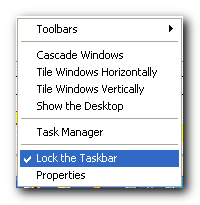
if you right-click on an empty space of taskbar, and uncheck "Lock the taskbar" item then you'll be able to adjust quicklaunch toolbar.

quicklaunch-lock.png

wreckedcarzz

  • Still lurking. Still an anthro.
  • Charter Member
  • Joined in 2005
  • ***
  • Posts: 1,629
    • Participated in NANY Challenge Twice
    • Coding Snacks
    • Furry Fandom Badge - Furry Fandom
    • Linux User
Re: Quicklaunch bar question
« Reply #3 on: October 12, 2006, 07:06 AM »
Thank you so much, would never have figured it out! (I thought I saw a bar there once, but didn't know what it was for).

lanux128

  • Global Moderator
  • Joined in 2005
  • *****
  • Posts: 6,277
    • Coding Snacks
    • Volunteers/Staff
    • Gathering Badge
    • Participated in NANY Challenge Once
    • Linux User
Re: Quicklaunch bar question
« Reply #4 on: October 12, 2006, 07:58 AM »
glad to be of help. :)

Dirhael

  • Supporting Member
  • Joined in 2006
  • **
  • Posts: 387
Re: Quicklaunch bar question
« Reply #5 on: October 12, 2006, 06:38 PM »
You might also want to take a look at Free Launch Bar. It's the freeware version of True Launch Bar :)
Registered nurse by day, hobby programmer by night.

app103

  • That scary taskbar girl
  • Global Moderator
  • Joined in 2006
  • *****
  • Posts: 5,888
    • Participated in NANY Challenge Six Times
    • Coding Snacks
    • Gathering Badge
    • Cody Award
    • Volunteers/Staff
Re: Quicklaunch bar question
« Reply #6 on: October 12, 2006, 07:40 PM »
or you can always do like I did and make 2 of them...one on each side and set them to autohide:

http://appsapps.info/stuff/2taskbars.png

:P

lanux128

  • Global Moderator
  • Joined in 2005
  • *****
  • Posts: 6,277
    • Coding Snacks
    • Volunteers/Staff
    • Gathering Badge
    • Participated in NANY Challenge Once
    • Linux User
Re: Quicklaunch bar question
« Reply #7 on: October 13, 2006, 01:20 AM »
wow, app. it does take some time getting used to all those icons.. :)

Original address: https://www.donationcoder.com/forum/index.php?topic=5741.0