


NANY 2026 Entry Information
| Application Name | BrickView |
| Version | 1.0.0 |
| Short Description | BrickView is a Windows application designed to view LEGO® set information from the Brickset.com website. |
| Supported OSes | Windows 10/11. Probably works, but not tested, on Windows Vista/7/8. |
| Web Page | Website |
| Help File | Help file |
| Download Link | Download |
| System Requirements | Tested on Windows 10/11 64-bit. Probably works, but not tested, on Windows Vista/7/8. |
| Version History | Changelog |
| Author | Jody Holmes (Skwire Empire) |
Description
BrickView is a Windows application designed to view LEGO® set information from the Brickset.com website.
Features
- You must have an account on Brickset.com for this application to work. Sign up here.
- Since BrickView has to download the set images to display them, the first time a set shows up in a search, it will be somewhat slow to load. However, images are cached, and subsequent searches that include that set should display much more quickly. If the image cache folder {appdir}\cache gets too large, feel free to delete all or some of the image folders within it, and BrickView will re-download the images as it needs them.
- The display of the results can vary with different combinations of View mode, Image size, & Group by options. This is the result of the standard Windows listview capabilities and limitations. Get into the habit of setting the different options before clicking the [Search] button.
Screenshots
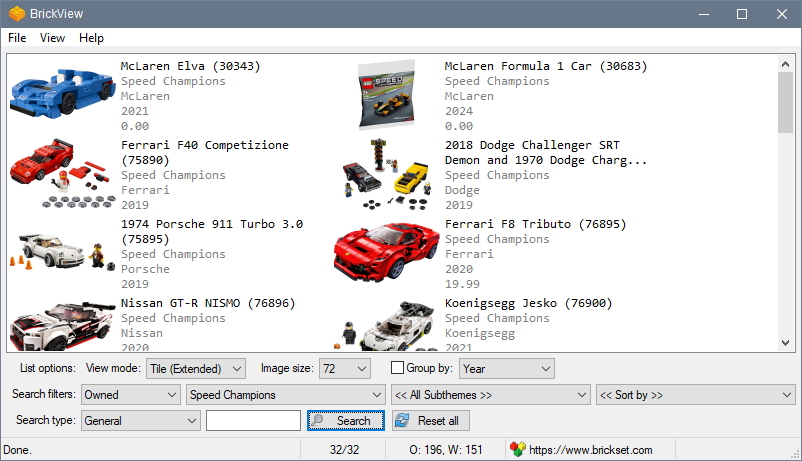
Usage
Installation
Download the zip file and extract its contents into a new folder. Run BrickView.exe.
Uninstallation
Exit the application and delete the folder you unzipped it to. No changes are made to the registry.
