DonationCoder.com forum
 
Read-only archive. This is a static copy of the DonationCoder.com forum. Reading and searching work as before; logging in, posting and private messages do not.
Archive of 2026-10-21 · About this archive · Main site

Author Topic: N.A.N.Y 2026: Quick Backup  (Read 33,465 times)

GrumpyCoder

  • Supporting Member
  • Joined in 2015
  • **
  • Posts: 37
    • Participated in NANY Challenge Five Times
    • Writer
N.A.N.Y 2026: Quick Backup
« on: December 24, 2025, 06:09 AM »
NANY 2026 Entry Information

Application Name Quick Backup
Version 1.0.0.3
Short Description Creates a quick backup (Zip) of any folder with a timestamp as a postfix
Supported OSes Windows 11
Download Link Click Here
System Requirements.NET 8.0
Author Grumpy Coder

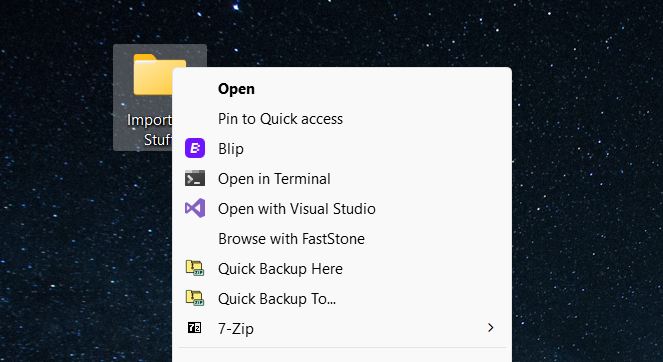
2025-12-24 09_00_54-.jpg

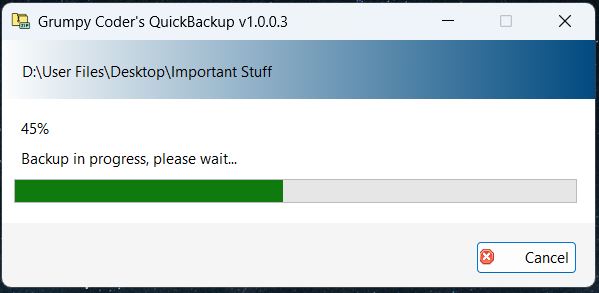
2025-12-24 09_01_24-.jpg

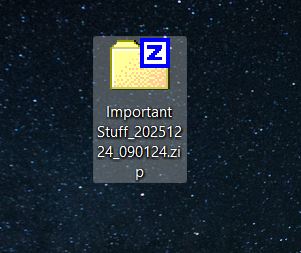
2025-12-24 09_13_37-Greenshot.jpg

Features
  • Right-click any folder, and you can back it up in its place or to a different destination. 

Planned Features
  • Nothing as of yet, but I'm open to suggestions.

Usage
Installation
  • Download, install (as admin), and run.

Using the Application
  • There is no UI, and it doesn't run in the background. It only works when needed.
  • The goal is to quickly create a Zip backup for any folder by appending the date and time of the backup.
  • This makes it painless to take quick backups for the same folder without having to rename the Zip file each time.
  • And because the timestamp is used as a postfix, you don't have to guess or check attributes to know which backup is more recent.
« Last Edit: December 24, 2025, 06:14 AM by GrumpyCoder »

techidave

  • Supporting Member
  • Joined in 2007
  • **
  • Posts: 1,046
Re: N.A.N.Y 2026: Quick Backup
« Reply #1 on: December 27, 2025, 03:45 AM »
Nice!  have to give it a whirl.

tomos

  • Charter Member
  • Joined in 2006
  • ***
  • Posts: 11,970
    • Gathering Badge
    • Participated in NANY Challenge Once
Re: N.A.N.Y 2026: Quick Backup
« Reply #2 on: January 06, 2026, 09:15 PM »
hi GrumpyCoder,
I installed this (and NET SDK 8 ).
When I right-click a folder and "Quick backup here" I get the following error:

[Content]This file does not have an app associated with it for performing this action. Please install an app or, if one is already installed, create an association in the Default Apps Settings page.[OK]

I cant find it under apps in the default apps settings.
Windows 10 (still getting updates fwiw).
Tom

GrumpyCoder

  • Supporting Member
  • Joined in 2015
  • **
  • Posts: 37
    • Participated in NANY Challenge Five Times
    • Writer
Re: N.A.N.Y 2026: Quick Backup
« Reply #3 on: January 07, 2026, 08:32 AM »
hi GrumpyCoder,
I installed this (and NET SDK 8 ).
When I right-click a folder and "Quick backup here" I get the following error:

[Content]This file does not have an app associated with it for performing this action. Please install an app or, if one is already installed, create an association in the Default Apps Settings page.[OK]

I cant find it under apps in the default apps settings.
Windows 10 (still getting updates fwiw).

That's weird. I just installed it o a fresh system, and it worked correctly.
What you need is the .NET Runtime 8.0.22. Try to install it, and re-install the application as administrator.
Also, verify that the application installed correctly by checking the files in: %AppData%\Quick Backup
If that doesn't solve the issue, it could be that there differences between the registry keys of Windows 11 and Windows 10.
Lemme know how it goes.

Original address: https://www.donationcoder.com/forum/index.php?topic=55551.0