


Wow! Sorry, I'm late. Wish I saw this thread when it first came out. 
Thanx wr975.
In the script, is it possible to incorporate a Refresh of the Explorer window after extracting single file archives to counter the file invisibility problem?
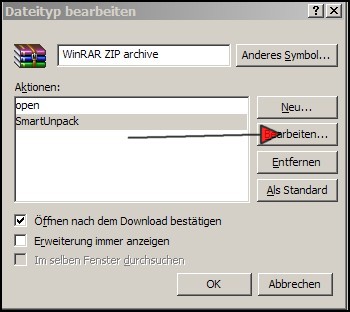
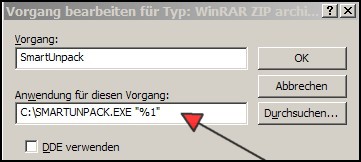
Did everybody associate the script with each filetype, 1 by 1, or is there an easier way to do this?
Sometimes the name of the archive file is more appropriate than the name of the folder/file that has been extracted (hereto referred to as the extractees). Would it be possible to add the name of the archive (minus the extension) to the clipboard so that it can be appended to an extractee if desired?
Hope I'm not asking for too much.
Thanx wr975.
In the script, is it possible to incorporate a Refresh of the Explorer window after extracting single file archives to counter the file invisibility problem?
Did everybody associate the script with each filetype, 1 by 1, or is there an easier way to do this?
Sometimes the name of the archive file is more appropriate than the name of the folder/file that has been extracted (hereto referred to as the extractees).
Would it be possible to add the name of the archive (minus the extension) to the clipboard so that it can be appended to an extractee if desired?Hope I'm not asking for too much.


 - carpe noctem
 (I expect some compressors and game protections to fail).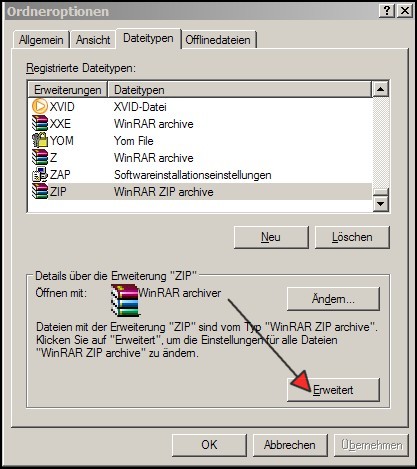


 Smart unpack.ahk