DonationCoder.com forum
 
Read-only archive. This is a static copy of the DonationCoder.com forum. Reading and searching work as before; logging in, posting and private messages do not.
Archive of 2026-10-21 · About this archive · Main site

Author Topic: Need buttons to download a file and disable used button, how to do so in HTML?  (Read 28,099 times)

OptimalDesigns

  • (retired) Mathematical Engineer
  • Supporting Member
  • Joined in 2018
  • **
  • Posts: 70
I have several download buttons that are to be clicked only once, in a table.  Each button has an ID = "btnXXX", how does one get this to work?

Each button, set of two, has code as follows:

Code
    <tr class="topic">
      <td>Descript 1</td>
      <td><a href="abc.ppt" download></a>
        <button Id="btn1-1" class="button btn1"
           onClick=“download_file()”>PPT</button></td>
      <td><a href="abc.pdf" download></a>
        <button Id="btn2-1" class="button btn2"
           onClick=“download_file()”>PDF</button></td>
    </tr>

This <tr> is duplicated some 10 to 20 times with different "Descript #", download file names, and button IDs.  Need a function "download_file" that downloads a file and disables used button.  There are two button IDs; btn1-# and btn2-#.  Each of these buttons may individually be clicked on in each <tr> set.  So e.g., 15 <tr> groups then 30 buttons for user to check from.

Ath

  • Supporting Member
  • Joined in 2006
  • **
  • Posts: 3,649
    • Participated in NANY Challenge Eleven Times
    • Coding Snacks
    • Linux User
    • Hardware Hacker
How are you going to save the downloaded-state for each file? As a refresh/reload of the page will re-enable any disabled buttons...

If you want an indication of what's been downloaded already, then present the downloads as links, default browser behavior is to give visited links a different color from new links, similar to:
https://www.donationcoder.com/forum
vs:
https://you.never.visited.this/page
/Ton
Ath's software collection, Quote: "A problem well stated is a problem half-solved." (Charles Kettering)

OptimalDesigns

  • (retired) Mathematical Engineer
  • Supporting Member
  • Joined in 2018
  • **
  • Posts: 70
No saving of downloaded info.

4wd

  • Pedantic Old Bastard
  • Supporting Member
  • Joined in 2006
  • **
  • Posts: 5,652
    • Coding Snacks
I would think you'd need to authenticate the user somehow, eg. user/pass, then you could use something similar as suggested here:
https://stackoverflow.com/questions/18867357/generating-unique-download-link-to-download-once-only

On user authentication, anything that relies on the client storing anything (eg. cookies), the IP, or software used for access (eg. browser fingerprinting), would be pointless as they can all be bypassed - so kind of falls back on the server to ensure single access only.
"I will not follow where the path may lead, but I will go where there is no path, and I will leave a trail." - Muriel Strode, 1903

OptimalDesigns

  • (retired) Mathematical Engineer
  • Supporting Member
  • Joined in 2018
  • **
  • Posts: 70
No, all my stuff is freeware including my math compiler :)  No user/pass type stuff on my website.

Deozaan

  • Charter Member
  • Joined in 2006
  • ***
  • Posts: 9,827
    • Participated in NANY Challenge Eight Times
    • Cody Award
So you just want to temporarily disable the download button to prevent accidental downloading of the same thing(s) twice, or to help the user keep track of what has already been downloaded, but you're not concerned about preventing someone from intentionally downloading things multiple times?

OptimalDesigns

  • (retired) Mathematical Engineer
  • Supporting Member
  • Joined in 2018
  • **
  • Posts: 70
Yes! :) You got it, now do you have a script to handle this?

Deozaan

  • Charter Member
  • Joined in 2006
  • ***
  • Posts: 9,827
    • Participated in NANY Challenge Eight Times
    • Cody Award
now do you have a script to handle this?

I don't. But I imagine it could be accomplished fairly simply with some JavaScript that disables the button or removes the link when it gets clicked.

I was just trying to clarify what your needs were, since others who responded understandably seemed to think you were trying to allow downloads once and only once per person.

ProCompSys

  • Participant
  • Joined in 2023
  • *
  • Posts: 11
Hi,
my five cent to this topic:

First, delete those A-Tags, just keep the BUTTON-Tags.
Then add a VALUE-Attribute to the BUTTON-Tags that keep the URL of the file you want to download.
In the OnClick-attribute, we start a small JavaScript that is nested in the HEAD-section of the HTML-file.
The script does 2 things:
1. it opens a new browser-tab (on older browsers a new window) and directs it to the file to download
2. it sets a new attribute to the button called "disabled". This does exactly what it sounds like... it disables the button ;-)

You can probably replace
Code
window.open(fileUrl,'_blank');
with
Code
window.open(fileUrl,'');
to not open the download in a new tab/window.
But please test with PDF-files, as current browsers tend to open PDFs within the browser... you might end up having to click the back-button to get back to your page. In that case you might have to stick to the "open in new tab" version.

Code
<html>
   <head>
      <STYLE TYPE="text/css">
         td {
            padding:10px;
         }
      </style>
   
      <script type="text/javascript">
         function dwldAndDisableButton(whichOne) {
            // read VALUE-attribute to get link to file
            fileUrl=document.getElementById(whichOne).value;
            
            // open new tab/window to download the file
            window.open(fileUrl,'_blank');
            
            // disable the button that was clicked
            document.getElementById(whichOne).setAttribute("disabled", "");
         }
      </script>
   
   </head>

   <body>

      <table border="1">
         <tr class="topic">
            <td>
               Descript 1
            </td>
            <td>
               <!-- <a href="abc.ppt" download></a> -->
               <button id="btn1-1" class="button btn1" value="abc.ppt" onClick="dwldAndDisableButton(this.id);">PPT</button>
            </td>
            <td>
               <!-- <a href="abc.pdf" download></a> -->
               <button id="btn2-1" class="button btn2" value="abc.pdf" onClick="dwldAndDisableButton(this.id);">PDF</button>
            </td>
         </tr>
      </table>

</body>

</html>


First, we define a function named "dwldAndDisableButton" that does the magic.
In the OnClick-attribute of the button(s) we call this function with a parameter... "this.id"... it tells the function which button was pressed by specifying THIS element of the page (that was clicked = the clicked button) and the individual ID, so that the function knows exactly where to look for the URL that needs to be downloaded.

The function then uses "getElementById" to find the clicked element within the page and reads the content of the VALUE-attribute, that - in our case - contains the needed URL.
It then opens a new tab/window with that URL... resulting in a download.

Finally, the function uses "getElementById" again, to add the attribute DISABLED to the button.

Done.
« Last Edit: July 10, 2023, 06:23 PM by ProCompSys »

OptimalDesigns

  • (retired) Mathematical Engineer
  • Supporting Member
  • Joined in 2018
  • **
  • Posts: 70
It kinda worked.  Here is a list of things needing some work on:
1. It opened the file, but no saved download file.  Anyway for both?
2. How to change background-color to lightgray for 'this.id' button?
3. Any way to put 'onClick="dwldAndDisableButton(this.id);" ' cmd in <table> cmd?  This takes up a lot of room and is redundant.  Presently there are 20+ rows of these and more may be coming.  Plus, another type of filetype may be added; giving another column of buttons.
4. Any simple way to save filename in <tr> and pass it on to <button> cmd.s as it is redundant too.  Will need to merge filename & filetype in <button> cmd.

I'm willing to pay for the help.
« Last Edit: July 11, 2023, 03:49 PM by OptimalDesigns »

ProCompSys

  • Participant
  • Joined in 2023
  • *
  • Posts: 11
It kinda worked.  Here is a list of things needing some work on:
1. It opened the file, but no saved download file.  Anyway for both?
What (kind of) file?
As mentioned before, it depends on the browser how to handle the file... PDFs might be opened right away within the browser as "PDF preview". If all else fails, try a zipped version of the file to download. In my case a "Save as..." dialogue-window was opened by the browser in the first place.

2. How to change background-color to lightgray for 'this.id' button?
The button design ist determined by the browser, if no special format is defined.
But you can change the appearance using CSS-code.
Though in my case, the button WAS changed to light grey (see screenshot).
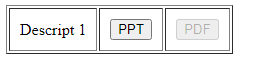
screenshot.001.png

Dealing with CSS (cascading style-sheets) is not really complicated, but if you're completely new to that matter it might need some work on the basics to it.
See updated source-code below.
I put some CSS-code for the buttons in the HEAD-section,
referencing the BUTTON-class via the .button-section (mind the dot at the beginning!) as such (i.e. for all buttons),
and another class called  .btn1 that only applies to the first button, as the second one has the class "btn2" (all taken from your original template).
If you're not familiar with CSS - at least with the basics - this might not be the best time to go for it, if you need fast results with your button-page... you might get lost in the middle of nowhere. ;-)


Code

<html>
   <head>
      <STYLE TYPE="text/css">
         td {
            padding:10px;
         }
         
         .button {
            padding: 6px 16px; 
            border: 1px solid green;
            border-radius: 0 8px 8px; 
            box-shadow: 0 lpx 5px gray; 
            color: white;
            text-shadow: 0 -1px 1px #333; 
            font-size: 20px; 
            line-height: 30px;
         }
         
         .btn1 {
            background: #5a9900 linear-gradient(#8db243, #5a9900); 
         }
         
         .btn1:disabled {
            background: #808080 linear-gradient(#C0C0C0, #808080); 
         }
         
         .btn2 {
            background: #5a3300 linear-gradient(#8db243, #5a3300); 
         }
         
      </style>
   
      <script type="text/javascript">
         function dNdB(whichOne) {
            // read VALUE-attribute to get link to file
            fileUrl=document.getElementById(whichOne).value;
            
            // open new tab/window to download the file
            window.open(fileUrl,'_blank');
            
            // disable the button that was clicked
            document.getElementById(whichOne).setAttribute("disabled", "");
         }
      </script>
   
   </head>

   <body>

      <table border="1">
         <tr class="topic">
            <td>
               Descript 1
            </td>
            <td>
               <!-- <a href="abc.ppt" download></a> -->
               <button id="btn1-1" class="button btn1" value="abc.ppt" onClick="dNdB(this.id);">PPT</button>
            </td>
            <td>
               <!-- <a href="abc.pdf" download></a> -->
               <button id="btn2-1" class="button btn2" value="abc.pdf" onClick="dNdB(this.id);">PDF</button>
            </td>
         </tr>
      </table>

</body>

</html>


3. Any way to put 'onClick="dwldAndDisableButton(this.id);" ' cmd in <table> cmd?  This takes up a lot of room and is redundant.  Presently there are 20+ rows of these and more may be coming.  Plus, another type of filetype may be added; giving another column of buttons.
Uhm... no, I don't think so.
It's actually no big difference to a standard A-HREF-tag. There you would have to put in the URL anyway. This is not more or less redundant than the  'onClick="dwldAndDisableButton(this.id);" '.
And I guess, there's more redundancy in all the TR- and TD-tags of a TABLE anyway. ;-)

You only have one TABLE, but 20+ ... 40+ ... buttons. How would you distinguish the URLs?
You can of course rename the function "dwldAndDisableButton()" to something shorter... like "dNdB()" or even just "x()". But from the view of a programmer, always try to name your variables and function to something intuitive and self-explaining, so you don't get lost in your code if you want to change it in two years, when you have to work yourself through understanding your own code.

You could though put all the URLs into the HEAD/SCRIPT-section, where your function is.
You could put all the URLs there in variables like
Code
   URL01=abc.ppt
   URL02=abc.pdf
   URL03=...
and so on.
Then you could call your function within your "onClick" by
Code
   onClick="dNdB(this.id,'URL01')"
But I see no point in this, as on the one hand it doesn't really make your code shorter (as you now have to pass two arguments to your function, one to tell the button-ID to change the button-style and one to define the URL), and on the other hand you produce "overhead" in the function itself, because every time you call the function, all your URL-variables have to be initialized of which you only need one.
Imagine a page with 500 buttons, thus 500 URL-variables in your function. Every time you click a button, all 500 URL-variables are parsed, and then you select one of them... no very performant.
Just tell the function what URL you want in the first place.


4. Any way to save filename in <tr> and pass it on to <button> cmd.s as it is redundant too.  Will need to merge filename & filetype in <button> cmd.
Filename in TR? From the original template, there's 2 button in a table-row (TR) with different URLs.
So there would have to be two URLs in one TR-tag that would have to be distinguished from one another.
Does not appear plausible to me.
You could put the URL in the table-data (TD = table-cell), as there is one button per TD, but what's the use? The amount of code stays the same if I move the URL from the BUTTON-tag to the TD-tag.
Same with TR... just cumulating two URLs from the buttons to two URLs in the TR surrounding it.
Just needs some additional JS-code to get from 'this.id' (i.e. the button) to the parent-element 'TD' and/or the parent-element of that, the 'TR'.

Don't get me wrong, there are ways of optimizing this and maybe making the code a little more compact, but that would need a database-system with PHP or ASP or similar. And I guess we're FAR away from that point where you want to setup a PHP-server or something like that.


« Last Edit: July 11, 2023, 04:32 PM by ProCompSys »

ProCompSys

  • Participant
  • Joined in 2023
  • *
  • Posts: 11
After a little thinking and re-reading, I now think I understand what you mean by putting filename in TR and filetype in TD/BUTTON:
The filename stays identical whithin a row, just the fileformat changes over the columns, right?
Would be possible, but... this appears a little too much 'over the top' of compressing code and avoiding redundancy.
I could try to make it work... shouldn't be much of a deal... but... really?  :-\

ProCompSys

  • Participant
  • Joined in 2023
  • *
  • Posts: 11
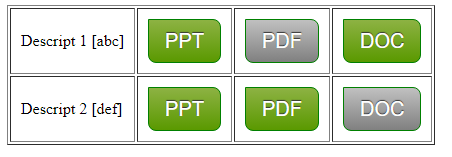
Looks like this:

screenshot.002.png


I added another line with filename(s) "def".
To avoid errors when clicking, the filenames have to exist, of course. At least as dummy-files.

Code like this:


Code: ( html5)
<html>
   <head>
      <STYLE TYPE="text/css">
         td {
            padding:10px;
         }
         
         .button {
            padding: 6px 16px; 
            border: 1px solid green;
            border-radius: 0 8px 8px; 
            box-shadow: 0 lpx 5px gray; 
            color: white;
            text-shadow: 0 -1px 1px #333; 
            font-size: 20px; 
            line-height: 30px;
            background: #5a9900 linear-gradient(#8db243, #5a9900); 
         }
         
         .button:disabled {
            background: #808080 linear-gradient(#C0C0C0, #808080); 
         }
         
      </style>
   
      <script type="text/javascript">
         function dNdB(whichOne) {
            // read VALUE-attribute to get filetype
            fileType=document.getElementById(whichOne).value;
            
            // read TITLE of parent-node (TR) to get filename (without extension)
            fileName=document.getElementById(whichOne).parentNode.parentNode.getAttribute("title");
            
            // creating fileUrl from fileName + "." + fileType
            fileUrl=fileName + "." + fileType;
            
            // for testing purposes
            // alert(fileUrl);
            
            // open new tab/window to download the file
            window.open(fileUrl,"_blank");
            
            // disable the button that was clicked
            document.getElementById(whichOne).setAttribute("disabled", "");
         }
      </script>
   
   </head>

   <body>

      <table border="1">
         <tr class="topic" title="abc">
            <td>
               Descript 1 [abc]
            </td>
            <td>
               <button id="btn1-1" class="button btn1" value="ppt" onClick="dNdB(this.id);">PPT</button>
            </td>
            <td>
               <button id="btn2-1" class="button btn2" value="pdf" onClick="dNdB(this.id);">PDF</button>
            </td>
            <td>
               <button id="btn3-1" class="button btn3" value="doc" onClick="dNdB(this.id);">DOC</button>
            </td>
         </tr>
         <tr class="topic" title="def">
            <td>
               Descript 2 [def]
            </td>
            <td>
               <button id="btn1-2" class="button btn1" value="ppt" onClick="dNdB(this.id);">PPT</button>
            </td>
            <td>
               <button id="btn2-2" class="button btn2" value="pdf" onClick="dNdB(this.id);">PDF</button>
            </td>
            <td>
               <button id="btn3-2" class="button btn3" value="doc" onClick="dNdB(this.id);">DOC</button>
            </td>
         </tr>
      </table>

</body>

</html>

OptimalDesigns

  • (retired) Mathematical Engineer
  • Supporting Member
  • Joined in 2018
  • **
  • Posts: 70
1. okay, will go with files opening AND no saving.
2. How to change background-color to lightgray for 'this.id' button?
The button design ist determined by the browser, if no special format is defined.
But you can change the appearance using CSS-code.
Though in my case, the button WAS changed to light grey (see screenshot).

[attachimg=1,msg452209]

Dealing with CSS (cascading style-sheets) is not really complicated, but if you're completely new to that matter it might need some work on the basics to it.
See updated source-code below.
I put some CSS-code for the buttons in the HEAD-section,
referencing the BUTTON-class via the .button-section (mind the dot at the beginning!) as such (i.e. for all buttons),
and another class called  .btn1 that only applies to the first button, as the second one has the class "btn2" (all taken from your original template).
If you're not familiar with CSS - at least with the basics - this might not be the best time to go for it, if you need fast results with your button-page... you might get lost in the middle of nowhere. ;-)
[/quote]

I have several <tables> on one webpage, so your general <scripts> and <styles> don't work as stated.  My buttons colors are set as:
<style>
.btn1 {background-color: #4CAF50;} /* Green */
.btn2 {background-color: #008CBA;} /* Blue */
</style>
Which may explain why no lightgray came thru, true?

3 & 4 ... okay will go with what you gave me.

OptimalDesigns

  • (retired) Mathematical Engineer
  • Supporting Member
  • Joined in 2018
  • **
  • Posts: 70
Hmm, code looks good, but still need a way to limit <styles> to just this one <table>.

Update!  Passing filename in <tr> working, I think.  Tested using 'alert' function and all look good.  But, a note pops up saying "Pop-up blocked" or something along this line, ideas?  So, no download or opening of file.

Here it is on my website; https://goal-driven.net/download/new.html .
« Last Edit: July 11, 2023, 10:02 PM by OptimalDesigns »

OptimalDesigns

  • (retired) Mathematical Engineer
  • Supporting Member
  • Joined in 2018
  • **
  • Posts: 70
It is up and working!  Thanks for all your help, Phil

Check your donation account for 180 'credits'

ProCompSys

  • Participant
  • Joined in 2023
  • *
  • Posts: 11
[...]
I have several <tables> on one webpage, so your general <scripts> and <styles> don't work as stated.

When using different tables, you can restrict your button design to only this table by giving your table an id like
Code
<table id="table01" ... >
and then assigning your css to only that table by
Code
<STYLE TYPE="text/css">
  #table01 button.btn1 {border: 1px solid red;}
</STYLE>
In this example, red borders are only applied to button-tags, that have the class "btn1",
and only if that button in within an element, that hat the ID "table01".
So buttons within other tables are not affected by that css-definition.


My buttons colors are set as:
<style>
.btn1 {background-color: #4CAF50;} /* Green */
.btn2 {background-color: #008CBA;} /* Blue */
</style>
Which may explain why no lightgray came thru, true?
True.
Try removing the background-style and the browser's standard display for buttons should be applied.

ProCompSys

  • Participant
  • Joined in 2023
  • *
  • Posts: 11
It is up and working!  Thanks for all your help, Phil

Check your donation account for 180 'credits'

Pleased I could help.
Thanks a lot!

publicdomain

  • Honorary Member
  • Joined in 2019
  • **
  • Posts: 732
    • Participated in NANY Challenge Three Times
    • Linux User
It is up and working!  Thanks for all your help, Phil

Check your donation account for 180 'credits'

Wow, thanks for supporting DonationCoders' work :Thmbsup:

You deserve a special badge for most-generous reward @OptimalDesigns  :-*

Kudos indeed!

ProCompSys

  • Participant
  • Joined in 2023
  • *
  • Posts: 11
I'm new to DC and besides an up to now unanswered "IDEA" I think this was my first reply to a question.
At this moment I was actually still in a phase of trying to figure out what that "180 credits" means in RL.
Working in a full-time position, I just didn't have the time yet to figure it out... except for that help-page "What are DonationCredits?".
Just from skimming over the text, I got the impression that this would represent real money.
Though I'm still not quite sure about it and still expect a catch to it, I do come to the conclusion that the amount is exceptional.
Being used to some standard discussion-boards, I kinda feel a little uncomfortable with the turnout and suspect there might as well be a typo on the part of @OptimalDesigns.
If so, please let me know!
Best Regards!

publicdomain

  • Honorary Member
  • Joined in 2019
  • **
  • Posts: 732
    • Participated in NANY Challenge Three Times
    • Linux User
I'm new to DC and besides an up to now unanswered "IDEA" I think this was my first reply to a question.

I see, please have a belated WELCOME TO DC then!  :Thmbsup:


I'm only now seeing your request @ IDEA: Tray-Tool to remember & restore open Explorer-windows (Reboot or Crash)

In my case, I have all the willingness to assist the world with public domain releases, up to devoting full-time to it  :-*

I'm soon to back to the "scene" as I finish my current contracts; if your request keeps unanswered by then, I'm willing to attend it to the best of my ability :)

Cheers & congrats on the DonationCredits! That's quite a welcoming on itself

ProCompSys

  • Participant
  • Joined in 2023
  • *
  • Posts: 11
Thank you for the warm welcome! To both of you. :-)
I'm still quite overwhelmed, especially as my contribution was just a q'n'd quick shot from the hip without any claim to clean style whatsoever.
It would make me very happy to see an approach to my "remember and restore explorer-windows"-idea.
Thanks and greetings!

OptimalDesigns

  • (retired) Mathematical Engineer
  • Supporting Member
  • Joined in 2018
  • **
  • Posts: 70
No "typo"!  The amount came from how much time it saved me, not sure how much time it took you to solve my problem :)

Thanks again!

PS: the "button:disabled" feature was the last step in fixing all my problems with buttons.

         .button:disabled {
            background: #808080 linear-gradient(#C0C0C0, #808080);
« Last Edit: July 17, 2023, 12:27 PM by OptimalDesigns »

publicdomain

  • Honorary Member
  • Joined in 2019
  • **
  • Posts: 732
    • Participated in NANY Challenge Three Times
    • Linux User
The amount came from how much time it saved me, not sure how much time it took you to solve my problem

Kudos on your generosity :-* I can also help you save time, from mini-tasks to whole-site revamps :)

Original address: https://www.donationcoder.com/forum/index.php?topic=53538.0