Bug report:
I noticed that the endpoint text attached to an arrow object can end up positioned outside the bounds of the current image. As long as the object definitions are saved you can't see it in the SSC editor, but if you copy the image to clipboard, or resize the canvas larger, or save it to a file without object definitions, it gets unceremoniously chopped off.
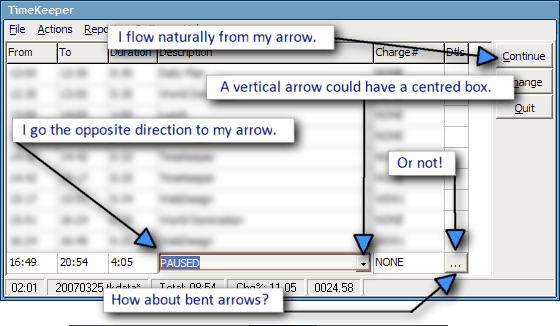
Whenever you get a chance to fix this, I have a related request -- if the arrow is exactly vertical or horizontal (not slanted at all), can the endpoint text be centered on the endpoint, rather than off to one side or the other? I imagine you'll probably also change the existing algorithm to position the text on the "inside" of the endpoint any time the endpoint is too close to the edge of the image?
Actually, if you can swing it, it might look really nice to continue allowing the text to go "outside" the image's bounds, if you can optionally expand the bounds of the image (resize the canvas) to make room for the endpoint text. Then we could have endpoint text "floating" outside the image on a transparent background.
I noticed that the endpoint text attached to an arrow object can end up positioned outside the bounds of the current image. As long as the object definitions are saved you can't see it in the SSC editor, but if you copy the image to clipboard, or resize the canvas larger, or save it to a file without object definitions, it gets unceremoniously chopped off.
Whenever you get a chance to fix this, I have a related request -- if the arrow is exactly vertical or horizontal (not slanted at all), can the endpoint text be centered on the endpoint, rather than off to one side or the other? I imagine you'll probably also change the existing algorithm to position the text on the "inside" of the endpoint any time the endpoint is too close to the edge of the image?
Actually, if you can swing it, it might look really nice to continue allowing the text to go "outside" the image's bounds, if you can optionally expand the bounds of the image (resize the canvas) to make room for the endpoint text. Then we could have endpoint text "floating" outside the image on a transparent background.