Running Screenshot Captor v4.36.2 on Windows 10 Pro 21H1, I was just sent down a rabbit hole. When I took a screenshot the main window properly appeared, overlaid by a dialog telling me the shot could not be saved as the file could not be found. I was able to save the shot to my Desktop folder.
There had been a recent Windows update, so I chased around verifying that the Screenshot folder existed, that it had the proper access permissions, that SC was running under the right account, looked at the event logs, etc. No joy, all looked OK.
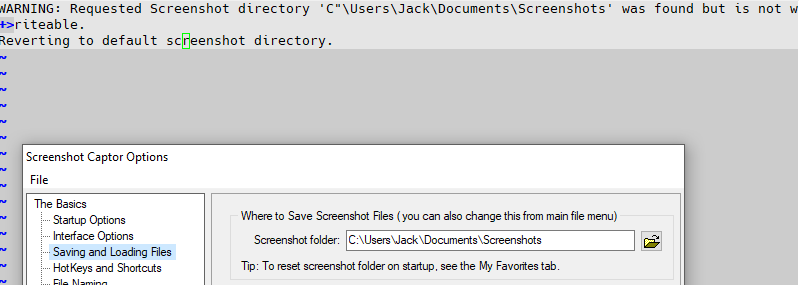
So, I restarted the computer. When SC auto-started, it popped up a dialog whose text is shown in the attached image. After closing the dialog I went to look at the preferences, also shown in the image and found the Screenshot folder unchanged. Then I took a capture, which worked as expected.
Don't know if this is somehow reproduceable, but SC got it's knickers in a twist somehow.

There had been a recent Windows update, so I chased around verifying that the Screenshot folder existed, that it had the proper access permissions, that SC was running under the right account, looked at the event logs, etc. No joy, all looked OK.
So, I restarted the computer. When SC auto-started, it popped up a dialog whose text is shown in the attached image. After closing the dialog I went to look at the preferences, also shown in the image and found the Screenshot folder unchanged. Then I took a capture, which worked as expected.
Don't know if this is somehow reproduceable, but SC got it's knickers in a twist somehow.