DonationCoder.com forum
 
Read-only archive. This is a static copy of the DonationCoder.com forum. Reading and searching work as before; logging in, posting and private messages do not.
Archive of 2026-10-21 · About this archive · Main site

Author Topic: Some thumbnails only show an icon  (Read 12,364 times)

JCarls

  • Participant
  • Joined in 2020
  • *
  • Posts: 2
Some thumbnails only show an icon
« on: May 08, 2020, 03:14 PM »
Is anyone else seeing an issue in which some thumbnails on the left panel only show up as icons? I just updated to 4.36.2 but the problem remains. I don't believe (and can't find) a Preferences setting that might do this.

Screenshot - 05_08_20 , 9_36_57 AM.png

mouser

  • First Author
  • Administrator
  • Joined in 2005
  • *****
  • Posts: 40,931
    • Gathering Badge
    • Plugin Coding Medal
    • Participated in NANY Challenge Seventeen Times
    • Cody Award
    • Coding Snacks
    • Volunteers/Staff
Re: Some thumbnails only show an icon
« Reply #1 on: May 08, 2020, 03:52 PM »
This may be a problem with windows itself not refreshing its thumbnail cache.  I remember this happening in the past and being fixed by a reboot.

JCarls

  • Participant
  • Joined in 2020
  • *
  • Posts: 2
Re: Some thumbnails only show an icon
« Reply #2 on: May 08, 2020, 09:27 PM »
Is there any chance that the number of thumbnails may have a practical limit? I have quite a few in the folder I use but this problem only appeared in the last month or so.

mouser

  • First Author
  • Administrator
  • Joined in 2005
  • *****
  • Posts: 40,931
    • Gathering Badge
    • Plugin Coding Medal
    • Participated in NANY Challenge Seventeen Times
    • Cody Award
    • Coding Snacks
    • Volunteers/Staff
Re: Some thumbnails only show an icon
« Reply #3 on: May 08, 2020, 11:21 PM »
i dont think so, but in SC MoveTo menu at the bottom it will give you the option to let it file all your older screenshots in the thumbnail panel into subfolders based on date.

Hilario

  • Supporting Member
  • Joined in 2017
  • **
  • Posts: 33
Re: Some thumbnails only show an icon
« Reply #4 on: March 31, 2021, 05:19 AM »
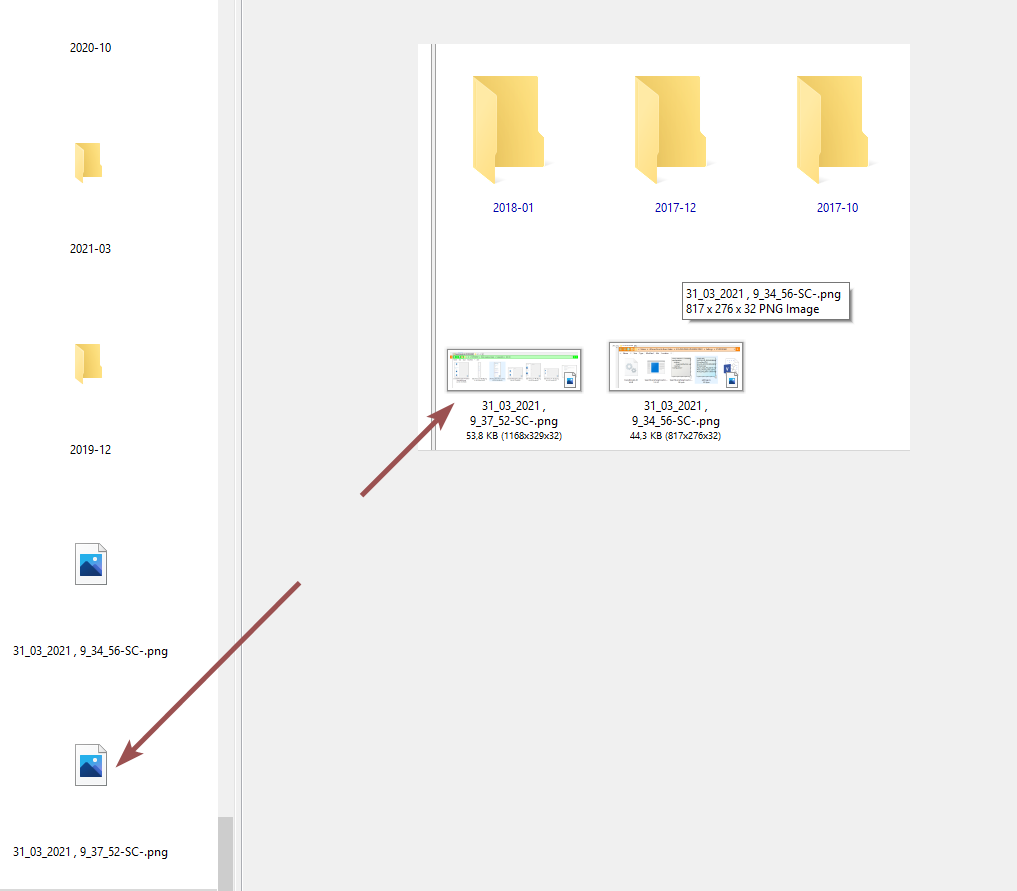
I go the same problem.
Sudently (I am not sure it happen at the same time I upgrade to v4.41.0)
SSC stop generating thumbnails
ScreenShotCaptor-Problem thumbnails.png

Any suggestion (I rebooted but no change)

tomos

  • Charter Member
  • Joined in 2006
  • ***
  • Posts: 11,970
    • Gathering Badge
    • Participated in NANY Challenge Once
Re: Some thumbnails only show an icon
« Reply #5 on: March 31, 2021, 07:06 AM »
^ do thumbnails show when you look at the same folder in Windows Explorer?
Tom

Hilario

  • Supporting Member
  • Joined in 2017
  • **
  • Posts: 33
Re: Some thumbnails only show an icon
« Reply #6 on: March 31, 2021, 07:46 AM »
Thumbnail in Windows and not in SSC
You can see it here
ScreenshotCaptor_2021-03-31_09-42-19.png

Hilario

  • Supporting Member
  • Joined in 2017
  • **
  • Posts: 33
Re: Some thumbnails only show an icon
« Reply #7 on: April 10, 2021, 06:58 PM »
I have changed the resolution to check
Problem persist.

ScreenshotCaptor_2021-04-10_20-56-19.png
¿No ideas?
¿Any test to try to understand what is happening?

x16wda

  • what am I doing in this handbasket?
  • Supporting Member
  • Joined in 2007
  • **
  • Posts: 888
    • Participated in NANY Challenge Once
Re: Some thumbnails only show an icon
« Reply #8 on: April 10, 2021, 08:26 PM »
You could try the "nuclear option" and rebuild the thumbnail cache, that might clear out something - instructions here.
vi vi vi - editor of the beast

Hilario

  • Supporting Member
  • Joined in 2017
  • **
  • Posts: 33
Re: Some thumbnails only show an icon
« Reply #9 on: April 11, 2021, 08:46 AM »
This is correct. The problem seams on windows.
I was confused because I don't use MS Explorer, I use DOPUS and there the thumbnails where OK
They were also OK on SHAREX
But when I forced MS EXPLORER I found the same behavior.
Then I tried your recomendation.
Not all worked.

> e4uinit.exe -show

> taskkill /IM explorer.exe /F

> DEL /A /Q "%localappdata%\IconCache.db"

> DEL /A /F /Q "%localappdata%\Microsoft\Windows\Explorer\iconcache*"    THIS COMMAND DID NOT WORK - SOME PRIVILEGE PROBLEM

> shutdown /r /f /t 00

But anyway the problem was solved after deleting IconCache.db and rebooting.
Thanks for the help

tomos

  • Charter Member
  • Joined in 2006
  • ***
  • Posts: 11,970
    • Gathering Badge
    • Participated in NANY Challenge Once
Re: Some thumbnails only show an icon
« Reply #10 on: April 11, 2021, 09:46 AM »
do thumbnails show when you look at the same folder in Windows Explorer?
Yeah, SC actually uses Windows Explorer for that panel
Tom

Nucleorion

  • Participant
  • Joined in 2013
  • *
  • Posts: 5
Re: Some thumbnails only show an icon
« Reply #11 on: October 19, 2021, 09:18 AM »
Hello there,
I see it well in the windows file explorer but I see it wrong in Screencaptor v4.36.2 also in the previous version. I updated but it didn't help, I cleared the icon cache but it didn't work either.

When I close Screencaptor I move the files from the windows explorer and reopen Screencaptor then it takes the thumbnails well, but if I take a screenshot the thumbnail does not appear in Screencaptor and if it appears in MS file explorer

fhayes

  • Charter Member
  • Joined in 2006
  • ***
  • Posts: 19
Re: Some thumbnails only show an icon
« Reply #12 on: March 07, 2022, 03:39 PM »
I've verified that it's a Windows 10 icon cache issue. In Directory Opus the thumbs show properly, but in Windows Explorer they do not.
After running "ie4uinit.exe -show" to rebuild the cache (without rebooting) the thumbs showed properly in both Windows Explorer and Screenshot Captor (v4.41).

https://superuser.com/questions/499078/refresh-icon-cache-without-rebooting

mouser

  • First Author
  • Administrator
  • Joined in 2005
  • *****
  • Posts: 40,931
    • Gathering Badge
    • Plugin Coding Medal
    • Participated in NANY Challenge Seventeen Times
    • Cody Award
    • Coding Snacks
    • Volunteers/Staff
Re: Some thumbnails only show an icon
« Reply #13 on: March 08, 2022, 07:04 AM »
Thanks for letting us know the solution -- maybe I can add a command in SC to run this cache refresh..

Original address: https://www.donationcoder.com/forum/index.php?topic=49896.0