DonationCoder.com forum
 
Read-only archive. This is a static copy of the DonationCoder.com forum. Reading and searching work as before; logging in, posting and private messages do not.
Archive of 2026-10-21 · About this archive · Main site

Last post Author Topic: Create ini from content folder : shortcuts, folders, any first level file.  (Read 43,003 times)

Contro

  • Supporting Member
  • Joined in 2007
  • **
  • Posts: 3,947
Solved the first part.
I notice I have the first time to locate shortcut.exe using browse.

;D

Contro

  • Supporting Member
  • Joined in 2007
  • **
  • Posts: 3,947
AsusPortatil - 10_03_2022 , 21_48_11.png The program don't work with the word "menú"
In the folder the program continues offerint in the autohotkey menu the full path. It's not necessary and difficult the use.

Contro

  • Supporting Member
  • Joined in 2007
  • **
  • Posts: 3,947
The exit option don't work
:-* :P

Contro

  • Supporting Member
  • Joined in 2007
  • **
  • Posts: 3,947
Bueno Vic. A ver si se soluciona lo de acumulación de trabajo.
A mi me está pasando igual.
Y la gente siempre con prisa.
Pero no te preocupes que todo sale.
;D :-* :P

publicdomain

  • Honorary Member
  • Joined in 2019
  • **
  • Posts: 732
    • Participated in NANY Challenge Three Times
    • Linux User
Hello again!

The exit option don't work
:-* :P

Thanks for advising. Next version fixes it :Thmbsup: Stay tuned! :)

publicdomain

  • Honorary Member
  • Joined in 2019
  • **
  • Posts: 732
    • Participated in NANY Challenge Three Times
    • Linux User
Hello! Just wanted to mention the reason this is unsolved is simple: I don't have Visual Studio on my Linux development computer. This is one of the edge cases where no library did the job.

Sorry to Contro (We tried to make things work using VS on his Machine via PM). The program is 99%, only need a developer to follow the instructions on:

https://stackoverflow.com/questions/9414152/get-target-of-shortcut-folder

Sincere apologies! I don't know when I am going to have a Windows 10 development computer again... for the time being, I am doing as much as I can to be helpful to the DC community with my Linux / Windows 7 setup.

Thanks!
« Last Edit: April 11, 2022, 08:17 PM by publicdomain »

publicdomain

  • Honorary Member
  • Joined in 2019
  • **
  • Posts: 732
    • Participated in NANY Challenge Three Times
    • Linux User
P.S. I'm aware of AHK's FileGetShortcut.

It is possible to use AHK as a link library of sorts yet due to licensing issues I usually avoid the GPL license covering AHK. I prefer MIT or other more-permissive license, given I release code with CC0 Universal myself...

In all honesty, a traditional AHK script serves Contro better in terms of simplicity :)
« Last Edit: April 11, 2022, 09:37 PM by publicdomain »

publicdomain

  • Honorary Member
  • Joined in 2019
  • **
  • Posts: 732
    • Participated in NANY Challenge Three Times
    • Linux User
P.S. I'm aware of AHK's FileGetShortcut.

Okay! I'm currently modifying the program to use Autohotkey as the .lnk library while avoiding GPL issues.

Let's try again to get this from 99% to 100% to finish the job & call it a completed release :Thmbsup:
« Last Edit: April 11, 2022, 09:38 PM by publicdomain »

publicdomain

  • Honorary Member
  • Joined in 2019
  • **
  • Posts: 732
    • Participated in NANY Challenge Three Times
    • Linux User
... to use Autohotkey as the .lnk library while avoiding GPL issues.

Done! Now coding the AHK script to translate using FileGetShortcut & release :up:

publicdomain

  • Honorary Member
  • Joined in 2019
  • **
  • Posts: 732
    • Participated in NANY Challenge Three Times
    • Linux User
Now coding the AHK script ...

Done!

Code: (autohotkey)
FileGetShortcut, %1%, OutTarget
stdout := FileOpen("*", "w")
stdout.Write(OutTarget)

Release + easy-to-follow instructions next :)

Contro

  • Supporting Member
  • Joined in 2007
  • **
  • Posts: 3,947
Hello! Just wanted to mention the reason this is unsolved is simple: I don't have Visual Studio on my Linux development computer. This is one of the edge cases where no library did the job.

Sorry to Contro (We tried to make things work using VS on his Machine via PM). The program is 99%, only need a developer to follow the instructions on:

https://stackoverflow.com/questions/9414152/get-target-of-shortcut-folder

Sincere apologies! I don't know when I am going to have a Windows 10 development computer again... for the time being, I am doing as much as I can to be helpful to the DC community with my Linux / Windows 7 setup.

Thanks!
Don't worry. Are difficult times for everybody.
:-* :P

publicdomain

  • Honorary Member
  • Joined in 2019
  • **
  • Posts: 732
    • Participated in NANY Challenge Three Times
    • Linux User
Re: INIalaContro_v0.2.0 download & instructions
« Reply #61 on: April 15, 2022, 04:16 PM »
Don't worry.

Hello & thanks! I'm doing, which is a better option! :)

Here's the result of the new AHK wrapper program:

Direct download: INIalaContro_v0-2-0.zip

GitHub release: https://github.com/publicdomain/ini-a-la-contro/releases/tag/v0.2.0


Instructions:

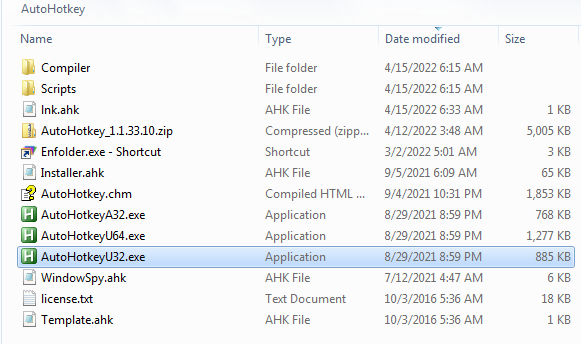
Download AutoHotkey from https://www.autohotkey.com/download/ (AutoHotkey_1.1.33.10.zip)

Unzip.

Save the AHK script as "lnk.ahk".

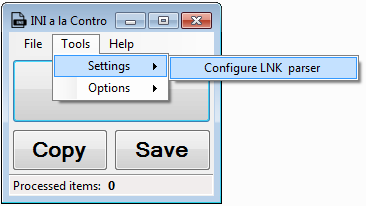
autohotkey-folder.png

Open the program, then click on Settings/Configure lnk parser.

INIalaContro_v0-2-0-settings.png

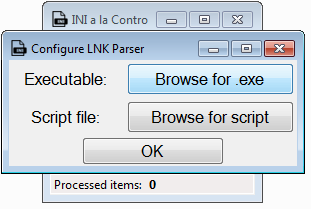
Configure executable and script:

INIalaContro_v0-2-0-configure.png

Executable: AutoHotkeyU32.exe / AutoHotkeyU64.exe

Script file: lnk.ahk

Hit OK

Now use the main program window to browse to the directory where you want to generate the Launcher.ini file.

That's it. Enjoy!
« Last Edit: April 16, 2022, 02:39 AM by publicdomain »

Original address: https://www.donationcoder.com/forum/index.php?topic=52043.0