DonationCoder.com forum
 
Read-only archive. This is a static copy of the DonationCoder.com forum. Reading and searching work as before; logging in, posting and private messages do not.
Archive of 2026-10-21 · About this archive · Main site

Author Topic: Ninotech Free Context Menu Tools  (Read 15,795 times)

mouser

  • First Author
  • Administrator
  • Joined in 2005
  • *****
  • Posts: 40,931
    • Gathering Badge
    • Plugin Coding Medal
    • Participated in NANY Challenge Seventeen Times
    • Cody Award
    • Coding Snacks
    • Volunteers/Staff
Ninotech Free Context Menu Tools
« on: September 05, 2006, 04:26 PM »
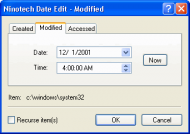
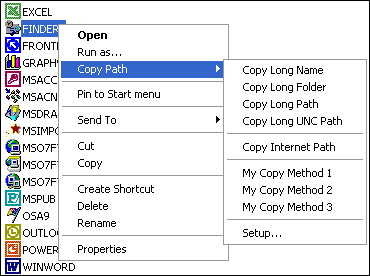
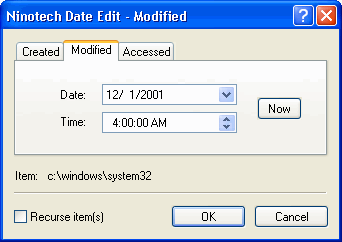
Carol Haynes recently reminded me of Ninotech Copy Path, a very nice shell extension to copy paths's from explorer to the clipboard in various formats, and i know KenR was looking for a file date/time modifier, which Ninotech also makes (Ninotech Date Edit), so this seemed like a good time to post about the very profession tools at Ninotech.

http://home.worldonline.dk/ninotech/freeutil.htm
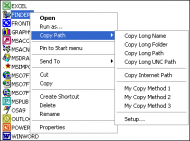
pathcopy.gif

dateedit.gif

They also make a shareware program called Ninotech Info Book Pro (http://home.worldonline.dk/ninotech/infobook.htm):
Quote
Ninotech Info Book Pro is a personal information manager (PIM) for Windows 95, 98, Me, NT4, 2000, and XP that enables you to manage information about your colleagues, contacts, friends, and family in a snap. Ninotech Info Book Pro is a shareware program and we urge you to try it for free for 30 days.
« Last Edit: September 05, 2006, 04:27 PM by mouser »

Carol Haynes

  • Waffles for England (patent pending)
  • Global Moderator
  • Joined in 2005
  • *****
  • Posts: 8,073
    • Cody Award
    • Furry Fandom Badge - Furry Fandom
Re: Ninotech Free Context Menu Tools
« Reply #1 on: September 05, 2006, 05:57 PM »
Thanks for posting that - I'm sure I posted it a long time ago (and as a reply today) but it may be useful for some people and worth a reminder.

It is probably worth saying too that Copy Path is really useful as you can copy filenames, full path names, and containing folder names to the clipboard via the right click menu in Explorer (and in Directory Opus) in both long name and short name formats - at times these can be very useful.

mouser

  • First Author
  • Administrator
  • Joined in 2005
  • *****
  • Posts: 40,931
    • Gathering Badge
    • Plugin Coding Medal
    • Participated in NANY Challenge Seventeen Times
    • Cody Award
    • Coding Snacks
    • Volunteers/Staff
Re: Ninotech Free Context Menu Tools
« Reply #2 on: September 05, 2006, 06:23 PM »
Quote
It is probably worth saying too that Copy Path is really useful as you can copy filenames, full path names, and containing folder names to the clipboard via the right click menu in Explorer (and in Directory Opus) in both long name and short name formats - at times these can be very useful.

agree completely.

nudone

  • Cody's Creator
  • Columnist
  • Joined in 2005
  • ***
  • Posts: 4,119
    • Cody Award
Re: Ninotech Free Context Menu Tools
« Reply #3 on: September 05, 2006, 07:35 PM »
doesn't really add anything to what's been said already but if you want to have a quick walk down DC memory lane - here's my old blog/column entry http://www.donationcoder.com/Columns/mts/b_nudone/archives/2005/04/ninotech_copy_p.html#comments

lanux128

  • Global Moderator
  • Joined in 2005
  • *****
  • Posts: 6,277
    • Coding Snacks
    • Volunteers/Staff
    • Gathering Badge
    • Participated in NANY Challenge Once
    • Linux User
Re: Ninotech Free Context Menu Tools
« Reply #4 on: January 31, 2009, 06:54 AM »
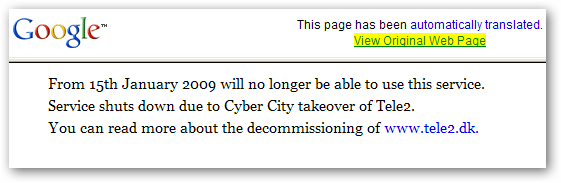
Ninotech is down atm and this is the page being displayed. i wonder what will happen to the hosted sites?

ws-ninotech-1.png

Giampy

  • Participant
  • Joined in 2009
  • *
  • Posts: 446
Re: Ninotech Free Context Menu Tools
« Reply #5 on: October 05, 2009, 07:46 PM »
Hail!
I have regularly installed Copy Path 4 but in the context menu I don't see the new item.
What might be wrong?

GF
"A refrigerator without beer is like a body without soul"

Original address: https://www.donationcoder.com/forum/index.php?topic=5109.0