DonationCoder.com forum
 
Read-only archive. This is a static copy of the DonationCoder.com forum. Reading and searching work as before; logging in, posting and private messages do not.
Archive of 2026-10-21 · About this archive · Main site

Author Topic: Powershell Scripting : VBA adaptation code for locate strings inside word files  (Read 18,173 times)

Contro

  • Supporting Member
  • Joined in 2007
  • **
  • Posts: 3,947
4wd indicates me this wonderful script to search a string in several word files and adapted for searching in doc files too (not only docx).
This script search word files in a folder.
https://www.datanumen.com/blogs/find-replace-contents-multiple-word-documents/
But don't do in its subfolders.
How can this be done ?

Additionally I have a problem of using fields in my word files and when a file is opened a window appear offering to update the links.
the idea is say no to that special windows and make the replace of the string only...

I can offer any information about that warning window if needed .
:-* :P
« Last Edit: February 03, 2021, 07:28 PM by Contro »

Contro

  • Supporting Member
  • Joined in 2007
  • **
  • Posts: 3,947
Re: VBA adaptation code for locate strings inside word files
« Reply #1 on: January 30, 2021, 10:34 AM »
how can I disable with VBA code when opening this window ? :


AsusPortatil - 30_01_2021 , 10_32_03.png

Notes :
1. Can I disable the window in a certain file ?
2. Can I disable the window when opening any file ?
3. Can I disable the window with VBA code ?

Best Regards

I have located in spanish how to deshabilitate the link update with https://mundo-geek.com/este-documento-contiene-enlaces-que-pueden-referirse-a-otros-archivos-como-manejarlo/
It would be perfect if I can inhabilitate with VBA code before opening and habilitate when finish...
:-* :P
« Last Edit: January 30, 2021, 12:15 PM by Contro »

Contro

  • Supporting Member
  • Joined in 2007
  • **
  • Posts: 3,947
Re: VBA adaptation code for locate strings inside word files
« Reply #2 on: January 30, 2021, 12:43 PM »
In English
Update automatic links on open

https://www.stigviewer.com/stig/microsoft_word_2010/2014-01-07/finding/V-17811
https://word.tips.net/T000654_Updating_Automatic_Links.html

So is possible even throug the windows registry.
The next step may be how to do this with VBA code.

:-* :P

Contro

  • Supporting Member
  • Joined in 2007
  • **
  • Posts: 3,947
Re: VBA adaptation code for locate strings inside word files
« Reply #3 on: January 30, 2021, 05:19 PM »
How can I adapt this for searching in a folder and its subfolders ?
https://stackoverflow.com/questions/22645347/loop-through-all-subfolders-using-vba
:-* :P

Contro

  • Supporting Member
  • Joined in 2007
  • **
  • Posts: 3,947
Re: VBA adaptation code for locate strings inside word files
« Reply #4 on: January 31, 2021, 06:27 PM »
Can I do a reg script to replace a string in the registry and execute this reg file from a VBA script ?

Best Regards

4wd

  • Pedantic Old Bastard
  • Supporting Member
  • Joined in 2006
  • **
  • Posts: 5,652
    • Coding Snacks
Re: VBA adaptation code for locate strings inside word files
« Reply #5 on: February 02, 2021, 05:10 AM »
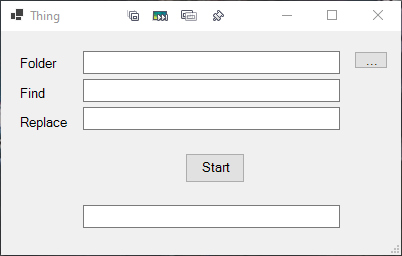
Works for me with Word 2k3.

[attach=#]

Code: ( powershell)
<# This form was created using POSHGUI.com  a free online gui designer for PowerShell
.NAME
    Thing.ps1

.USAGE
    powershell path\to\Thing.ps1
#>

Add-Type -AssemblyName System.Windows.Forms
[System.Windows.Forms.Application]::EnableVisualStyles()

$Form                            = New-Object system.Windows.Forms.Form
$Form.ClientSize                 = New-Object System.Drawing.Point(400,224)
$Form.text                       = "Thing"
$Form.TopMost                    = $false

$Label1                          = New-Object system.Windows.Forms.Label
$Label1.text                     = "Folder"
$Label1.AutoSize                 = $true
$Label1.width                    = 25
$Label1.height                   = 10
$Label1.location                 = New-Object System.Drawing.Point(17,24)
$Label1.Font                     = New-Object System.Drawing.Font('Microsoft Sans Serif',10)

$Label2                          = New-Object system.Windows.Forms.Label
$Label2.text                     = "Find"
$Label2.AutoSize                 = $true
$Label2.width                    = 25
$Label2.height                   = 10
$Label2.location                 = New-Object System.Drawing.Point(17,54)
$Label2.Font                     = New-Object System.Drawing.Font('Microsoft Sans Serif',10)

$Label3                          = New-Object system.Windows.Forms.Label
$Label3.text                     = "Replace"
$Label3.AutoSize                 = $true
$Label3.width                    = 25
$Label3.height                   = 10
$Label3.location                 = New-Object System.Drawing.Point(17,83)
$Label3.Font                     = New-Object System.Drawing.Font('Microsoft Sans Serif',10)

$TextBox1                        = New-Object system.Windows.Forms.TextBox
$TextBox1.multiline              = $false
$TextBox1.width                  = 257
$TextBox1.height                 = 20
$TextBox1.location               = New-Object System.Drawing.Point(82,20)
$TextBox1.Font                   = New-Object System.Drawing.Font('Microsoft Sans Serif',10)

$TextBox2                        = New-Object system.Windows.Forms.TextBox
$TextBox2.multiline              = $false
$TextBox2.width                  = 257
$TextBox2.height                 = 20
$TextBox2.location               = New-Object System.Drawing.Point(82,48)
$TextBox2.Font                   = New-Object System.Drawing.Font('Microsoft Sans Serif',10)

$TextBox3                        = New-Object system.Windows.Forms.TextBox
$TextBox3.multiline              = $false
$TextBox3.width                  = 257
$TextBox3.height                 = 20
$TextBox3.location               = New-Object System.Drawing.Point(82,76)
$TextBox3.Font                   = New-Object System.Drawing.Font('Microsoft Sans Serif',10)

$Button1                         = New-Object system.Windows.Forms.Button
$Button1.text                    = "..."
$Button1.width                   = 34
$Button1.height                  = 18
$Button1.location                = New-Object System.Drawing.Point(353,20)
$Button1.Font                    = New-Object System.Drawing.Font('Microsoft Sans Serif',10)

$Button2                         = New-Object system.Windows.Forms.Button
$Button2.text                    = "Start"
$Button2.width                   = 60
$Button2.height                  = 30
$Button2.location                = New-Object System.Drawing.Point(184,122)
$Button2.Font                    = New-Object System.Drawing.Font('Microsoft Sans Serif',10)

$TextBox4                        = New-Object system.Windows.Forms.TextBox
$TextBox4.multiline              = $false
$TextBox4.width                  = 257
$TextBox4.height                 = 20
$TextBox4.location               = New-Object System.Drawing.Point(82,174)
$TextBox4.Font                   = New-Object System.Drawing.Font('Microsoft Sans Serif',10)

$Form.controls.AddRange(@($Label1,$Label2,$Label3,$TextBox1,$TextBox2,$TextBox3,$Button1,$Button2,$TextBox4))

$Button1.Add_Click({
  $objForm = New-Object System.Windows.Forms.FolderBrowserDialog
  $objForm.Description = "Select folder containing files"
  $objForm.SelectedPath = [System.Environment+SpecialFolder]'MyComputer'
  $objForm.ShowNewFolderButton = $false
  $result = $objForm.ShowDialog()
  if ($result -eq "OK") {
    $TextBox1.Text = $objForm.SelectedPath
  } else {
    $TextBox1.Text = ""
  }
})

$Button2.Add_Click({
  if ($TextBox1.Text -ne '' -and $TextBox2.Text -ne '') {
    Start-ReplaceText $TextBox1.Text $TextBox2.Text $TextBox3.Text
  }
})


function Start-ReplaceText {
  param (
    [Parameter(Mandatory = $true)][string]$srce,
    [Parameter(Mandatory = $true)][string]$FindText,
    [Parameter(Mandatory = $true)][string]$ReplaceWith
  )

  $wdAlertsAll = -1         # All message boxes and alerts are displayed; errors are returned to the macro.
  $wdAlertsMessageBox = -2  # Only message boxes are displayed; errors are trapped and returned to the macro.
  $wdAlertsNone = 0         # No alerts or message boxes are displayed. If a macro encounters a message box, the default value is chosen and the macro continues.
  
  # Code below came from StackOverflow but I've lost the link
  $objWord = New-Object -comobject Word.Application
  $objWord.Visible = $false
  $objWord.DisplayAlerts = $wdAlertsNone  # See values above

  $list = Get-ChildItem "$($srce)\*" -Include *.doc,*.docx -exclude ~*,*.mem.doc -Recurse # Add more to exclude if necessary
  foreach($item in $list){
    $TextBox4.Text = "Doing file: $([System.io.Path]::GetFileName($item))"
    $objDoc = $objWord.Documents.Open($item.FullName, $true)
    $objSelection = $objWord.Selection
    $wdFindContinue = 1
    $MatchCase = $False
    $MatchWholeWord = $true
    $MatchWildCards = $False
    $MatchSoundsLike = $False
    $MatchAllWordForms = $False
    $Forward = $True
    $Wrap = $wdFindContinue
    $Format = $True
#    $wdReplaceNone = 0
    $wdFindContinue = 1
    $ReplaceAll = 2

    $a = $objSelection.Find.Execute($FindText, $MatchCase, $MatchWholeWord, $MatchWildCards, `
      $MatchSoundsLike, $MatchAllWordForms, $Forward, $Wrap, $Format, $ReplaceWith, `
      $ReplaceAll)

    $objDoc.Save()
    $objDoc.Close()
  }

  $objWord.DisplayAlerts = $wdAlertsAll  # Turn alerts back on, see values above
  $objWord.Quit()
  $TextBox4.Text = 'Finished'
}


#Write your logic code here

[void]$Form.ShowDialog()
"I will not follow where the path may lead, but I will go where there is no path, and I will leave a trail." - Muriel Strode, 1903
« Last Edit: February 04, 2021, 12:25 PM by 4wd »

Contro

  • Supporting Member
  • Joined in 2007
  • **
  • Posts: 3,947
Re: VBA adaptation code for locate strings inside word files
« Reply #6 on: February 02, 2021, 11:42 PM »
I will try and comment
Best Regards
:-* :P

Contro

  • Supporting Member
  • Joined in 2007
  • **
  • Posts: 3,947
Re: VBA adaptation code for locate strings inside word files
« Reply #7 on: February 03, 2021, 12:04 AM »
I will try step by step. Seems other type of code. Not VBA. So I have to learn.

You anticipate that you prefer Powershell.

I will study and learn and comment.
Best Regards

4wd

  • Pedantic Old Bastard
  • Supporting Member
  • Joined in 2006
  • **
  • Posts: 5,652
    • Coding Snacks
Re: VBA adaptation code for locate strings inside word files
« Reply #8 on: February 03, 2021, 02:47 AM »
You anticipate that you prefer Powershell.

I don't anticipate that I prefer PowerShell ...

I only use PowerShell. ;)
"I will not follow where the path may lead, but I will go where there is no path, and I will leave a trail." - Muriel Strode, 1903

Contro

  • Supporting Member
  • Joined in 2007
  • **
  • Posts: 3,947
Re: VBA adaptation code for locate strings inside word files
« Reply #9 on: February 03, 2021, 11:26 AM »
You anticipate that you prefer Powershell.

I don't anticipate that I prefer PowerShell ...

I only use PowerShell. ;)
;D :)  :-* :P

Contro

  • Supporting Member
  • Joined in 2007
  • **
  • Posts: 3,947
Re: VBA adaptation code for locate strings inside word files
« Reply #10 on: February 03, 2021, 04:54 PM »
I am trying the script and seems go well, but with some files I have problem
I can put screenshots if needed

.eml files are processed if contain in the description .doc ?
doing file : ~$5.proyecto.doc and similar are not needed..
pdf files are not needed

where can I control this in the script ?

I only need to process doc, docx and rtf files initially.
And some of them may be excluded like :
EMERGENCIA.doc
beginning with ~$ ,,,,,, doc
and some others
:-\

Contro

  • Supporting Member
  • Joined in 2007
  • **
  • Posts: 3,947
Re: VBA adaptation code for locate strings inside word files
« Reply #11 on: February 03, 2021, 05:04 PM »
Initially i am trying in a security copy in the desktop.

Some files give me errors. Some of them are from external programs for calculations and I don't need to process.
Like EMERGENCIA.doc
I put some screenshots with the errors I am obtaining...
AsusPortatil - 03_02_2021 , 16_34_16.pngAsusPortatil - 03_02_2021 , 16_43_17.pngAsusPortatil - 03_02_2021 , 16_45_26.pngAsusPortatil - 03_02_2021 , 16_58_53.pngAsusPortatil - 03_02_2021 , 16_58_53.pngAsusPortatil - 03_02_2021 , 17_01_03.png

Contro

  • Supporting Member
  • Joined in 2007
  • **
  • Posts: 3,947
Re: VBA adaptation code for locate strings inside word files
« Reply #12 on: February 03, 2021, 05:25 PM »
I''ll make an experiment to see if process eml files or pdf files creating a folder with this type of files.
When need to depure something I observ microsoft word interaction goes to open the program directly and then I have the window of the program open.

:-* :P

Contro

  • Supporting Member
  • Joined in 2007
  • **
  • Posts: 3,947
Re: VBA adaptation code for locate strings inside word files
« Reply #13 on: February 03, 2021, 05:43 PM »
I need to exclude these too :
*.MEM.doc
*.PST.doc
*.pry.doc
*.anx.doc
*.CTF.doc
*.rey.doc

I am trying to determine if the supposed eml and pdf intercepted are because or not containing the string .doc in the description ....

Contro

  • Supporting Member
  • Joined in 2007
  • **
  • Posts: 3,947
So :
1. I need a filter to filter what types and names I want to process

2. I would like too an option to manipulate the windows registry , specially if a window appear when opening the word file.

:-* :P

4wd

  • Pedantic Old Bastard
  • Supporting Member
  • Joined in 2006
  • **
  • Posts: 5,652
    • Coding Snacks
I am trying to determine if the supposed eml and pdf intercepted are because or not containing the string .doc in the description ....

That's not a description, it's a file name.  Use the Comment metadata for a description.

1. I need a filter to filter what types and names I want to process

See above:

Code: ( powershell)
  $list = Get-ChildItem "$($srce)\*" -Include *.doc,*.docx -exclude ~*,*.mem.doc -Recurse # Add more to exclude if necessary

Edit as necessary.


Quote
2. I would like too an option to manipulate the windows registry , specially if a window appear when opening the word file.

Code: ( powershell)
...
  $wdAlertsAll = -1         # All message boxes and alerts are displayed; errors are returned to the macro.
  $wdAlertsMessageBox = -2  # Only message boxes are displayed; errors are trapped and returned to the macro.
  $wdAlertsNone = 0         # No alerts or message boxes are displayed. If a macro encounters a message box, the default value is chosen and the macro continues.
...
  $objWord.DisplayAlerts = $wdAlertsNone  # See values above
...

Might work, might not.
"I will not follow where the path may lead, but I will go where there is no path, and I will leave a trail." - Muriel Strode, 1903

Contro

  • Supporting Member
  • Joined in 2007
  • **
  • Posts: 3,947
I put this :
   
      $list = Get-ChildItem "$($srce)\*" -Include *.doc* -exclude ~*,*.mem.doc,~*,*.rey.doc,~*,*.CTF.doc,~*,*.anx.doc,~*,*.pry.doc,~*,*.PST.doc, -Recurse # Add more to exclude if necessary

I'll put in a few days the window I wish to deactivate and how I do throught the options in microsoft word.
:-* :P

4wd

  • Pedantic Old Bastard
  • Supporting Member
  • Joined in 2006
  • **
  • Posts: 5,652
    • Coding Snacks
      $list = Get-ChildItem "$($srce)\*" -Include *.doc* -exclude ~*,*.mem.doc,~*,*.rey.doc,~*,*.CTF.doc,~*,*.anx.doc,~*,*.pry.doc,~*,*.PST.doc, -Recurse # Add more to exclude if necessary

I'll put in a few days the window I wish to deactivate and how I do throught the options in microsoft word.

Changes were already in original post, you only had to add more to exclude.
"I will not follow where the path may lead, but I will go where there is no path, and I will leave a trail." - Muriel Strode, 1903

reynolds_john

  • Charter Member
  • Joined in 2005
  • ***
  • Posts: 8
May I suggest Everything ?

I tested it on Word docx and doc and other files for content and it works brilliantly. You can configure it to just monitor particular folders if you wish, run as a service, etc. etc.
Command line supported as well.
I've used this in environments with massive (20 million)+ files and had great success too.

Best,
--J

Contro

  • Supporting Member
  • Joined in 2007
  • **
  • Posts: 3,947
May I suggest Everything ?

I tested it on Word docx and doc and other files for content and it works brilliantly. You can configure it to just monitor particular folders if you wish, run as a service, etc. etc.
Command line supported as well.
I've used this in environments with massive (20 million)+ files and had great success too.

Best,
--J
Wait for 4wd. He is my guru.
Have you tried to replace strings inside doc and docx files ?
Notepad++ and others also have the ability to search, but not to replace. Or if you replace you get a mess and a headache !!!!!

reynolds_john

  • Charter Member
  • Joined in 2005
  • ***
  • Posts: 8
Sorry, I missed the part about replacing words too.

Contro

  • Supporting Member
  • Joined in 2007
  • **
  • Posts: 3,947
Sorry, I missed the part about replacing words too.
I use Everything several years ago !!!!!!!!!
:-* :P

Original address: https://www.donationcoder.com/forum/index.php?topic=51025.0