DonationCoder.com forum
 
Read-only archive. This is a static copy of the DonationCoder.com forum. Reading and searching work as before; logging in, posting and private messages do not.
Archive of 2026-10-21 · About this archive · Main site

Author Topic: naming an alias  (Read 9,266 times)

kireta

  • Supporting Member
  • Joined in 2007
  • **
  • Posts: 7
naming an alias
« on: December 27, 2019, 09:12 PM »
Hi, not sure what I am doing wrong for naming an alias

This works to launch Android Messenger as a new window:
"C:\Program Files (x86)\BraveSoftware\Brave-Browser\Application\brave.exe"  --app=https://messages.google.com/web/conversations /ICON=C:\Program Files (x86)\FindAndRunRobot\AliasGroups\Installed\Core_Aliases\icons\Messages Android 32.ico

Adding "Messages | " in the beginning results in nothing launching
Messages | "C:\Program Files (x86)\BraveSoftware\Brave-Browser\Application\brave.exe"  --app=https://messages.google.com/web/conversations /ICON=C:\Program Files (x86)\FindAndRunRobot\AliasGroups\Installed\Core_Aliases\icons\Messages Android 32.ico

(I did create a custom icon "Messages Android 32.ico" and added it to the Core_Aliases\icons folder)

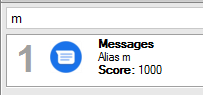
How can I get "Messages" to display when I type the alias "m"?

Any insight would be appreciated, thx :-)
Nod5

  • Supporting Member
  • Joined in 2006
  • **
  • Posts: 1,175
    • Coding Snacks
    • Participated in NANY Challenge Three Times
    • Plugin Coding Medal
Re: naming an alias
« Reply #1 on: December 28, 2019, 10:20 AM »
Does it work if you remove the quote marks around the path to brave.exe ?
Code
Messages | C:\Program Files (x86)\BraveSoftware\Brave-Browser\Application\brave.exe --app=https://messages.google.com/web/conversations /ICON=C:\Program Files (x86)\FindAndRunRobot\AliasGroups\Installed\Core_Aliases\icons\Messages Android 32.ico

kireta

  • Supporting Member
  • Joined in 2007
  • **
  • Posts: 7
Re: naming an alias
« Reply #2 on: December 28, 2019, 11:08 AM »
Yes! Thank you  :)

This works:

Messages | C:\Program Files (x86)\BraveSoftware\Brave-Browser\Application\brave.exe  --app=https://messages.google.com/web/conversations /ICON=C:\Program Files (x86)\FindAndRunRobot\AliasGroups\Installed\Core_Aliases\icons\Messages Android 32.ico

Nod5

  • Supporting Member
  • Joined in 2006
  • **
  • Posts: 1,175
    • Coding Snacks
    • Participated in NANY Challenge Three Times
    • Plugin Coding Medal
Re: naming an alias
« Reply #3 on: December 28, 2019, 01:54 PM »
Glad to help.

Question to Mouser concerning this:
Is the issue with quotes around the file path in Results a bug regression? Compare to
https://www.donationcoder.com/Software/Mouser/findrun/help/index.html?version_history.htm
Quote
Version 2.224.01 Beta - May 6, 2015
[BugFix] Fixed issue where double quotes in alias results were causing failure to launch result and bad icons.

Example alias to showcase the issue
Alias Name
Code
testing
RegEx
Code
^(te|tes|test)$

Results
Code
test1 | C:\Program Files (x86)\Mozilla Firefox\firefox.exe
test2 | "C:\Program Files (x86)\Mozilla Firefox\firefox.exe"
test3 | C:\Program Files (x86)\Mozilla Firefox\firefox.exe https://donationcoder.com
test4 | "C:\Program Files (x86)\Mozilla Firefox\firefox.exe" https://donationcoder.com

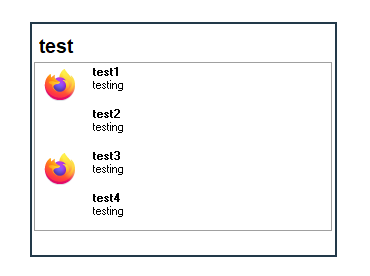
In FARR v2.234 and Windows 10 I see these effects
- Test1-3 launches Firefox, in the case of test3 the site is opened correctly. Test4 does nothing.
- Test1 and 3 show the Firefox icon, 2 and 4 shows no icon (I tested in both small and big icon mode).

1.png
« Last Edit: December 28, 2019, 02:16 PM by Nod5 »

mouser

  • First Author
  • Administrator
  • Joined in 2005
  • *****
  • Posts: 40,931
    • Gathering Badge
    • Plugin Coding Medal
    • Participated in NANY Challenge Seventeen Times
    • Cody Award
    • Coding Snacks
    • Volunteers/Staff
Re: naming an alias
« Reply #4 on: December 30, 2019, 11:49 AM »
Sure seems like a bug.. Since I'm working on FARR now I will try to fix now..
Thank you so much for the clear examples and tests.. It makes my life much easier!  :up:

mouser

  • First Author
  • Administrator
  • Joined in 2005
  • *****
  • Posts: 40,931
    • Gathering Badge
    • Plugin Coding Medal
    • Participated in NANY Challenge Seventeen Times
    • Cody Award
    • Coding Snacks
    • Volunteers/Staff
Re: naming an alias
« Reply #5 on: December 30, 2019, 03:41 PM »
Nod, could you try the latest beta, here: https://www.donationcoder.com/forum/index.php?topic=10505.msg434824#msg434824

I've tried to improve handling arguments with double quotes, and also displaying of alias results with arguments, etc.

Based on your test result alias and some others:

BEFORE:
[attachthumb]
« Last Edit: December 30, 2019, 04:07 PM by mouser »

Nod5

  • Supporting Member
  • Joined in 2006
  • **
  • Posts: 1,175
    • Coding Snacks
    • Participated in NANY Challenge Three Times
    • Plugin Coding Medal
Re: naming an alias
« Reply #6 on: January 02, 2020, 12:42 AM »
Tested 2.238.01 beta portable in Virtualbox Win10

Test 1: result lines for an alias meant to run notepad and show a .txt file

Code
1 | C:\Windows\System32\notepad.exe C:\test\a b.txt
2 | C:\Windows\System32\notepad.exe "C:\test\a b.txt"
3 | "C:\Windows\System32\notepad.exe" "C:\test\a b.txt"
4 | "C:\Windows\System32\notepad.exe" C:\test\a b.txt
5 | "C:\Windows\System32\notepad.exe"
6 | C:\Windows\System32\notepad.exe

- All items show up with correct icons in FARR
- This is what happens when an item is started from FARR:
1 4: opens blank Notepad and error messagebox about file not found
2: opens Notepad and with the .txt correctly
3: does nothing

5 6: opens blank Notepad correctly

5 6 also work as expected when adding ++ C:\test\a b.txt and ++ "C:\test\a b.txt" after the alias regex in the search box

Test 2: an alias meant to run Firefox and show google.com

Code
1 | C:\Program Files\Mozilla Firefox\Firefox.exe https://www.google.com
2 | C:\Program Files\Mozilla Firefox\Firefox.exe "https://www.google.com"
3 | "C:\Program Files\Mozilla Firefox\Firefox.exe" "https://www.google.com"
4 | "C:\Program Files\Mozilla Firefox\Firefox.exe" https://www.google.com
5 | "C:\Program Files\Mozilla Firefox\Firefox.exe"
6 | C:\Program Files\Mozilla Firefox\Firefox.exe
- All items show up with correct icons in FARR
- This is what happens when an item is started from FARR:
1 2 4: opens Firefox and loads google.com correctly
3: does nothing
5 6: opens Firefox correctly

5 6 also work as expected when adding ++ https://www.google.com and ++ "https://www.google.com" after the alias regex in the search box

Related FARR help page on using ++ in searchbox to add a parameter
https://www.donationcoder.com/Software/Mouser/findrun/help/passing_commandline_parameters.htm[/code]

mouser

  • First Author
  • Administrator
  • Joined in 2005
  • *****
  • Posts: 40,931
    • Gathering Badge
    • Plugin Coding Medal
    • Participated in NANY Challenge Seventeen Times
    • Cody Award
    • Coding Snacks
    • Volunteers/Staff
Re: naming an alias
« Reply #7 on: January 02, 2020, 01:00 AM »
Code
3 | "C:\Program Files\Mozilla Firefox\Firefox.exe" "https://www.google.com"
3: does nothing

oops that slipped by my testing, i can confirm that result.  working on it.


Code
"C:\Program Files\Mozilla Firefox\Firefox.exe" "https://www.google.com"
3: does nothing

ok that's same problem, will fix.

Code
1 4: opens blank Notepad and error messagebox about file not found

I guess that's to be expected and may not be considered a farr bug.. as long as i can fix the ones with doublequotes. Unless you tell me that those used to would work on the prior version of farr..

« Last Edit: January 02, 2020, 01:41 AM by mouser »

mouser

  • First Author
  • Administrator
  • Joined in 2005
  • *****
  • Posts: 40,931
    • Gathering Badge
    • Plugin Coding Medal
    • Participated in NANY Challenge Seventeen Times
    • Cody Award
    • Coding Snacks
    • Volunteers/Staff
Re: naming an alias
« Reply #8 on: January 02, 2020, 02:19 AM »
New beta uploaded -- hopefully that fixes both case 3 cases..
Thank you for all your help testing this, Nod5  :Thmbsup:

Nod5

  • Supporting Member
  • Joined in 2006
  • **
  • Posts: 1,175
    • Coding Snacks
    • Participated in NANY Challenge Three Times
    • Plugin Coding Medal
Re: naming an alias
« Reply #9 on: January 02, 2020, 08:07 AM »
That was fast!  :) I'm short on time, will test new beta on Saturday.

mouser

  • First Author
  • Administrator
  • Joined in 2005
  • *****
  • Posts: 40,931
    • Gathering Badge
    • Plugin Coding Medal
    • Participated in NANY Challenge Seventeen Times
    • Cody Award
    • Coding Snacks
    • Volunteers/Staff
Re: naming an alias
« Reply #10 on: January 03, 2020, 05:39 PM »
Make sure you download the latest version -- I've since fixed another bug relating to the new handling of double-quoted arguments.

Nod5

  • Supporting Member
  • Joined in 2006
  • **
  • Posts: 1,175
    • Coding Snacks
    • Participated in NANY Challenge Three Times
    • Plugin Coding Medal
Re: naming an alias
« Reply #11 on: January 04, 2020, 09:55 PM »
Regarding my above test cases 1 and 4: You correctly replied
Quote
I guess that's to be expected and may not be considered a farr bug.. as long as i can fix the ones with doublequotes. Unless you tell me that those used to would work on the prior version of farr..
I shouldn't have included 1 and 4 at all, but was confused earlier because on a PC here with an older FARR version case 1 did open the file (despite spaces in path and not quote enclosed!). But it turns out that was only because Microsoft's Notepad.exe was replaced by Notepad2 on that PC. And Notepad2 (weirdly!) doesn't require quotes when passing a spaced filepath as parameter. So disregard that.

In other words: test case 2 and 3 (and 5 and 6 using the ++ method) are what matters. Forget 1 and 4.

In the as of now latest portable beta test cases 2 3 (and 5 6) work fine. So the issue seems solved.  :up:

Original address: https://www.donationcoder.com/forum/index.php?topic=49295.0