DonationCoder.com forum
 
Read-only archive. This is a static copy of the DonationCoder.com forum. Reading and searching work as before; logging in, posting and private messages do not.
Archive of 2026-10-21 · About this archive · Main site

Author Topic: IDEA: Subfolder Creator  (Read 8,350 times)

magician62

  • Supporting Member
  • Joined in 2011
  • **
  • Posts: 180
IDEA: Subfolder Creator
« on: April 13, 2019, 05:49 PM »
Ideally AHK so I can learn.

A dropzone where one or more folders can be dropped from various source locations.

Dropzone creates one or more empty folders of user defined name(s) inside dropped folder(s).

Sounds simple, but is it?

Purpose is to allow pre-population of folder sets for subsequent use.

TIA
Why an I Magician62? Because Magician1 thru 61 were gone. :)
« Last Edit: April 13, 2019, 05:55 PM by magician62 »

Nod5

  • Supporting Member
  • Joined in 2006
  • **
  • Posts: 1,175
    • Coding Snacks
    • Participated in NANY Challenge Three Times
    • Plugin Coding Medal
Re: IDEA: Subfolder Creator
« Reply #1 on: April 13, 2019, 06:49 PM »
An example, just to see if I understand the request.

If the user drops the folder
C:\this\folder
on the GUI dropzone then the program should create
C:\this\folder\somesubfolder
C:\this\folder\anothersubfolder
C:\this\folder\third

And similarly create the same named subfolders if we drop the folder C:\other\directory and so on.

If that's it then AutoHotkey can do it.

But if you want to learn perhaps you'd like to give it a shot yourself first? Help on commands to use
https://autohotkey.com/docs/Tutorial.htm
https://autohotkey.com/docs/commands/Gui.htm
https://autohotkey.com/docs/commands/Gui.htm#GuiDropFiles
https://autohotkey.com/docs/commands/FileCreateDir.htm

magician62

  • Supporting Member
  • Joined in 2011
  • **
  • Posts: 180
Re: IDEA: Subfolder Creator
« Reply #2 on: April 13, 2019, 07:45 PM »
You have it correct
  :up:

Although I have looked at AHK in the past only bits of it made sense. I still have a long, long way to go. :)
Why an I Magician62? Because Magician1 thru 61 were gone. :)

Nod5

  • Supporting Member
  • Joined in 2006
  • **
  • Posts: 1,175
    • Coding Snacks
    • Participated in NANY Challenge Three Times
    • Plugin Coding Medal
Re: IDEA: Subfolder Creator
« Reply #3 on: April 13, 2019, 10:35 PM »
Ok, here is a basic version. You could enhance it in several ways: Edit the subfolder names of course; Add editboxes so the user can change subfolder names on each use; Change the color, font and look of the window; Accept dropping more than one folder at a time; and more. If you look up the commands on each line in the AutoHotkey manual you'll quickly get ideas on how to tweak things.

Code: ( autohotkey)
#NoEnv
#SingleInstance force
Gui, font, s14 cBlack bold
Gui, Add, Text,x100 y120,Drop folder
Gui, Show, w300 h300, Subfolder Creator
return

GuiDropFiles:
  Loop, parse, A_GuiControlEvent, `n, `r
  {
    folder := A_LoopField
    break
  }
  if !InStr(FileExist(folder), "D")
    return
   FileCreateDir, %folder%\subfolder name
   FileCreateDir, %folder%\another subfolder
   FileCreateDir, %folder%\subfolder 3
return

GuiClose:
exitapp

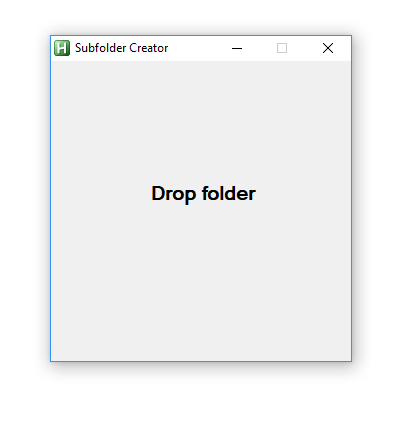
Here is how it looks in Windows 10
3.png
« Last Edit: April 13, 2019, 10:55 PM by Nod5 »

magician62

  • Supporting Member
  • Joined in 2011
  • **
  • Posts: 180
Re: IDEA: Subfolder Creator
« Reply #4 on: April 14, 2019, 07:50 AM »
I like your use of "quickly ". It is a relative term, and the closer you get to retirement, the longer "quickly" takes. :)

From what you have there I can see how the GUI is created. In my working version I have moved the box creation to the top which seems to work, but is there a reason not to do this? To me the logical progression is make a box, chose pen and ink, and write something with it. :)

I created a gosub for folder creation and dropped it to the bottom with the appropriate entries for folder creation.

The bit I had trouble with is a loop for a group of folders dropped. I took a while before I realised that your "Break" might be stopping a Loop through all the folders dropped  So tried substituting the gosub for the Break, and all seems to work!

Code: ( autohotkey)
#NoEnv
#SingleInstance force
Gui, Show, w300 h300, Subfolder Creator
Gui, font, s14 cBlack bold
Gui, Add, Text, x150 y150, Drop folder

return
 
GuiDropFiles:
  Loop, parse, A_GuiControlEvent, `n, `r
  {
    folder := A_LoopField
    gosub,create_folder
  }

return
GuiClose:
exitapp


create_folder:
  if !InStr(FileExist(folder), "D")
    return
   FileCreateDir, %folder%\p01
   FileCreateDir, %folder%\p02
   FileCreateDir, %folder%\p03
   FileCreateDir, %folder%\p04
   FileCreateDir, %folder%\p05
   FileCreateDir, %folder%\p06
   FileCreateDir, %folder%\p07
   FileCreateDir, %folder%\p08
   FileCreateDir, %folder%\p09
   FileCreateDir, %folder%\p10
   FileCreateDir, %folder%\p11
   FileCreateDir, %folder%\p12
return
Why an I Magician62? Because Magician1 thru 61 were gone. :)
« Last Edit: April 14, 2019, 11:45 AM by magician62 »

Nod5

  • Supporting Member
  • Joined in 2006
  • **
  • Posts: 1,175
    • Coding Snacks
    • Participated in NANY Challenge Three Times
    • Plugin Coding Medal
Re: IDEA: Subfolder Creator
« Reply #5 on: April 14, 2019, 10:37 AM »
You've enhanced the program to accept multiple folder drops at once - nice going!  :)

Tip: when you add code to a forum post use the "code highlighting" dropdown to colorize the AutoHotkey code, like in my posts.

Quote
In my working version I have moved the box creation to the top which seems to work, but is there a reason not to do this?
No problem in this case. But with more complex GUIs putting Show first can result in the user first seeing a blank window and only later text, buttons, editboxes. Avoided by putting Show last. Just to illustrate that try what happens if you add in a delay, like so

Code: ( autohotkey)
Gui, Show, w300 h300, Subfolder Creator
Sleep 700
Gui, font, s14 cBlack bold
Gui, Add, Text,x150 y150,Drop folder

Quote
To me the logical progression is make a box, chose pen and ink, and write something with it.
Makes sense in the sketching/planning phase. But that can differ from what is later on the best code order. It often helps to comment (shown in green here) the code to make it more intuitive to read later. For example
Code: ( autohotkey)
;Main GUI window where user drops folders
Gui, font, s14 cBlack bold
Gui, Add, Text, x150 y150, Drop folder
Gui, Show, w300 h300, Subfolder Creator

Quote
I created a gosub for folder creation and dropped it to the bottom with the appropriate entries for folder creation.
That works. Just for example, another way to do it without the gosub. Notice: continue instead of break.
Code: ( autohotkey)
    #NoEnv
    #SingleInstance force
    Gui, font, s14 cBlack bold
    Gui, Add, Text,x100 y120,Drop folder
    Gui, Show, w300 h300, Subfolder Creator
    return
     
    GuiDropFiles:
      Loop, parse, A_GuiControlEvent, `n, `r
      {
        folder := A_LoopField
        if !InStr(FileExist(folder), "D")
          continue
         FileCreateDir, %folder%\subfolder name
         FileCreateDir, %folder%\another subfolder
         FileCreateDir, %folder%\subfolder 3
      }
    return
     
    GuiClose:
    exitapp

Or alternatively with a function instead of gosub
Code: ( autohotkey)
    #NoEnv
    #SingleInstance force
    Gui, font, s14 cBlack bold
    Gui, Add, Text,x100 y120,Drop folder
    Gui, Show, w300 h300, Subfolder Creator
    return
     
    GuiDropFiles:
      Loop, parse, A_GuiControlEvent, `n, `r
      {
        folder := A_LoopField
        if InStr(FileExist(folder), "D")
          MakeFolders(folder)
      }
    return
     
    GuiClose:
    exitapp

MakeFolders(folder) {
  FileCreateDir, %folder%\subfolder name
  FileCreateDir, %folder%\another subfolder
  FileCreateDir, %folder%\subfolder 3
}

One great thing with AutoHotkey is that it is relatively easy to get going with commands and make small programs. We can then gradually move from commands/gosub style coding to expressions, functions and objects as the programs get more complex.

If all your subfolder names will have an increasing pattern you can shorten code by replacing all the FileCreateDir lines with a loop

Simple example, but without padding so the folders get named p1, p2 ... rather than p01, p02 ...
Code: ( autohotkey)
Loop, 12
  FileCreateDir, %folder%\p%A_Index%
This gives padding
Code: ( autohotkey)
Loop, 12
{
  if A_Index < 10
    FileCreateDir, %folder%p0%A_Index%
  else
    FileCreateDir, %folder%p%A_Index%
}
This gives padding in a shorter way by using expressions and the Format() function.
Code: ( autohotkey)
Loop, 12
  FileCreateDir, % folder "\p" Format("{1:02}", A_Index)
« Last Edit: April 14, 2019, 10:49 AM by Nod5 »

magician62

  • Supporting Member
  • Joined in 2011
  • **
  • Posts: 180
Re: IDEA: Subfolder Creator
« Reply #6 on: April 14, 2019, 11:50 AM »
Thank you for the answers and suggestions to improve. As I say a lot to learn. Although I played with php about 10, I have probably forgotten most of it, prior to that it was BASIC almost 40 years ago lol.

The nice thing is I use this process in various different cases so can adjust and re-use as needed.

At present it is for downloaded newspaper pages, where they may not be sequentially named. So dropping into the right folder allows for a subsequent quick rename using the folder as the new filename. Only 150 years of a weekly papers to work through. :)
Why an I Magician62? Because Magician1 thru 61 were gone. :)

Nod5

  • Supporting Member
  • Joined in 2006
  • **
  • Posts: 1,175
    • Coding Snacks
    • Participated in NANY Challenge Three Times
    • Plugin Coding Medal
Re: IDEA: Subfolder Creator
« Reply #7 on: April 15, 2019, 07:02 AM »
Quote
At present it is for downloaded newspaper pages, where they may not be sequentially named. So dropping into the right folder allows for a subsequent quick rename using the folder as the new filename. Only 150 years of a weekly papers to work through.

Wow, that's a lot! :)

If you're downloading the pages for one paper issue in the right sequence and without gaps (download page 1 first, then page 2, ...) you might be able to rename in one go with a script that reads the "date modified" metadata. At least if there is reliably one or more second time difference between each download. See variable A_LoopFileTimeModified for Loop command.

magician62

  • Supporting Member
  • Joined in 2011
  • **
  • Posts: 180
Re: IDEA: Subfolder Creator
« Reply #8 on: April 16, 2019, 06:14 AM »
Unfortunately sometimes the download misses one or takes two copies. And to make things worse, the page code is broken. If you go one direction you get the numbers generally in random ascending order, but if you miss one and have to go back, the filename is different, or better put, the same as another page! 
Why an I Magician62? Because Magician1 thru 61 were gone. :)

Original address: https://www.donationcoder.com/forum/index.php?topic=47503.0