DonationCoder.com forum
 
Read-only archive. This is a static copy of the DonationCoder.com forum. Reading and searching work as before; logging in, posting and private messages do not.
Archive of 2026-10-21 · About this archive · Main site

Author Topic: Backup and restore sound volume profiles  (Read 4,098 times)

Sarkand

  • Time is Relative
  • Supporting Member
  • Joined in 2006
  • **
  • Posts: 18
Backup and restore sound volume profiles
« on: December 04, 2018, 09:37 PM »
I have a 5.1 sound system.  I often adjust the volumes of the various speaker channels to give me the best sound for a given application - e.g. Netflix streaming, music player, You Tube videos, etc.  It's a pain to continually readjust each channel.  I'd like a way to make a sound setting, back it up, then reapply it when I need it.  I'd like to store several different profiles from which to select.  Can anyone pull this off?

Thanks,
Sarkand

4wd

  • Pedantic Old Bastard
  • Supporting Member
  • Joined in 2006
  • **
  • Posts: 5,652
    • Coding Snacks
Re: Backup and restore sound volume profiles
« Reply #1 on: December 05, 2018, 02:13 AM »
Perhaps Sound Volume View ?

It allows you to Save/Load profiles.

eg.
1) Set all the volumes using the Windows Sound control panel.
2) Run Sound Volume View and save the current profile.
3) Do 1 and 2 as necessary for more profiles.
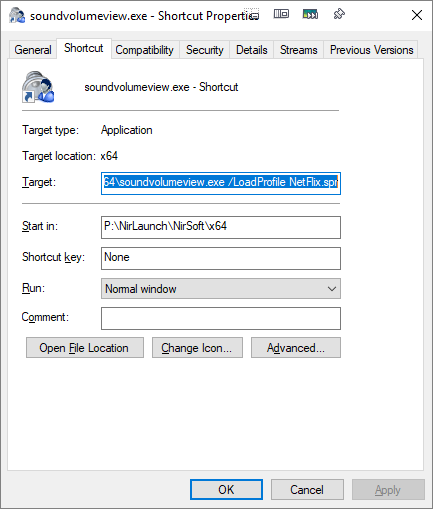
4) Create shortcut icons as follows, (rename the shortcuts to NetFlix, Youtube, etc):

2018-12-05 13_37_44-soundvolumeview.exe - Shortcut Properties.png
"I will not follow where the path may lead, but I will go where there is no path, and I will leave a trail." - Muriel Strode, 1903
« Last Edit: December 05, 2018, 02:40 AM by 4wd »

Original address: https://www.donationcoder.com/forum/index.php?topic=46781.0