DonationCoder.com forum
 
Read-only archive. This is a static copy of the DonationCoder.com forum. Reading and searching work as before; logging in, posting and private messages do not.
Archive of 2026-10-21 · About this archive · Main site

Author Topic: when Explicit Rule set to Force Low, application still running at 90% cpu...  (Read 20,323 times)

mathisonrichard

  • Participant
  • Joined in 2017
  • *
  • Posts: 2
Greetings,

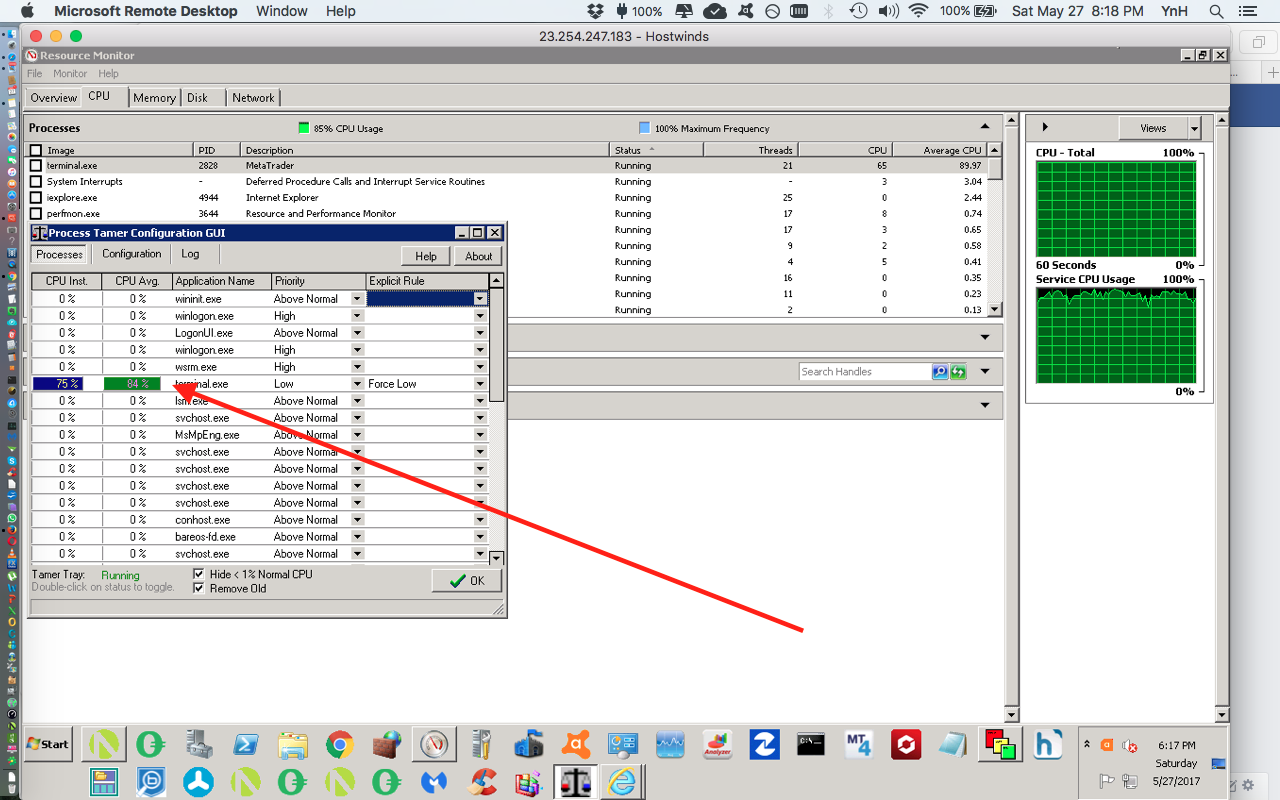
ProceessTamer related... when Explicit Rule set to Force Low, application still running at 90% cpu average. what am I missing ?? [see attached] Please assist.

I am looking forward to hearing from you soon. Thank you.

Cordially,

Richard

mouser

  • First Author
  • Administrator
  • Joined in 2005
  • *****
  • Posts: 40,931
    • Gathering Badge
    • Plugin Coding Medal
    • Participated in NANY Challenge Seventeen Times
    • Cody Award
    • Coding Snacks
    • Volunteers/Staff
Hi Richard.

The explanation for this has to do with the nature of Process Tamer and what it is doing.

Process Tamer does not explicitly try to make programs use less of your cpu.  What it does is adjust the relative priority of processes, so that if you have one process that is TRYING to use up all your cpu, and there are OTHER processes that are asking for cpu time, Process Tamer can ensure that the OTHER processes operate smoothly and get enough time to run responsively.

What that means is that in a case like the one you are showing, where only 1 process is really competing for the cpu, you shouldn't see very much of a difference (windows GUI controls, start menu, etc. may respond a bit faster).

It is only when you have a second program that you want to use where you should see the real difference.  With PT taming your terminal.exe application and setting it to low priority, your OTHER apps should now run more smoothly.

So for example if you run another process that needs a substantial amount of cpu time simultaneously with this terminal.exe which is currently alone using 90% of your cpu, THEN you should see that 90% drop lower when PT has lowered its priority, compared to if its priority it normal.

Does that make sense?

mathisonrichard

  • Participant
  • Joined in 2017
  • *
  • Posts: 2
Hello,

I appreciate your prompt response.

Yes, your explanation does make sense.

I was looking for a utility that would not allow any specific cpu process over a maximum percentage, say 60%.

Might you have a suggestion ??

Thank you.

Richard

mouser

  • First Author
  • Administrator
  • Joined in 2005
  • *****
  • Posts: 40,931
    • Gathering Badge
    • Plugin Coding Medal
    • Participated in NANY Challenge Seventeen Times
    • Cody Award
    • Coding Snacks
    • Volunteers/Staff
I'm not sure I've ever seen such a program, but it is an intriguing idea.. Let me know if you find something.

Ath

  • Supporting Member
  • Joined in 2006
  • **
  • Posts: 3,649
    • Participated in NANY Challenge Eleven Times
    • Coding Snacks
    • Linux User
    • Hardware Hacker
I'm more interested in arguments for limiting a process in using the available cpu power. Do you buy a car with hundreds of hp, just to keep the hand-brake on all the time to get a slower acceleration?
What process-tamer does is the most sensible: give a cpu-hog a lower priority so other processes get a fair chance of getting their work done. And while others demand no cpu-cycles, keep the hand-brake off and let it run free.
/Ton
Ath's software collection, Quote: "A problem well stated is a problem half-solved." (Charles Kettering)

wraith808

  • Supporting Member
  • Joined in 2006
  • **
  • Posts: 11,205
    • Participated in NANY Challenge Fourteen Times
    • Coding Snacks
    • Writer
    • Hardware Hacker
I'm more interested in arguments for limiting a process in using the available cpu power. Do you buy a car with hundreds of hp, just to keep the hand-brake on all the time to get a slower acceleration?
What process-tamer does is the most sensible: give a cpu-hog a lower priority so other processes get a fair chance of getting their work done. And while others demand no cpu-cycles, keep the hand-brake off and let it run free.

One use case that I've run into, is that if the CPU is higher than a certain %, the OS becomes unresponsive.  The ability to limit processes that hog the CPU to a certain limit would be quite useful.  I've had AV when running, and nothing else is running, even when set to a lower priority, be unresponsive.  Then when you attempt to do something else, because nothing else is running, the priority makes no difference in the responsiveness.

Ath

  • Supporting Member
  • Joined in 2006
  • **
  • Posts: 3,649
    • Participated in NANY Challenge Eleven Times
    • Coding Snacks
    • Linux User
    • Hardware Hacker
I've had AV when running, and nothing else is running, even when set to a lower priority, be unresponsive.
That is most likely explained by the security level of the level-0 drivers most AV software is using for their scan... I've (also) never been successful in lowering the priority of the AV I was using at any time.
For regular applications ProcessTamer should be adequate.
/Ton
Ath's software collection, Quote: "A problem well stated is a problem half-solved." (Charles Kettering)

wraith808

  • Supporting Member
  • Joined in 2006
  • **
  • Posts: 11,205
    • Participated in NANY Challenge Fourteen Times
    • Coding Snacks
    • Writer
    • Hardware Hacker
I've had AV when running, and nothing else is running, even when set to a lower priority, be unresponsive.
That is most likely explained by the security level of the level-0 drivers most AV software is using for their scan... I've (also) never been successful in lowering the priority of the AV I was using at any time.
For regular applications ProcessTamer should be adequate.

That was just one use case.  I have others I've experienced, especially when dealing with compilers.

antekgla

  • Participant
  • Joined in 2011
  • *
  • Posts: 75
    • Participated in NANY Challenge Once
Hello,

I appreciate your prompt response.

Yes, your explanation does make sense.

I was looking for a utility that would not allow any specific cpu process over a maximum percentage, say 60%.

Might you have a suggestion ??

Thank you.

Richard

Your best bet for this is BES
SRTFilter Automatic Subtitle Editor & Renamer
Dualcopy If you use Teracopy or Fastcopy this can be interesting   - My N.A.N.Y 2018 Entry

wraith808

  • Supporting Member
  • Joined in 2006
  • **
  • Posts: 11,205
    • Participated in NANY Challenge Fourteen Times
    • Coding Snacks
    • Writer
    • Hardware Hacker
Hello,

I appreciate your prompt response.

Yes, your explanation does make sense.

I was looking for a utility that would not allow any specific cpu process over a maximum percentage, say 60%.

Might you have a suggestion ??

Thank you.

Richard

Your best bet for this is BES


That is cool!  Thanks for sharing!

f0dder

  • [Well, THAT escalated quickly!]
  • Charter Honorary Member
  • Joined in 2005
  • ***
  • Posts: 9,153
    • Participated in NANY Challenge Once
I'm more interested in arguments for limiting a process in using the available cpu power. Do you buy a car with hundreds of hp, just to keep the hand-brake on all the time to get a slower acceleration?
I guess it could be useful in a few scenarios for keeping the thermal output lower - like if you have a long-running job on your laptop that you don't need finished as fast as possible, and would rather not get it running blisteringly hot?
- carpe noctem

antekgla

  • Participant
  • Joined in 2011
  • *
  • Posts: 75
    • Participated in NANY Challenge Once
I'm more interested in arguments for limiting a process in using the available cpu power. Do you buy a car with hundreds of hp, just to keep the hand-brake on all the time to get a slower acceleration?
I guess it could be useful in a few scenarios for keeping the thermal output lower - like if you have a long-running job on your laptop that you don't need finished as fast as possible, and would rather not get it running blisteringly hot?

In my case, I only have one machine so if I want to re-encode a video I dont want to make my machine useless for several hours until my re-econde finish, so I use BES to limit -30% the Vidcoder process, so it use only 60% of my processor instead 100% and I can use my machine meantime.

Besides as f0dder says limiting CPU in process what usually take ALL (100%) of your processor helps to maintain the temperature down.
SRTFilter Automatic Subtitle Editor & Renamer
Dualcopy If you use Teracopy or Fastcopy this can be interesting   - My N.A.N.Y 2018 Entry

f0dder

  • [Well, THAT escalated quickly!]
  • Charter Honorary Member
  • Joined in 2005
  • ***
  • Posts: 9,153
    • Participated in NANY Challenge Once
For video encoding, if you're not worried about temperature, just setting the encoder process to a low priority should still keep the machine usable, though.
- carpe noctem

Shades

  • Member
  • Joined in 2006
  • **
  • Posts: 2,954
Since I have ProcessLasso installed, my computer remains quite usable during video-encoding. For my video-encoding tasks I use VidCoder (a Handbrake fork with an easier interface). And I must say that it a quite well-behaved video-encoder, because if you would start other tasks, the resource consumption from VidCoder would reduce and allow those other tasks to be executed without too much of a hassle.

A few days ago, there was an offer to get ProcessLasso Pro v9.0 for free, so I installed it again and usability did improve more.

Perhaps it would be an option for you to use a more well-behaved video-encoder and in combination with your BES installation you have a (much) more usable system too.

My video encoding tasks usually entail ripping my DVDs with the x265 (HEVC) encoding format or re-encoding previously ripped x264 content in case the DVD became unreadable in the mean time. VidCoder does an excellent job in both use-cases.   
The easy path is usually downhill...

Original address: https://www.donationcoder.com/forum/index.php?topic=43890.0