
Windows 10 Pro • 64-bit • Version 1703 • OS Build 15063.296 • (Creators Update)


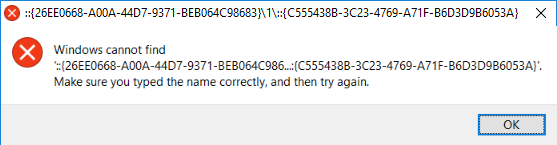
 Topic: T-Clock 2.4.3 build 471 Display Properties throws error (Read 42,355 times)


So it seems MS (Creators Update) problem.Yes, I wondered about that maybe being an error peculiar to the Creators Update Windows version, or maybe it's an error caused by the update.
MS hasn't advised me to get Creators Update, and no error in 32 bit Win 10, same result as IainB.
...
_________________________
IainB, it doesn't look like you're running the Windows 10 Creators Update. It was just rolled out recently. If Windows Update says "you're up to date", there should be a message underneath that text explaining how to download the Creators Update from Microsoft.Yes, thanks for the helpful tip, @bobofeta. I was aware that I was not running the Windows 10 Creators Update version (I'm in no hurry to install it either). It was that fact that made me say "That's odd" and why I copied my Windows version details. I wondered whether the error was an error in T-Clock, or (more likely) the result of changes in the Win10 Pro 64-bit Creators Update version
_____________________


Build 14393.rs1_release_sec.170427-1353Same issue here W10x64 [Version 10.0.15063]
I don't think it's a bug, and I don't think this is a case of just wait until Microsoft fixes it. ...Ah, well, if you think that, then maybe I could be accused of being a tad optimistic in supposing what I did there.
________________________


... So the old Display Settings may very well just be gone...Oh, good point. If they have been progressively decommissioning the old Control Panel, then you might well be proven right. Ha-ha and there I was gullibly presuming that they would probably fix it...
____________________


Maybe, for whatever reason, MS won't, in the end, take responsibility for fixing whatever they seem to have broken, and which apparently only they could fix, so then it would be left to the app developer(s) to adapt the apps affected, so that they point to the new address (or whatever it is).
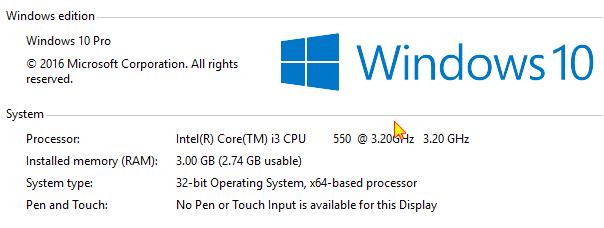
@anandcoral: Sorry for the off-topic request, but could you please provide the hardware spec that you have running the Win10 32-bit OS?
And could you summarise your view of its overall performance when using that OS, please? Do you have a basis for comparison? - i.e., did you previously have Win7 32-bit, or something, on that hardware?
I'm just interested in your experience with that, as I am considering putting Win10 32-bit on a 32-bit laptop for someone, but am unsure whether it's advisable - i.e, whether maybe it'd be better to stick with the existing Win7 32-bit installation.
Thanks in advance for any input.
If you develop for a platform, you know that the platform's developers are under no obligation to support your software. Or at least you should know that. You have to roll with the platform's releases. They didn't intentionally break t-clock. They also didn't intentionally not break it these years. It would be up to a developer to figure out what the problem is, and change/correct the software.
... So the old Display Settings may very well just be gone...Oh, good point. If they have been progressively decommissioning the old Control Panel, then you might well be proven right. Ha-ha and there I was gullibly presuming that they would probably fix it...
____________________
...It is the interface which has some learning curve. You may have to give your user some time to guide them "how to find in Win10 which was in WinXp/7" This is the biggest problem/change of this upgrade. And more is coming ... as we finding after each OS update.- then I would strongly suggest consideration be given to installing Classic Start Menu - refer Classic Shell (shell alternative for Windows 10, 8, 7) - Mini-Review
________________________
... Then there was that damn nifty system calendar in 10 that - got moved from where it had been for years... - I never could figure out how to launch back when. How the hell White Tiger found the damn thing I'm not sure...but he did shortly after taking over the project.I posted a reply to this in the general thread at: Re: Welcome to the new T-Clock forum section
______________________________
- then I would strongly suggest consideration be given to installing Classic Start Menu - refer Classic Shell (shell alternative for Windows 10, 8, 7) - Mini-Review
Classic Start Menu also provides an alternative XP, or Vista, or Win7 interface (take your pick). This could be useful for you with your users' needs (as you have described them).

If you develop for a platform, you know that the platform's developers are under no obligation to support your software. Or at least you should know that. You have to roll with the platform's releases. They didn't intentionally break t-clock. They also didn't intentionally not break it these years. It would be up to a developer to figure out what the problem is, and change/correct the software.


In the Miscellaneous menu, there is an option: Restore Previous Calendar (!! Global Win 10 Setting !!)Since the Anniversary update? Nothing... before that.. It restored the good-old Windows Calendar you used to know pre-Win10
What is it supposed to do?
[...]
[...]Actually.. "before" since that's the "main" reason by which you forced me to fork T-Clock^^ And in fact.. I've used Google to "figure" it out
Then there was that damn nifty system calendar in 10 that - got moved from where it had been for years... - I never could figure out how to launch back when. How the hell White Tiger found the damn thing I'm not sure...but he did shortly after taking over the project.
 But the old way got also broken by Windows 10's Anniversary update... which is why there's some ugly workaround now.
[attachment 1 not found]
Windows 10 Pro • 64-bit • Version 1703 • OS Build 15063.296 • (Creators Update)
Original address: https://www.donationcoder.com/forum/index.php?topic=43869.0
