
| Originally posted: | 2014-08-04 |
| Last updated | 2017-12-05 - developer of Classic Shell announces he is quitting, and releases the last version of the program. |
Basic Info
| App/Service Name | [attach] |

 Topic: Classic Shell (shell alternative for Windows 10, 8, 7) - Mini-Review (Read 29,084 times)


| Originally posted: | 2014-08-04 |
| Last updated | 2017-12-05 - developer of Classic Shell announces he is quitting, and releases the last version of the program. |
| App/Service Name | [attach] |
 Classic Shell 01 - logo.png
(8.8 KB, 116x101 - viewed 4086 times.)
Classic Shell 01 - logo.png
(8.8 KB, 116x101 - viewed 4086 times.)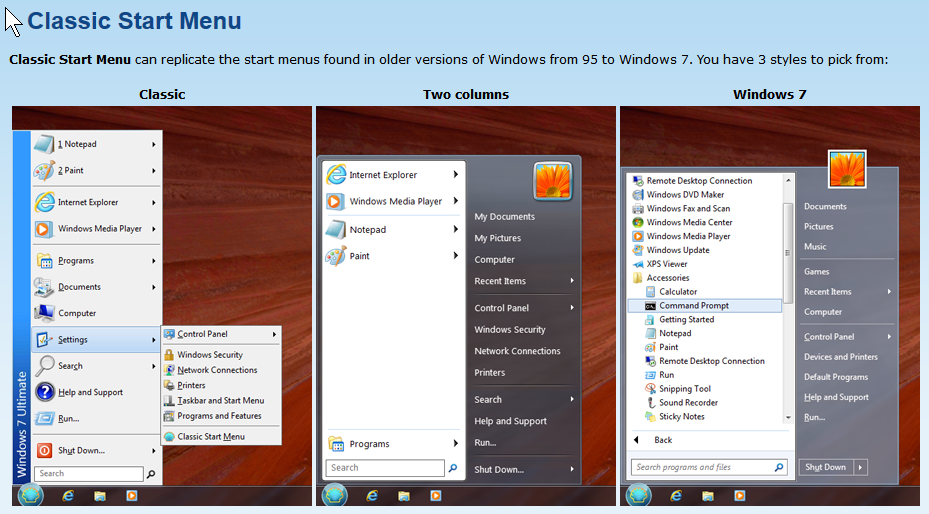 Classic Shell 02 - 3 x Start Menus.png
(414.1 KB, 929x514 - viewed 4574 times.)
Classic Shell 02 - 3 x Start Menus.png
(414.1 KB, 929x514 - viewed 4574 times.)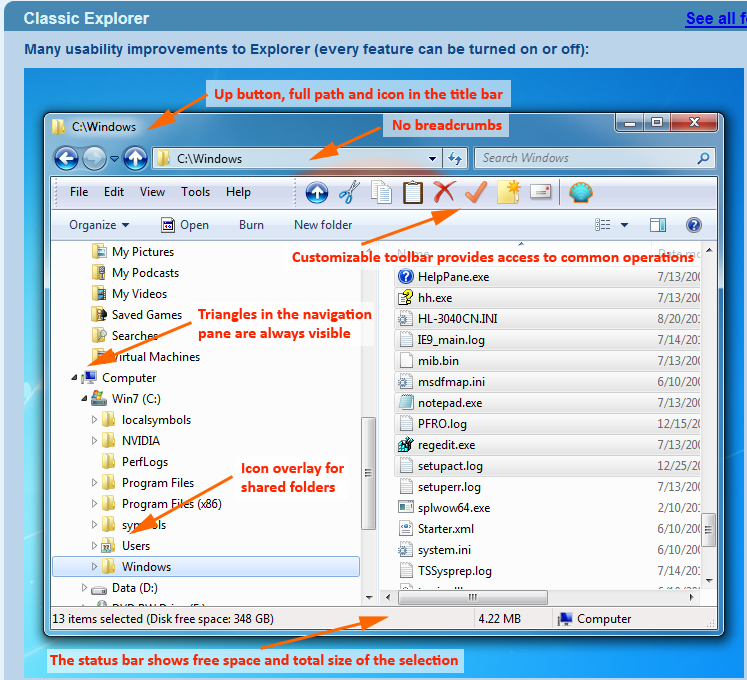 Classic Shell 03 - Explorer+notes.png
(261.7 KB, 747x680 - viewed 5102 times.)
Classic Shell 03 - Explorer+notes.png
(261.7 KB, 747x680 - viewed 5102 times.)
Here's an objective comparison of the Start Menus: http://www.classicshell.net/forum/viewtopic.php?t=2399Thanks for that! Just what was needed - compares it to the standard system also. I have added the link to the comparison review to s7.0 of the opening post.
 - as the latest stable version of Classic Shell is now 4.2.5, and almost 2 years have passed since my last update
  - during which time Classic Shell has gone from strength to strength, having by now been in active development for 6 years and has tens of millions of downloads.

@anandcoral:
Thanks for the response. Very interesting (to me).
If, as you write,Quote...It is the interface which has some learning curve. You may have to give your user some time to guide them "how to find in Win10 which was in WinXp/7" This is the biggest problem/change of this upgrade. And more is coming ... as we finding after each OS update.- then I would strongly suggest consideration be given to installing Classic Start Menu - refer Classic Shell (shell alternative for Windows 10, 8, 7) - Mini-Review
________________________
Classic Start Menu also provides an alternative XP, or Vista, or Win7 interface (take your pick). This could be useful for you with your users' needs (as you have described them).
In any event, this worked very well for me and my 2 favourite guinea-pigs (my now 15½ y/o daughter and 6 y/o son). They never noticed the migration from Vista-->Win7-->Win8/8.1-->Win10.
Ergonomically, Classic Start Menu seems to provide a far better GUI anyway (compared to the arguably ergonomically atrocious Metro GUI) and performance/stability seem to be unimpaired and the overhead seems to be minimal.
By providing a consistent and ergonomically sound interface as one migrates across OS upgrades, the process will be relatively transparent - i.e., hardly noticeable by users - and thus they will have little difficulty (minimal learning curve) after the upgrade. It's quite impressive to see this happening with users of the Classic Start Menu.
A lot of my perspective on GUIs comes from experience including, for example, managing the implementation of corporate-wide systems upgrades, where the greatest challenge was often trying to get a large population of users (e.g., knowledge workers in offices, or bank tellers in bank branches) up and running productively as quickly as possible - i.e., with minimum downtime/re-learning. Consistency with the old GUI and ergonomic efficiency were always a priority at the outset, during the system requirements analysis stage.
Good ergonomics may be a very real requirement, especially in military and office-based systems and where the ergonomics have already been been finely crafted to meet fairly stringent requirements in the first place.
My experience is that consistency and good ergonomics in the GUI generally tends to be universally beneficial and improves user-acceptance and take-up of the new system, whether it be in cases as above (the military, or banks) or (say) the family unit, or educational programmed-learning environments.


Yup, loving the "Classic with two columns" start menu replacement for Win7.Yes. Once trialled, rarely uninstalled, I suspect. Of the three components of Classic Shell, the older-styles of Classic Start Menu are arguably the most impressive and useful, but the other two components - the older-style Windows Explorer GUI and IE GUI - will probably have their adherents too.
__________________________
Is Classic Shell dead? Developer quits
tags: Software
by Martin Brinkmann on December 4, 2017 in Software - Last Update:December 4, 2017
The developer of the popular Classic Shell application for Microsoft's Windows operating system released the last version of the program yesterday. ...
...The developer of Classic Shell announced yesterday on the official forum that he won't work on the program anymore. He provided three explanations for stopping development of the application:The last official version of Classic Shell, version 4.3.1 was released yesterday as well. Users of the application can download and install it.
- Lack of free time because of other interests.
- Windows 10 is updated too frequently (twice a year with a new feature update) which makes it difficult to keep up with the development, especially since updates break functionality of Classic Shell frequently.
- Microsoft changing the core of Windows from being based on the classic Win32 programming model, and thereby making it more difficult for developers to achieve the level of customization that Classic Shell offers.
The latest version is compatible with all recent versions of Windows starting with Windows 7. I tested it on the most recent Redstone 4 build of Windows 10 as well, and did not run into any issues installing it on that system.
The lead developer uploaded that last version, and the application's source code to SourceForge. While he won't develop the software anymore, others may come and fork the code to continue development.
Original address: https://www.donationcoder.com/forum/index.php?topic=38607.0