DonationCoder.com forum
 
Read-only archive. This is a static copy of the DonationCoder.com forum. Reading and searching work as before; logging in, posting and private messages do not.
Archive of 2026-10-21 · About this archive · Main site

Author Topic: Making screenshot of Screenshot Captor menu  (Read 12,009 times)

james48

  • Like it working computer
  • Supporting Member
  • Joined in 2017
  • **
  • Posts: 50
Making screenshot of Screenshot Captor menu
« on: April 09, 2017, 02:30 PM »
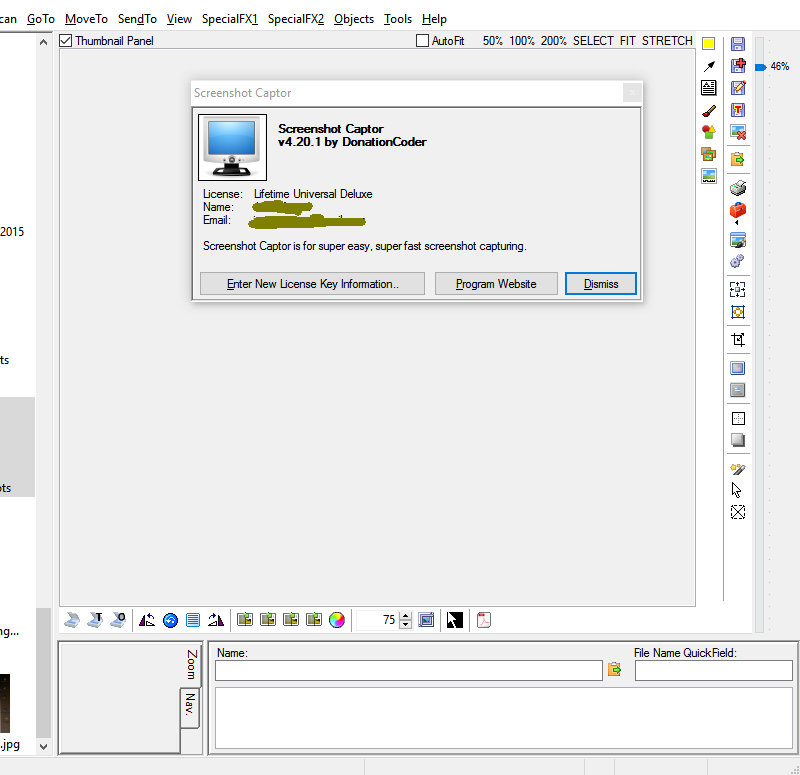
Hello, maybe a difficult question, but like to know it's possible somehow to make a screenshot of the Screenshot Captor menu with opened License screen?
Yesterday I wanted because of a question in your forum on Screenshot Captor make a point with a screenshot, but after starting a screenshot the whole menu disappears immediately, also when pushing on PrtScn button..
If necessary I can do it first with Windows Snipping Tool. ;)
I just like to know there is a possibility that it can do with Screenshot Captor? :-[
Windows 10
ASUS ROG STRIX Z690-A GAMING
- Intel Core i9 13900KF - 3,0Ghz
- Corsair Vengeance 32GB(3600Mhz)
- Samsung 970 EVO Plus 1TB (M.2)
- DVD Brander (Extern)
- NVIDIA RTX 4070 Ti 12GB
- Onboard - 7.1 HD audio Realtek ALC4080  - NZXT Kraken X63
- Corsair AF120 2.0(Wit)
- Corsair RM1000x (1000Watt)

mouser

  • First Author
  • Administrator
  • Joined in 2005
  • *****
  • Posts: 40,931
    • Gathering Badge
    • Plugin Coding Medal
    • Participated in NANY Challenge Seventeen Times
    • Cody Award
    • Coding Snacks
    • Volunteers/Staff
Re: Making screenshot of Screenshot Captor menu
« Reply #1 on: April 09, 2017, 04:05 PM »
You could do it with a delayed capture, but that is a bit annoying to do currently because you have to first set a delay for all captures, then capture, then turn off delay.
I will be adding a one-time delayed screenshot hotkey in next release to make it easier.

AbteriX

  • Member #520
  • Charter Honorary Member
  • Joined in 2005
  • ***
  • Posts: 1,150
Re: Making screenshot of Screenshot Captor menu
« Reply #2 on: April 10, 2017, 09:42 AM »
Wouldn't disabling that work too?

Preferences > Basic Capturing > Capturing Options > >> Before Capture > [_] Hide Screenshot Captor window


Greetings, Stefan.

mouser

  • First Author
  • Administrator
  • Joined in 2005
  • *****
  • Posts: 40,931
    • Gathering Badge
    • Plugin Coding Medal
    • Participated in NANY Challenge Seventeen Times
    • Cody Award
    • Coding Snacks
    • Volunteers/Staff
Re: Making screenshot of Screenshot Captor menu
« Reply #3 on: April 10, 2017, 01:09 PM »
Maybe I was over-thinking things, assuming that the SC menu was closing due to a keypress.  If not then yeah what Abterix says is true, you can just use SC to capture images of itself including a dropped-down menu, as long as you don't have SC configure to hide itself before capture.  That option can be found in the "Capture Options" tab, about half way down under "Before Capture".

Ath

  • Supporting Member
  • Joined in 2006
  • **
  • Posts: 3,649
    • Participated in NANY Challenge Eleven Times
    • Coding Snacks
    • Linux User
    • Hardware Hacker
Re: Making screenshot of Screenshot Captor menu
« Reply #4 on: April 10, 2017, 03:07 PM »
From the SSC main window:
Normally you'd use "Capture/Capture image of ScreenshotCaptor window", but you can't use that menu-item when the Help/About window is opened, as the OP was apparently trying... :o (or at least I did :huh:)
/Ton
Ath's software collection, Quote: "A problem well stated is a problem half-solved." (Charles Kettering)

mouser

  • First Author
  • Administrator
  • Joined in 2005
  • *****
  • Posts: 40,931
    • Gathering Badge
    • Plugin Coding Medal
    • Participated in NANY Challenge Seventeen Times
    • Cody Award
    • Coding Snacks
    • Volunteers/Staff
Re: Making screenshot of Screenshot Captor menu
« Reply #5 on: April 10, 2017, 03:19 PM »
Good point -- this gets back to what Abterix was saying.  Don't try to use that special function, just disable the "hide before capture" option and then you can capture SC screenshots just like any other app.

arnal

  • Participant
  • Joined in 2017
  • *
  • Posts: 1
Re: Making screenshot of Screenshot Captor menu
« Reply #6 on: October 04, 2017, 09:59 AM »
This software is just bullshit. I regret my donation.

tomos

  • Charter Member
  • Joined in 2006
  • ***
  • Posts: 11,970
    • Gathering Badge
    • Participated in NANY Challenge Once
Re: Making screenshot of Screenshot Captor menu
« Reply #7 on: October 04, 2017, 10:19 AM »
This software is just bullshit. I regret my donation.

what's the problem arnal?
Tom

mouser

  • First Author
  • Administrator
  • Joined in 2005
  • *****
  • Posts: 40,931
    • Gathering Badge
    • Plugin Coding Medal
    • Participated in NANY Challenge Seventeen Times
    • Cody Award
    • Coding Snacks
    • Volunteers/Staff
Re: Making screenshot of Screenshot Captor menu
« Reply #8 on: October 04, 2017, 03:17 PM »
If you (or anyone) ever regrets donating, just contact us and we will refund your donation!

wraith808

  • Supporting Member
  • Joined in 2006
  • **
  • Posts: 11,205
    • Participated in NANY Challenge Fourteen Times
    • Coding Snacks
    • Writer
    • Hardware Hacker
Re: Making screenshot of Screenshot Captor menu
« Reply #9 on: October 04, 2017, 05:02 PM »
If you (or anyone) ever regrets donating, just contact us and we will refund your donation!

Doesn't his title of participant mean that he hasn't actually donated?

mouser

  • First Author
  • Administrator
  • Joined in 2005
  • *****
  • Posts: 40,931
    • Gathering Badge
    • Plugin Coding Medal
    • Participated in NANY Challenge Seventeen Times
    • Cody Award
    • Coding Snacks
    • Volunteers/Staff
Re: Making screenshot of Screenshot Captor menu
« Reply #10 on: October 04, 2017, 05:06 PM »
It's easy for people who donate to forget to visit the link to upgrade their forum account, so it's possible that they donated and forgot to update their forum account.

Regardless -- arnal, tell us what you are having trouble with and perhaps we can assist.

Original address: https://www.donationcoder.com/forum/index.php?topic=43707.0