DonationCoder.com forum
 
Read-only archive. This is a static copy of the DonationCoder.com forum. Reading and searching work as before; logging in, posting and private messages do not.
Archive of 2026-10-21 · About this archive · Main site

Author Topic: NANY 2017: Scratchpad - A simple way of recording notes, with autosave!  (Read 31,074 times)

camerb

  • Member
  • Joined in 2016
  • **
  • Posts: 13
    • Participated in NANY Challenge Four Times
NANY 2017 Entry Information

Application NameScratchpad
Version2016-12-31
Short DescriptionA simple notepad editor with autosave capabilities
Supported OSesWindows Only
Web PageThis One
DownloadAttached to this post
System Requirements64-bit currently
Version Historyv1.0 -- initial public release

Description
A simple notepad editor for quickly recording notes.

Background
This program is a very simple script that I use for keeping a high level of productivity. I frequently will leave a notepad window open to jot notes in for my current project, but this causes some difficulty, because I always forget to hit 'save', and my employer frequently resets out workstations due to Windows updates. Scratchpad allows me to keep my little window open for notes, and saves the contents automatically, whenever there has been a change. In addition, I frequently will start a new scratchpad and don't really want to be bothered with the file save location. Instead of prompting for the full location, Scratchpad shows you a Drop-Down List Box that allows you to see most recently opened Scratchpads, or you can type in a new topic name to create a new Scratchpad for it.

Features
Autosave!
Doesn't require a full file name, allows you just type the topic of the scratchpad and use that for saving
Operates completely off-line, should not use the network at all

Screenshots
Initial Prompt for the topic of the Scratchpad:

load.png
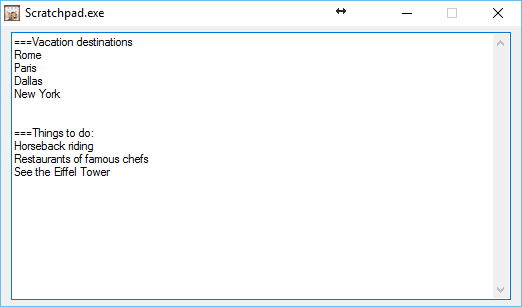
Editing a Scratchpad:
editMode.png

Usage
Installation
Unzip the zip file.

Using the Application
Open the Scratchpad.exe file to launch the application
On the first prompt, enter the topic of the information you want to record
Hit 'OK'
A multiline prompt will open for you to begin typing your ideas into
Note that the contents of this window will be autosaved every 10 seconds, to prevent loss of data
(on subsequent launches, it will allow you to specify the name of the scratchpad that you want to open)

Uninstallation
Delete the unzipped folder.

Known Issues
There isn't a 'help' feature
« Last Edit: January 02, 2018, 04:09 AM by camerb »

techidave

  • Supporting Member
  • Joined in 2007
  • **
  • Posts: 1,046
Screenshots would be awesome.  Sounds like a nifty tool.

tomos

  • Charter Member
  • Joined in 2006
  • ***
  • Posts: 11,970
    • Gathering Badge
    • Participated in NANY Challenge Once
thanks camerb :Thmbsup:
sounds good.

I tend to use Cinta Notes as a scratch pad which it isn't really designed to be. This sounds perfect for the job :up:
will try it (probably be during the week at this stage)
Tom

camerb

  • Member
  • Joined in 2016
  • **
  • Posts: 13
    • Participated in NANY Challenge Four Times
techidave: Screenshots have been attached!

tomos: Feel free to provide feedback, I'd be interested to see if it works well for the way that others work during the day.

IainB

  • @Slartibartfarst
  • Supporting Member
  • Joined in 2008
  • **
  • Posts: 7,544
@camerb:
Thankyou for giving us Scratchpad.    :Thmbsup:
By the way, I think you might have meant the version in the table in the OP to be "2016-12-31", not "2006-12-31".

I too - similar to @tomos - use other tools for scratchpad functionality, but I am always interested in trying out new tools, since that is the only way I am likely to run the risk of finding something better!    :D
So, I shall give this new tool a whirl and provide some feedback later.

SugarHooves

  • Supporting Member
  • Joined in 2010
  • **
  • Posts: 1

Thank you ... the best of KISS scratchpadding, thanks.

c.gingerich

  • Supporting Member
  • Joined in 2011
  • **
  • Posts: 748
    • Participated in NANY Challenge Six Times
    • Coding Snacks
@camerb

When trying to save a note/scratch pad with special characters, it errors out. Looks like you are not converting characters like *?/ etc. I would either convert those or not allow those to be used.

Screen Shot - https://cl.ly/0J0A3R450C0E

tomos

  • Charter Member
  • Joined in 2006
  • ***
  • Posts: 11,970
    • Gathering Badge
    • Participated in NANY Challenge Once
tomos: Feel free to provide feedback, I'd be interested to see if it works well for the way that others work during the day.

nice and simple and works well :up:
will keep using for a while and see if it suits my needs.

I see you're getting lots of downloads up there !
Tom

tomos

  • Charter Member
  • Joined in 2006
  • ***
  • Posts: 11,970
    • Gathering Badge
    • Participated in NANY Challenge Once
Hi camerb
found a biggish bug:

The shortcut Ctrl+R works as a universal hotkey to restore scratchpad.exe -- not only that,
it seems to close whatever scratchpad file you have open, and bring the initial scratchpad.exe dialogue/window to the front ("Which scracthpad would you like to load?")

Windows 7 x64
Tom

TaoPhoenix

  • 0 - 60 ... then back to 0 again!
  • Supporting Member
  • Joined in 2011
  • **
  • Posts: 4,642
    • Participated in NANY Challenge Three Times

I JUST had Win10 reboot on me and I keep stuff on open tabs and apps so I will try to look at this because that wipes everything out!  : (
Use attachthumb=# to show an attached image as an expandable thumbnail, or attach=# to show full size. (With Brackets)

nogojoe

  • Charter Member
  • Joined in 2006
  • ***
  • Posts: 174
NANY 2017 Entry Information

Application NameScratchpad
System Requirements64-bit currently

Is Scratchpad going to cater for 32-bit systems?

Often the most convincing people are those who have lost the plot so much they don't recognize the difference between fact and fantasy
« Last Edit: January 20, 2017, 08:48 PM by Deozaan »

AzureToad

  • Charter Member
  • Joined in 2006
  • ***
  • Posts: 101
The shortcut Ctrl+R works as a universal hotkey to restore scratchpad.exe

I have the same issue as Tomos. Is there a config file or registry setting that can be tweaked to change hotkey combinations? When I try to reply to emails, I instead get a new Scratchpad prompt. And another dollar in the swear jar.  :mad:

Tuxman

  • OMG not him again!
  • Supporting Member
  • Joined in 2006
  • **
  • Posts: 2,522
    • Participated in NANY Challenge Seven Times
Is Scratchpad going to cater for 32-bit systems?

I really wonder under which circumstances a note can ever become huge enough to exceed the 32-bit limit. Hilarious typing.
I bet when Cheetahs race and one of them cheats, the other one goes "Man, you're such a Cheetah!" and they laugh & eat a zebra or whatever.

tomos

  • Charter Member
  • Joined in 2006
  • ***
  • Posts: 11,970
    • Gathering Badge
    • Participated in NANY Challenge Once
Re: NANY 2017: Scratchpad - A simple way of recording notes, with autosave!
« Reply #13 on: November 10, 2017, 11:56 AM »
The shortcut Ctrl+R works as a universal hotkey to restore scratchpad.exe -- not only that,
it seems to close whatever scratchpad file you have open, and bring the initial scratchpad.exe dialogue/window to the front ("Which scratchpad would you like to load?")
I have the same issue as Tomos. Is there a config file or registry setting that can be tweaked to change hotkey combinations? When I try to reply to emails, I instead get a new Scratchpad prompt. And another dollar in the swear jar.  :mad:

looking (again) for a scratch notetaker:
any chance of the above being fixed @camerb?
Tom

wraith808

  • Supporting Member
  • Joined in 2006
  • **
  • Posts: 11,205
    • Participated in NANY Challenge Fourteen Times
    • Coding Snacks
    • Writer
    • Hardware Hacker
Re: NANY 2017: Scratchpad - A simple way of recording notes, with autosave!
« Reply #14 on: November 10, 2017, 12:31 PM »
looking (again) for a scratch notetaker:

I use notation for this and/or notepad++.  Notepad++ saves what you write as you write it and persists it between settings, though not in a file; there are plugins to make it more normal auto-save to a file.  Notation is the better option and the one I use more.  Both are free.

any chance of the above being fixed @camerb?

As for this, he hasn't been on this forum since January 2017, so I'd take that as a no.

tomos

  • Charter Member
  • Joined in 2006
  • ***
  • Posts: 11,970
    • Gathering Badge
    • Participated in NANY Challenge Once
Re: NANY 2017: Scratchpad - A simple way of recording notes, with autosave!
« Reply #15 on: November 10, 2017, 12:42 PM »
I use notation for this and/or notepad++.  Notepad++ saves what you write as you write it and persists it between settings, though not in a file; there are plugins to make it more normal auto-save to a file.  Notation is the better option and the one I use more.

will try Notation, thanks wraith
Tom

Original address: https://www.donationcoder.com/forum/index.php?topic=43346.0