


This request is made on the basis that, for data stores, meta-data integrity is arguably as important as data integrity.
Note:
Note:
- The image below has been sharpened for improved visual clarity.
- The full text of the image has been copied into the spoiler at the bottom of this post.
Spoiler (click to show/hide)
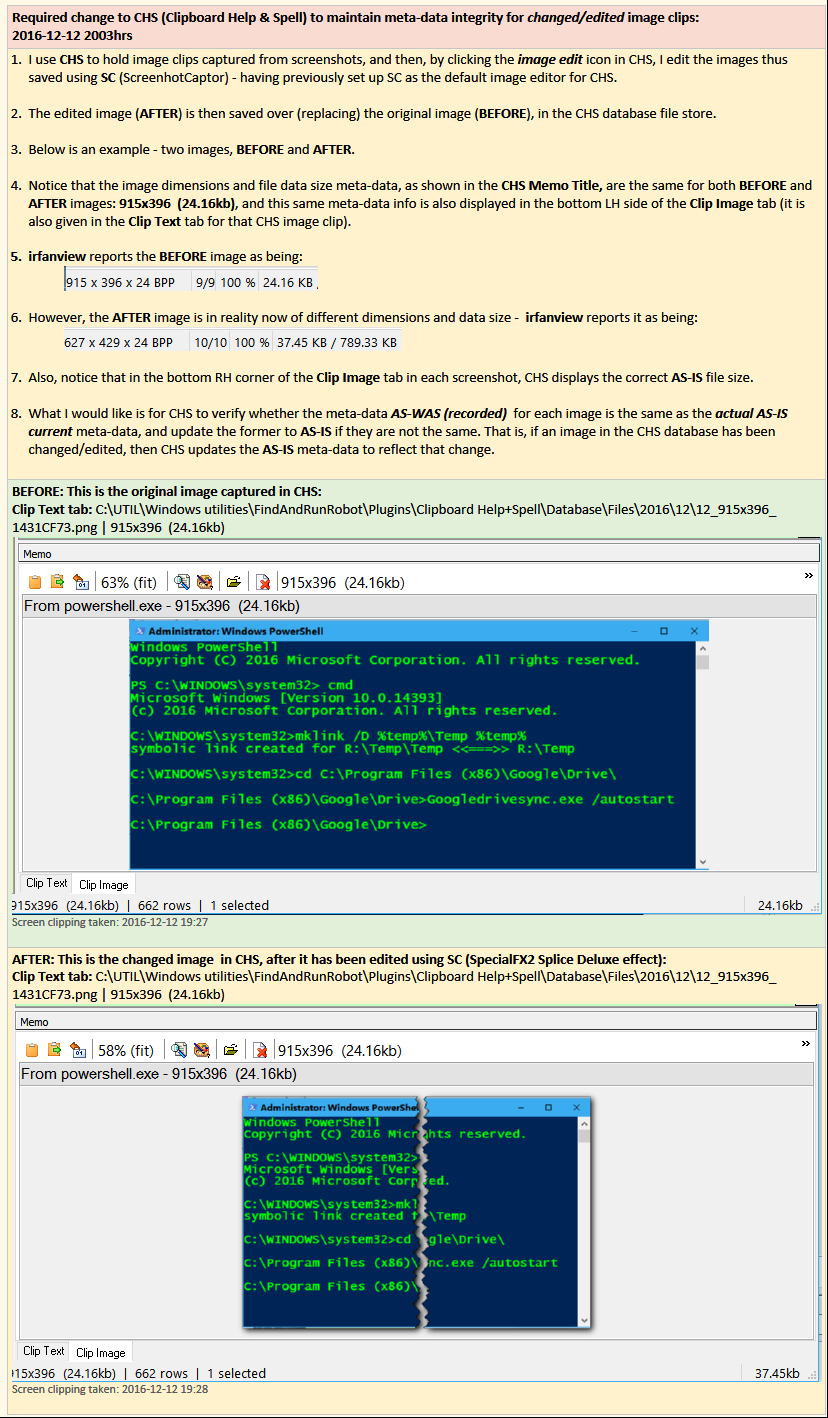
Required change to CHS (Clipboard Help & Spell) to maintain meta-data integrity for changed/edited image clips:
2016-12-12 2003hrs
1. I use CHS to hold image clips captured from screenshots, and then, by clicking the image edit icon in CHS, I edit the images thus saved using SC (ScreenhotCaptor) - having previously set up SC as the default image editor for CHS.
2. The edited image (AFTER) is then saved over (replacing) the original image (BEFORE), in the CHS database file store.
3. Below is an example - two images, BEFORE and AFTER.
4. Notice that the image dimensions and file data size meta-data, as shown in the CHS Memo Title, are the same for both BEFORE and AFTER images: 915x396 (24.16kb), and this same meta-data info is also displayed in the bottom LH side of the Clip Image tab (it is also given in the Clip Text tab for that CHS image clip).
5. irfanview reports the BEFORE image as being:
6. However, the AFTER image is in reality now of different dimensions and data size - irfanview reports it as being:
7. Also, notice that in the bottom RH corner of the Clip Image tab in each screenshot, CHS displays the correct AS-IS file size.
8. What I would like is for CHS to verify whether the meta-data AS-WAS (recorded) for each image is the same as the actual AS-IS current meta-data, and update the former to AS-IS if they are not the same. That is, if an image in the CHS database has been changed/edited, then CHS updates the AS-IS meta-data to reflect that change.
BEFORE: This is the original image captured in CHS:
Clip Text tab: C:\UTIL\Windows utilities\FindAndRunRobot\Plugins\Clipboard Help+Spell\Database\Files\2016\12\12_915x396_1431CF73.png | 915x396 (24.16kb)
Screen clipping taken: 2016-12-12 19:27
AFTER: This is the changed image in CHS, after it has been edited using SC (SpecialFX2 Splice Deluxe effect):
Clip Text tab: C:\UTIL\Windows utilities\FindAndRunRobot\Plugins\Clipboard Help+Spell\Database\Files\2016\12\12_915x396_1431CF73.png | 915x396 (24.16kb)
Screen clipping taken: 2016-12-12 19:28
1. I use CHS to hold image clips captured from screenshots, and then, by clicking the image edit icon in CHS, I edit the images thus saved using SC (ScreenhotCaptor) - having previously set up SC as the default image editor for CHS.
2. The edited image (AFTER) is then saved over (replacing) the original image (BEFORE), in the CHS database file store.
3. Below is an example - two images, BEFORE and AFTER.
4. Notice that the image dimensions and file data size meta-data, as shown in the CHS Memo Title, are the same for both BEFORE and AFTER images: 915x396 (24.16kb), and this same meta-data info is also displayed in the bottom LH side of the Clip Image tab (it is also given in the Clip Text tab for that CHS image clip).
5. irfanview reports the BEFORE image as being:
6. However, the AFTER image is in reality now of different dimensions and data size - irfanview reports it as being:
7. Also, notice that in the bottom RH corner of the Clip Image tab in each screenshot, CHS displays the correct AS-IS file size.
8. What I would like is for CHS to verify whether the meta-data AS-WAS (recorded) for each image is the same as the actual AS-IS current meta-data, and update the former to AS-IS if they are not the same. That is, if an image in the CHS database has been changed/edited, then CHS updates the AS-IS meta-data to reflect that change.
BEFORE: This is the original image captured in CHS:
Clip Text tab: C:\UTIL\Windows utilities\FindAndRunRobot\Plugins\Clipboard Help+Spell\Database\Files\2016\12\12_915x396_1431CF73.png | 915x396 (24.16kb)
Screen clipping taken: 2016-12-12 19:27
AFTER: This is the changed image in CHS, after it has been edited using SC (SpecialFX2 Splice Deluxe effect):
Clip Text tab: C:\UTIL\Windows utilities\FindAndRunRobot\Plugins\Clipboard Help+Spell\Database\Files\2016\12\12_915x396_1431CF73.png | 915x396 (24.16kb)
Screen clipping taken: 2016-12-12 19:28