DonationCoder.com forum
 
Read-only archive. This is a static copy of the DonationCoder.com forum. Reading and searching work as before; logging in, posting and private messages do not.
Archive of 2026-10-21 · About this archive · Main site

Author Topic: IDEA: Batch merge many pdf (result : only one big pdf per subfolder)?  (Read 17,677 times)

jity2

  • Charter Member
  • Joined in 2006
  • ***
  • Posts: 126
Dear all,

I need to merge many pdf files located into thousands of subfolders (several levels) full of pdf and other files. At the end, I need only one big pdf file per subfolder.


Example: “C:\Main_folder\” contains :

C:\Main_folder\subfolder_wgs\jshhd545.pdf

C:\Main_folder\subfolder_wgs\jshhd545.htm

C:\Main_folder\subfolder_wgs\ejkehe5485.pdf

…

C:\Main_folder\subfolder_ghdfdhd\jdjdhjd5545.pdf

C:\Main_folder\subfolder_ghdfdhd\jdsdjdh44.pdf

…

C:\Main_folder\subfolder_yuege255\uejgd56564\kdfhk5465.txt

C:\Main_folder\subfolder_yuege255\uejgd56564\kdfhk5465.pdf

…etc..

Desired results:

C:\Main_folder\subfolder_wgs\subfolder_wgs.pdf

C:\Main_folder\subfolder_ghdfdhd\subfolder_ghdfdhd.pdf

C:\Main_folder\subfolder_yuege255\uejgd56564\subfolder_yuege255.pdf  (or C:\Main_folder\subfolder_yuege255\uejgd56564\uejgd56564.pdf)

etc…


note: It would be great if results could be added into a new big folder (like C:\Main_folder2\ for instance).

I am on Win8.1 64bits.
Free or open source solutions preferred.
Thanks in advance ;)

4wd

  • Pedantic Old Bastard
  • Supporting Member
  • Joined in 2006
  • **
  • Posts: 5,652
    • Coding Snacks
Something along these lines?
"I will not follow where the path may lead, but I will go where there is no path, and I will leave a trail." - Muriel Strode, 1903

jity2

  • Charter Member
  • Joined in 2006
  • ***
  • Posts: 126
Thanks "4wd". ;)

I had some difficulties (virus or hammering websites) finding the correct programs that you have recommended files in the thread (https://www.donationcoder.com/forum/index.php?topic=40103.msg374877#msg374877) but I finally found a work around with these links :
http://filehippo.com/download_universal_extractor/4795/
http://web.archive.org/web/20140315000000*/http://www.adultpdf.com/products/txttopdf/txttopdf.exe
https://www.pdflabs.com/tools/pdftk-the-pdf-toolkit/pdftk_free-2.02-win-setup.exe
Universal extractor did not work with pdftk but I was able to find the correct file once I installed PDKtk in : "C:\Program Files (x86)\PDFtk\bin\".

So anyway I was able to test your solution. It works correctly for one folder. ;) I hope you can adapt it to subfolders. ;)
Note: the header is not really needed for me but please do as you prefer. ;)

Thanks in advance for you help ;)
Jity

PS: in my case I don't have password protected pdf files but if someone has some you can remove them using the shareware "PDF Password Remover v3.1" http://www.verypdf.com/app/pdf-password-remover/password-remover-com.html using these instructions :
In windows find the "command prompt" then copy/paste the following (just adapt the correct path C:\...\) :
for /r "C:\test\" %F in (*.pdf) do "C:\Program Files (x86)\PDF Password Remover v3.1\pdfdecrypt.exe" -i "%F"

4wd

  • Pedantic Old Bastard
  • Supporting Member
  • Joined in 2006
  • **
  • Posts: 5,652
    • Coding Snacks
I had some difficulties (virus or hammering websites) finding the correct programs that you have recommended files in the thread (https://www.donationcoder.com/forum/index.php?topic=40103.msg374877#msg374877) but I finally found a work around with these links :
http://filehippo.com/download_universal_extractor/4795/
http://web.archive.org/web/20140315000000*/http://www.adultpdf.com/products/txttopdf/txttopdf.exe
https://www.pdflabs.com/tools/pdftk-the-pdf-toolkit/pdftk_free-2.02-win-setup.exe
Universal extractor did not work with pdftk but I was able to find the correct file once I installed PDKtk in : "C:\Program Files (x86)\PDFtk\bin\".

Yes, probably need to update the innounp binary for UniExtract, I run a more updated version than what is available on the original site along with updated extractor binaries.  You can get it here, (17.51MB - link will expire in 72 hours).

Quote
I hope you can adapt it to subfolders. ;)

Should be easy, I'll have a play around.
"I will not follow where the path may lead, but I will go where there is no path, and I will leave a trail." - Muriel Strode, 1903

4wd

  • Pedantic Old Bastard
  • Supporting Member
  • Joined in 2006
  • **
  • Posts: 5,652
    • Coding Snacks
jity2's Strange PDF Thing (jsPDFt)  :P

Code: ( powershell)
<#
  jsPDFt.ps1

  Concatenate PDFs in sub-folders
#>

Function Get-Folder {
  Add-Type -AssemblyName System.Windows.Forms
  $FolderBrowser = New-Object System.Windows.Forms.FolderBrowserDialog
  [void]$FolderBrowser.ShowDialog()
  $temp = $FolderBrowser.SelectedPath
  If($temp -eq '') {Exit}
  If(-Not $temp.EndsWith('\')) {$temp = $temp + '\'}
  Return $temp
}  

Function Get-PDF {
  Param(
    [String]$folder,
    [string]$source,
    [string]$dest,
    [string]$command
  )
  If(-Not $folder.EndsWith('\')) {$folder = $folder + '\'}

# If there are any PDFs in the folder then execute the concatenation
  If(@(Get-ChildItem -Path ($folder + '*') -Include *.pdf -File).Count -gt 0) {
    Write-Host 'Folder:' $folder -BackgroundColor Black -ForegroundColor Yellow
# Create output file name
    If((Split-Path -Path $folder -Leaf).EndsWith('\')) { # Input was root folder
      $outFile = $dest + '\' + $source.Substring(0, 1) + '.pdf'
    } else {
      $outFile = $dest + $folder.Replace($source, "") + '\' + (Split-Path -Path $folder -Leaf) + '.pdf'
    }
    $outFile = $outFile.Replace('\\', '\')

# Otherwise, check if output folder exists and create if necessary
    If(-Not (Test-Path (Split-Path -Path $outFile))) {
      New-Item (Split-Path -Path $outFile) -Type Directory | Out-Null
    }

    Write-Host 'File:  ' $outFile -BackgroundColor Black -ForegroundColor White
# Compose argument string
    $arguments = '"' + $folder + '*.pdf" cat output "' + $outFile + '"'
# Execute pdftk.exe with arguments
    Start-Process -FilePath $command -Wait -ArgumentList $arguments -NoNewWindow
  }
}

$console = $host.UI.RawUI
$size = $console.WindowSize
$size.Width = 80
$size.Height = 30
$console.WindowSize = $size

If($PSVersionTable.PSVersion.Major -lt 3) {
    Write-Host '** Script requires at least Powershell V3 **'
  } else {
  Write-Host 'Choose folder with PDF files: ' -NoNewline -BackgroundColor DarkGreen -ForegroundColor White
  $srcFolder = (Get-Folder)
  Write-Host $srcFolder
  Write-Host 'Choose output folder: ' -NoNewline -BackgroundColor DarkGreen -ForegroundColor White
  Do {$dstFolder = (Get-Folder)} While($dstFolder -eq $srcFolder)
  Write-Host $dstFolder

# Full path to pdftk.exe which should be in the same folder as Powershell script
  $pdftk = '"' + (Split-Path $SCRIPT:MyInvocation.MyCommand.Path -Parent) + '\pdftk.exe"'
# List of sub-folders
  $aFolders = @(Get-ChildItem -Path $srcFolder -Recurse -Directory | Select-Object -ExpandProperty Fullname)
  for($i=0; $i -lt $aFolders.Count; $i++) {
# For each sub-folder call the routine
    Get-PDF $aFolders[$i] $srcFolder $dstFolder $pdftk
  }
# Finally, call routine on source folder
  Get-PDF $srcFolder $srcFolder $dstFolder $pdftk
}

Write-Host ''
Write-Host 'Close window to exit ...'
cmd /c pause | out-null

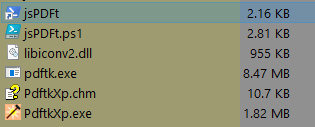
Requires the files from PDF Toolkit either extract them from the setup file using UniExtract or install it and then copy the files into the same folder as the script, (then you can uninstall it).

So your folder will look like this:

2016-06-27 17_02_29.png

Run jsPDFt.ps1 using the shortcut.

Hopefully it'll work - it did here.

NOTES:
  • No provision for password protected PDFs, it'll probably die a horrible death while running if it finds one.
  • No provision for seeing if the output file already exists, if it does it will probably be overwritten.
"I will not follow where the path may lead, but I will go where there is no path, and I will leave a trail." - Muriel Strode, 1903

jity2

  • Charter Member
  • Joined in 2006
  • ***
  • Posts: 126
Dear "4wd",
Many thanks. ;) It works like a charm. ;)
Thank you again ;)
See ya

4wd

  • Pedantic Old Bastard
  • Supporting Member
  • Joined in 2006
  • **
  • Posts: 5,652
    • Coding Snacks
You're welcome, I think we can get skwire to move this thread  :)
"I will not follow where the path may lead, but I will go where there is no path, and I will leave a trail." - Muriel Strode, 1903

Original address: https://www.donationcoder.com/forum/index.php?topic=42768.0